Import Google Calendar to Outlook


Today we want to take a quick look at how you can sync between the most frequently used calendars. It’s about how you can import the Google calendar into your Outlook calendar and keep it up to date.
Import Google Calendar to Outlook
Today we want to take a quick look at how you can sync between the most frequently used calendars. It’s about how you can import the Google calendar into your Outlook calendar and keep it up to date.
Import Google Calendar to Outlook
Import Google Calendar to Outlook
You can import Google calendar to Outlook by following the steps below:
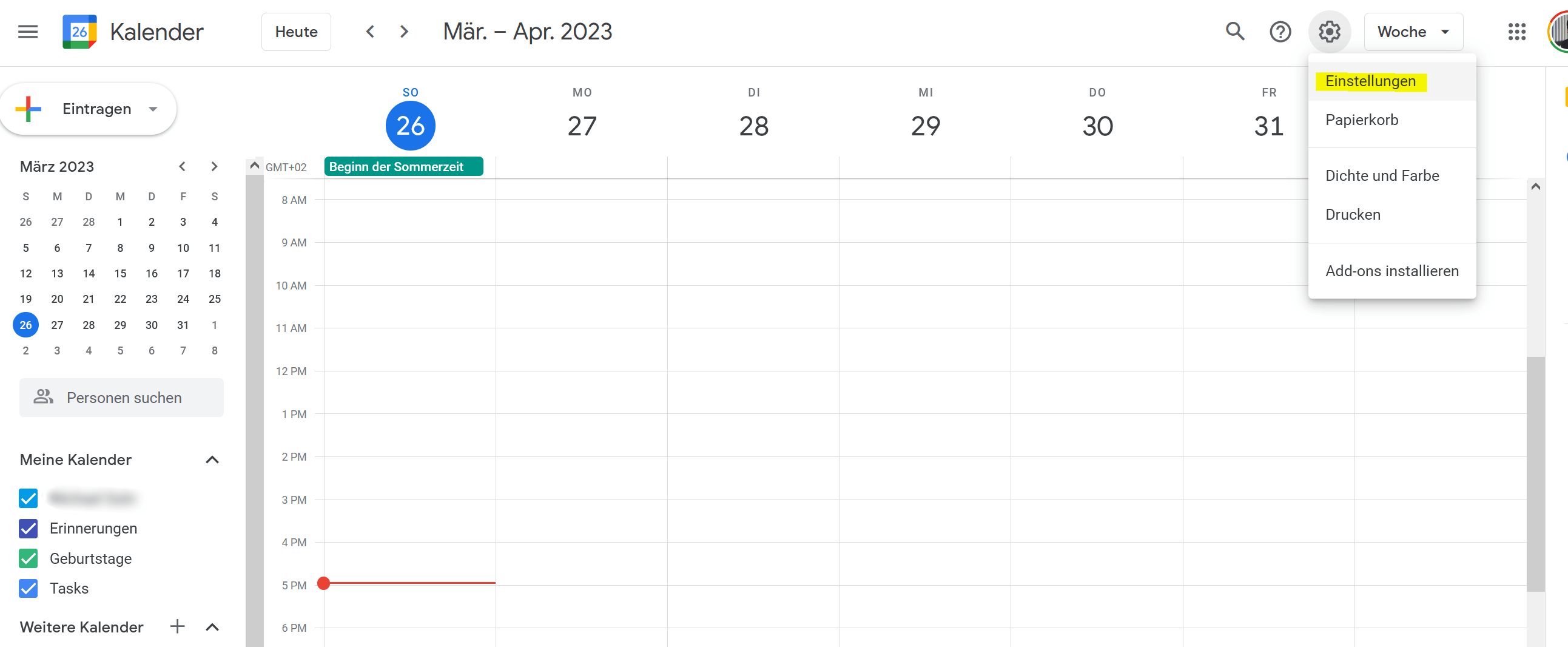
- Open your Google calendar in a web browser and click on the settings icon in the top right corner of the screen. It looks like a gear.
- Select “Settings” from the drop-down menu.
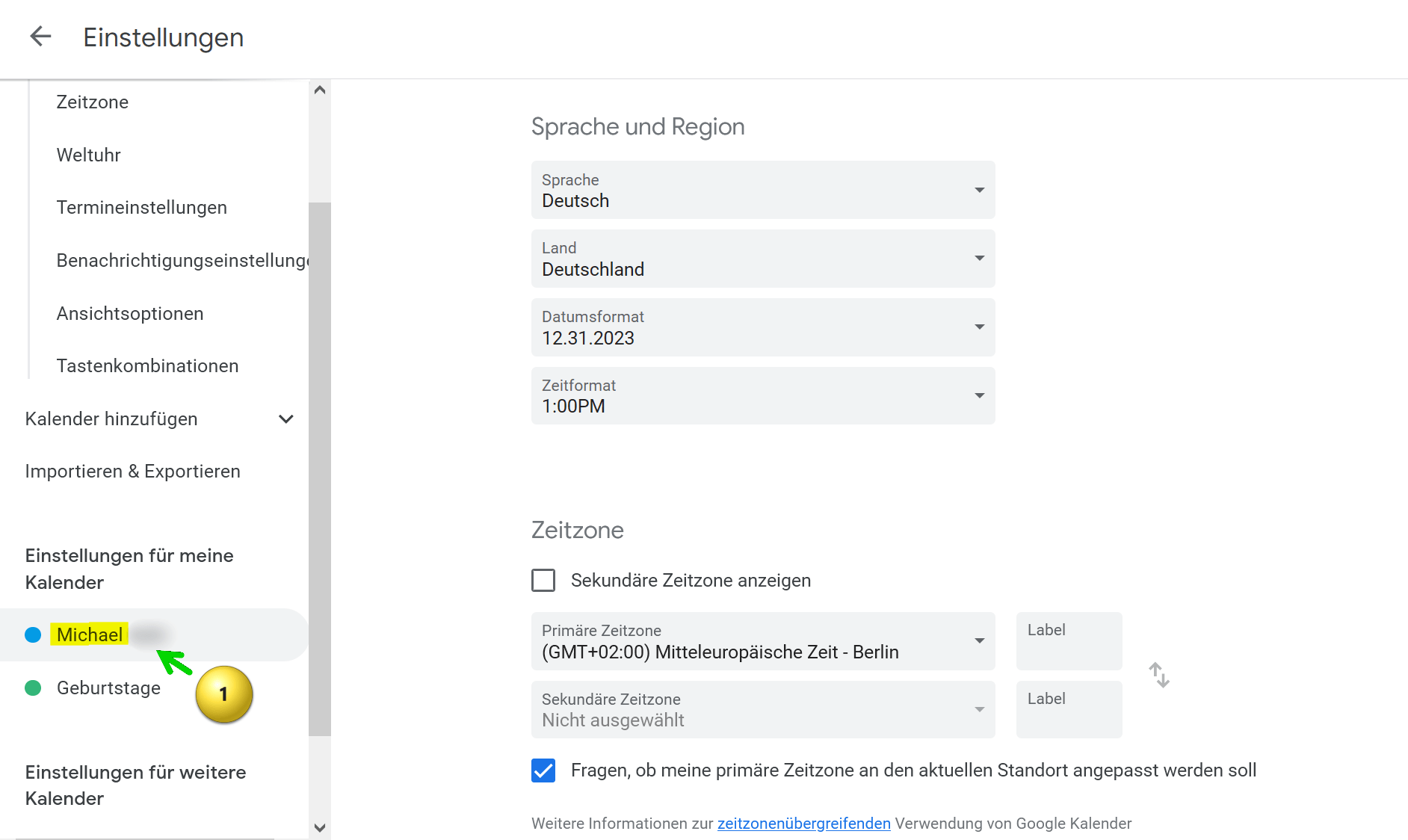
- Locate the calendar you want to import into Outlook and click the calendar name.
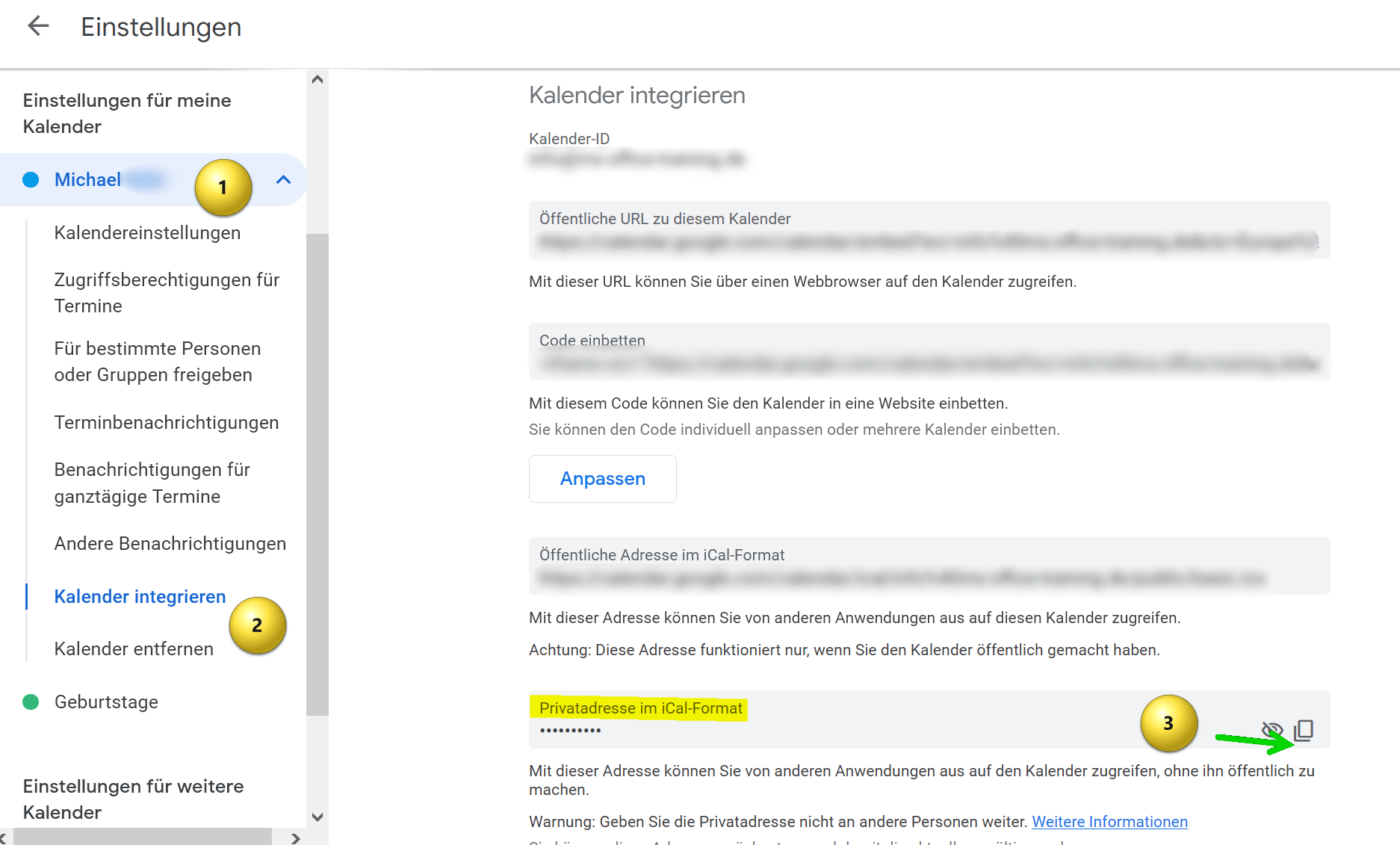
- Then click on “Integrate calendar“.
- Scroll down until you see the option “Home address in iCal format” and copy that address.
see fig. (click to enlarge)
- Create a text file on your computer and copy the address into it.
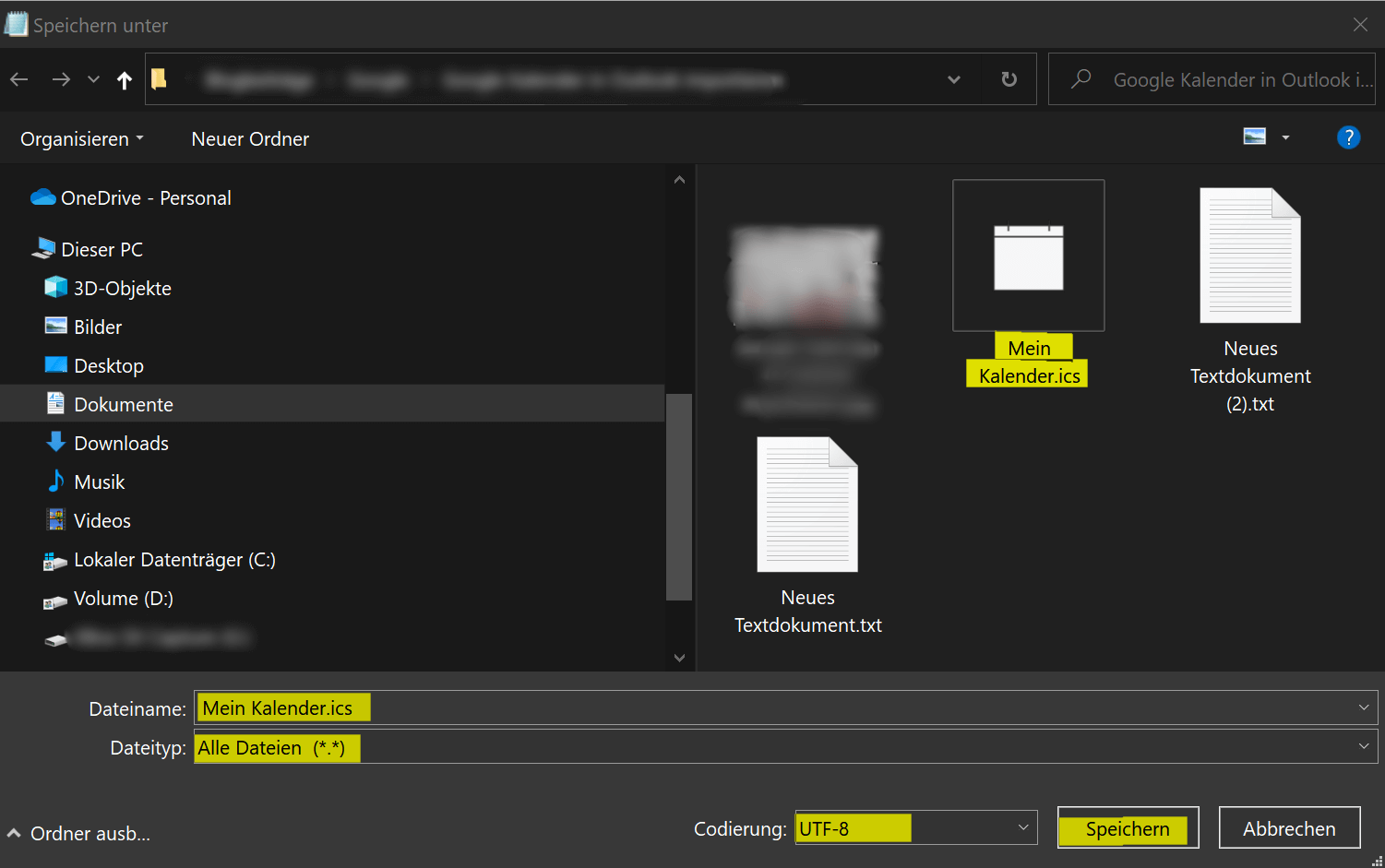
- Then save the file with any filename and the .ics extension. Use “All files” as the file type in the drop-down selection and please keep UTF-8 for the encoding.
- Save this file anywhere on your PC.
see fig. (click to enlarge)

- Open Outlook on your computer.
- Click “File” in the top left.
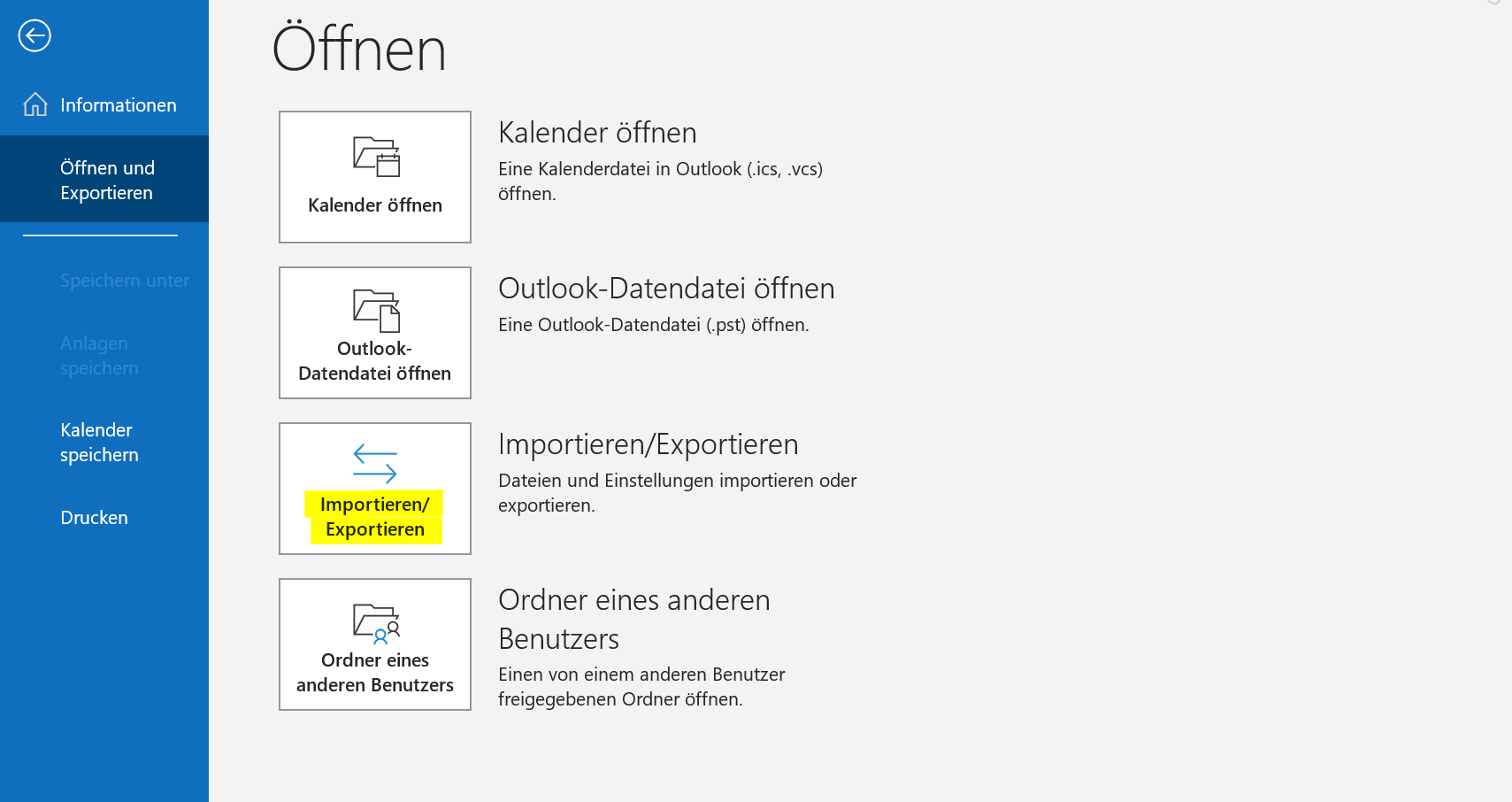
- Click “Open and Export“.
- Click “Import/Export“.
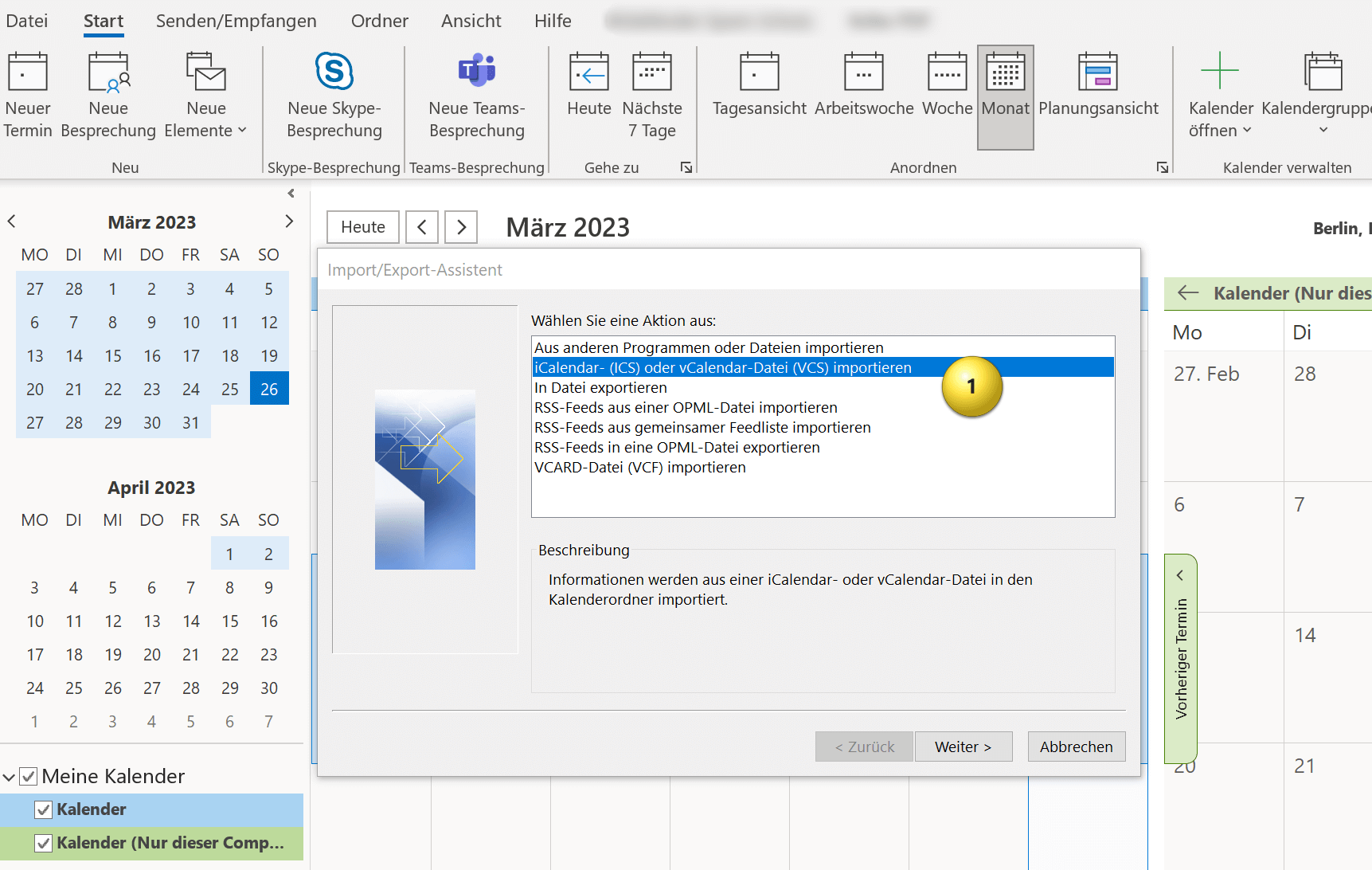
- In the Import and Export Wizard, select “Import an iCalendar (ICS) or vCalendar file (VCS)” and click Next.
Here you now have the option of integrating the Google calendar into your existing Outlook calendar or embedding it as an independent calendar. You have to decide for yourself what makes more sense. If you otherwise also work with several calendars, it makes sense to let the Google calendar run independently, otherwise it is more practical if you integrate the Google calendar into your existing one, so that appointment conflicts are easier to recognize.
see fig. (click to enlarge)

And that’s it. Your Google calendar has been successfully imported into Outlook and you can open the calendar and view all appointments and events in Outlook. Of course, your Outlook calendar will continue to be synchronized with Google calendar in the future.
You can import Google calendar to Outlook by following the steps below:
- Open your Google calendar in a web browser and click on the settings icon in the top right corner of the screen. It looks like a gear.
- Select “Settings” from the drop-down menu.
- Locate the calendar you want to import into Outlook and click the calendar name.
- Then click on “Integrate calendar“.
- Scroll down until you see the option “Home address in iCal format” and copy that address.
see fig. (click to enlarge)
- Create a text file on your computer and copy the address into it.
- Then save the file with any filename and the .ics extension. Use “All files” as the file type in the drop-down selection and please keep UTF-8 for the encoding.
- Save this file anywhere on your PC.
see fig. (click to enlarge)
- Open Outlook on your computer.
- Click “File” in the top left.
- Click “Open and Export“.
- Click “Import/Export“.
- In the Import and Export Wizard, select “Import an iCalendar (ICS) or vCalendar file (VCS)” and click Next.
Here you now have the option of integrating the Google calendar into your existing Outlook calendar or embedding it as an independent calendar. You have to decide for yourself what makes more sense. If you otherwise also work with several calendars, it makes sense to let the Google calendar run independently, otherwise it is more practical if you integrate the Google calendar into your existing one, so that appointment conflicts are easier to recognize.
see fig. (click to enlarge)
And that’s it. Your Google calendar has been successfully imported into Outlook and you can open the calendar and view all appointments and events in Outlook. Of course, your Outlook calendar will continue to be synchronized with Google calendar in the future.
Popular Posts:

The best backup solutions for your data
Keep your data safe and secure! Discover our best backup solutions for your valuable information now. Because safety is the be-all and end-all - and we have the perfect tips.

Internet Addiction – A serious look at a growing problem
Internet addiction is just as serious an illness as alcohol or drug addiction. Just that this is a mental illness. In this article we want to go into the phenomenon in more detail and provide assistance.

Main keyboard shortcuts in Windows 10/11
Entdecken Sie die wichtigsten Shortcuts in Windows 11, um Ihre Produktivität zu steigern. Von allgemeinen Befehlen bis hin zu spezifischen Fenster-Management- und System-Shortcuts, lernen Sie, wie Sie mit diesen Tastenkombinationen effizienter arbeiten können.

Encrypt USB stick – These options are available
Protecting sensitive data is essential. Encrypting USB sticks provides an extra layer of security. Whether it's built-in software, operating system features, third-party software, or hardware encryption, there are numerous options.

With the webcam to your dream job: Preparation for the video job interview!
Streamline your video interview with our tips on technique, setting, dress, body language and preparation. It's not quite success from the sofa, but this is where you can prove your professionalism.

IT security: The deceptive appearance of digital security
In a digitized world, IT security is an important factor. But technology alone is not enough. A holistic strategy is needed that also takes into account the human component.
Offers 2024: Word & Excel Templates











Popular Posts:
The best backup solutions for your data
Keep your data safe and secure! Discover our best backup solutions for your valuable information now. Because safety is the be-all and end-all - and we have the perfect tips.
Internet Addiction – A serious look at a growing problem
Internet addiction is just as serious an illness as alcohol or drug addiction. Just that this is a mental illness. In this article we want to go into the phenomenon in more detail and provide assistance.
Main keyboard shortcuts in Windows 10/11
Entdecken Sie die wichtigsten Shortcuts in Windows 11, um Ihre Produktivität zu steigern. Von allgemeinen Befehlen bis hin zu spezifischen Fenster-Management- und System-Shortcuts, lernen Sie, wie Sie mit diesen Tastenkombinationen effizienter arbeiten können.
Encrypt USB stick – These options are available
Protecting sensitive data is essential. Encrypting USB sticks provides an extra layer of security. Whether it's built-in software, operating system features, third-party software, or hardware encryption, there are numerous options.
With the webcam to your dream job: Preparation for the video job interview!
Streamline your video interview with our tips on technique, setting, dress, body language and preparation. It's not quite success from the sofa, but this is where you can prove your professionalism.
IT security: The deceptive appearance of digital security
In a digitized world, IT security is an important factor. But technology alone is not enough. A holistic strategy is needed that also takes into account the human component.
Offers 2024: Word & Excel Templates