Create distribution lists in Outlook


The longer you work with Outlook, the greater will be your contact list over time.
Therefore, it can be quite useful to organize the contacts into groups so that you do not have to select them individually for emails with multiple recipients, but instead use a recipient group instead.
How to create and edit distribution lists in Microsoft Outlook 2016/2019 can be found in our article.

Create distribution lists in Outlook
The longer you work with Outlook, the greater will be your contact list over time.
Therefore, it can be quite useful to organize the contacts into groups so that you do not have to select them individually for emails with multiple recipients, but instead use a recipient group instead.
How to create and edit distribution lists in Microsoft Outlook 2016/2019 can be found in our article.
1. Create a new distribution list
1. Create a new distribution list
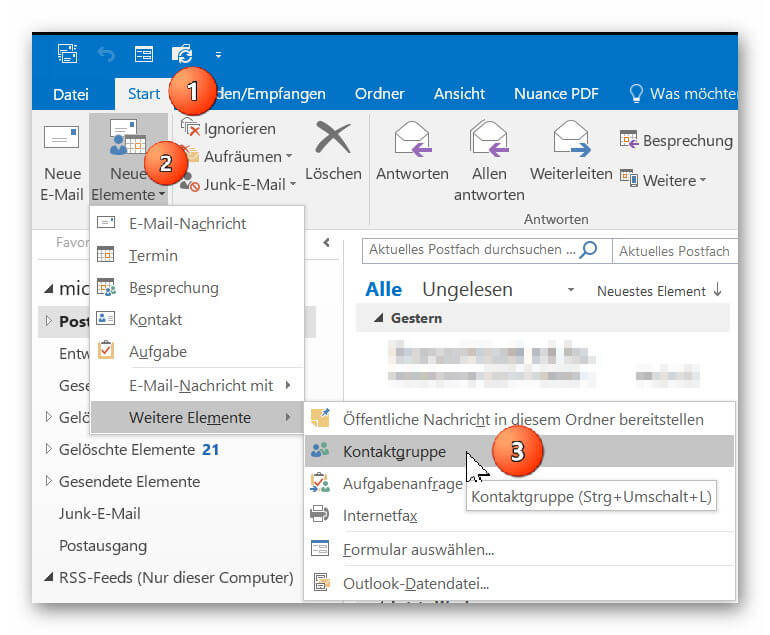
In Outlook go to “Start” tab on “New Items” – “More Items”
there to “contact group” and add a new contact group to your address book.
Next, give your new contact group a name (for example, family, friends, colleagues, etc.)
See picture: (click to enlarge)

In Outlook go to “Start” tab on “New Items” – “More Items”
there to “contact group” and add a new contact group to your address book.
Next, give your new contact group a name (for example, family, friends, colleagues, etc.)
See picture: (click to enlarge)
2. Add contacts to distribution list
2. Add contacts to distribution list
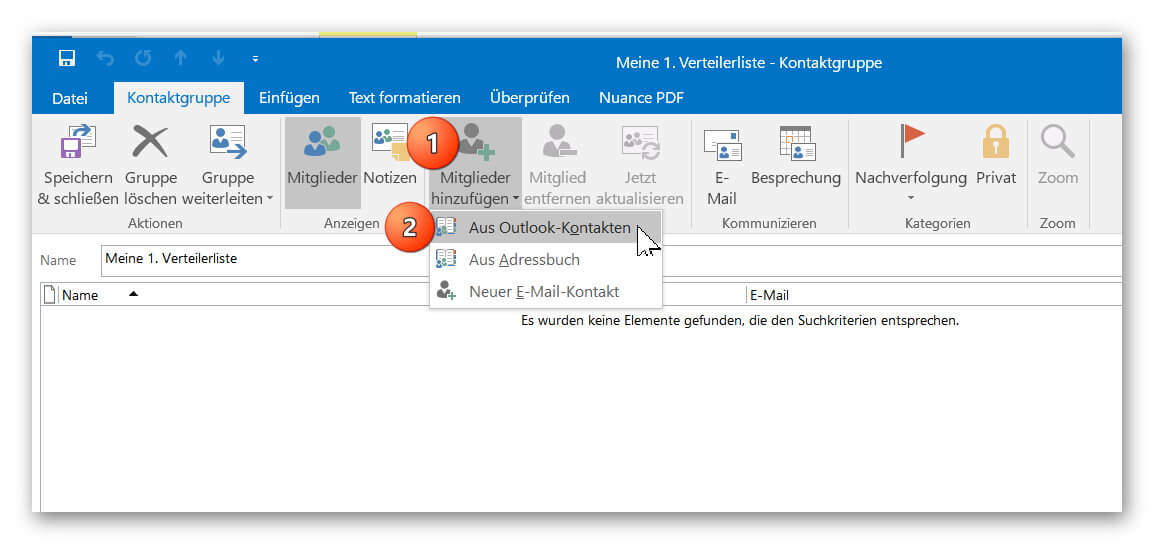
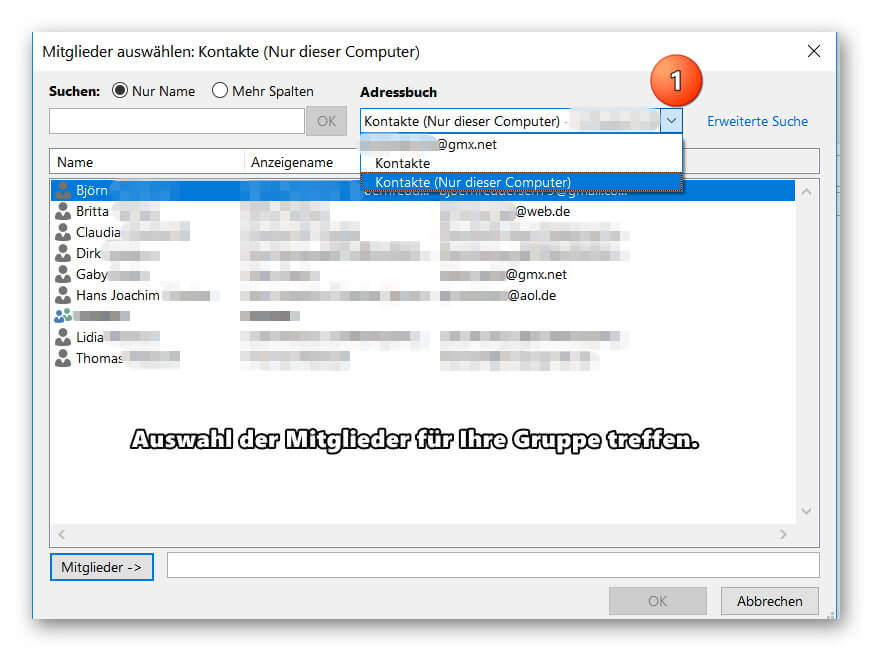
You can now add your contacts from your existing Outlook contacts to your distribution list or create new contacts.
If you should miss some entries in your address book, check if several address books have been created, and then select the missing entries by double-clicking on them.
See picture: (click to enlarge)
You can now add your contacts from your existing Outlook contacts to your distribution list or create new contacts.
If you should miss some entries in your address book, check if several address books have been created, and then select the missing entries by double-clicking on them.
See picture: (click to enlarge)
3. Send e-mail to distribution list in Outlook
3. Send e-mail to distribution list in Outlook
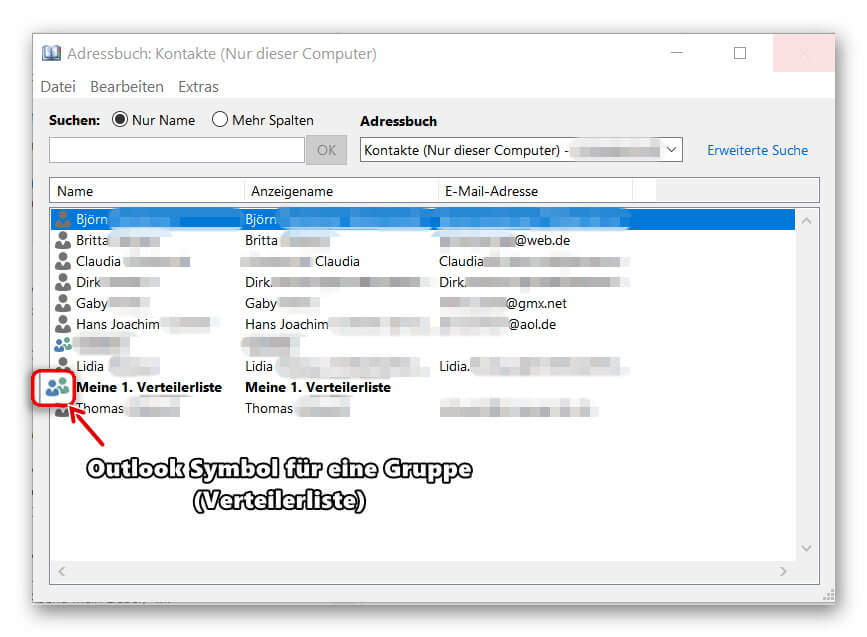
After you have successfully created your distribution list, you will now find it as additional entries in your address book.
Of course, the contacts contained in the group will continue to be displayed as individual entries so that you can always select them specifically as e-mail recipients.
To send an e-mail to one of your distribution lists, simply click on “New E-mail” as usual and double-click on your contact group in the address book.
To check the distribution list again before sending it for security, you can double-click it when selecting it directly in the address book, and if necessary add or remove other members to the list.
See picture: (click to enlarge)

After you have successfully created your distribution list, you will now find it as additional entries in your address book.
Of course, the contacts contained in the group will continue to be displayed as individual entries so that you can always select them specifically as e-mail recipients.
To send an e-mail to one of your distribution lists, simply click on “New E-mail” as usual and double-click on your contact group in the address book.
To check the distribution list again before sending it for security, you can double-click it when selecting it directly in the address book, and if necessary add or remove other members to the list.
See picture: (click to enlarge)
Popular Posts:
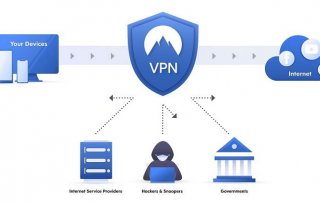
That’s why a VPN is worthwhile for everyone
Cyber attacks on the Internet are on the rise, and freedom on the Internet is at risk. A VPN can provide a remedy.

Cloud Working – what is behind digital collaboration?
The Internet is constantly evolving and has a massive impact on the world of work. In order for employers and employees to remain competitive in the long term, they must adapt to changing circumstances and use new technologies for themselves.
How does Conditional Formatting work in Excel
Many times, you have certainly wished that certain contents of your Excel spreadsheet be highlighted a little bit more, so that they catch your eye at a glance.

Create dependent dropdown menus in Excel
In Excel, it may make sense to create a drop-down list that is based on a data source and also adapts dynamically instead of creating a very long list in rows or columns.

Is the purchase of Office 2019 worth it?
We clarify the new features of Office 2019, and if and for whom it is worth buying.
Offers 2024: Word & Excel Templates











Popular Posts:
That’s why a VPN is worthwhile for everyone
Cyber attacks on the Internet are on the rise, and freedom on the Internet is at risk. A VPN can provide a remedy.
Cloud Working – what is behind digital collaboration?
The Internet is constantly evolving and has a massive impact on the world of work. In order for employers and employees to remain competitive in the long term, they must adapt to changing circumstances and use new technologies for themselves.
How does Conditional Formatting work in Excel
Many times, you have certainly wished that certain contents of your Excel spreadsheet be highlighted a little bit more, so that they catch your eye at a glance.
Create dependent dropdown menus in Excel
In Excel, it may make sense to create a drop-down list that is based on a data source and also adapts dynamically instead of creating a very long list in rows or columns.
Is the purchase of Office 2019 worth it?
We clarify the new features of Office 2019, and if and for whom it is worth buying.
Offers 2024: Word & Excel Templates