Record and save Skype video calls


Even though Skype has had to cope with fierce losses against the competition WhatsApp & Co. (which mainly scores in the mobile sector) since its market launch about 15 years ago, the messenger service is still one of the most popular services when it comes to video conferencing.
However, what a feature users have long missed is the ability to save a recording of a conversation (with and without video). Microsoft has finally closed this gap since July 2018.
The recordings are stored in Microsoft’s own cloud.
However, if you prefer to save the saved recordings locally, there is also a free software solution that we would like to introduce in the following article.

Record and save Skype video calls
Even though Skype has had to cope with fierce losses against the competition WhatsApp & Co. (which mainly scores in the mobile sector) since its market launch about 15 years ago, the messenger service is still one of the most popular services when it comes to video conferencing.
However, what a feature users have long missed is the ability to save a recording of a conversation (with and without video). Microsoft has finally closed this gap since July 2018.
The recordings are stored in Microsoft’s own cloud.
However, if you prefer to save the saved recordings locally, there is also a free software solution that we would like to introduce in the following article.
1. Record skype calls with on-board resources
1. Record skype calls with on-board resources
First, we look at the possibility directly in Skype -so with on-board resources-.
To do this, proceed as follows:
- Start a call
- Click the + icon in the lower right corner of the screen
- Then click on “start recording”
- To stop the recording simply click on “Stop recording”
The recording is done while all participants are also displayed. The recording is stored on Microsoft Cloud servers for 30 days, and is available for download to all participants as an MP4 file.

First, we look at the possibility directly in Skype -so with on-board resources-.
To do this, proceed as follows:
- Start a call
- Click the + icon in the lower right corner of the screen
- Then click on “start recording”
- To stop the recording simply click on “Stop recording”
The recording is done while all participants are also displayed. The recording is stored on Microsoft Cloud servers for 30 days, and is available for download to all participants as an MP4 file.
2. Software solution for Skype recording
2. Software solution for Skype recording
As with all files that are stored in an external cloud, one may of course also ask the question what actually happens with the data, and whether these are not yet stored and evaluated after the deadline somewhere.
The providers of cloud systems deny this, but at least since Facebook, we know that the Internet never really forgets.
A software solution to save calls in Skype directly on the PC offers the manufacturer DVD Videosoft with the free program Free Video Call Recorder for Skype. The operation is very simple, and it can be determined in advance where, and in what format the conversation should be recorded, and also the differentiation either only audio, video only or complete is possible.
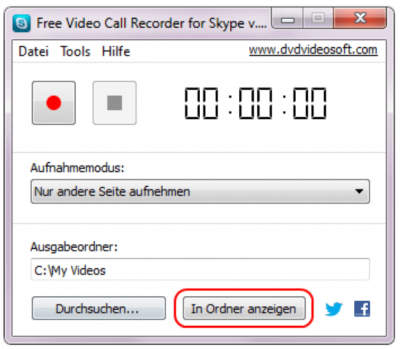
The difference in contrast to the on-board solution directly from Skype out is that here a recording of conversations is possible without the other participants to be notified.
As with all files that are stored in an external cloud, one may of course also ask the question what actually happens with the data, and whether these are not yet stored and evaluated after the deadline somewhere.
The providers of cloud systems deny this, but at least since Facebook, we know that the Internet never really forgets.
A software solution to save calls in Skype directly on the PC offers the manufacturer DVD Videosoft with the free program Free Video Call Recorder for Skype. The operation is very simple, and it can be determined in advance where, and in what format the conversation should be recorded, and also the differentiation either only audio, video only or complete is possible.
The difference in contrast to the on-board solution directly from Skype out is that here a recording of conversations is possible without the other participants to be notified.
3. Legal Notice
3. Legal Notice
Although the software solution is a practical matter to save videos directly on the PC without outsourcing them in a cloud before, but also represents a legal stumbling block.
Because in Germany the recording of non-public spoken word is prohibited. All the more so, of course, if the video track was also recorded. We therefore recommend the participants in advance to point out -bzw. to agree that you would like to record this conversation and save it locally.
You have the double security in any case if you also have the consent as appropriate record for later disagreements.

Although the software solution is a practical matter to save videos directly on the PC without outsourcing them in a cloud before, but also represents a legal stumbling block.
Because in Germany the recording of non-public spoken word is prohibited. All the more so, of course, if the video track was also recorded. We therefore recommend the participants in advance to point out -bzw. to agree that you would like to record this conversation and save it locally.
You have the double security in any case if you also have the consent as appropriate record for later disagreements.
Popular Posts:

Move pages and insert new ones in word
You probably also know the situation that you are sitting on a very long document, and in the middle of it falls on the actually between page 2 and page 3 still a page in between must.
The Sreference and the Wreference in Excel
Microsoft Excel: How to get S-reference and W-reference purposefully data out of a source.

Automatic backup of your files under Windows 10
You have invested a lot of work in creating your files! Let Windows 10 automatically create file backups to your specifications.

Calculate with date, time and working days in Excel
Calculating correctly with date, time and working days in Excel always causes uncertainty. We will explain step by step how it works.

Easily insert PowerPoint into Word in 5 steps
This is how you bring PowerPoint and Word together and easily add presentations to your Word documents.

How to create secure passwords for your online accounts
Each of us has a variety of online accounts that should all have a separate password if possible. But who should be able to remember everything ...
Offers 2024: Word & Excel Templates











Popular Posts:
Move pages and insert new ones in word
You probably also know the situation that you are sitting on a very long document, and in the middle of it falls on the actually between page 2 and page 3 still a page in between must.
The Sreference and the Wreference in Excel
Microsoft Excel: How to get S-reference and W-reference purposefully data out of a source.
Automatic backup of your files under Windows 10
You have invested a lot of work in creating your files! Let Windows 10 automatically create file backups to your specifications.
Calculate with date, time and working days in Excel
Calculating correctly with date, time and working days in Excel always causes uncertainty. We will explain step by step how it works.
Easily insert PowerPoint into Word in 5 steps
This is how you bring PowerPoint and Word together and easily add presentations to your Word documents.
How to create secure passwords for your online accounts
Each of us has a variety of online accounts that should all have a separate password if possible. But who should be able to remember everything ...
Offers 2024: Word & Excel Templates