
How to delete and edit Google reviews


Reviews on Google help millions of users every day with their decision for or against a product, service or company. But sometimes evaluations are also given in the affect, and do not reflect a differentiated opinion, but only a snapshot.
Ratings can be submitted by all users who have a Google account and who are logged in at this point in time. It often takes a few days until a given review can be viewed online by all users worldwide. During this period, an internal check takes place at Google to prevent fake reviews.
Because this has not happened seldom in the past, and can have negative economic effects for companies that were wrongly rated with negative entries in your Google Business presence if, for example, customers do not even shop here due to the negative reviews or services in Claim.
We would like to briefly explain how you can change or delete evaluations that you have made yourself.

How to delete and edit Google reviews
Reviews on Google help millions of users every day with their decision for or against a product, service or company. But sometimes evaluations are also given in the affect, and do not reflect a differentiated opinion, but only a snapshot.
Ratings can be submitted by all users who have a Google account and who are logged in at this point in time. It often takes a few days until a given review can be viewed online by all users worldwide. During this period, an internal check takes place at Google to prevent fake reviews.
Because this has not happened seldom in the past, and can have negative economic effects for companies that were wrongly rated with negative entries in your Google Business presence if, for example, customers do not even shop here due to the negative reviews or services in Claim.
We would like to briefly explain how you can change or delete evaluations that you have made yourself.
1. Correctly change or delete Google rating
1. Correctly change or delete Google rating
If you have several Google accounts, please make sure to log into the correct account in advance, because it is also possible as an individual to submit several reviews with the corresponding user account.
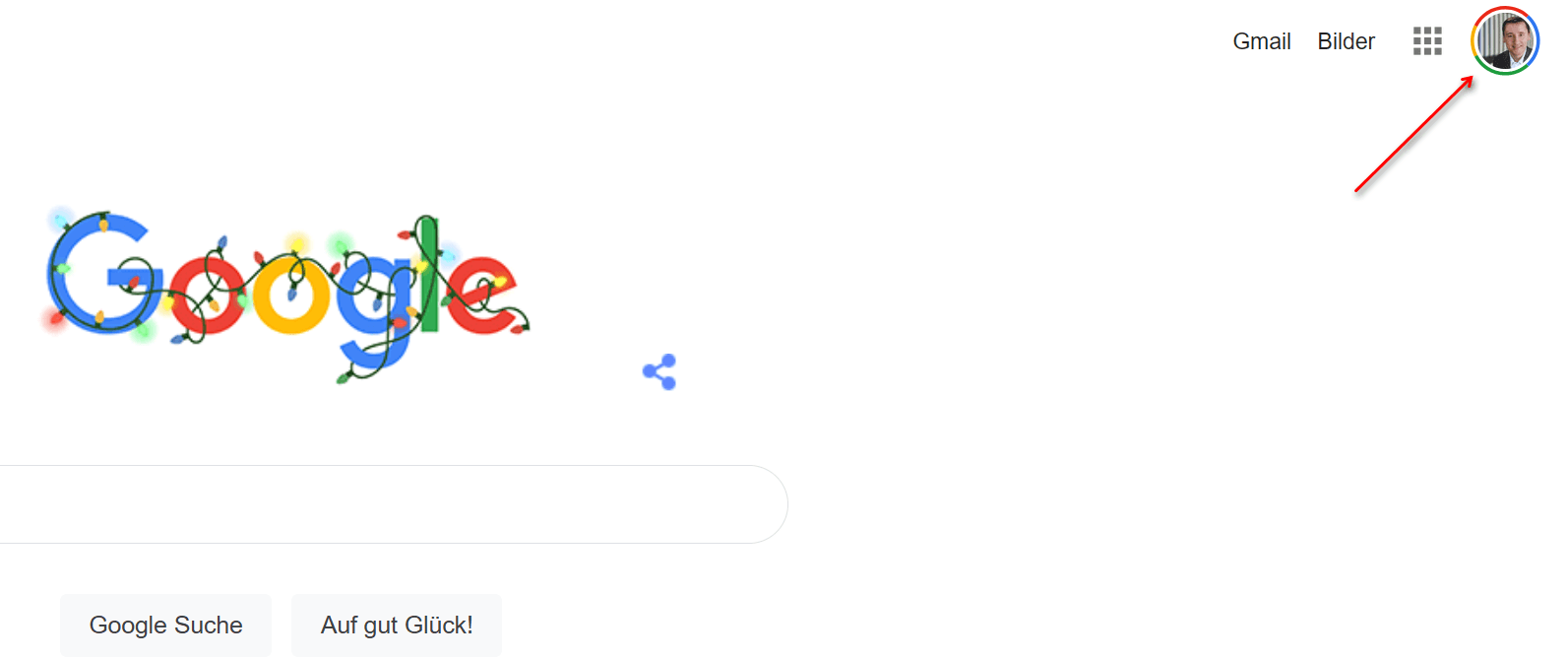
You can easily see whether and in which account you are currently logged in on the Google homepage in the top right corner, and there you can also switch back and forth between your accounts.
See fig. (Click to enlarge)

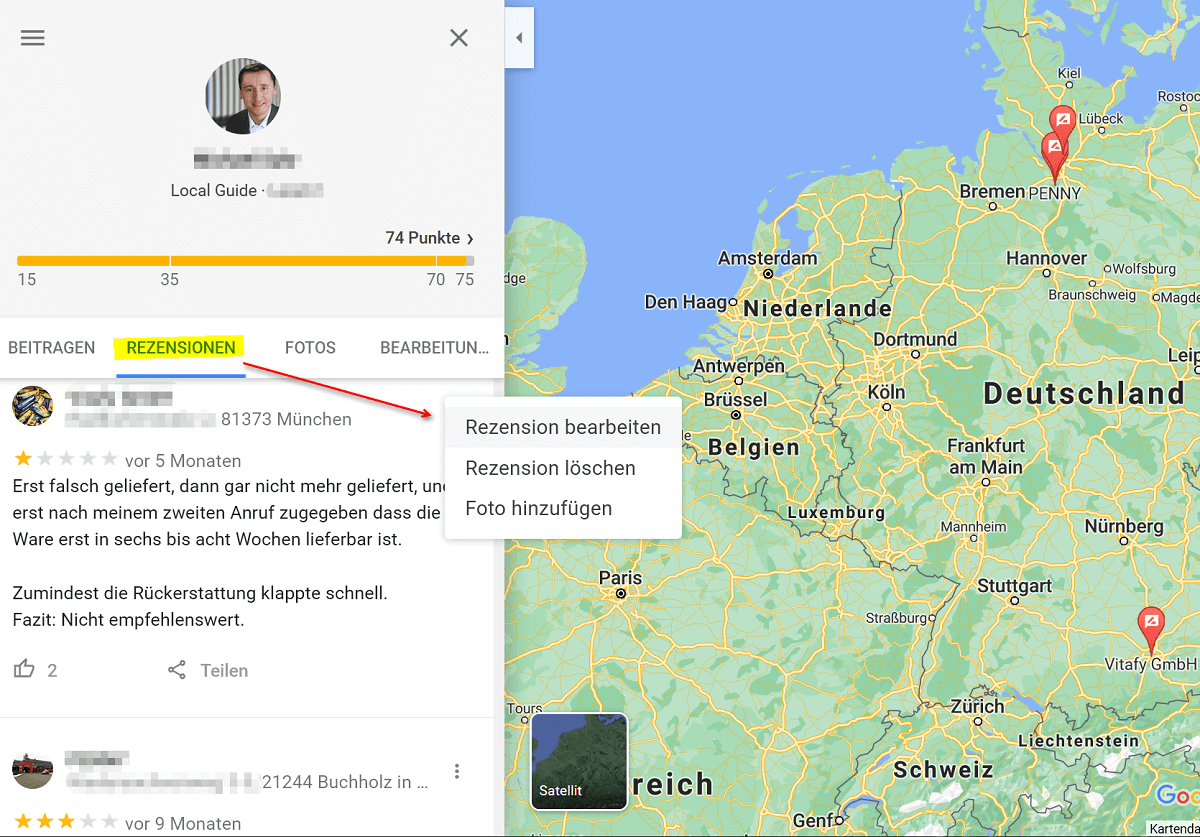
After you have logged into your Google account, go to the official Google Maps page at https://www.google.com/maps/ and click on “My Posts” in the menu. There you will also find the sub-item “Reviews”, under which you can view, edit and delete your previous reviews.
Please keep in mind that it may take some time before your updated rating is publicly available, as this process is also checked again.
See fig. (Click to enlarge)

So it is actually pretty easy to change or delete a rating once it has been submitted. Because on the one hand, opinions sometimes simply change after you have had very positive experiences with the company later, or the other way around, everything is much worse and you want to express your displeasure.
Note:
However, always make sure to remain factual in your reviews. Please do not start with personal mention of names, or worse, utter insults.
So if you write for example:
Mr / Ms XYZ is the greatest id … t ever walking around. How can such a sh…t company survive ??? !!!,
then this is not only irrelevant, but can also cause legal problems due to your insults. In case of doubt, such reviews are rightly not published by Google. Because the possibility of submitting reviews does not serve to get rid of your frustration, but rather to help the whole community with your experience in the decision-making process.

If you have several Google accounts, please make sure to log into the correct account in advance, because it is also possible as an individual to submit several reviews with the corresponding user account.
You can easily see whether and in which account you are currently logged in on the Google homepage in the top right corner, and there you can also switch back and forth between your accounts.
See fig. (Click to enlarge)
After you have logged into your Google account, go to the official Google Maps page at https://www.google.com/maps/ and click on “My Posts” in the menu. There you will also find the sub-item “Reviews”, under which you can view, edit and delete your previous reviews.
Please keep in mind that it may take some time before your updated rating is publicly available, as this process is also checked again.
See fig. (Click to enlarge)
So it is actually pretty easy to change or delete a rating once it has been submitted. Because on the one hand, opinions sometimes simply change after you have had very positive experiences with the company later, or the other way around, everything is much worse and you want to express your displeasure.
Note:
However, always make sure to remain factual in your reviews. Please do not start with personal mention of names, or worse, utter insults.
So if you write for example:
Mr / Ms XYZ is the greatest id … t ever walking around. How can such a sh…t company survive ??? !!!,
then this is not only irrelevant, but can also cause legal problems due to your insults. In case of doubt, such reviews are rightly not published by Google. Because the possibility of submitting reviews does not serve to get rid of your frustration, but rather to help the whole community with your experience in the decision-making process.
Popular Posts:

Finally faster Internet WiFi 6 is at the start
After 6 years of WLAN standard 802.11ac comes now with Wi-Fi 6 the replacement and has plenty of steam under the hood.

Create Pivot Table and Pivot Chart in Excel
So you can easily create pivot tables with Microsoft Excel, and also sort large amounts of data without much effort.

No Internet access in Windows 10 – How you solve the problem
If access to the Internet stops working in Microsoft Windows 10, there are many causes. We give tips on how to solve the problem.

Format bachelor thesis in Word correctly
The review of the formatting of your bachelor thesis only makes sense after the proofreading and the plagiarism check.

This is how the Name Manager works in Excel
Calculate instead of numbers but just by name in Microsoft Excel, and make easier with the name manager's work.
That’s why a VPN is worthwhile for everyone
Cyber attacks on the Internet are on the rise, and freedom on the Internet is at risk. A VPN can provide a remedy.
Offers 2024: Word & Excel Templates











Popular Posts:
Finally faster Internet WiFi 6 is at the start
After 6 years of WLAN standard 802.11ac comes now with Wi-Fi 6 the replacement and has plenty of steam under the hood.
Create Pivot Table and Pivot Chart in Excel
So you can easily create pivot tables with Microsoft Excel, and also sort large amounts of data without much effort.
No Internet access in Windows 10 – How you solve the problem
If access to the Internet stops working in Microsoft Windows 10, there are many causes. We give tips on how to solve the problem.
Format bachelor thesis in Word correctly
The review of the formatting of your bachelor thesis only makes sense after the proofreading and the plagiarism check.
This is how the Name Manager works in Excel
Calculate instead of numbers but just by name in Microsoft Excel, and make easier with the name manager's work.
That’s why a VPN is worthwhile for everyone
Cyber attacks on the Internet are on the rise, and freedom on the Internet is at risk. A VPN can provide a remedy.
Offers 2024: Word & Excel Templates















