AI-powered surfing and shopping with Bing and Edge


With ten billion searches per day, it’s clear that the demands on search engines go far beyond simply finding web pages. Microsoft has accepted this challenge and presents the new AI-supported Bing and the previously unsuccessful in-house web browser Edge, and wants to revolutionize surfing and shopping through the use of artificial intelligence on the Internet.
The innovations combine search, browsing and chat into a seamless experience that accompanies us throughout the web. Bing now offers an improved search function, which is achieved by working with OpenAI provides more relevant results and a new sidebar that displays more comprehensive answers. Bing searches the entire web to find and summarize the answer you’re looking for, making the search more efficient.

AI-powered surfing and shopping with Bing and Edge
With ten billion searches per day, it’s clear that the demands on search engines go far beyond simply finding web pages. Microsoft has accepted this challenge and presents the new AI-supported Bing and the previously unsuccessful in-house web browser Edge, and wants to revolutionize surfing and shopping through the use of artificial intelligence on the Internet.
The innovations combine search, browsing and chat into a seamless experience that accompanies us throughout the web. Bing now offers an improved search function, which is achieved by working with OpenAI provides more relevant results and a new sidebar that displays more comprehensive answers. Bing searches the entire web to find and summarize the answer you’re looking for, making the search more efficient.
Shopping on the Internet with AI
Shopping on the Internet with AI
For more complex search queries, Bing now offers an interactive chat that refines the search to the desired result, instead of processing new search queries from users as usual. In addition, Bing can help in situations where inspiration is needed, like writing an email or planning a vacation.
For this purpose, the Edge browser was developed in cooperation with OpenAI (The company behind ChatGPT) updated with AI capabilities and a new look, adding features like chat and compose. For example, you can use Edge to request the synopsis of a long financial report or get suggestions for a LinkedIn post. However, these possibilities should only represent the beginning of an exciting future of AI-supported search engines and web browsers. It is not yet possible to say what this development means for content creators such as journalists, but also for SEO optimization for website operators, but the increased use of artificial intelligence for the best search result should shake up the website ranking.
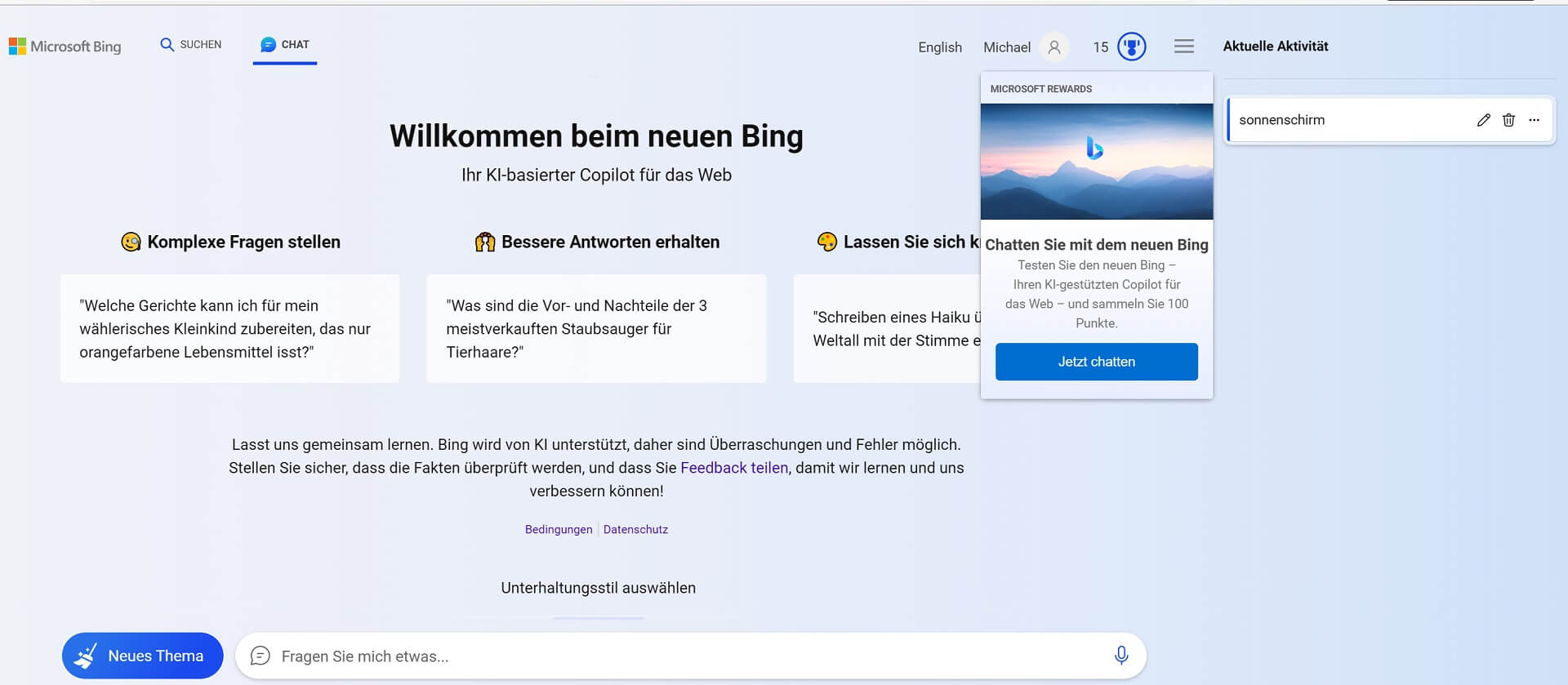
The new Bing experience is based on four technological breakthroughs, including the Next Generation OpenAI Model (GPT 4.0) and the Microsoft Prometheus Model. This combination enables more relevant, timely and targeted results with greater certainty. Microsoft and OpenAI have also introduced safeguards to protect against malicious content and are working on issues such as misinformation and disinformation, content blocking and data security.
The new Bing is available now in a limited preview on desktop, and the preview will be expanding to millions of users in the coming weeks. A preview for mobile devices will also be available soon. Artificial intelligence is here to stay and is changing our world at breakneck speed in almost all areas of life. Even if you don’t see it at first glance, this is behind many of the services we use every day artificial intelligence is stuck.
For more complex search queries, Bing now offers an interactive chat that refines the search to the desired result, instead of processing new search queries from users as usual. In addition, Bing can help in situations where inspiration is needed, like writing an email or planning a vacation.
For this purpose, the Edge browser was developed in cooperation with OpenAI (The company behind ChatGPT) updated with AI capabilities and a new look, adding features like chat and compose. For example, you can use Edge to request the synopsis of a long financial report or get suggestions for a LinkedIn post. However, these possibilities should only represent the beginning of an exciting future of AI-supported search engines and web browsers. It is not yet possible to say what this development means for content creators such as journalists, but also for SEO optimization for website operators, but the increased use of artificial intelligence for the best search result should shake up the website ranking.
The new Bing experience is based on four technological breakthroughs, including the Next Generation OpenAI Model (GPT 4.0) and the Microsoft Prometheus Model. This combination enables more relevant, timely and targeted results with greater certainty. Microsoft and OpenAI have also introduced safeguards to protect against malicious content and are working on issues such as misinformation and disinformation, content blocking and data security.
The new Bing is available now in a limited preview on desktop, and the preview will be expanding to millions of users in the coming weeks. A preview for mobile devices will also be available soon. Artificial intelligence is here to stay and is changing our world at breakneck speed in almost all areas of life. Even if you don’t see it at first glance, this is behind many of the services we use every day artificial intelligence is stuck.

Beliebte Beiträge

From assistant to agent: Microsoft’s Copilot
Copilot is growing up: Microsoft's AI is no longer an assistant, but a proactive agent. With "Vision," it sees your Windows desktop; in M365, it analyzes data as a "Researcher"; and in GitHub, it autonomously corrects code. The biggest update yet.

Never do the same thing again: How to record a macro in Excel
Tired of repetitive tasks in Excel? Learn how to create your first personal "magic button" with the macro recorder. Automate formatting and save hours – no programming required! Click here for easy instructions.
IMAP vs. Local Folders: The secret to your Outlook structure and why it matters
Do you know the difference between IMAP and local folders in Outlook? Incorrect use can lead to data loss! We'll explain simply what belongs where, how to clean up your mailbox, and how to archive emails securely and for the long term.

Der ultimative Effizienz-Boost: Wie Excel, Word und Outlook für Sie zusammenarbeiten
Schluss mit manuellem Kopieren! Lernen Sie, wie Sie Excel-Listen, Word-Vorlagen & Outlook verbinden, um personalisierte Serien-E-Mails automatisch zu versenden. Sparen Sie Zeit, vermeiden Sie Fehler und steigern Sie Ihre Effizienz. Hier geht's zur einfachen Anleitung!

Microsoft 365 Copilot in practice: Your guide to the new everyday work routine
What can Microsoft 365 Copilot really do? 🤖 We'll show you in a practical way how the AI assistant revolutionizes your daily work in Word, Excel & Teams. From a blank page to a finished presentation in minutes! The ultimate practical guide for the new workday. #Copilot #Microsoft365 #AI

Integrate and use ChatGPT in Excel – is that possible?
ChatGPT is more than just a simple chatbot. Learn how it can revolutionize how you work with Excel by translating formulas, creating VBA macros, and even promising future integration with Office.
Offers 2024: Word & Excel Templates











Beliebte Beiträge
From assistant to agent: Microsoft’s Copilot
Copilot is growing up: Microsoft's AI is no longer an assistant, but a proactive agent. With "Vision," it sees your Windows desktop; in M365, it analyzes data as a "Researcher"; and in GitHub, it autonomously corrects code. The biggest update yet.
Never do the same thing again: How to record a macro in Excel
Tired of repetitive tasks in Excel? Learn how to create your first personal "magic button" with the macro recorder. Automate formatting and save hours – no programming required! Click here for easy instructions.
IMAP vs. Local Folders: The secret to your Outlook structure and why it matters
Do you know the difference between IMAP and local folders in Outlook? Incorrect use can lead to data loss! We'll explain simply what belongs where, how to clean up your mailbox, and how to archive emails securely and for the long term.
Der ultimative Effizienz-Boost: Wie Excel, Word und Outlook für Sie zusammenarbeiten
Schluss mit manuellem Kopieren! Lernen Sie, wie Sie Excel-Listen, Word-Vorlagen & Outlook verbinden, um personalisierte Serien-E-Mails automatisch zu versenden. Sparen Sie Zeit, vermeiden Sie Fehler und steigern Sie Ihre Effizienz. Hier geht's zur einfachen Anleitung!
Microsoft 365 Copilot in practice: Your guide to the new everyday work routine
What can Microsoft 365 Copilot really do? 🤖 We'll show you in a practical way how the AI assistant revolutionizes your daily work in Word, Excel & Teams. From a blank page to a finished presentation in minutes! The ultimate practical guide for the new workday. #Copilot #Microsoft365 #AI
Integrate and use ChatGPT in Excel – is that possible?
ChatGPT is more than just a simple chatbot. Learn how it can revolutionize how you work with Excel by translating formulas, creating VBA macros, and even promising future integration with Office.
Offers 2024: Word & Excel Templates