New features in Google Maps


After an extensive update of probably the most popular navigation software app on Android devices, Google has now introduced some innovations that make the map service even more versatile than already.
So there is now an “AR function Live View” with the exploration of unknown holiday regions made even more interesting.
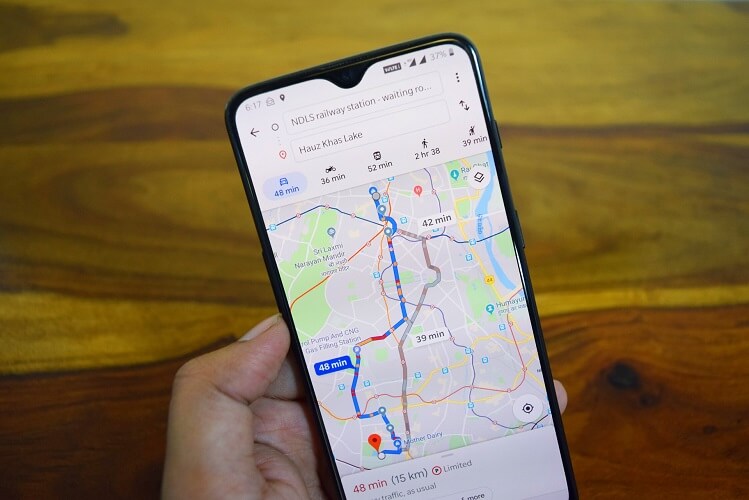
New features in Google Maps
After an extensive update of probably the most popular navigation software app on Android devices, Google has now introduced some innovations that make the map service even more versatile than already.
So there is now an “AR function Live View” with the exploration of unknown holiday regions made even more interesting.
Augmented reality “Live View” in Google Maps
One of the most innovative features in Google Maps is probably the function “Live View”, which is based on augmented reality technology. The AR function is used to show the user during navigation practical pointers indicating the direction to be taken.
In particular, for people with a rather moderate sense of orientation, who are a bit struggling with the standard navigation, the “Live View” function in Google Maps could be a real help, because here is enough a quick look to know where to go, rather than the road on the most quite clear display to look for.
According to Google, this feature has been successfully tested by Local Guides and selected Google Pixel owners.

Augmented reality “Live View” in Google Maps
Improved reservation function
For those who travel a lot, Google implemented another helpful tool.
Via the menu “My Places” – “Reservations” you will find a list of all planned trips. There you can then select any trip and directly display the flight and hotel reservations. Fortunately, this feature is also available offline, so you do not have to worry about bad internet connections that are still abundant in Germany ..
Improved reservation function
New timeline on Google Maps
Furthermore, Google has revised the function of the “timeline”, so that can be displayed over years, the visited places and shops.
This could prove to be quite useful if, for example, you can not remember the name of a restaurant after a long time, and perhaps want to go there again. As this list becomes more and more crowded over the course of time, the places visited can also be displayed by category (eg country, city, bar, restaurant, sight, etc.).
The lists collected in this way can later even be forwarded to friends and acquaintances.
Initially, the new timeline was introduced exclusively for Android users. An update for iOS but should follow.
Note:
Of course, the feature only works if you have enabled location history in the settings of your device.
In any case it will be interesting to see how Augmented Reality continues. Of course, Google is guaranteed to stay on the ball here and will continue to make everyday life easier for us with great features in the future.

New timeline on Google Maps
In any case it will be interesting to see how Augmented Reality continues. Of course, Google is guaranteed to stay on the ball here and will continue to make everyday life easier for us with great features in the future.
Popular Posts:

The best tips for Microsoft Word
Sparen Sie mit diesen Tipps für Microsoft Word viel Zeit und Nerven. Arbeiten Sie effektiver mit der beliebtesten Textverarbeitungssoftware.

Why is my Excel File so big?
Solve the problem with Excel spreadsheets that take up several megabytes of space without any apparent reason.
What to do if the Windows license expires?
What exactly happens when the Windows license expires soon? Do I have to buy a new license? And how can the message be switched off so that it never appears again?

The most important tips for Excel
These 10 tips for Microsoft Excel 2016/2019 with questions that many users ask every day are guaranteed to help you and save a lot of time.

More fonts in Word through Google Fonts
You can find out how to expand the font selection in Word with just a few steps and above all free in our article.

Data protection settings in Windows 10
With Windows 10, Microsoft's operating system has not only become better, but also more curious. Read which data protection settings are important.
Offers 2024: Word & Excel Templates











Popular Posts:
The best tips for Microsoft Word
Sparen Sie mit diesen Tipps für Microsoft Word viel Zeit und Nerven. Arbeiten Sie effektiver mit der beliebtesten Textverarbeitungssoftware.
Why is my Excel File so big?
Solve the problem with Excel spreadsheets that take up several megabytes of space without any apparent reason.
What to do if the Windows license expires?
What exactly happens when the Windows license expires soon? Do I have to buy a new license? And how can the message be switched off so that it never appears again?
The most important tips for Excel
These 10 tips for Microsoft Excel 2016/2019 with questions that many users ask every day are guaranteed to help you and save a lot of time.
More fonts in Word through Google Fonts
You can find out how to expand the font selection in Word with just a few steps and above all free in our article.
Data protection settings in Windows 10
With Windows 10, Microsoft's operating system has not only become better, but also more curious. Read which data protection settings are important.
Offers 2024: Word & Excel Templates