

New features in Google Maps


After an extensive update of probably the most popular navigation software app on Android devices, Google has now introduced some innovations that make the map service even more versatile than already.
So there is now an “AR function Live View” with the exploration of unknown holiday regions made even more interesting.
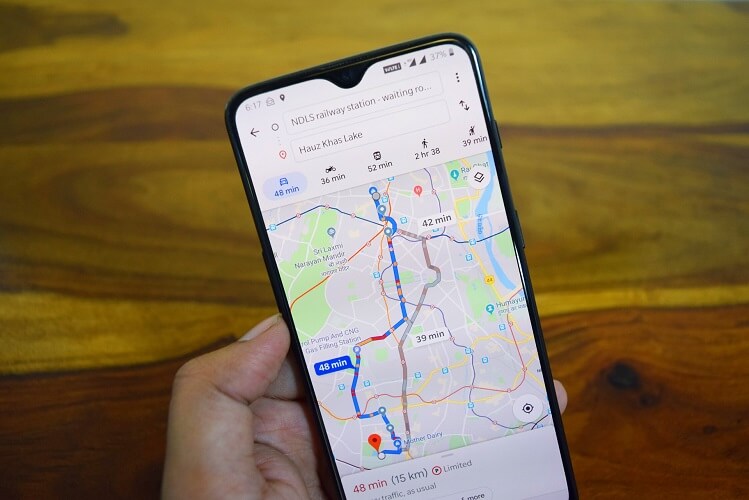
New features in Google Maps
After an extensive update of probably the most popular navigation software app on Android devices, Google has now introduced some innovations that make the map service even more versatile than already.
So there is now an “AR function Live View” with the exploration of unknown holiday regions made even more interesting.
Augmented reality “Live View” in Google Maps
One of the most innovative features in Google Maps is probably the function “Live View”, which is based on augmented reality technology. The AR function is used to show the user during navigation practical pointers indicating the direction to be taken.
In particular, for people with a rather moderate sense of orientation, who are a bit struggling with the standard navigation, the “Live View” function in Google Maps could be a real help, because here is enough a quick look to know where to go, rather than the road on the most quite clear display to look for.
According to Google, this feature has been successfully tested by Local Guides and selected Google Pixel owners.

Augmented reality “Live View” in Google Maps
Improved reservation function
For those who travel a lot, Google implemented another helpful tool.
Via the menu “My Places” – “Reservations” you will find a list of all planned trips. There you can then select any trip and directly display the flight and hotel reservations. Fortunately, this feature is also available offline, so you do not have to worry about bad internet connections that are still abundant in Germany ..
Improved reservation function
New timeline on Google Maps
Furthermore, Google has revised the function of the “timeline”, so that can be displayed over years, the visited places and shops.
This could prove to be quite useful if, for example, you can not remember the name of a restaurant after a long time, and perhaps want to go there again. As this list becomes more and more crowded over the course of time, the places visited can also be displayed by category (eg country, city, bar, restaurant, sight, etc.).
The lists collected in this way can later even be forwarded to friends and acquaintances.
Initially, the new timeline was introduced exclusively for Android users. An update for iOS but should follow.
Note:
Of course, the feature only works if you have enabled location history in the settings of your device.
In any case it will be interesting to see how Augmented Reality continues. Of course, Google is guaranteed to stay on the ball here and will continue to make everyday life easier for us with great features in the future.

New timeline on Google Maps
In any case it will be interesting to see how Augmented Reality continues. Of course, Google is guaranteed to stay on the ball here and will continue to make everyday life easier for us with great features in the future.
Popular Posts:
Ad-free home network: Install Pi-hole on Windows
Say goodbye to ads on smart TVs and in apps: Pi-hole software turns your Windows laptop into a network filter. This article explains step-by-step how to install it via Docker and configure the necessary DNS settings in your FRITZ!Box.
How to tune your FRITZ!Box into a professional call server
A professional telephone system can be built using a FRITZ!Box and a laptop. This article shows step by step how to use the free software "Phoner" to schedule announcements and record calls – including important legal information (§ 201 StGB).

Why to-do lists are a waste of time
Do you feel unproductive at the end of the day, even though you've worked hard? Your to-do list is to blame. It tempts you to focus on easy tasks and ignores your limited time. This article explains why lists are "self-deception" and why professionals use a calendar instead.

Smartphone Wi-Fi security: Public hotspots vs. home network
Is smartphone Wi-Fi a security risk? This article analyzes in detail threats such as evil twin attacks and explains protective measures for when you're on the go. We also clarify why home Wi-Fi is usually secure and how you can effectively separate your smart home from sensitive data using a guest network.

Warum dein Excel-Kurs Zeitverschwendung ist – was du wirklich lernen solltest!
Hand aufs Herz: Wann hast du zuletzt eine komplexe Excel-Formel ohne Googeln getippt? Eben. KI schreibt heute den Code für dich. Erfahre, warum klassische Excel-Trainings veraltet sind und welche 3 modernen Skills deinen Marktwert im Büro jetzt massiv steigern.

Cybersicherheit: Die 3 größten Fehler, die 90% aller Mitarbeiter machen
Hacker brauchen keine Codes, sie brauchen nur einen unaufmerksamen Mitarbeiter. Von Passwort-Recycling bis zum gefährlichen Klick: Wir zeigen die drei häufigsten Fehler im Büroalltag und geben praktische Tipps, wie Sie zur menschlichen Firewall werden.
Offers 2024: Word & Excel Templates











Popular Posts:
Ad-free home network: Install Pi-hole on Windows
Say goodbye to ads on smart TVs and in apps: Pi-hole software turns your Windows laptop into a network filter. This article explains step-by-step how to install it via Docker and configure the necessary DNS settings in your FRITZ!Box.
How to tune your FRITZ!Box into a professional call server
A professional telephone system can be built using a FRITZ!Box and a laptop. This article shows step by step how to use the free software "Phoner" to schedule announcements and record calls – including important legal information (§ 201 StGB).
Why to-do lists are a waste of time
Do you feel unproductive at the end of the day, even though you've worked hard? Your to-do list is to blame. It tempts you to focus on easy tasks and ignores your limited time. This article explains why lists are "self-deception" and why professionals use a calendar instead.
Smartphone Wi-Fi security: Public hotspots vs. home network
Is smartphone Wi-Fi a security risk? This article analyzes in detail threats such as evil twin attacks and explains protective measures for when you're on the go. We also clarify why home Wi-Fi is usually secure and how you can effectively separate your smart home from sensitive data using a guest network.
Warum dein Excel-Kurs Zeitverschwendung ist – was du wirklich lernen solltest!
Hand aufs Herz: Wann hast du zuletzt eine komplexe Excel-Formel ohne Googeln getippt? Eben. KI schreibt heute den Code für dich. Erfahre, warum klassische Excel-Trainings veraltet sind und welche 3 modernen Skills deinen Marktwert im Büro jetzt massiv steigern.
Cybersicherheit: Die 3 größten Fehler, die 90% aller Mitarbeiter machen
Hacker brauchen keine Codes, sie brauchen nur einen unaufmerksamen Mitarbeiter. Von Passwort-Recycling bis zum gefährlichen Klick: Wir zeigen die drei häufigsten Fehler im Büroalltag und geben praktische Tipps, wie Sie zur menschlichen Firewall werden.
Offers 2024: Word & Excel Templates


















