Moving to a new PC with Windows


You probably also know the situation that you buy a new PC without an operating system (to save money), since you still have your Windows version for which has already been paid. Only if you then want to activate Windows on the new computer comes at once an error message that Windows is already activated on another PC.
So what to do?
First of all, it does not help to format the boot drive (mostly drive: C).

If you have already done that and are looking for another solution, unfortunately you have had bad luck.
Before you move to a new PC, you must log off or deactivate your Windows license from the old computer in order to make it available again.
By the way, it does not necessarily have to be that you are facing the problem if you have bought a new computer, but it can be enough if so-called system-relevant components are exchanged.
This is the same for Windows as if it were a completely new PC.
The system-relevant components include e.g. Mainboard, CPU, hard drive and in some cases, even the graphics card (albeit the exception) to be the trigger.
Moving to a new PC with Windows
You probably also know the situation that you buy a new PC without an operating system (to save money), since you still have your Windows version for which has already been paid. Only if you then want to activate Windows on the new computer comes at once an error message that Windows is already activated on another PC.
So what to do?
First of all, it does not help to format the boot drive (mostly drive: C).
If you have already done that and are looking for another solution, unfortunately you have had bad luck.
Before you move to a new PC, you must log off or deactivate your Windows license from the old computer in order to make it available again.
By the way, it does not necessarily have to be that you are facing the problem if you have bought a new computer, but it can be enough if so-called system-relevant components are exchanged.
This is the same for Windows as if it were a completely new PC.
The system-relevant components include e.g. Mainboard, CPU, hard drive and in some cases, even the graphics card (albeit the exception) to be the trigger.
1. Start Windows Command Prompt as administrator
1. Start Windows Command Prompt as administrator
First, you start your old computer quite normally.
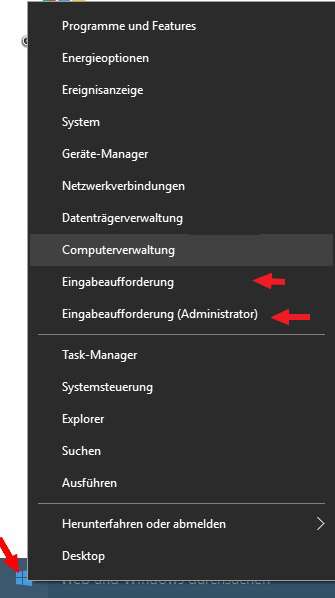
Then go to the bottom left of the taskbar on the Windows icon and right-click once to open the options menu.
Select the item: “Command Prompt (Administrator)”.
This step is very important because if you choose only “Command Prompt” you will not have the required rights for the action you’ve planned, and the command would be denied.
see picture: (click to enlarge)
First, you start your old computer quite normally.
Then go to the bottom left of the taskbar on the Windows icon and right-click once to open the options menu.
Select the item: “Command Prompt (Administrator)”.
This step is very important because if you choose only “Command Prompt” you will not have the required rights for the action you’ve planned, and the command would be denied.
see picture:
2. Disable Windows license
2. Disable Windows license
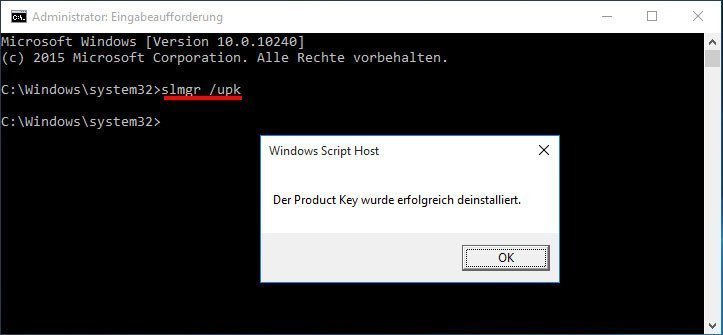
To deactivate the Windows license from your old computer, enter the following:
slmgr / upk
Then simply confirm with the Enter key and that’s it.
If you have entered the command correctly, you will receive a confirmation immediately.
see picture: (click to enlarge)

Now you can easily format your old hard drive, or install it in your new computer to use it even further.
If you come up with the idea to say:
“Why should not I just install the old hard drive in the new computer and use it as a system hard drive?”
Windows would not recognize the PC and issue the message that you should please activate your copy of Windows.
Which, of course, would not work in that case.

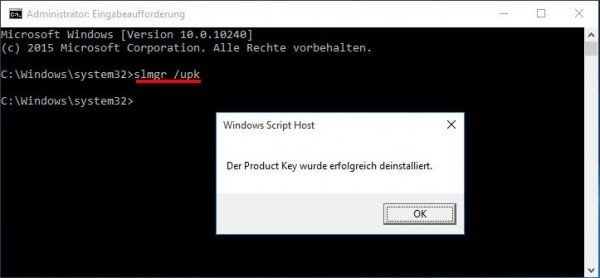
To deactivate the Windows license from your old computer, enter the following:
slmgr / upk
Then simply confirm with the Enter key and that’s it.
If you have entered the command correctly, you will receive a confirmation immediately.
see picture:
Now you can easily format your old hard drive, or install it in your new computer to use it even further.
If you come up with the idea to say:
“Why should not I just install the old hard drive in the new computer and use it as a system hard drive?”
Windows would not recognize the PC and issue the message that you should please activate your copy of Windows.
Which, of course, would not work in that case.
Popular Posts:

Wi-Fi 7 vs. Wi-Fi 6: A quantum leap for your home network?
Wi-Fi 7 is here! Learn all about its advantages over Wi-Fi 6: extreme speed, minimal latency, and MLO. We'll explain who should upgrade now and what you can do with your ISP router. Your guide to the Wi-Fi of the future.

Microsoft 365 Copilot in practice: Your guide to the new everyday work routine
What can Microsoft 365 Copilot really do? 🤖 We'll show you in a practical way how the AI assistant revolutionizes your daily work in Word, Excel & Teams. From a blank page to a finished presentation in minutes! The ultimate practical guide for the new workday. #Copilot #Microsoft365 #AI

EU chat control: The battle between protection and privacy
The EU's chat control measures aim to scan private messages on WhatsApp and similar platforms. Critics see this as mass surveillance. Following massive resistance, including from Germany, the crucial vote in the EU Council has been postponed again. The fight for digital privacy continues.

Safe at Home: The Ultimate Guide to Your PC and Your Wi-Fi
Is your home Wi-Fi really secure? 🏠 From router passwords to phishing protection – our ultimate security guide will make life difficult for hackers. Secure your PC and home network now with our simple and easy-to-understand tips! #Cybersecurity #HomeNetwork

Integrate and use ChatGPT in Excel – is that possible?
ChatGPT is more than just a simple chatbot. Learn how it can revolutionize how you work with Excel by translating formulas, creating VBA macros, and even promising future integration with Office.

Create Out of Office Notice in Outlook
To create an Out of Office message in Microsoft Outlook - Office 365, and start relaxing on vacation
Offers 2024: Word & Excel Templates











Popular Posts:
Wi-Fi 7 vs. Wi-Fi 6: A quantum leap for your home network?
Wi-Fi 7 is here! Learn all about its advantages over Wi-Fi 6: extreme speed, minimal latency, and MLO. We'll explain who should upgrade now and what you can do with your ISP router. Your guide to the Wi-Fi of the future.
Microsoft 365 Copilot in practice: Your guide to the new everyday work routine
What can Microsoft 365 Copilot really do? 🤖 We'll show you in a practical way how the AI assistant revolutionizes your daily work in Word, Excel & Teams. From a blank page to a finished presentation in minutes! The ultimate practical guide for the new workday. #Copilot #Microsoft365 #AI
EU chat control: The battle between protection and privacy
The EU's chat control measures aim to scan private messages on WhatsApp and similar platforms. Critics see this as mass surveillance. Following massive resistance, including from Germany, the crucial vote in the EU Council has been postponed again. The fight for digital privacy continues.
Safe at Home: The Ultimate Guide to Your PC and Your Wi-Fi
Is your home Wi-Fi really secure? 🏠 From router passwords to phishing protection – our ultimate security guide will make life difficult for hackers. Secure your PC and home network now with our simple and easy-to-understand tips! #Cybersecurity #HomeNetwork
Integrate and use ChatGPT in Excel – is that possible?
ChatGPT is more than just a simple chatbot. Learn how it can revolutionize how you work with Excel by translating formulas, creating VBA macros, and even promising future integration with Office.
Create Out of Office Notice in Outlook
To create an Out of Office message in Microsoft Outlook - Office 365, and start relaxing on vacation
Offers 2024: Word & Excel Templates