
Microsoft Office gets fresher with a new design


After users were spared too big changes in the menu navigation thanks to the latest offshoot of the most popular office software with Microsoft Office 2019 in September 2018, and the focus was primarily on more functionality and networking, there should now be a refreshment for all Office versions.
Microsoft Office gets fresher with a new design
After users were spared too big changes in the menu navigation thanks to the latest offshoot of the most popular office software with Microsoft Office 2019 in September 2018, and the focus was primarily on more functionality and networking, there should now be a refreshment for all Office versions.
No more ribbon in Microsoft Office in the future
When Office 2003 was replaced by Office 2007, many users who could use Word, Excel & Co almost blindly – because they knew exactly where which function is located – had to get used to it when the menu ribbon was introduced to better categorize functional areas.
And of course at the beginning – as with almost everything that is new – there was a lot of criticism from the users. And now it’s time again that we all have to get used to it. Because the menu ribbon to which we have all got used falls victim to the red pen after 13 years, and should give way to a new, slimmer design. In the future, there will be a context-sensitive strip with buttons at the top of the screen, which changes depending on the work being carried out.
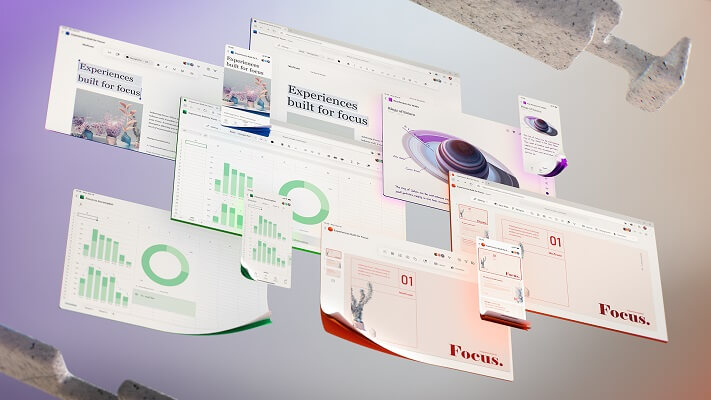
With this step, Microsoft would like to make it easier for users to work with the Office software through a tidier design, and to simplify the sometimes cluttered menu navigation. The focus should always be on the current work to be carried out. That this redesign is not just a visual gimmick for Microsoft, but really about improving the workflow with the office software is also noticeable because there is still no fixed date for the implementation with which everything is changed in one go becomes.
Rather, it is a project that is designed to be implemented in the long term. While some changes have already been tested, others are still in the testing phase to see whether changes really bring added value to users here, or only confuse them in the end. So it will take a while before all users will receive the new design. We think that (if Microsoft stays true to its cycle) the new design will be available to all users with the Office 2022 version at the latest.

No more ribbon in Microsoft Office in the future
When Office 2003 was replaced by Office 2007, many users who could use Word, Excel & Co almost blindly – because they knew exactly where which function is located – had to get used to it when the menu ribbon was introduced to better categorize functional areas.
And of course at the beginning – as with almost everything that is new – there was a lot of criticism from the users. And now it’s time again that we all have to get used to it. Because the menu ribbon to which we have all got used falls victim to the red pen after 13 years, and should give way to a new, slimmer design. In the future, there will be a context-sensitive strip with buttons at the top of the screen, which changes depending on the work being carried out.
With this step, Microsoft would like to make it easier for users to work with the Office software through a tidier design, and to simplify the sometimes cluttered menu navigation. The focus should always be on the current work to be carried out. That this redesign is not just a visual gimmick for Microsoft, but really about improving the workflow with the office software is also noticeable because there is still no fixed date for the implementation with which everything is changed in one go becomes.
Rather, it is a project that is designed to be implemented in the long term. While some changes have already been tested, others are still in the testing phase to see whether changes really bring added value to users here, or only confuse them in the end. So it will take a while before all users will receive the new design. We think that (if Microsoft stays true to its cycle) the new design will be available to all users with the Office 2022 version at the latest.
Popular Posts:

Easily insert PowerPoint into Word in 5 steps
This is how you bring PowerPoint and Word together and easily add presentations to your Word documents.

How to create secure passwords for your online accounts
Each of us has a variety of online accounts that should all have a separate password if possible. But who should be able to remember everything ...

Alternative for Microsoft Office? – Use Google Docs on Desktop
Microsoft still offers the most popular software package for the office. Competition has been around for some time. Now Google Docs is also available on the desktop.

Finally faster Internet WiFi 6 is at the start
After 6 years of WLAN standard 802.11ac comes now with Wi-Fi 6 the replacement and has plenty of steam under the hood.

Create Pivot Table and Pivot Chart in Excel
So you can easily create pivot tables with Microsoft Excel, and also sort large amounts of data without much effort.

No Internet access in Windows 10 – How you solve the problem
If access to the Internet stops working in Microsoft Windows 10, there are many causes. We give tips on how to solve the problem.
Offers 2024: Word & Excel Templates











Popular Posts:
Easily insert PowerPoint into Word in 5 steps
This is how you bring PowerPoint and Word together and easily add presentations to your Word documents.
How to create secure passwords for your online accounts
Each of us has a variety of online accounts that should all have a separate password if possible. But who should be able to remember everything ...
Alternative for Microsoft Office? – Use Google Docs on Desktop
Microsoft still offers the most popular software package for the office. Competition has been around for some time. Now Google Docs is also available on the desktop.
Finally faster Internet WiFi 6 is at the start
After 6 years of WLAN standard 802.11ac comes now with Wi-Fi 6 the replacement and has plenty of steam under the hood.
Create Pivot Table and Pivot Chart in Excel
So you can easily create pivot tables with Microsoft Excel, and also sort large amounts of data without much effort.
No Internet access in Windows 10 – How you solve the problem
If access to the Internet stops working in Microsoft Windows 10, there are many causes. We give tips on how to solve the problem.
Offers 2024: Word & Excel Templates















