

How to correctly write a review on Google


The range of products and services on the Internet is growing every day, and so it is becoming more and more difficult for us consumers to classify which offers are really worth their price, and which ones should be avoided.
In principle, the opinions of customers in rating portals are of course very helpful, because one should think that if many people rate a product or service positively, it must be good and also meet one’s own requirements.
However, at the latest since reports about fake and purchased reviews, e.g. in travel portals about the quality of hotel facilities, etc., trust in such reviews has not necessarily increased.
Therefore, not only is an evaluation itself relevant for a purchase decision, but also its credibility and quality!
Read our article on how to successfully submit reviews on Google.

How to correctly write a review on Google
The range of products and services on the Internet is growing every day, and so it is becoming more and more difficult for us consumers to classify which offers are really worth their price, and which ones should be avoided.
In principle, the opinions of customers in rating portals are of course very helpful, because one should think that if many people rate a product or service positively, it must be good and also meet one’s own requirements.
However, at the latest since reports about fake and purchased reviews, e.g. in travel portals about the quality of hotel facilities, etc., trust in such reviews has not necessarily increased.
Therefore, not only is an evaluation itself relevant for a purchase decision, but also its credibility and quality!
Read our article on how to successfully submit reviews on Google.
1. What is the value of a Google rating?
1. What is the value of a Google rating?
Compared to many other rating portals on the Internet, Google has set the bar a little higher here.
Because, on the one hand, a rating cannot be submitted anonymously by people, and on the other hand, it is also prevented that artificial ratings are created by so-called bots through technical gimmicks.
Each of us is in some way always a provider, but also a customer, and we all want a realistic cut of opinion for our decision-making.
The value of a Google rating can therefore be classified as very high.
Compared to many other rating portals on the Internet, Google has set the bar a little higher here.
Because, on the one hand, a rating cannot be submitted anonymously by people, and on the other hand, it is also prevented that artificial ratings are created by so-called bots through technical gimmicks.
Each of us is in some way always a provider, but also a customer, and we all want a realistic cut of opinion for our decision-making.
The value of a Google rating can therefore be classified as very high.
2. Requirements for a Google rating
2. Requirements for a Google rating
In order to be able to successfully submit a Google rating, 2 things are necessary:
- You need a Google account.
- You must also be logged in for the evaluation.
In order to be able to successfully submit a Google rating, 2 things are necessary:
- You need a Google account.
- You must also be logged in for the evaluation.
3. Do I already have a Google account?
3. Do I already have a Google account?
If you have already logged into a Google product such as YouTube, Gmail, Google+ at some point, then you also have a corresponding account with which you can use all Google products and write reviews. Perhaps you have logged in there at some point, but you no longer have your access data?
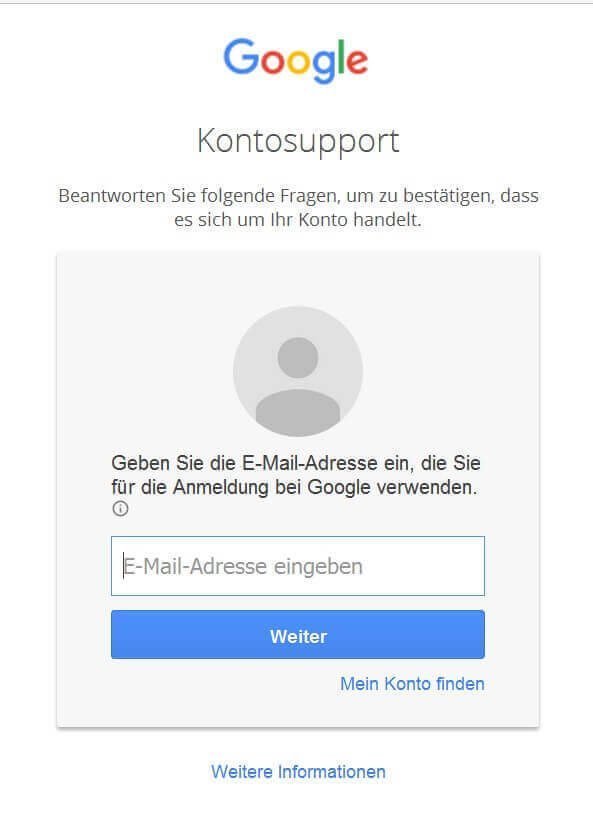
That is also no problem. Just go to Google’s password help at:
https://accounts.google.com/ForgotPasswd
and enter your email address here.
See fig .: (click to enlarge)

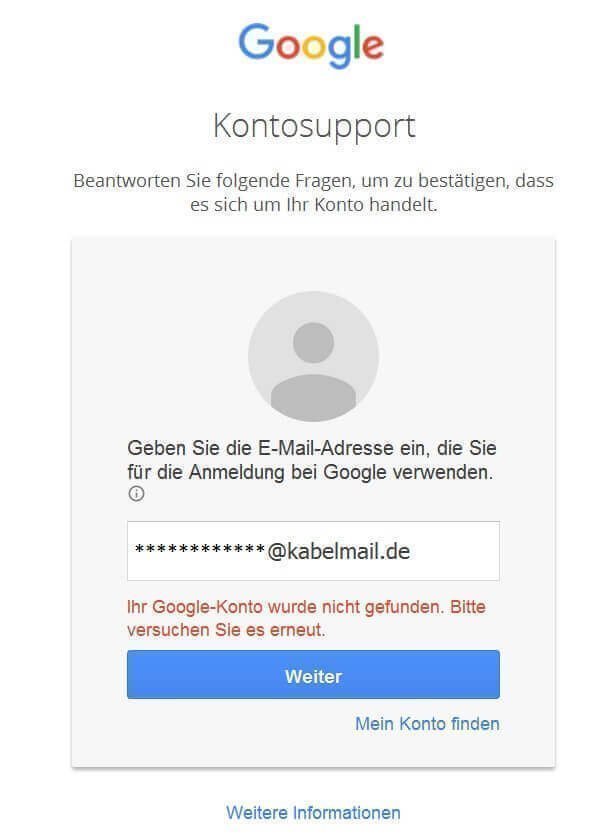
If you use several e-mail addresses and do not know which is the right one, then simply try several e-mail addresses one after the other. If the email address you entered is unknown to Google, you will immediately receive an error message.
See fig .: (click to enlarge)
If you have already logged into a Google product such as YouTube, Gmail, Google+ at some point, then you also have a corresponding account with which you can use all Google products and write reviews. Perhaps you have logged in there at some point, but you no longer have your access data?
That is also no problem. Just go to Google’s password help at:
https://accounts.google.com/ForgotPasswd
and enter your email address here.
See fig .: (click to enlarge)
If you use several e-mail addresses and do not know which is the right one, then simply try several e-mail addresses one after the other. If the email address you entered is unknown to Google, you will immediately receive an error message.
See fig .: (click to enlarge)
4. Create a Google account
4. Create a Google account
To create a Google account, do the following:
Go to the following link: https://accounts.google.com/SignUp
See fig. (Click to enlarge)
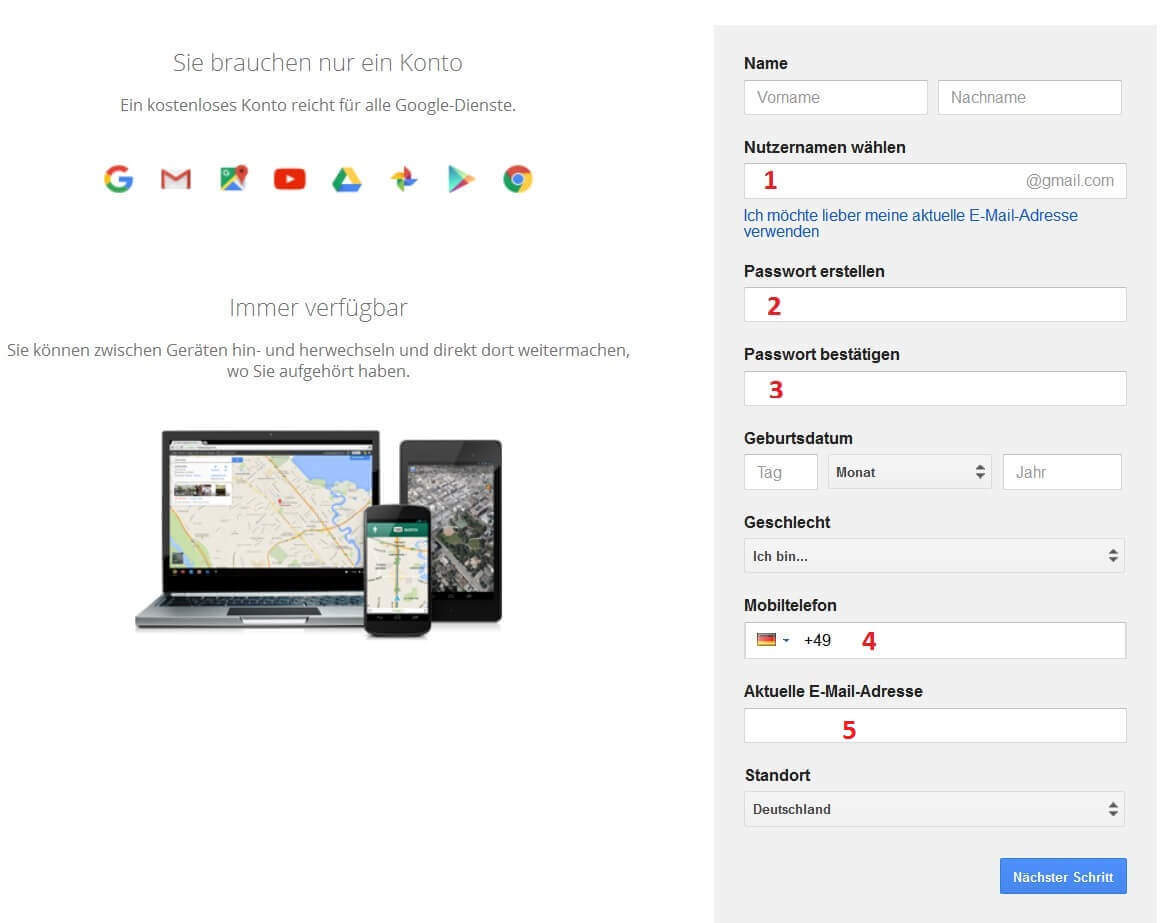
- Create any username. Together with the ending “@ gmail.com”, this will later become your Google E-Mail address, which you can, but do not have to use.
- Choose any password. Make sure that it contains upper and lower case letters as well as characters, numbers and special characters in order to achieve a high level of security!
- Repeat password for security.
- You do not have to enter your mobile phone number here.
- Enter your current email address, to which Google will send you an additional confirmation email. This email address will also be used later by Google to contact you if necessary.
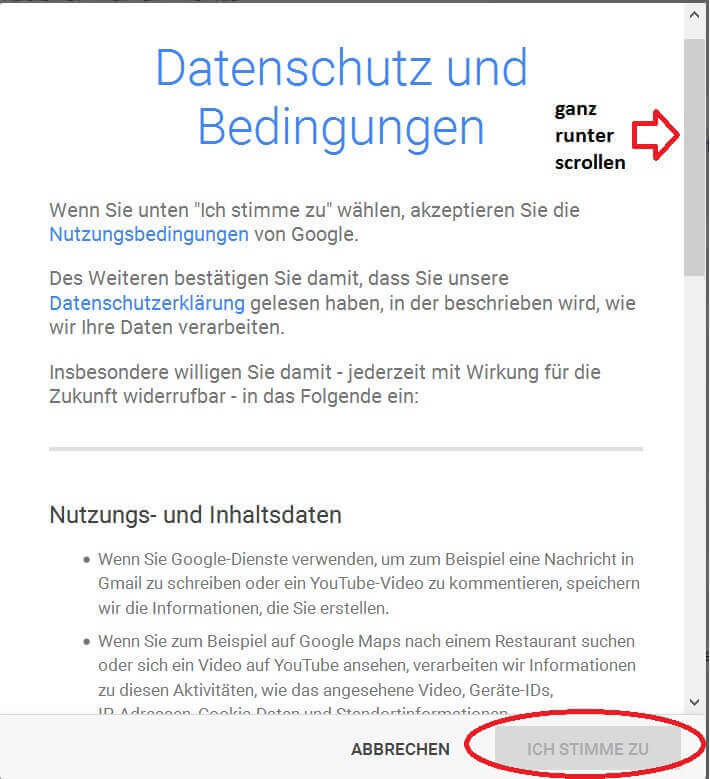
- After you have entered your data, you still have to accept the data protection regulations.
Note:
You can only click on “I agree” when you have scrolled the text all the way down!
See fig. (Click to enlarge)
In order to prevent fake accounts, Google used telephone confirmation in the next point.
- You can have Google call you free of charge to receive a confirmation code, or you can enter your mobile phone number here and receive your confirmation code free of charge by SMS.
- If you enter your landline number and are not sure whether your phone supports the SMS function, please select the option Voice call.
See fig. (Click to enlarge)
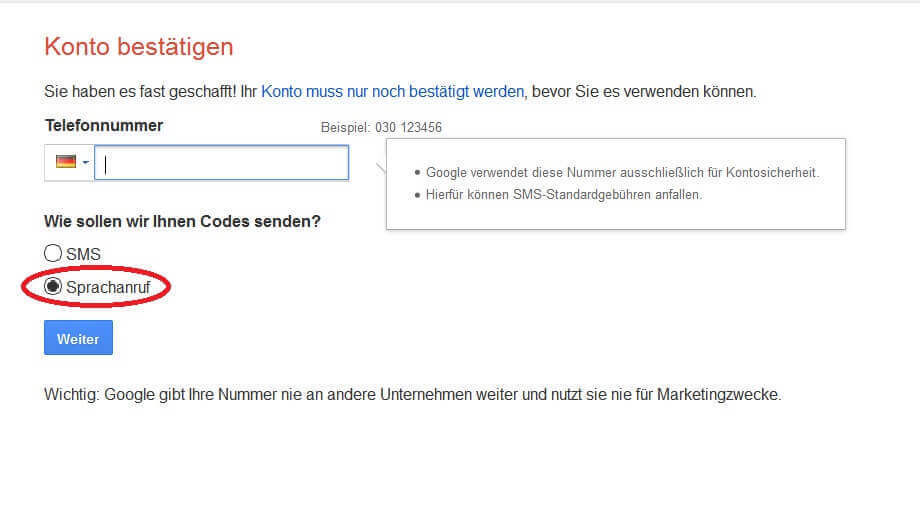
A few minutes (usually less than 1 minute) after entering your telephone number and confirming with “Next” you will receive an automatic call with your confirmation code.
Enter this in the following window.
See fig. (Click to enlarge)

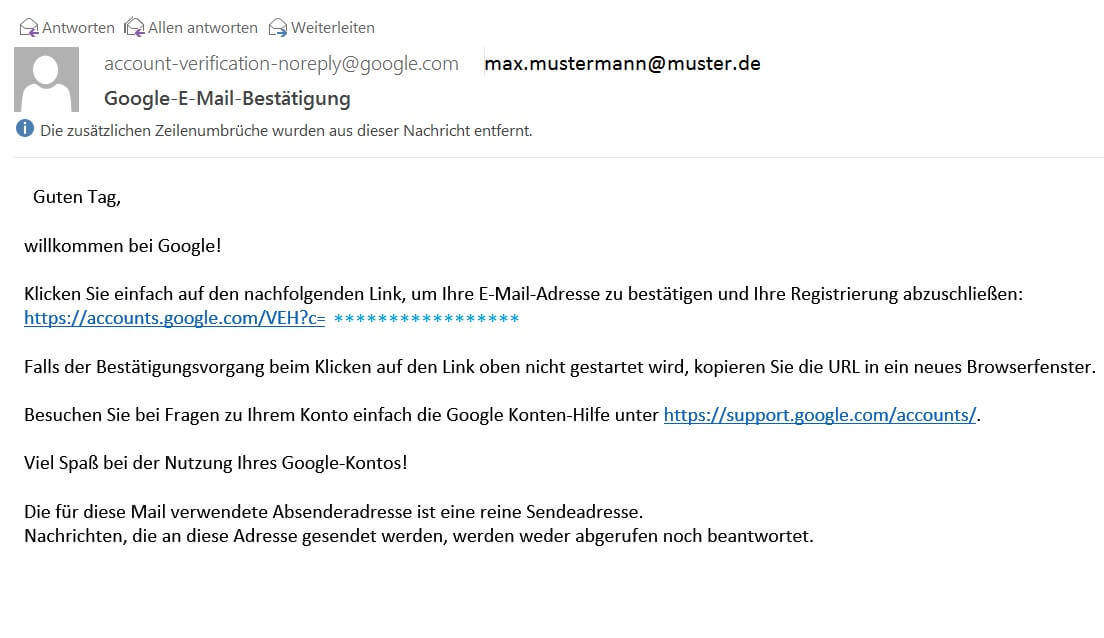
In the last step, you will receive a confirmation link from Google to your main e-mail address (not the newly created “@gmail” address) for the confirmation of your e-mail address.
See fig. (Click to enlarge)
That was it already…
From now on, you can not only post reviews in Google, but also make full use of the comments function in YouTube, as well as many other advantages in Google products.
To create a Google account, do the following:
Go to the following link: https://accounts.google.com/SignUp
See fig. (Click to enlarge)
- Create any username. Together with the ending “@ gmail.com”, this will later become your Google E-Mail address, which you can, but do not have to use.
- Choose any password. Make sure that it contains upper and lower case letters as well as characters, numbers and special characters in order to achieve a high level of security!
- Repeat password for security.
- You do not have to enter your mobile phone number here.
- Enter your current email address, to which Google will send you an additional confirmation email. This email address will also be used later by Google to contact you if necessary.
- After you have entered your data, you still have to accept the data protection regulations.
Note:
You can only click on “I agree” when you have scrolled the text all the way down!
See fig. (Click to enlarge)
In order to prevent fake accounts, Google used telephone confirmation in the next point.
- You can have Google call you free of charge to receive a confirmation code, or you can enter your mobile phone number here and receive your confirmation code free of charge by SMS.
- If you enter your landline number and are not sure whether your phone supports the SMS function, please select the option Voice call.
See fig. (Click to enlarge)
A few minutes (usually less than 1 minute) after entering your telephone number and confirming with “Next” you will receive an automatic call with your confirmation code.
Enter this in the following window.
See fig. (Click to enlarge)
In the last step, you will receive a confirmation link from Google to your main e-mail address (not the newly created “@gmail” address) for the confirmation of your e-mail address.
See fig. (Click to enlarge)
That was it already…
From now on, you can not only post reviews in Google, but also make full use of the comments function in YouTube, as well as many other advantages in Google products.
5. How can I see if I’m logged in?
5. How can I see if I’m logged in?
After we have created our account, we are automatically logged into Google from this point in time and can start right away. However, to be on the safe side, you can always easily check whether you are currently logged into Google or not:
See fig. (Click to enlarge)

On the Google page you can always see in the top right if you are logged in. There you can change your account, make settings or edit your Google+ account and select other Google services directly.
After we have created our account, we are automatically logged into Google from this point in time and can start right away. However, to be on the safe side, you can always easily check whether you are currently logged into Google or not:
See fig. (Click to enlarge)
On the Google page you can always see in the top right if you are logged in. There you can change your account, make settings or edit your Google+ account and select other Google services directly.
6. Write a review on Google
6. Write a review on Google
After we have successfully created our Google account, we can start evaluating companies.
- Enter the company name in Google Search.
- If this company has a Google Business Account (most reputable companies do) you will find an entry on the right-hand side of the search results that may contain reviews.
See fig. (Click to enlarge)
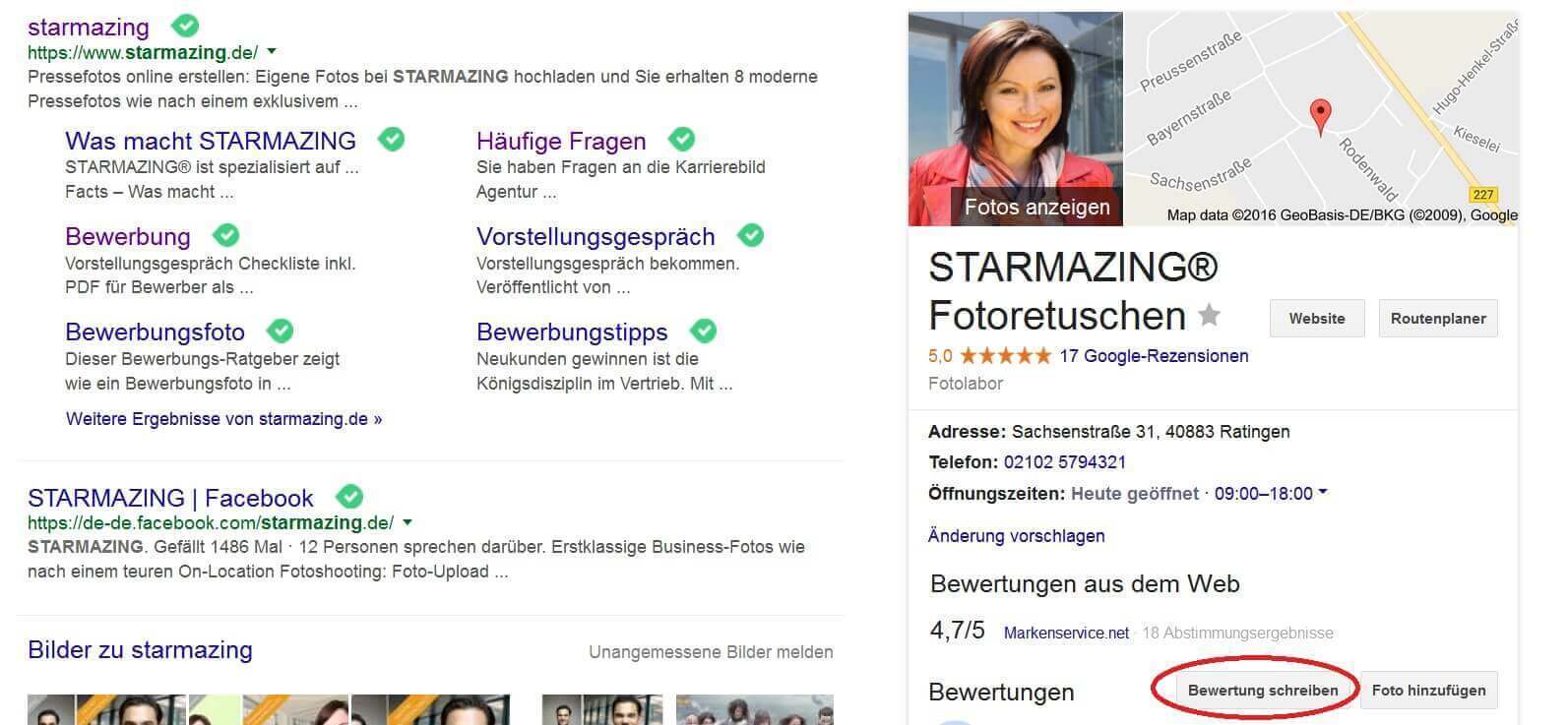
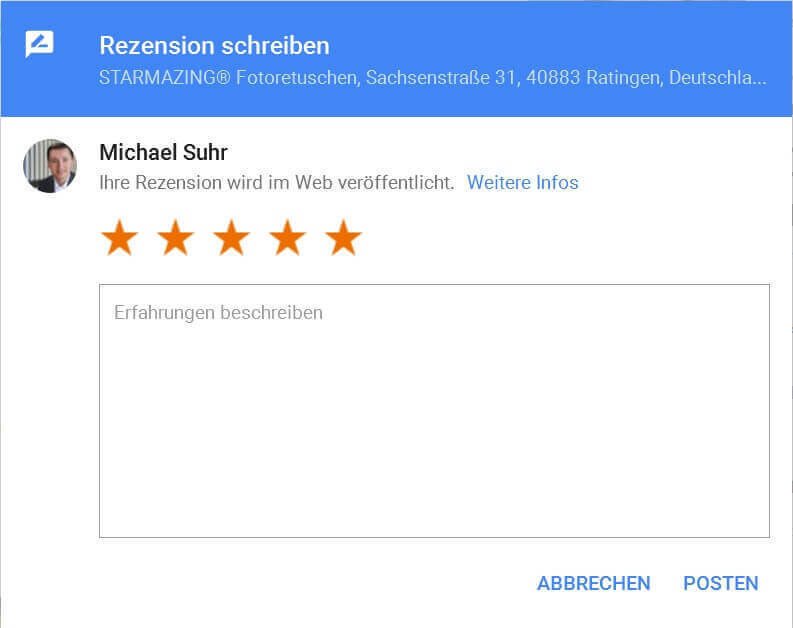
Now just click on: “Write a review” and give your review in the form of stars and a short text.
See fig. (Click to enlarge)

After we have successfully created our Google account, we can start evaluating companies.
- Enter the company name in Google Search.
- If this company has a Google Business Account (most reputable companies do) you will find an entry on the right-hand side of the search results that may contain reviews.
See fig. (Click to enlarge)
Now just click on: “Write a review” and give your review in the form of stars and a short text.
See fig. (Click to enlarge)
Popular Posts:

Ad-free home network: Install Pi-hole on Windows
Say goodbye to ads on smart TVs and in apps: Pi-hole software turns your Windows laptop into a network filter. This article explains step-by-step how to install it via Docker and configure the necessary DNS settings in your FRITZ!Box.

How to tune your FRITZ!Box into a professional call server
A professional telephone system can be built using a FRITZ!Box and a laptop. This article shows step by step how to use the free software "Phoner" to schedule announcements and record calls – including important legal information (§ 201 StGB).

Why to-do lists are a waste of time
Do you feel unproductive at the end of the day, even though you've worked hard? Your to-do list is to blame. It tempts you to focus on easy tasks and ignores your limited time. This article explains why lists are "self-deception" and why professionals use a calendar instead.

Smartphone Wi-Fi security: Public hotspots vs. home network
Is smartphone Wi-Fi a security risk? This article analyzes in detail threats such as evil twin attacks and explains protective measures for when you're on the go. We also clarify why home Wi-Fi is usually secure and how you can effectively separate your smart home from sensitive data using a guest network.

Warum dein Excel-Kurs Zeitverschwendung ist – was du wirklich lernen solltest!
Hand aufs Herz: Wann hast du zuletzt eine komplexe Excel-Formel ohne Googeln getippt? Eben. KI schreibt heute den Code für dich. Erfahre, warum klassische Excel-Trainings veraltet sind und welche 3 modernen Skills deinen Marktwert im Büro jetzt massiv steigern.

Cybersicherheit: Die 3 größten Fehler, die 90% aller Mitarbeiter machen
Hacker brauchen keine Codes, sie brauchen nur einen unaufmerksamen Mitarbeiter. Von Passwort-Recycling bis zum gefährlichen Klick: Wir zeigen die drei häufigsten Fehler im Büroalltag und geben praktische Tipps, wie Sie zur menschlichen Firewall werden.
Offers 2024: Word & Excel Templates











Popular Posts:
Ad-free home network: Install Pi-hole on Windows
Say goodbye to ads on smart TVs and in apps: Pi-hole software turns your Windows laptop into a network filter. This article explains step-by-step how to install it via Docker and configure the necessary DNS settings in your FRITZ!Box.
How to tune your FRITZ!Box into a professional call server
A professional telephone system can be built using a FRITZ!Box and a laptop. This article shows step by step how to use the free software "Phoner" to schedule announcements and record calls – including important legal information (§ 201 StGB).
Why to-do lists are a waste of time
Do you feel unproductive at the end of the day, even though you've worked hard? Your to-do list is to blame. It tempts you to focus on easy tasks and ignores your limited time. This article explains why lists are "self-deception" and why professionals use a calendar instead.
Smartphone Wi-Fi security: Public hotspots vs. home network
Is smartphone Wi-Fi a security risk? This article analyzes in detail threats such as evil twin attacks and explains protective measures for when you're on the go. We also clarify why home Wi-Fi is usually secure and how you can effectively separate your smart home from sensitive data using a guest network.
Warum dein Excel-Kurs Zeitverschwendung ist – was du wirklich lernen solltest!
Hand aufs Herz: Wann hast du zuletzt eine komplexe Excel-Formel ohne Googeln getippt? Eben. KI schreibt heute den Code für dich. Erfahre, warum klassische Excel-Trainings veraltet sind und welche 3 modernen Skills deinen Marktwert im Büro jetzt massiv steigern.
Cybersicherheit: Die 3 größten Fehler, die 90% aller Mitarbeiter machen
Hacker brauchen keine Codes, sie brauchen nur einen unaufmerksamen Mitarbeiter. Von Passwort-Recycling bis zum gefährlichen Klick: Wir zeigen die drei häufigsten Fehler im Büroalltag und geben praktische Tipps, wie Sie zur menschlichen Firewall werden.
Offers 2024: Word & Excel Templates


















