

More fonts in Word through Google Fonts


As long as you are limited to writing texts when working with Word, you will probably never have thought that it would be convenient to have more fonts in your luggage. But as soon as you start to use the potential of Word really, and thus also create flyers and business cards, invitations and the like, there is more of a desire to expand the portfolio.
You can find out how to expand the font selection in Word with just a few steps and above all free in our article
More fonts in Word through Google Fonts
As long as you are limited to writing texts when working with Word, you will probably never have thought that it would be convenient to have more fonts in your luggage. But as soon as you start to use the potential of Word really, and thus also create flyers and business cards, invitations and the like, there is more of a desire to expand the portfolio.
You can find out how to expand the font selection in Word with just a few steps and above all free in our article
1. Go to Google Fonts
1. Go to Google Fonts
First, go to https://fonts.google.com
Here you will first find a large selection of available fonts, which of course can be filtered according to either specific criteria, or (if you already know the name of a desired font) can be searched directly.
You can add them to your download list via the small + symbol to the right of each font.
See picture: (click to enlarge)

First, go to https://fonts.google.com
Here you will first find a large selection of available fonts, which of course can be filtered according to either specific criteria, or (if you already know the name of a desired font) can be searched directly.
You can add them to your download list via the small + symbol to the right of each font.
See picture:
2. Customize and download font
2. Customize and download font
In the next step, you can directly copy out the HTML or CSS shortcodes in order to insert them on a web page, for example.
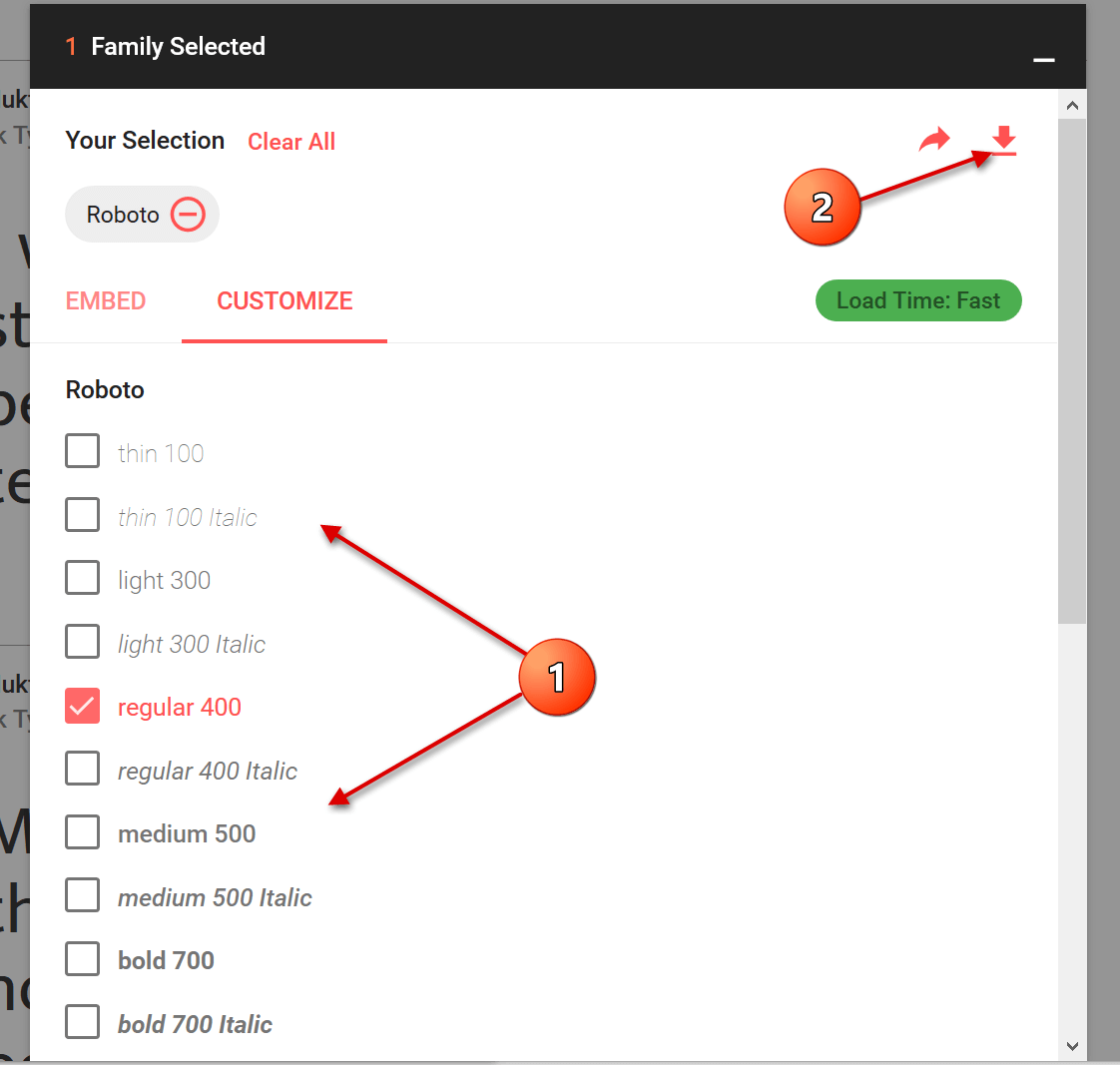
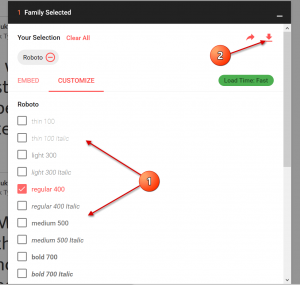
For the implementation in Word you do not need this, but you can go straight to the tab “Customize”, where you can select the desired font size and download it directly.
See picture: (click to enlarge)
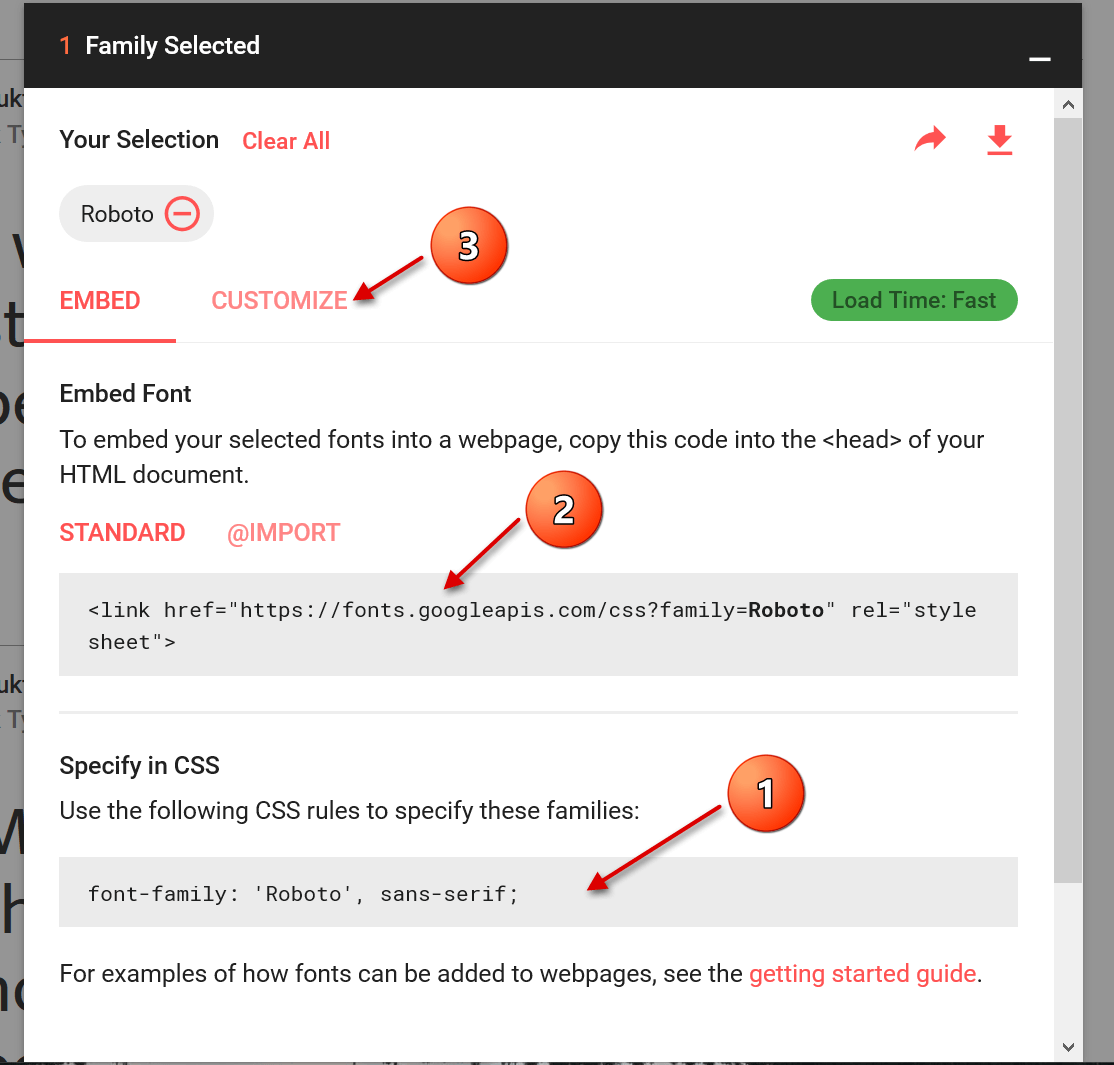
In the next step, you can directly copy out the HTML or CSS shortcodes in order to insert them on a web page, for example.
For the implementation in Word you do not need this, but you can go straight to the tab “Customize”, where you can select the desired font size and download it directly.
See picture: (click to enlarge)
3. Install font
3. Install font
The last step we need to take now is the simplest of them all.
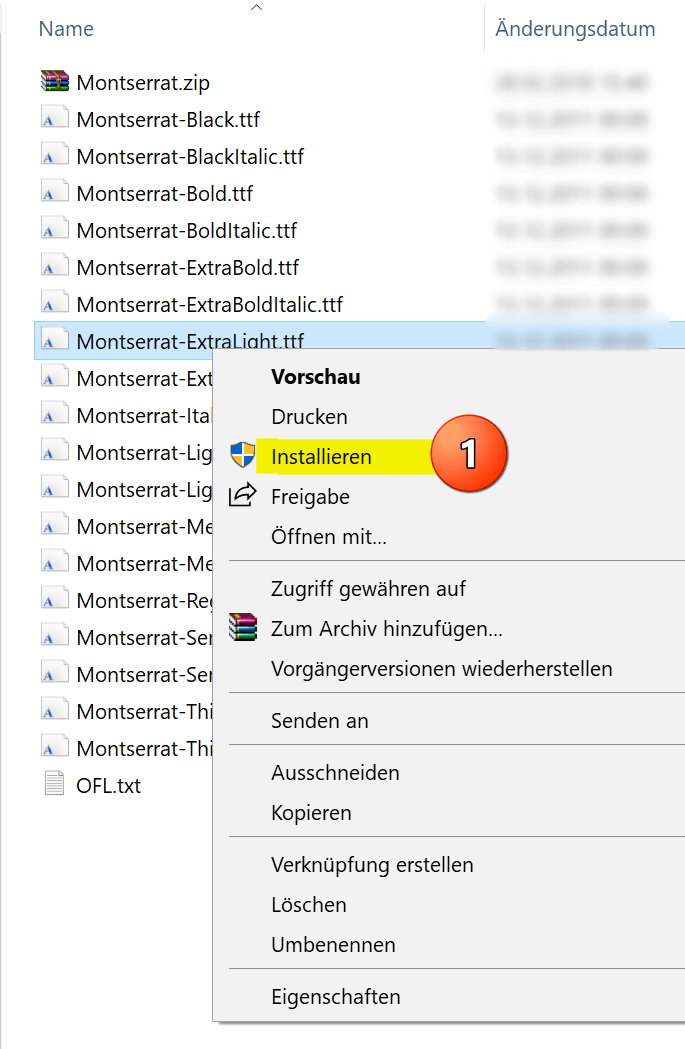
After you have downloaded the zip file, it is best unpacked in a folder specially created for the respective font.
Here all font sizes are displayed, and can be easily installed by right-clicking on the appropriate file.
See picture: (click to enlarge)

The big advantage of this type of installation is that you have not only expanded the font selection in Word, but in all Microsoft Office applications.
What does this mean the fonts are also available in: Outlook, Excel, Powerpoint, etc.

The last step we need to take now is the simplest of them all.
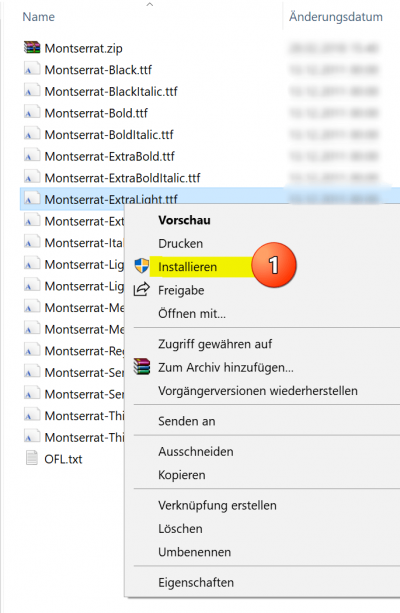
After you have downloaded the zip file, it is best unpacked in a folder specially created for the respective font.
Here all font sizes are displayed, and can be easily installed by right-clicking on the appropriate file.
See picture:
The big advantage of this type of installation is that you have not only expanded the font selection in Word, but in all Microsoft Office applications.
What does this mean the fonts are also available in: Outlook, Excel, Powerpoint, etc.
Popular Posts:

Ad-free home network: Install Pi-hole on Windows
Say goodbye to ads on smart TVs and in apps: Pi-hole software turns your Windows laptop into a network filter. This article explains step-by-step how to install it via Docker and configure the necessary DNS settings in your FRITZ!Box.

How to tune your FRITZ!Box into a professional call server
A professional telephone system can be built using a FRITZ!Box and a laptop. This article shows step by step how to use the free software "Phoner" to schedule announcements and record calls – including important legal information (§ 201 StGB).

Why to-do lists are a waste of time
Do you feel unproductive at the end of the day, even though you've worked hard? Your to-do list is to blame. It tempts you to focus on easy tasks and ignores your limited time. This article explains why lists are "self-deception" and why professionals use a calendar instead.

Smartphone Wi-Fi security: Public hotspots vs. home network
Is smartphone Wi-Fi a security risk? This article analyzes in detail threats such as evil twin attacks and explains protective measures for when you're on the go. We also clarify why home Wi-Fi is usually secure and how you can effectively separate your smart home from sensitive data using a guest network.

Warum dein Excel-Kurs Zeitverschwendung ist – was du wirklich lernen solltest!
Hand aufs Herz: Wann hast du zuletzt eine komplexe Excel-Formel ohne Googeln getippt? Eben. KI schreibt heute den Code für dich. Erfahre, warum klassische Excel-Trainings veraltet sind und welche 3 modernen Skills deinen Marktwert im Büro jetzt massiv steigern.

Cybersicherheit: Die 3 größten Fehler, die 90% aller Mitarbeiter machen
Hacker brauchen keine Codes, sie brauchen nur einen unaufmerksamen Mitarbeiter. Von Passwort-Recycling bis zum gefährlichen Klick: Wir zeigen die drei häufigsten Fehler im Büroalltag und geben praktische Tipps, wie Sie zur menschlichen Firewall werden.
Offers 2024: Word & Excel Templates











Popular Posts:
Ad-free home network: Install Pi-hole on Windows
Say goodbye to ads on smart TVs and in apps: Pi-hole software turns your Windows laptop into a network filter. This article explains step-by-step how to install it via Docker and configure the necessary DNS settings in your FRITZ!Box.
How to tune your FRITZ!Box into a professional call server
A professional telephone system can be built using a FRITZ!Box and a laptop. This article shows step by step how to use the free software "Phoner" to schedule announcements and record calls – including important legal information (§ 201 StGB).
Why to-do lists are a waste of time
Do you feel unproductive at the end of the day, even though you've worked hard? Your to-do list is to blame. It tempts you to focus on easy tasks and ignores your limited time. This article explains why lists are "self-deception" and why professionals use a calendar instead.
Smartphone Wi-Fi security: Public hotspots vs. home network
Is smartphone Wi-Fi a security risk? This article analyzes in detail threats such as evil twin attacks and explains protective measures for when you're on the go. We also clarify why home Wi-Fi is usually secure and how you can effectively separate your smart home from sensitive data using a guest network.
Warum dein Excel-Kurs Zeitverschwendung ist – was du wirklich lernen solltest!
Hand aufs Herz: Wann hast du zuletzt eine komplexe Excel-Formel ohne Googeln getippt? Eben. KI schreibt heute den Code für dich. Erfahre, warum klassische Excel-Trainings veraltet sind und welche 3 modernen Skills deinen Marktwert im Büro jetzt massiv steigern.
Cybersicherheit: Die 3 größten Fehler, die 90% aller Mitarbeiter machen
Hacker brauchen keine Codes, sie brauchen nur einen unaufmerksamen Mitarbeiter. Von Passwort-Recycling bis zum gefährlichen Klick: Wir zeigen die drei häufigsten Fehler im Büroalltag und geben praktische Tipps, wie Sie zur menschlichen Firewall werden.
Offers 2024: Word & Excel Templates


















