

Cloud Working – what is behind digital collaboration?


The Internet is constantly evolving and has a massive impact on the world of work. In order for employers and employees to remain competitive in the long term, they must adapt to changing circumstances and use new technologies for themselves.
One of the biggest innovations of recent years is the so-called cloud working – the cooperation from any place in the world.
Cloud Working – what is behind digital collaboration?
The Internet is constantly evolving and has a massive impact on the world of work. In order for employers and employees to remain competitive in the long term, they must adapt to changing circumstances and use new technologies for themselves.
One of the biggest innovations of recent years is the so-called cloud working – the cooperation from any place in the world.
1. Why Cloud Working at All?
1. Why Cloud Working at All?
Computer technology is developing at a rapid pace. More powerful processors, faster memory, and ever-increasing capacity hard drives make it possible to work on projects that would have been unthinkable a few years ago or required an incredible amount of computation time. At the same time, fast Internet is increasingly available across the board, making it easy to transfer large amounts of data in the shortest possible time.
These technological innovations make it possible to work on large projects in which the limiting factor increasingly becomes the human being himself. Businesses often rely on the world’s leading professionals in specific areas.
In order to be attractive for these employees as employers, and to have an advantage over the competition, they must create correspondingly attractive working conditions.

Home work, freely assignable working hours and global presence play a crucial role here. The open-plan office as a suitable workplace has just as long-lived as the e-mail as the number one medium for the transmission of large amounts of data. The cloud solves all problems in one go.
Computer technology is developing at a rapid pace. More powerful processors, faster memory, and ever-increasing capacity hard drives make it possible to work on projects that would have been unthinkable a few years ago or required an incredible amount of computation time. At the same time, fast Internet is increasingly available across the board, making it easy to transfer large amounts of data in the shortest possible time.
These technological innovations make it possible to work on large projects in which the limiting factor increasingly becomes the human being himself. Businesses often rely on the world’s leading professionals in specific areas.
In order to be attractive for these employees as employers, and to have an advantage over the competition, they must create correspondingly attractive working conditions.
Home work, freely assignable working hours and global presence play a crucial role here. The open-plan office as a suitable workplace has just as long-lived as the e-mail as the number one medium for the transmission of large amounts of data. The cloud solves all problems in one go.
2. What does Cloud Working offer?
2. What does Cloud Working offer?
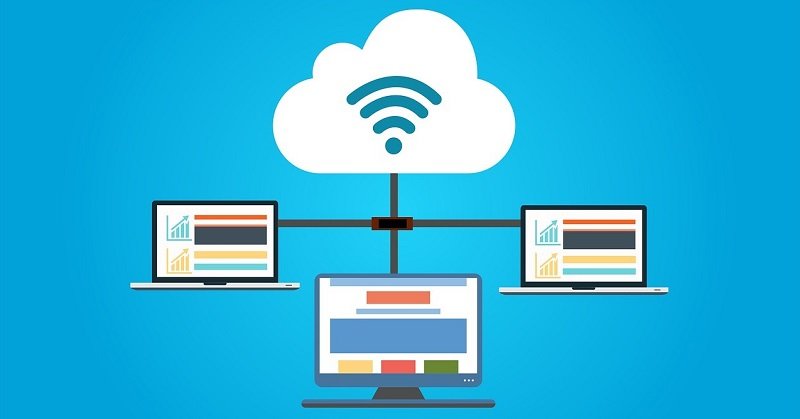
First of all, a cloud does not offer much more than external storage on servers from other companies or on company-owned servers. But this seemingly small innovation opens up completely new possibilities for a company and its employees at work. The cloud enables a variety of people to collaborate on large projects.
It is a logical evolution of the local network. Instead of wiring within the enterprise using LAN cables between each computer, shared access to the storage and all data on it is via the Internet – wirelessly even wireless.
First of all, a cloud does not offer much more than external storage on servers from other companies or on company-owned servers. But this seemingly small innovation opens up completely new possibilities for a company and its employees at work. The cloud enables a variety of people to collaborate on large projects.
It is a logical evolution of the local network. Instead of wiring within the enterprise using LAN cables between each computer, shared access to the storage and all data on it is via the Internet – wirelessly even wireless.
3. The Benefits of Cloud Working
3. The Benefits of Cloud Working
In the classic world of work, companies and employees are bound together spatially and temporally. An employee must go to his office to work hours. The company takes no account of the employee and his other life. On the surface, this seems to be an advantage, as it puts the company itself first.
In fact, a company harms itself by doing so. Even if an employee is present, this does not mean that he is well rested or able to work in a concentrated manner. In fact, more and more studies show that the natural sleep rhythm is postponed further, meaning that real performance is not achieved until late in the morning.
Cloud Working allows each employee to choose their own working hours and work from anywhere, assuming an Internet connection.
This makes him more motivated, well-rested and focused, allowing him to pay more attention to the company he works for. This benefits a company and makes it attractive to more employees.
Because with increasing demands on specialists, companies have to be more and more internationally present. Free choice of working hours and local freedom allow professionals around the world to work in the cloud. It is not only possible to exchange individual data packets, as it would be possible by e-mail, but in the cloud can also be installed highly specialized software, which not every employee can have on his own computer or could make good use of.
In the classic world of work, companies and employees are bound together spatially and temporally. An employee must go to his office to work hours. The company takes no account of the employee and his other life. On the surface, this seems to be an advantage, as it puts the company itself first.
In fact, a company harms itself by doing so. Even if an employee is present, this does not mean that he is well rested or able to work in a concentrated manner. In fact, more and more studies show that the natural sleep rhythm is postponed further, meaning that real performance is not achieved until late in the morning.
Cloud Working allows each employee to choose their own working hours and work from anywhere, assuming an Internet connection.
This makes him more motivated, well-rested and focused, allowing him to pay more attention to the company he works for. This benefits a company and makes it attractive to more employees.
Because with increasing demands on specialists, companies have to be more and more internationally present. Free choice of working hours and local freedom allow professionals around the world to work in the cloud. It is not only possible to exchange individual data packets, as it would be possible by e-mail, but in the cloud can also be installed highly specialized software, which not every employee can have on his own computer or could make good use of.
4. What do you need for Cloud Working?
4. What do you need for Cloud Working?
There are two ways to work in a cloud. One of them is the work of specialized providers in an external cloud or running their own cloud. Both variants have advantages and disadvantages. An external cloud is not controllable when it comes to failures or security problems. A separate cloud is more maintenance intensive.
There are many suitable providers for running an external cloud. However, it makes more sense to search for a suitable NAS server for your own cloud and to remain independent.

There are two ways to work in a cloud. One of them is the work of specialized providers in an external cloud or running their own cloud. Both variants have advantages and disadvantages. An external cloud is not controllable when it comes to failures or security problems. A separate cloud is more maintenance intensive.
There are many suitable providers for running an external cloud. However, it makes more sense to search for a suitable NAS server for your own cloud and to remain independent.
About the Author:

About the Author:
Popular Posts:

Ad-free home network: Install Pi-hole on Windows
Say goodbye to ads on smart TVs and in apps: Pi-hole software turns your Windows laptop into a network filter. This article explains step-by-step how to install it via Docker and configure the necessary DNS settings in your FRITZ!Box.
How to tune your FRITZ!Box into a professional call server
A professional telephone system can be built using a FRITZ!Box and a laptop. This article shows step by step how to use the free software "Phoner" to schedule announcements and record calls – including important legal information (§ 201 StGB).

Why to-do lists are a waste of time
Do you feel unproductive at the end of the day, even though you've worked hard? Your to-do list is to blame. It tempts you to focus on easy tasks and ignores your limited time. This article explains why lists are "self-deception" and why professionals use a calendar instead.

Smartphone Wi-Fi security: Public hotspots vs. home network
Is smartphone Wi-Fi a security risk? This article analyzes in detail threats such as evil twin attacks and explains protective measures for when you're on the go. We also clarify why home Wi-Fi is usually secure and how you can effectively separate your smart home from sensitive data using a guest network.

Warum dein Excel-Kurs Zeitverschwendung ist – was du wirklich lernen solltest!
Hand aufs Herz: Wann hast du zuletzt eine komplexe Excel-Formel ohne Googeln getippt? Eben. KI schreibt heute den Code für dich. Erfahre, warum klassische Excel-Trainings veraltet sind und welche 3 modernen Skills deinen Marktwert im Büro jetzt massiv steigern.

Cybersicherheit: Die 3 größten Fehler, die 90% aller Mitarbeiter machen
Hacker brauchen keine Codes, sie brauchen nur einen unaufmerksamen Mitarbeiter. Von Passwort-Recycling bis zum gefährlichen Klick: Wir zeigen die drei häufigsten Fehler im Büroalltag und geben praktische Tipps, wie Sie zur menschlichen Firewall werden.
Offers 2024: Word & Excel Templates











Popular Posts:
Ad-free home network: Install Pi-hole on Windows
Say goodbye to ads on smart TVs and in apps: Pi-hole software turns your Windows laptop into a network filter. This article explains step-by-step how to install it via Docker and configure the necessary DNS settings in your FRITZ!Box.
How to tune your FRITZ!Box into a professional call server
A professional telephone system can be built using a FRITZ!Box and a laptop. This article shows step by step how to use the free software "Phoner" to schedule announcements and record calls – including important legal information (§ 201 StGB).
Why to-do lists are a waste of time
Do you feel unproductive at the end of the day, even though you've worked hard? Your to-do list is to blame. It tempts you to focus on easy tasks and ignores your limited time. This article explains why lists are "self-deception" and why professionals use a calendar instead.
Smartphone Wi-Fi security: Public hotspots vs. home network
Is smartphone Wi-Fi a security risk? This article analyzes in detail threats such as evil twin attacks and explains protective measures for when you're on the go. We also clarify why home Wi-Fi is usually secure and how you can effectively separate your smart home from sensitive data using a guest network.
Warum dein Excel-Kurs Zeitverschwendung ist – was du wirklich lernen solltest!
Hand aufs Herz: Wann hast du zuletzt eine komplexe Excel-Formel ohne Googeln getippt? Eben. KI schreibt heute den Code für dich. Erfahre, warum klassische Excel-Trainings veraltet sind und welche 3 modernen Skills deinen Marktwert im Büro jetzt massiv steigern.
Cybersicherheit: Die 3 größten Fehler, die 90% aller Mitarbeiter machen
Hacker brauchen keine Codes, sie brauchen nur einen unaufmerksamen Mitarbeiter. Von Passwort-Recycling bis zum gefährlichen Klick: Wir zeigen die drei häufigsten Fehler im Büroalltag und geben praktische Tipps, wie Sie zur menschlichen Firewall werden.
Offers 2024: Word & Excel Templates


















