AI-powered surfing and shopping with Bing and Edge


With ten billion searches per day, it’s clear that the demands on search engines go far beyond simply finding web pages. Microsoft has accepted this challenge and presents the new AI-supported Bing and the previously unsuccessful in-house web browser Edge, and wants to revolutionize surfing and shopping through the use of artificial intelligence on the Internet.
The innovations combine search, browsing and chat into a seamless experience that accompanies us throughout the web. Bing now offers an improved search function, which is achieved by working with OpenAI provides more relevant results and a new sidebar that displays more comprehensive answers. Bing searches the entire web to find and summarize the answer you’re looking for, making the search more efficient.

AI-powered surfing and shopping with Bing and Edge
With ten billion searches per day, it’s clear that the demands on search engines go far beyond simply finding web pages. Microsoft has accepted this challenge and presents the new AI-supported Bing and the previously unsuccessful in-house web browser Edge, and wants to revolutionize surfing and shopping through the use of artificial intelligence on the Internet.
The innovations combine search, browsing and chat into a seamless experience that accompanies us throughout the web. Bing now offers an improved search function, which is achieved by working with OpenAI provides more relevant results and a new sidebar that displays more comprehensive answers. Bing searches the entire web to find and summarize the answer you’re looking for, making the search more efficient.
Shopping on the Internet with AI
Shopping on the Internet with AI
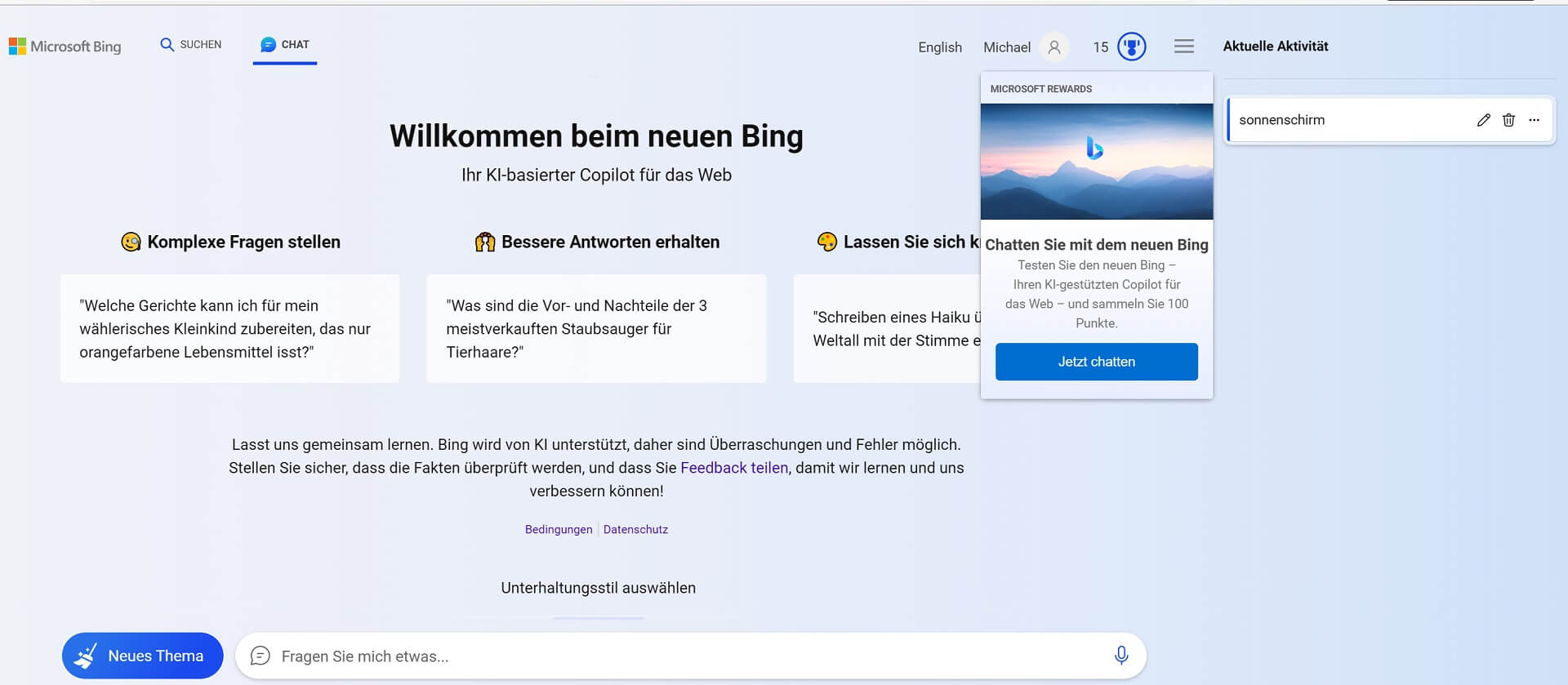
For more complex search queries, Bing now offers an interactive chat that refines the search to the desired result, instead of processing new search queries from users as usual. In addition, Bing can help in situations where inspiration is needed, like writing an email or planning a vacation.
For this purpose, the Edge browser was developed in cooperation with OpenAI (The company behind ChatGPT) updated with AI capabilities and a new look, adding features like chat and compose. For example, you can use Edge to request the synopsis of a long financial report or get suggestions for a LinkedIn post. However, these possibilities should only represent the beginning of an exciting future of AI-supported search engines and web browsers. It is not yet possible to say what this development means for content creators such as journalists, but also for SEO optimization for website operators, but the increased use of artificial intelligence for the best search result should shake up the website ranking.
The new Bing experience is based on four technological breakthroughs, including the Next Generation OpenAI Model (GPT 4.0) and the Microsoft Prometheus Model. This combination enables more relevant, timely and targeted results with greater certainty. Microsoft and OpenAI have also introduced safeguards to protect against malicious content and are working on issues such as misinformation and disinformation, content blocking and data security.
The new Bing is available now in a limited preview on desktop, and the preview will be expanding to millions of users in the coming weeks. A preview for mobile devices will also be available soon. Artificial intelligence is here to stay and is changing our world at breakneck speed in almost all areas of life. Even if you don’t see it at first glance, this is behind many of the services we use every day artificial intelligence is stuck.
For more complex search queries, Bing now offers an interactive chat that refines the search to the desired result, instead of processing new search queries from users as usual. In addition, Bing can help in situations where inspiration is needed, like writing an email or planning a vacation.
For this purpose, the Edge browser was developed in cooperation with OpenAI (The company behind ChatGPT) updated with AI capabilities and a new look, adding features like chat and compose. For example, you can use Edge to request the synopsis of a long financial report or get suggestions for a LinkedIn post. However, these possibilities should only represent the beginning of an exciting future of AI-supported search engines and web browsers. It is not yet possible to say what this development means for content creators such as journalists, but also for SEO optimization for website operators, but the increased use of artificial intelligence for the best search result should shake up the website ranking.
The new Bing experience is based on four technological breakthroughs, including the Next Generation OpenAI Model (GPT 4.0) and the Microsoft Prometheus Model. This combination enables more relevant, timely and targeted results with greater certainty. Microsoft and OpenAI have also introduced safeguards to protect against malicious content and are working on issues such as misinformation and disinformation, content blocking and data security.
The new Bing is available now in a limited preview on desktop, and the preview will be expanding to millions of users in the coming weeks. A preview for mobile devices will also be available soon. Artificial intelligence is here to stay and is changing our world at breakneck speed in almost all areas of life. Even if you don’t see it at first glance, this is behind many of the services we use every day artificial intelligence is stuck.

Beliebte Beiträge

Use bookmarks and cross-references in Word
How to use text markers to make your Word document dynamic and click through your pages.
Create flyers and business cards with Word
To create professional flyers and business cards in Word 2016/2019 without any additional image editing program.

Microsoft Office gets fresher with a new design
The familiar appearance of Microsoft Office versions will soon be a thing of the past, and a sleek design gives it a fresh look.

Autocompletion and Autocorrection in Word
What is not suitable, is made suitable. How to Customize Auto Completion & Auto-Correction to Your Needs
The absolute, relative and mixed references in Excel
This is how you correctly use relative and absolute references in Excel and save yourself a lot of work
How to create professional Excel invoice templates
How to create professional invoice templates in Excel 2016/2019 for small businesses, with tax ID, logo and everything that goes with it.
Offers 2024: Word & Excel Templates











Beliebte Beiträge
Use bookmarks and cross-references in Word
How to use text markers to make your Word document dynamic and click through your pages.
Create flyers and business cards with Word
To create professional flyers and business cards in Word 2016/2019 without any additional image editing program.
Microsoft Office gets fresher with a new design
The familiar appearance of Microsoft Office versions will soon be a thing of the past, and a sleek design gives it a fresh look.
Autocompletion and Autocorrection in Word
What is not suitable, is made suitable. How to Customize Auto Completion & Auto-Correction to Your Needs
The absolute, relative and mixed references in Excel
This is how you correctly use relative and absolute references in Excel and save yourself a lot of work
How to create professional Excel invoice templates
How to create professional invoice templates in Excel 2016/2019 for small businesses, with tax ID, logo and everything that goes with it.
Offers 2024: Word & Excel Templates