Record and save Skype video calls


Even though Skype has had to cope with fierce losses against the competition WhatsApp & Co. (which mainly scores in the mobile sector) since its market launch about 15 years ago, the messenger service is still one of the most popular services when it comes to video conferencing.
However, what a feature users have long missed is the ability to save a recording of a conversation (with and without video). Microsoft has finally closed this gap since July 2018.
The recordings are stored in Microsoft’s own cloud.
However, if you prefer to save the saved recordings locally, there is also a free software solution that we would like to introduce in the following article.

Record and save Skype video calls
Even though Skype has had to cope with fierce losses against the competition WhatsApp & Co. (which mainly scores in the mobile sector) since its market launch about 15 years ago, the messenger service is still one of the most popular services when it comes to video conferencing.
However, what a feature users have long missed is the ability to save a recording of a conversation (with and without video). Microsoft has finally closed this gap since July 2018.
The recordings are stored in Microsoft’s own cloud.
However, if you prefer to save the saved recordings locally, there is also a free software solution that we would like to introduce in the following article.
1. Record skype calls with on-board resources
1. Record skype calls with on-board resources
First, we look at the possibility directly in Skype -so with on-board resources-.
To do this, proceed as follows:
- Start a call
- Click the + icon in the lower right corner of the screen
- Then click on “start recording”
- To stop the recording simply click on “Stop recording”
The recording is done while all participants are also displayed. The recording is stored on Microsoft Cloud servers for 30 days, and is available for download to all participants as an MP4 file.

First, we look at the possibility directly in Skype -so with on-board resources-.
To do this, proceed as follows:
- Start a call
- Click the + icon in the lower right corner of the screen
- Then click on “start recording”
- To stop the recording simply click on “Stop recording”
The recording is done while all participants are also displayed. The recording is stored on Microsoft Cloud servers for 30 days, and is available for download to all participants as an MP4 file.
2. Software solution for Skype recording
2. Software solution for Skype recording
As with all files that are stored in an external cloud, one may of course also ask the question what actually happens with the data, and whether these are not yet stored and evaluated after the deadline somewhere.
The providers of cloud systems deny this, but at least since Facebook, we know that the Internet never really forgets.
A software solution to save calls in Skype directly on the PC offers the manufacturer DVD Videosoft with the free program Free Video Call Recorder for Skype. The operation is very simple, and it can be determined in advance where, and in what format the conversation should be recorded, and also the differentiation either only audio, video only or complete is possible.
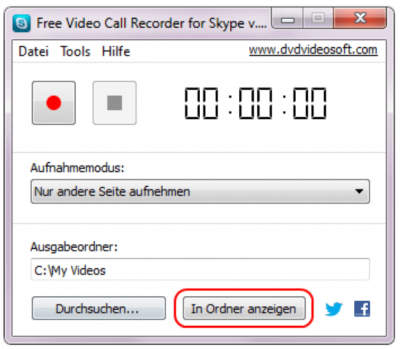
The difference in contrast to the on-board solution directly from Skype out is that here a recording of conversations is possible without the other participants to be notified.
As with all files that are stored in an external cloud, one may of course also ask the question what actually happens with the data, and whether these are not yet stored and evaluated after the deadline somewhere.
The providers of cloud systems deny this, but at least since Facebook, we know that the Internet never really forgets.
A software solution to save calls in Skype directly on the PC offers the manufacturer DVD Videosoft with the free program Free Video Call Recorder for Skype. The operation is very simple, and it can be determined in advance where, and in what format the conversation should be recorded, and also the differentiation either only audio, video only or complete is possible.
The difference in contrast to the on-board solution directly from Skype out is that here a recording of conversations is possible without the other participants to be notified.
3. Legal Notice
3. Legal Notice
Although the software solution is a practical matter to save videos directly on the PC without outsourcing them in a cloud before, but also represents a legal stumbling block.
Because in Germany the recording of non-public spoken word is prohibited. All the more so, of course, if the video track was also recorded. We therefore recommend the participants in advance to point out -bzw. to agree that you would like to record this conversation and save it locally.
You have the double security in any case if you also have the consent as appropriate record for later disagreements.

Although the software solution is a practical matter to save videos directly on the PC without outsourcing them in a cloud before, but also represents a legal stumbling block.
Because in Germany the recording of non-public spoken word is prohibited. All the more so, of course, if the video track was also recorded. We therefore recommend the participants in advance to point out -bzw. to agree that you would like to record this conversation and save it locally.
You have the double security in any case if you also have the consent as appropriate record for later disagreements.
Popular Posts:

Wi-Fi 7 vs. Wi-Fi 6: A quantum leap for your home network?
Wi-Fi 7 is here! Learn all about its advantages over Wi-Fi 6: extreme speed, minimal latency, and MLO. We'll explain who should upgrade now and what you can do with your ISP router. Your guide to the Wi-Fi of the future.

Microsoft 365 Copilot in practice: Your guide to the new everyday work routine
What can Microsoft 365 Copilot really do? 🤖 We'll show you in a practical way how the AI assistant revolutionizes your daily work in Word, Excel & Teams. From a blank page to a finished presentation in minutes! The ultimate practical guide for the new workday. #Copilot #Microsoft365 #AI

EU chat control: The battle between protection and privacy
The EU's chat control measures aim to scan private messages on WhatsApp and similar platforms. Critics see this as mass surveillance. Following massive resistance, including from Germany, the crucial vote in the EU Council has been postponed again. The fight for digital privacy continues.

Safe at Home: The Ultimate Guide to Your PC and Your Wi-Fi
Is your home Wi-Fi really secure? 🏠 From router passwords to phishing protection – our ultimate security guide will make life difficult for hackers. Secure your PC and home network now with our simple and easy-to-understand tips! #Cybersecurity #HomeNetwork

Integrate and use ChatGPT in Excel – is that possible?
ChatGPT is more than just a simple chatbot. Learn how it can revolutionize how you work with Excel by translating formulas, creating VBA macros, and even promising future integration with Office.

Create Out of Office Notice in Outlook
To create an Out of Office message in Microsoft Outlook - Office 365, and start relaxing on vacation
Offers 2024: Word & Excel Templates











Popular Posts:
Wi-Fi 7 vs. Wi-Fi 6: A quantum leap for your home network?
Wi-Fi 7 is here! Learn all about its advantages over Wi-Fi 6: extreme speed, minimal latency, and MLO. We'll explain who should upgrade now and what you can do with your ISP router. Your guide to the Wi-Fi of the future.
Microsoft 365 Copilot in practice: Your guide to the new everyday work routine
What can Microsoft 365 Copilot really do? 🤖 We'll show you in a practical way how the AI assistant revolutionizes your daily work in Word, Excel & Teams. From a blank page to a finished presentation in minutes! The ultimate practical guide for the new workday. #Copilot #Microsoft365 #AI
EU chat control: The battle between protection and privacy
The EU's chat control measures aim to scan private messages on WhatsApp and similar platforms. Critics see this as mass surveillance. Following massive resistance, including from Germany, the crucial vote in the EU Council has been postponed again. The fight for digital privacy continues.
Safe at Home: The Ultimate Guide to Your PC and Your Wi-Fi
Is your home Wi-Fi really secure? 🏠 From router passwords to phishing protection – our ultimate security guide will make life difficult for hackers. Secure your PC and home network now with our simple and easy-to-understand tips! #Cybersecurity #HomeNetwork
Integrate and use ChatGPT in Excel – is that possible?
ChatGPT is more than just a simple chatbot. Learn how it can revolutionize how you work with Excel by translating formulas, creating VBA macros, and even promising future integration with Office.
Create Out of Office Notice in Outlook
To create an Out of Office message in Microsoft Outlook - Office 365, and start relaxing on vacation
Offers 2024: Word & Excel Templates