

More privacy on Facebook through Container Add-On


The Facebook is not necessarily known for the highest privacy standards, of course, is no longer a secret for a long time.
However, the social network not only collects data from you as long as you are on its side and act with apps, but it tracks you virtually around the globe with your overall browsing habits. Even if you have not opened the official Facebook page at all.
Since the amount of data that Facebook collects about us has become as unclear as the third party to whom this data is shared, everyone should worry about how at least part of this data can be hidden from the all-seeing eyes of Facebook.
How it works and why it makes sense to use the mobile website instead of the Facebook app on mobile devices can be found in our article.

More privacy on Facebook through Container Add-On
The Facebook is not necessarily known for the highest privacy standards, of course, is no longer a secret for a long time.
However, the social network not only collects data from you as long as you are on its side and act with apps, but it tracks you virtually around the globe with your overall browsing habits. Even if you have not opened the official Facebook page at all.
Since the amount of data that Facebook collects about us has become as unclear as the third party to whom this data is shared, everyone should worry about how at least part of this data can be hidden from the all-seeing eyes of Facebook.
How it works and why it makes sense to use the mobile website instead of the Facebook app on mobile devices can be found in our article.
1. Facebook Container Add-On for Mozilla Firefox
1. Facebook Container Add-On for Mozilla Firefox
The Facebook container addon has been developed for the browser Mozilla Firefox, a tool that the possibilities of Facebook to track your browsing behavior is not completely excluded, but at least significantly reduced.
With such a container add-on, so to speak, online identities can be separated from each other by storing different cookies within the Facebook Container Tab, than in a normal tab which usually maps your complete surfing behavior.
You can easily find the add-on in Firefox in the settings menu under “Extensions” and enter “Facebook Container” in the search field. Here you can install and activate the additional tool.
See picture: (click to enlarge)


After the installation, you will first be automatically logged out of Facebook and have to log in again, and from then on you will find yourself in a separate area that no longer reflects your regular surfing behavior for Facebook.
For example, if you click on the “Share” button, a new special tab will be opened with the container icon.
For other browsers like the most used Google Chrome, and the tail end Microsoft Edge missing at the time of this article unfortunately comparable adequate solutions. Of course we hope that this will be replenished soon.
The Facebook container addon has been developed for the browser Mozilla Firefox, a tool that the possibilities of Facebook to track your browsing behavior is not completely excluded, but at least significantly reduced.
With such a container add-on, so to speak, online identities can be separated from each other by storing different cookies within the Facebook Container Tab, than in a normal tab which usually maps your complete surfing behavior.
You can easily find the add-on in Firefox in the settings menu under “Extensions” and enter “Facebook Container” in the search field. Here you can install and activate the additional tool.
See picture:
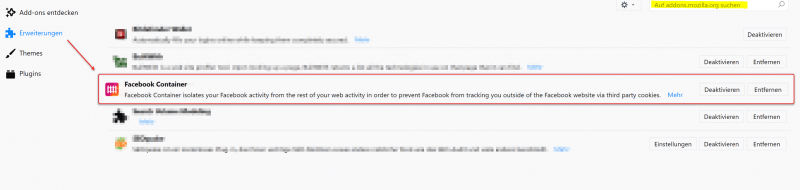
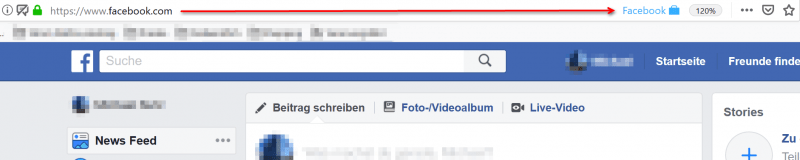
After the installation, you will first be automatically logged out of Facebook and have to log in again, and from then on you will find yourself in a separate area that no longer reflects your regular surfing behavior for Facebook.
For example, if you click on the “Share” button, a new special tab will be opened with the container icon.
For other browsers like the most used Google Chrome, and the tail end Microsoft Edge missing at the time of this article unfortunately comparable adequate solutions. Of course we hope that this will be replenished soon.
2. Use mobile page instead of the Facebook app
2. Use mobile page instead of the Facebook app
Even more data than on the Facebook website on the desktop collects the official Facebook app for mobile devices.
Often this is also installed by the users of course because it is just optimized for the small displays of smartphones and tablets, and also provides a lot of networking with the already stored on the device data such as pictures and contacts.
Far too carefree when installing the Facebook App the necessary rights that you have to grant her to use them waved through. But this problem can be solved easily by simply using the mobile page of Facebook at: m.facebook.com instead of the official app.
One must always be aware of the fact that every app is a small additional software, which can give itself of course completely different permissions than a website can over the (for example Google Chrome) web browser.
And considering how many sensitive data are nowadays on smartphones that are not really anyone’s business, the permissions of the Facebook app are basically a data protection catastrophe.

Even more data than on the Facebook website on the desktop collects the official Facebook app for mobile devices.
Often this is also installed by the users of course because it is just optimized for the small displays of smartphones and tablets, and also provides a lot of networking with the already stored on the device data such as pictures and contacts.
Far too carefree when installing the Facebook App the necessary rights that you have to grant her to use them waved through. But this problem can be solved easily by simply using the mobile page of Facebook at: m.facebook.com instead of the official app.
One must always be aware of the fact that every app is a small additional software, which can give itself of course completely different permissions than a website can over the (for example Google Chrome) web browser.
And considering how many sensitive data are nowadays on smartphones that are not really anyone’s business, the permissions of the Facebook app are basically a data protection catastrophe.
Popular Posts:

Ad-free home network: Install Pi-hole on Windows
Say goodbye to ads on smart TVs and in apps: Pi-hole software turns your Windows laptop into a network filter. This article explains step-by-step how to install it via Docker and configure the necessary DNS settings in your FRITZ!Box.
How to tune your FRITZ!Box into a professional call server
A professional telephone system can be built using a FRITZ!Box and a laptop. This article shows step by step how to use the free software "Phoner" to schedule announcements and record calls – including important legal information (§ 201 StGB).

Why to-do lists are a waste of time
Do you feel unproductive at the end of the day, even though you've worked hard? Your to-do list is to blame. It tempts you to focus on easy tasks and ignores your limited time. This article explains why lists are "self-deception" and why professionals use a calendar instead.

Smartphone Wi-Fi security: Public hotspots vs. home network
Is smartphone Wi-Fi a security risk? This article analyzes in detail threats such as evil twin attacks and explains protective measures for when you're on the go. We also clarify why home Wi-Fi is usually secure and how you can effectively separate your smart home from sensitive data using a guest network.

Warum dein Excel-Kurs Zeitverschwendung ist – was du wirklich lernen solltest!
Hand aufs Herz: Wann hast du zuletzt eine komplexe Excel-Formel ohne Googeln getippt? Eben. KI schreibt heute den Code für dich. Erfahre, warum klassische Excel-Trainings veraltet sind und welche 3 modernen Skills deinen Marktwert im Büro jetzt massiv steigern.

Cybersicherheit: Die 3 größten Fehler, die 90% aller Mitarbeiter machen
Hacker brauchen keine Codes, sie brauchen nur einen unaufmerksamen Mitarbeiter. Von Passwort-Recycling bis zum gefährlichen Klick: Wir zeigen die drei häufigsten Fehler im Büroalltag und geben praktische Tipps, wie Sie zur menschlichen Firewall werden.
Offers 2024: Word & Excel Templates











Popular Posts:
Ad-free home network: Install Pi-hole on Windows
Say goodbye to ads on smart TVs and in apps: Pi-hole software turns your Windows laptop into a network filter. This article explains step-by-step how to install it via Docker and configure the necessary DNS settings in your FRITZ!Box.
How to tune your FRITZ!Box into a professional call server
A professional telephone system can be built using a FRITZ!Box and a laptop. This article shows step by step how to use the free software "Phoner" to schedule announcements and record calls – including important legal information (§ 201 StGB).
Why to-do lists are a waste of time
Do you feel unproductive at the end of the day, even though you've worked hard? Your to-do list is to blame. It tempts you to focus on easy tasks and ignores your limited time. This article explains why lists are "self-deception" and why professionals use a calendar instead.
Smartphone Wi-Fi security: Public hotspots vs. home network
Is smartphone Wi-Fi a security risk? This article analyzes in detail threats such as evil twin attacks and explains protective measures for when you're on the go. We also clarify why home Wi-Fi is usually secure and how you can effectively separate your smart home from sensitive data using a guest network.
Warum dein Excel-Kurs Zeitverschwendung ist – was du wirklich lernen solltest!
Hand aufs Herz: Wann hast du zuletzt eine komplexe Excel-Formel ohne Googeln getippt? Eben. KI schreibt heute den Code für dich. Erfahre, warum klassische Excel-Trainings veraltet sind und welche 3 modernen Skills deinen Marktwert im Büro jetzt massiv steigern.
Cybersicherheit: Die 3 größten Fehler, die 90% aller Mitarbeiter machen
Hacker brauchen keine Codes, sie brauchen nur einen unaufmerksamen Mitarbeiter. Von Passwort-Recycling bis zum gefährlichen Klick: Wir zeigen die drei häufigsten Fehler im Büroalltag und geben praktische Tipps, wie Sie zur menschlichen Firewall werden.
Offers 2024: Word & Excel Templates



















