

The most important cookie settings in Google Chrome


In today’s digital world, online security and privacy is of utmost importance. Google Chrome, as the leading web browser, has made significant changes to its cookie settings in recent years. These changes aim to make users’ online experience safer and more private. In this article, we’ll take a look at the main cookie settings in Google Chrome and how they affect your digital navigation.

The most important cookie settings in Google Chrome
In today’s digital world, online security and privacy is of utmost importance. Google Chrome, as the leading web browser, has made significant changes to its cookie settings in recent years. These changes aim to make users’ online experience safer and more private. In this article, we’ll take a look at the main cookie settings in Google Chrome and how they affect your digital navigation.
Blocking third-party cookies
Blocking third-party cookies
What are third-party cookies?
Third-party cookies are files created by a domain other than the one the user is currently visiting. These cookies are often used by advertising networks to track user behavior across different websites. They enable personalized advertising based on users’ surfing behavior.
Google’s steps to blocking
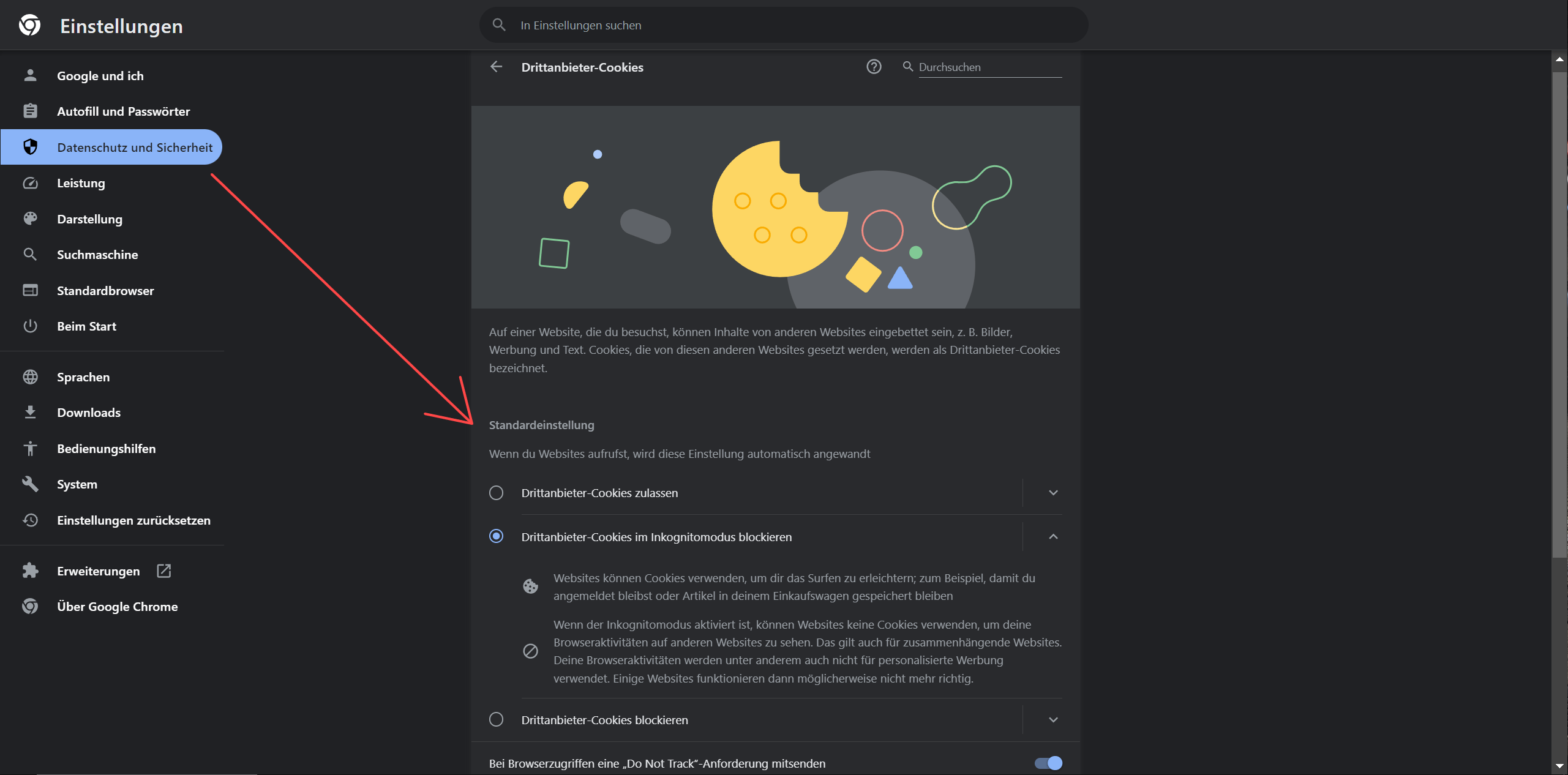
Google Chrome has started blocking third-party cookies by default. This measure aims to strengthen user privacy by limiting the ability of third parties to track users across different websites.
Setting options for users
Chrome users have the option to adjust third-party cookie settings. You can choose whether you want to block these cookies completely, only allow them in certain cases or allow them entirely. This flexibility allows users to design their privacy the way they want.
Impact on users and the advertising industry
For users, this change represents a significant increase in their online privacy and security. It reduces the amount of data collected about your browsing behavior, which in turn reduces the risk of data breaches. This poses a challenge for the advertising industry as personalized advertising becomes more difficult. They now need to find alternative methods to reach their target groups effectively.
One consequence could also be that there is increasingly more content behind so-called Paywalls . But especially smaller bloggers could lose interest in producing new content because it is no longer relevant worthwhile, and a paywall would probably not be accepted by users here.
What are third-party cookies?
Third-party cookies are files created by a domain other than the one the user is currently visiting. These cookies are often used by advertising networks to track user behavior across different websites. They enable personalized advertising based on users’ surfing behavior.
Google’s steps to blocking
Google Chrome has started blocking third-party cookies by default. This measure aims to strengthen user privacy by limiting the ability of third parties to track users across different websites.
Setting options for users
Chrome users have the option to adjust third-party cookie settings. You can choose whether you want to block these cookies completely, only allow them in certain cases or allow them entirely. This flexibility allows users to design their privacy the way they want.
Impact on users and the advertising industry
For users, this change represents a significant increase in their online privacy and security. It reduces the amount of data collected about your browsing behavior, which in turn reduces the risk of data breaches. This poses a challenge for the advertising industry as personalized advertising becomes more difficult. They now need to find alternative methods to reach their target groups effectively.
One consequence could also be that there is increasingly more content behind so-called Paywalls . But especially smaller bloggers could lose interest in producing new content because it is no longer relevant worthwhile, and a paywall would probably not be accepted by users here.
SameSite cookie attribute
SameSite cookie attribute
The SameSite cookie attribute is an important addition to the world of web cookies, introduced in response to growing security concerns. It serves as a security measure that determines how cookies are handled in different contexts, especially regarding requests that go beyond the boundaries of the original website.
How the SameSite attribute works
The SameSite attribute in Chrome allows website developers to specify whether their cookies should be attached to requests coming from a different domain. There are three possible settings:
- Strict: This is the strictest setting. Cookies are only sent when the user is directly on the website from which the cookie comes. This setting provides the highest level of protection, but may impact user experience as some cross-site features may not work.
- Lax: This setting is less restrictive. Cookies are sent during navigational requests from an external website, such as clicking on a link. It offers a balanced combination of security and user-friendliness.
- None: With this setting, cookies are sent in all contexts, including requests from other domains. However, cookies with SameSite=None require that they are also marked as secure, i.e. they are only sent over HTTPS connections.
Importance for security and data protection
By introducing the SameSite attribute, Cross-Site Request -Forgery (CSRF) attacks more difficult. Such attacks unknowingly trick users into performing actions on a website to which they are logged in. The SameSite attribute ensures that cookies cannot be used for such fraudulent requests.
Impact on web development and online advertising
For web developers, the introduction of the SameSite attribute means they need to rethink their cookie usage strategies, especially for applications that rely on cross-site requests. This can create challenges in online advertising, as personalized advertising is often based on tracking user behavior across different websites.
Need for adaptation and best practices
Website owners and developers must ensure that their websites and applications are updated to meet new security standards. It is recommended to choose an appropriate SameSite setting for all cookies that ensures both security and functionality of the website.
The SameSite cookie attribute is an important addition to the world of web cookies, introduced in response to growing security concerns. It serves as a security measure that determines how cookies are handled in different contexts, especially regarding requests that go beyond the boundaries of the original website.
How the SameSite attribute works
The SameSite attribute in Chrome allows website developers to specify whether their cookies should be attached to requests coming from a different domain. There are three possible settings:
- Strict: This is the strictest setting. Cookies are only sent when the user is directly on the website from which the cookie comes. This setting provides the highest level of protection, but may impact user experience as some cross-site features may not work.
- Lax: This setting is less restrictive. Cookies are sent during navigational requests from an external website, such as clicking on a link. It offers a balanced combination of security and user-friendliness.
- None: With this setting, cookies are sent in all contexts, including requests from other domains. However, cookies with SameSite=None require that they are also marked as secure, i.e. they are only sent over HTTPS connections.
Importance for security and data protection
By introducing the SameSite attribute, Cross-Site Request -Forgery (CSRF) attacks more difficult. Such attacks unknowingly trick users into performing actions on a website to which they are logged in. The SameSite attribute ensures that cookies cannot be used for such fraudulent requests.
Impact on web development and online advertising
For web developers, the introduction of the SameSite attribute means they need to rethink their cookie usage strategies, especially for applications that rely on cross-site requests. This can create challenges in online advertising, as personalized advertising is often based on tracking user behavior across different websites.
Need for adaptation and best practices
Website owners and developers must ensure that their websites and applications are updated to meet new security standards. It is recommended to choose an appropriate SameSite setting for all cookies that ensures both security and functionality of the website.
Secure by default cookies in Google Chrome
Secure by default cookies in Google Chrome
Secure by Default cookies are a security measure implemented in Google Chrome to improve online security and privacy. This policy states that cookies marked as “Secure” may only be sent over HTTPS connections. This measure is crucial to ensure the security of user data while using the Internet.
Why are they important?
In the past, secure cookies could also be sent over non-secure (HTTP) connections. This opened a loophole for potential security threats as sensitive data stored in these cookies could be intercepted or manipulated. With the introduction of Secure-by-Default, these cookies are now only transmitted over encrypted connections, which increases the risk of Man-in-the-middle attacks significantly reduced.
Advantages of the HTTPS-only policy
- Improved data security: Because cookies are only sent over secure connections, the information they contain is protected from unauthorized access and interception.
- Protection against man-in-the-middle attacks: HTTPS encrypts the traffic between the browser and the web server, protecting the data from potential attacks.
- Trust and Compliance: This policy strengthens user trust in browser security and helps website operators meet compliance standards such as GDPR.
The implementation of Secure by Default cookies in Google Chrome is a significant step towards a more secure internet environment. Not only does it protect user privacy and data, it also promotes a general movement toward more secure, encrypted web connections across the Internet. This development demonstrates the ongoing effort to make the web a safer place for all of its users.
Secure by Default cookies are a security measure implemented in Google Chrome to improve online security and privacy. This policy states that cookies marked as “Secure” may only be sent over HTTPS connections. This measure is crucial to ensure the security of user data while using the Internet.
Why are they important?
In the past, secure cookies could also be sent over non-secure (HTTP) connections. This opened a loophole for potential security threats as sensitive data stored in these cookies could be intercepted or manipulated. With the introduction of Secure-by-Default, these cookies are now only transmitted over encrypted connections, which increases the risk of Man-in-the-middle attacks significantly reduced.
Advantages of the HTTPS-only policy
- Improved data security: Because cookies are only sent over secure connections, the information they contain is protected from unauthorized access and interception.
- Protection against man-in-the-middle attacks: HTTPS encrypts the traffic between the browser and the web server, protecting the data from potential attacks.
- Trust and Compliance: This policy strengthens user trust in browser security and helps website operators meet compliance standards such as GDPR.
The implementation of Secure by Default cookies in Google Chrome is a significant step towards a more secure internet environment. Not only does it protect user privacy and data, it also promotes a general movement toward more secure, encrypted web connections across the Internet. This development demonstrates the ongoing effort to make the web a safer place for all of its users.
Cookie consent banner and data protection
Cookie consent banner and data protection
At a time when digital privacy is increasingly in focus, cookie consent banners have taken on an important role in web browsers such as Google Chrome. These banners are not only a response to stricter privacy laws, but also a means to increase users’ transparency and control over their online data.
Cookie consent banners are pop-up windows or bars that appear when you visit a website and inform the user that the website uses cookies. These banners typically provide options to give or refuse consent to different types of cookies.
Regulatory Compliance
The introduction of cookie consent banners is partly a direct response to data protection laws such as the European General Data Protection Regulation (GDPR) and the California Consumer Privacy Act (CCPA). These laws require websites to obtain users’ consent before collecting or storing personal information, which is typically done through cookies.
Impact and outlook
Cookie consent banners have a significant impact on the user experience. While they play an important role in protecting privacy, they can also be perceived as annoying, especially if they are intrusive or make the website difficult to navigate.
The way cookie consent banners are implemented and perceived by users is expected to continue to evolve. As awareness of privacy issues increases, these banners could become more user-friendly while also being more effective at maintaining privacy.
At a time when digital privacy is increasingly in focus, cookie consent banners have taken on an important role in web browsers such as Google Chrome. These banners are not only a response to stricter privacy laws, but also a means to increase users’ transparency and control over their online data.
Cookie consent banners are pop-up windows or bars that appear when you visit a website and inform the user that the website uses cookies. These banners typically provide options to give or refuse consent to different types of cookies.
Regulatory Compliance
The introduction of cookie consent banners is partly a direct response to data protection laws such as the European General Data Protection Regulation (GDPR) and the California Consumer Privacy Act (CCPA). These laws require websites to obtain users’ consent before collecting or storing personal information, which is typically done through cookies.
Impact and outlook
Cookie consent banners have a significant impact on the user experience. While they play an important role in protecting privacy, they can also be perceived as annoying, especially if they are intrusive or make the website difficult to navigate.
The way cookie consent banners are implemented and perceived by users is expected to continue to evolve. As awareness of privacy issues increases, these banners could become more user-friendly while also being more effective at maintaining privacy.

Popular Posts

Why Zero Trust doesn’t work without identity protection!
Zero Trust means: Trust no one, verify everyone. Identity protection is at the heart of this modern security model. Learn how IAM, MFA, Conditional Access, and the principle of least privilege effectively protect your business when the old network perimeter is gone.

How AI fuels cyberattacks – and how it protects us from them
Cybercriminals are using AI for deepfakes and automated attacks. Defenses are also relying on AI: through behavioral analysis (UEBA) and automated responses (SOAR). Learn how this arms race works and how modern security strategies can protect your business.

Put an end to password chaos: Why a password manager is important
Passwords are constantly being stolen through data leaks. A password manager is your digital vault. It creates and stores strong, unique passwords for every service. This effectively protects you against identity theft through "credential stuffing".

More than just a password: Why 2-factor authentication is mandatory today
Why is two-factor authentication (2FA) mandatory today? Because passwords are constantly being stolen through data leaks and phishing. 2FA is the second, crucial barrier (e.g., via an app) that stops attackers – even if they know your password. Protect yourself now!

Beware of phishing: Your PayPal account has been restricted.
Beware of the email "Your PayPal account has been restricted." Criminals are using this phishing scam to steal your login information and money. They pressure you into clicking on fake links. We'll show you how to recognize the scam immediately and what to do.

Excel Tutorial: How to quickly and safely remove duplicates
Duplicate entries in your Excel lists? This distorts your data. Our tutorial shows you, using a practical example, how to clean up your data in seconds with the "Remove Duplicates" function – whether you want to delete identical rows or just values in a column.
Offers 2024: Word & Excel Templates











Popular Posts
Why Zero Trust doesn’t work without identity protection!
Zero Trust means: Trust no one, verify everyone. Identity protection is at the heart of this modern security model. Learn how IAM, MFA, Conditional Access, and the principle of least privilege effectively protect your business when the old network perimeter is gone.
How AI fuels cyberattacks – and how it protects us from them
Cybercriminals are using AI for deepfakes and automated attacks. Defenses are also relying on AI: through behavioral analysis (UEBA) and automated responses (SOAR). Learn how this arms race works and how modern security strategies can protect your business.
Put an end to password chaos: Why a password manager is important
Passwords are constantly being stolen through data leaks. A password manager is your digital vault. It creates and stores strong, unique passwords for every service. This effectively protects you against identity theft through "credential stuffing".
More than just a password: Why 2-factor authentication is mandatory today
Why is two-factor authentication (2FA) mandatory today? Because passwords are constantly being stolen through data leaks and phishing. 2FA is the second, crucial barrier (e.g., via an app) that stops attackers – even if they know your password. Protect yourself now!
Beware of phishing: Your PayPal account has been restricted.
Beware of the email "Your PayPal account has been restricted." Criminals are using this phishing scam to steal your login information and money. They pressure you into clicking on fake links. We'll show you how to recognize the scam immediately and what to do.
Excel Tutorial: How to quickly and safely remove duplicates
Duplicate entries in your Excel lists? This distorts your data. Our tutorial shows you, using a practical example, how to clean up your data in seconds with the "Remove Duplicates" function – whether you want to delete identical rows or just values in a column.
Offers 2024: Word & Excel Templates


























