Microsoft Office gets fresher with a new design


After users were spared too big changes in the menu navigation thanks to the latest offshoot of the most popular office software with Microsoft Office 2019 in September 2018, and the focus was primarily on more functionality and networking, there should now be a refreshment for all Office versions.
Microsoft Office gets fresher with a new design
After users were spared too big changes in the menu navigation thanks to the latest offshoot of the most popular office software with Microsoft Office 2019 in September 2018, and the focus was primarily on more functionality and networking, there should now be a refreshment for all Office versions.
No more ribbon in Microsoft Office in the future
When Office 2003 was replaced by Office 2007, many users who could use Word, Excel & Co almost blindly – because they knew exactly where which function is located – had to get used to it when the menu ribbon was introduced to better categorize functional areas.
And of course at the beginning – as with almost everything that is new – there was a lot of criticism from the users. And now it’s time again that we all have to get used to it. Because the menu ribbon to which we have all got used falls victim to the red pen after 13 years, and should give way to a new, slimmer design. In the future, there will be a context-sensitive strip with buttons at the top of the screen, which changes depending on the work being carried out.
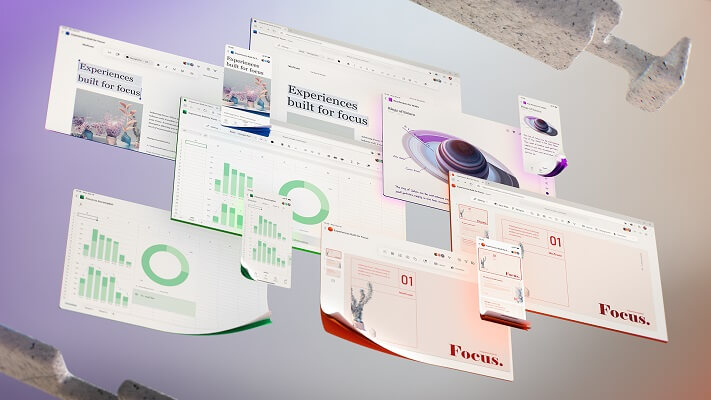
With this step, Microsoft would like to make it easier for users to work with the Office software through a tidier design, and to simplify the sometimes cluttered menu navigation. The focus should always be on the current work to be carried out. That this redesign is not just a visual gimmick for Microsoft, but really about improving the workflow with the office software is also noticeable because there is still no fixed date for the implementation with which everything is changed in one go becomes.
Rather, it is a project that is designed to be implemented in the long term. While some changes have already been tested, others are still in the testing phase to see whether changes really bring added value to users here, or only confuse them in the end. So it will take a while before all users will receive the new design. We think that (if Microsoft stays true to its cycle) the new design will be available to all users with the Office 2022 version at the latest.

No more ribbon in Microsoft Office in the future
When Office 2003 was replaced by Office 2007, many users who could use Word, Excel & Co almost blindly – because they knew exactly where which function is located – had to get used to it when the menu ribbon was introduced to better categorize functional areas.
And of course at the beginning – as with almost everything that is new – there was a lot of criticism from the users. And now it’s time again that we all have to get used to it. Because the menu ribbon to which we have all got used falls victim to the red pen after 13 years, and should give way to a new, slimmer design. In the future, there will be a context-sensitive strip with buttons at the top of the screen, which changes depending on the work being carried out.
With this step, Microsoft would like to make it easier for users to work with the Office software through a tidier design, and to simplify the sometimes cluttered menu navigation. The focus should always be on the current work to be carried out. That this redesign is not just a visual gimmick for Microsoft, but really about improving the workflow with the office software is also noticeable because there is still no fixed date for the implementation with which everything is changed in one go becomes.
Rather, it is a project that is designed to be implemented in the long term. While some changes have already been tested, others are still in the testing phase to see whether changes really bring added value to users here, or only confuse them in the end. So it will take a while before all users will receive the new design. We think that (if Microsoft stays true to its cycle) the new design will be available to all users with the Office 2022 version at the latest.
Popular Posts:

How AI fuels cyberattacks – and how it protects us from them
Cybercriminals are using AI for deepfakes and automated attacks. Defenses are also relying on AI: through behavioral analysis (UEBA) and automated responses (SOAR). Learn how this arms race works and how modern security strategies can protect your business.

Information overload: Protection & tips against digital stress
Constantly online, overwhelmed by news, emails & social media? Digital information overload leads to stress and concentration problems. Learn the best strategies and practical tips to effectively protect yourself, manage the chaos, and regain your focus.
Put an end to password chaos: Why a password manager is important
Passwords are constantly being stolen through data leaks. A password manager is your digital vault. It creates and stores strong, unique passwords for every service. This effectively protects you against identity theft through "credential stuffing".

Stop procrastinating: How distraction blockers can help you regain focus
Constant digital distractions kill your productivity. Distraction blockers like Forest or Freedom help you regain focus. They specifically block distractions on your PC and mobile phone and use techniques like the Pomodoro Technique. This helps you stop procrastinating.
Wer ist wo? Microsoft Teams schafft Klarheit im Hybrid-Büro
Die neue Arbeitsstandort-Funktion in Microsoft Teams zeigt, wer im Büro oder remote arbeitet. Verbessern Sie Ihre Meeting-Planung in Outlook und die Team-Koordination. Wir erklären die Vorteile, die Admin-Steuerung und die tiefe Anbindung an Microsoft Viva.

Excel Tutorial: How to quickly and safely remove duplicates
Duplicate entries in your Excel lists? This distorts your data. Our tutorial shows you, using a practical example, how to clean up your data in seconds with the "Remove Duplicates" function – whether you want to delete identical rows or just values in a column.
Offers 2024: Word & Excel Templates











Popular Posts:
How AI fuels cyberattacks – and how it protects us from them
Cybercriminals are using AI for deepfakes and automated attacks. Defenses are also relying on AI: through behavioral analysis (UEBA) and automated responses (SOAR). Learn how this arms race works and how modern security strategies can protect your business.
Information overload: Protection & tips against digital stress
Constantly online, overwhelmed by news, emails & social media? Digital information overload leads to stress and concentration problems. Learn the best strategies and practical tips to effectively protect yourself, manage the chaos, and regain your focus.
Put an end to password chaos: Why a password manager is important
Passwords are constantly being stolen through data leaks. A password manager is your digital vault. It creates and stores strong, unique passwords for every service. This effectively protects you against identity theft through "credential stuffing".
Stop procrastinating: How distraction blockers can help you regain focus
Constant digital distractions kill your productivity. Distraction blockers like Forest or Freedom help you regain focus. They specifically block distractions on your PC and mobile phone and use techniques like the Pomodoro Technique. This helps you stop procrastinating.
Wer ist wo? Microsoft Teams schafft Klarheit im Hybrid-Büro
Die neue Arbeitsstandort-Funktion in Microsoft Teams zeigt, wer im Büro oder remote arbeitet. Verbessern Sie Ihre Meeting-Planung in Outlook und die Team-Koordination. Wir erklären die Vorteile, die Admin-Steuerung und die tiefe Anbindung an Microsoft Viva.
Excel Tutorial: How to quickly and safely remove duplicates
Duplicate entries in your Excel lists? This distorts your data. Our tutorial shows you, using a practical example, how to clean up your data in seconds with the "Remove Duplicates" function – whether you want to delete identical rows or just values in a column.
Offers 2024: Word & Excel Templates