Automatic backup of your files under Windows 10


The longer you work on Windows 10, the more important files such as: letters, spreadsheets, images, etc. will accumulate on your drives over time. Now you have probably already thought about what would happen if these files were destroyed by a defect on your hard drive, or a fault in the system in whole or in part, and so much work and effort you put into the creation and archiving would be gone.
Nobody needs to explain that regular data backup is important.
Only who always thinks that it would be time for a backup again? And you certainly do not want to have to create an additional entry in your organizer! Fortunately, Windows 10 with its on-board resources offers you the opportunity to take on this task, and to automate the regular data backup individually customizable.
Read our article on how to use Windows 10 automatic file backup.
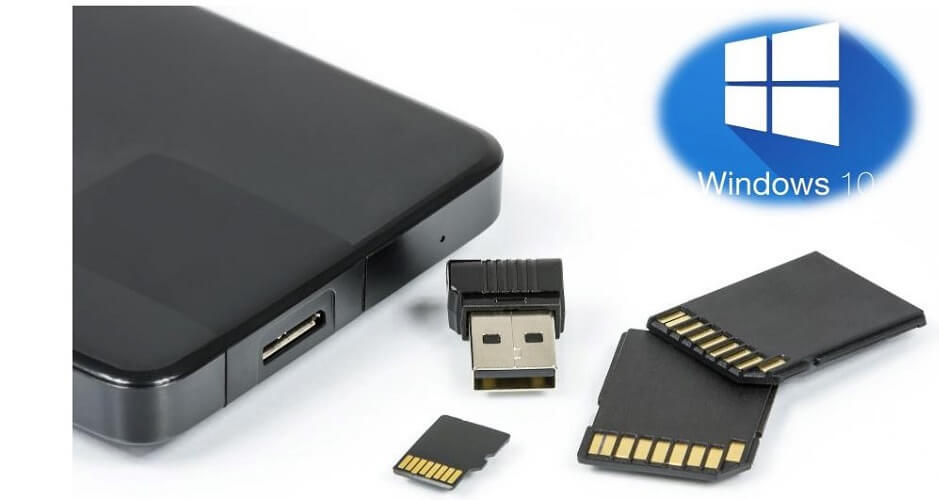
Automatic backup of your files under Windows 10
The longer you work on Windows 10, the more important files such as: letters, spreadsheets, images, etc. will accumulate on your drives over time. Now you have probably already thought about what would happen if these files were destroyed by a defect on your hard drive, or a fault in the system in whole or in part, and so much work and effort you put into the creation and archiving would be gone.
Nobody needs to explain that regular data backup is important.
Only who always thinks that it would be time for a backup again? And you certainly do not want to have to create an additional entry in your organizer! Fortunately, Windows 10 with its on-board resources offers you the opportunity to take on this task, and to automate the regular data backup individually customizable.
Read our article on how to use Windows 10 automatic file backup.
1. Call Windows 10 Settings
1. Call Windows 10 Settings
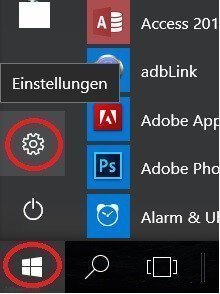
First, call up the Windows 10 settings:
- Left mouse button in the start menu
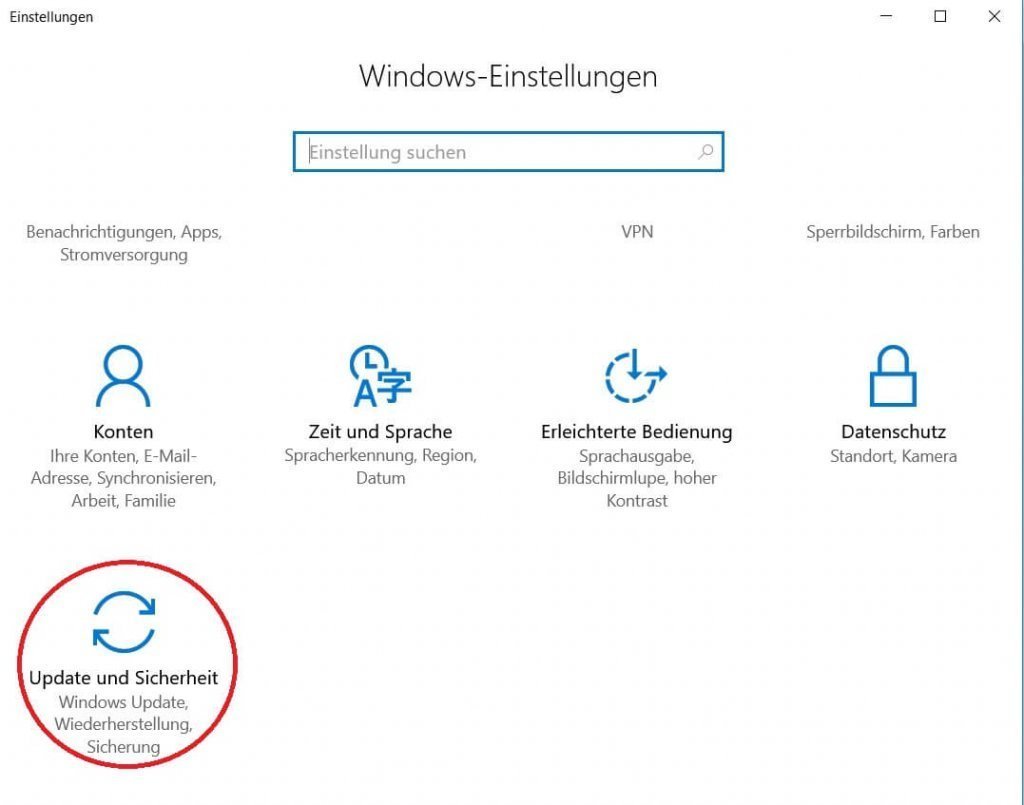
- Call up the settings menu (Update & Security)
See picture (click to enlarge)
First, call up the Windows 10 settings:
- Left mouse button in the start menu
- Call up the settings menu (Update & Security)
See picture (click to enlarge)
2. Select drive for backup
2. Select drive for backup
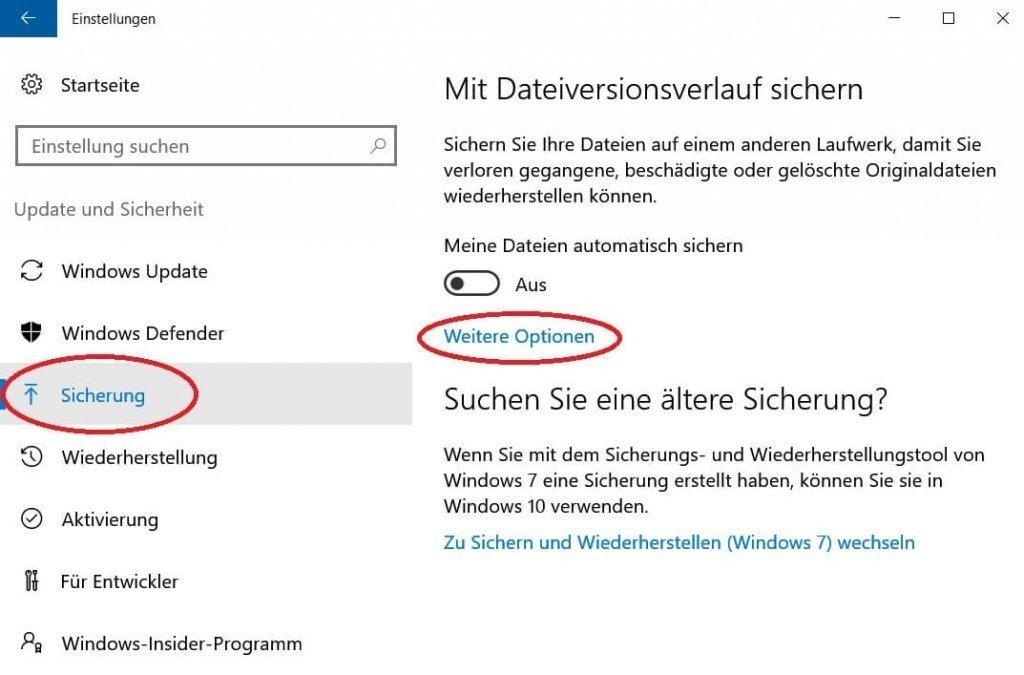
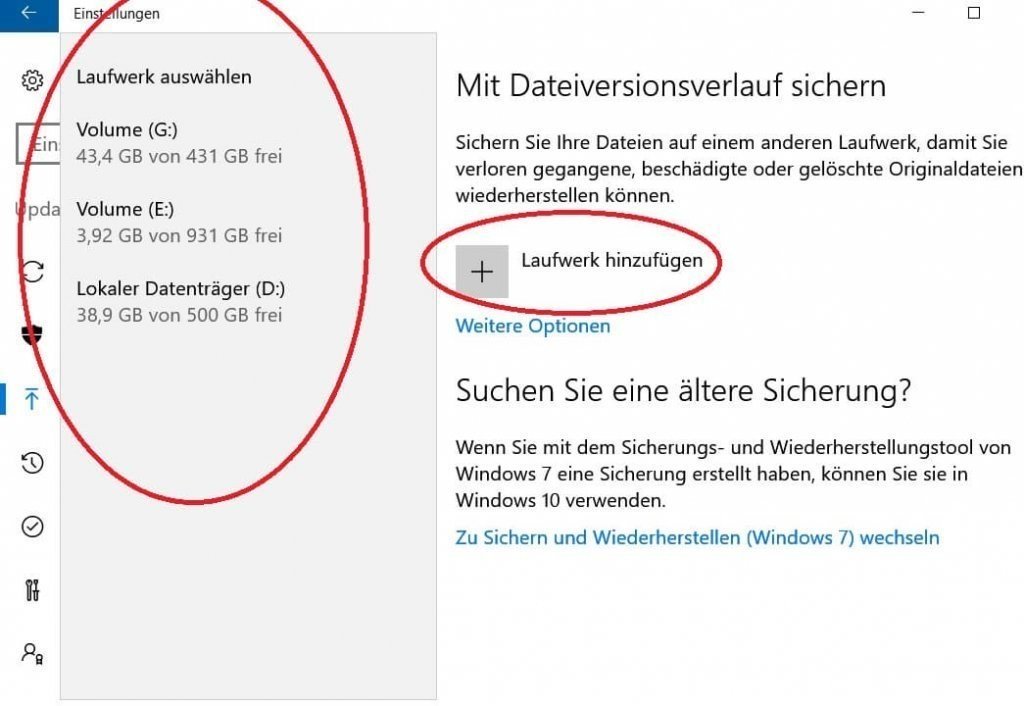
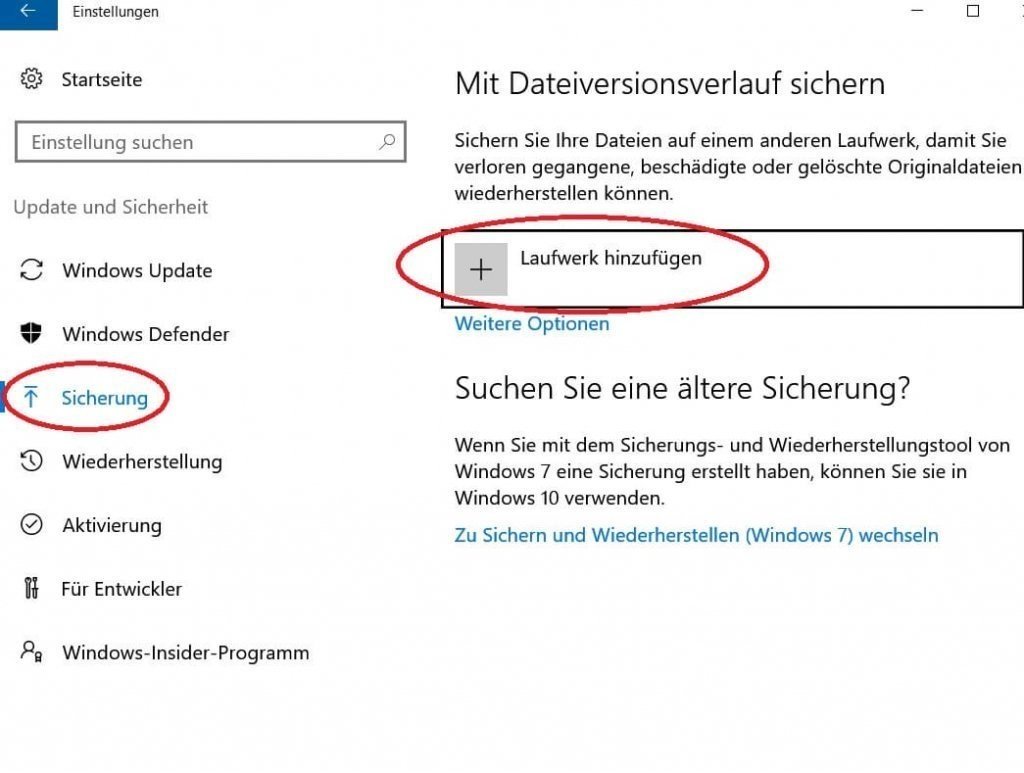
The next step is to select a drive for the regular backup.
- For this we select the menu item “Backup” on the left side.
- And then in the right column “Add drive”
See picture (click to enlarge)
Note:
Understandably, under no circumstances should you select the drive to backup from which the files should be backed up!
We recommend an external data carrier such as to use an external USB hard drive in 2.5-inch format, as this, in contrast to a 3.5-inch drive, the power supply via the USB port, and does not need to be powered separately.
Of course, you can also use a USB stick, although it should be remembered that this is a so-called flash memory, which is infinitely often readable, but not unlimited writable, since this is the same storage technology as a modern SSD hard drive is.

The next step is to select a drive for the regular backup.
- For this we select the menu item “Backup” on the left side.
- And then in the right column “Add drive”
See picture (click to enlarge)
Note:
Understandably, under no circumstances should you select the drive to backup from which the files should be backed up!
We recommend an external data carrier such as to use an external USB hard drive in 2.5-inch format, as this, in contrast to a 3.5-inch drive, the power supply via the USB port, and does not need to be powered separately.
Of course, you can also use a USB stick, although it should be remembered that this is a so-called flash memory, which is infinitely often readable, but not unlimited writable, since this is the same storage technology as a modern SSD hard drive is.
3. Select files to backup
3. Select files to backup
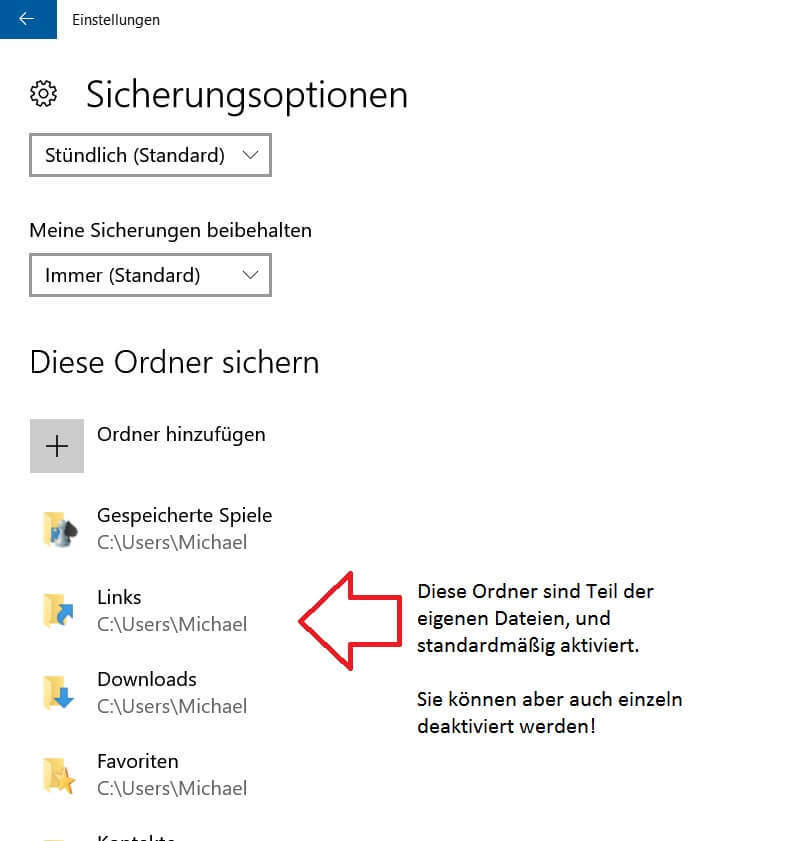
Now that we’ve set up a drive, we’ll have to adjust the following points:
- Which files should be backed up
- How often should the backup be created (hourly, daily, etc.)
- Should the old backups be constantly overwritten, or only if there is no space on the disk for backup is more.
These settings can be found under: “Backup” and then “other options”
See picture (click to enlarge)
Now that we’ve set up a drive, we’ll have to adjust the following points:
- Which files should be backed up
- How often should the backup be created (hourly, daily, etc.)
- Should the old backups be constantly overwritten, or only if there is no space on the disk for backup is more.
These settings can be found under: “Backup” and then “other options”
See picture (click to enlarge)
4. Switch on automatic fuse
4. Switch on automatic fuse
After we have set our drive, as well as the files to be backed up, and set the backup options as described in the previous points, we check in the last step whether the automatic backup is really turned on, and correct if necessary.
See picture (click to enlarge)
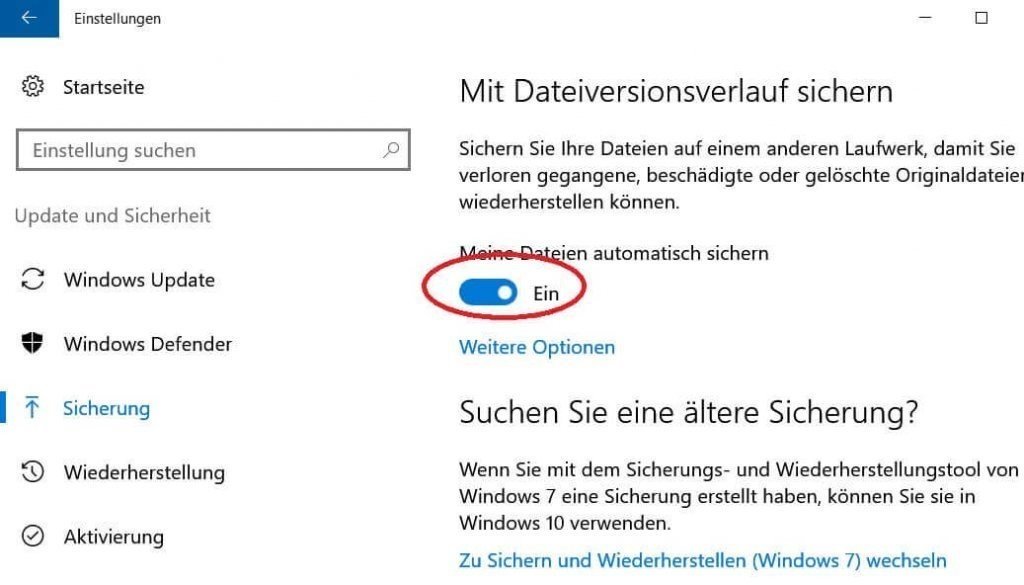
From now on, you no longer have to worry about regularly backing up your files, but let this work done automatically by Windows 10.

After we have set our drive, as well as the files to be backed up, and set the backup options as described in the previous points, we check in the last step whether the automatic backup is really turned on, and correct if necessary.
See picture (click to enlarge)
From now on, you no longer have to worry about regularly backing up your files, but let this work done automatically by Windows 10.
Popular Posts:

5 simple security rules against phishing and spam that everyone should know
Deceptively authentic emails from your bank, DHL, or PayPal? That's phishing! Data theft and viruses are a daily threat. We'll show you 5 simple rules (2FA, password managers, etc.) to protect yourself immediately and effectively and help you spot scammers.

The 5 best tips for a clean folder structure on your PC and in the cloud
Say goodbye to file chaos! "Offer_final_v2.docx" is a thing of the past. Learn 5 simple tips for a perfect folder structure on your PC and in the cloud (OneDrive). With proper file naming and archive rules, you'll find everything instantly.

Never do the same thing again: How to record a macro in Excel
Tired of repetitive tasks in Excel? Learn how to create your first personal "magic button" with the macro recorder. Automate formatting and save hours – no programming required! Click here for easy instructions.
IMAP vs. Local Folders: The secret to your Outlook structure and why it matters
Do you know the difference between IMAP and local folders in Outlook? Incorrect use can lead to data loss! We'll explain simply what belongs where, how to clean up your mailbox, and how to archive emails securely and for the long term.

Der ultimative Effizienz-Boost: Wie Excel, Word und Outlook für Sie zusammenarbeiten
Schluss mit manuellem Kopieren! Lernen Sie, wie Sie Excel-Listen, Word-Vorlagen & Outlook verbinden, um personalisierte Serien-E-Mails automatisch zu versenden. Sparen Sie Zeit, vermeiden Sie Fehler und steigern Sie Ihre Effizienz. Hier geht's zur einfachen Anleitung!

Agentic AI: The next quantum leap in artificial intelligence?
Forget simple chatbots! Agentic AI is here: Autonomous AI that plans, learns, and solves complex tasks for you. Discover how AI agents will revolutionize the world of work and your everyday life. Are you ready for the future of artificial intelligence?
Offers 2024: Word & Excel Templates











Popular Posts:
5 simple security rules against phishing and spam that everyone should know
Deceptively authentic emails from your bank, DHL, or PayPal? That's phishing! Data theft and viruses are a daily threat. We'll show you 5 simple rules (2FA, password managers, etc.) to protect yourself immediately and effectively and help you spot scammers.
The 5 best tips for a clean folder structure on your PC and in the cloud
Say goodbye to file chaos! "Offer_final_v2.docx" is a thing of the past. Learn 5 simple tips for a perfect folder structure on your PC and in the cloud (OneDrive). With proper file naming and archive rules, you'll find everything instantly.
Never do the same thing again: How to record a macro in Excel
Tired of repetitive tasks in Excel? Learn how to create your first personal "magic button" with the macro recorder. Automate formatting and save hours – no programming required! Click here for easy instructions.
IMAP vs. Local Folders: The secret to your Outlook structure and why it matters
Do you know the difference between IMAP and local folders in Outlook? Incorrect use can lead to data loss! We'll explain simply what belongs where, how to clean up your mailbox, and how to archive emails securely and for the long term.
Der ultimative Effizienz-Boost: Wie Excel, Word und Outlook für Sie zusammenarbeiten
Schluss mit manuellem Kopieren! Lernen Sie, wie Sie Excel-Listen, Word-Vorlagen & Outlook verbinden, um personalisierte Serien-E-Mails automatisch zu versenden. Sparen Sie Zeit, vermeiden Sie Fehler und steigern Sie Ihre Effizienz. Hier geht's zur einfachen Anleitung!
Agentic AI: The next quantum leap in artificial intelligence?
Forget simple chatbots! Agentic AI is here: Autonomous AI that plans, learns, and solves complex tasks for you. Discover how AI agents will revolutionize the world of work and your everyday life. Are you ready for the future of artificial intelligence?
Offers 2024: Word & Excel Templates