More privacy on Facebook through Container Add-On


The Facebook is not necessarily known for the highest privacy standards, of course, is no longer a secret for a long time.
However, the social network not only collects data from you as long as you are on its side and act with apps, but it tracks you virtually around the globe with your overall browsing habits. Even if you have not opened the official Facebook page at all.
Since the amount of data that Facebook collects about us has become as unclear as the third party to whom this data is shared, everyone should worry about how at least part of this data can be hidden from the all-seeing eyes of Facebook.
How it works and why it makes sense to use the mobile website instead of the Facebook app on mobile devices can be found in our article.

More privacy on Facebook through Container Add-On
The Facebook is not necessarily known for the highest privacy standards, of course, is no longer a secret for a long time.
However, the social network not only collects data from you as long as you are on its side and act with apps, but it tracks you virtually around the globe with your overall browsing habits. Even if you have not opened the official Facebook page at all.
Since the amount of data that Facebook collects about us has become as unclear as the third party to whom this data is shared, everyone should worry about how at least part of this data can be hidden from the all-seeing eyes of Facebook.
How it works and why it makes sense to use the mobile website instead of the Facebook app on mobile devices can be found in our article.
1. Facebook Container Add-On for Mozilla Firefox
1. Facebook Container Add-On for Mozilla Firefox
The Facebook container addon has been developed for the browser Mozilla Firefox, a tool that the possibilities of Facebook to track your browsing behavior is not completely excluded, but at least significantly reduced.
With such a container add-on, so to speak, online identities can be separated from each other by storing different cookies within the Facebook Container Tab, than in a normal tab which usually maps your complete surfing behavior.
You can easily find the add-on in Firefox in the settings menu under “Extensions” and enter “Facebook Container” in the search field. Here you can install and activate the additional tool.
See picture: (click to enlarge)


After the installation, you will first be automatically logged out of Facebook and have to log in again, and from then on you will find yourself in a separate area that no longer reflects your regular surfing behavior for Facebook.
For example, if you click on the “Share” button, a new special tab will be opened with the container icon.
For other browsers like the most used Google Chrome, and the tail end Microsoft Edge missing at the time of this article unfortunately comparable adequate solutions. Of course we hope that this will be replenished soon.
The Facebook container addon has been developed for the browser Mozilla Firefox, a tool that the possibilities of Facebook to track your browsing behavior is not completely excluded, but at least significantly reduced.
With such a container add-on, so to speak, online identities can be separated from each other by storing different cookies within the Facebook Container Tab, than in a normal tab which usually maps your complete surfing behavior.
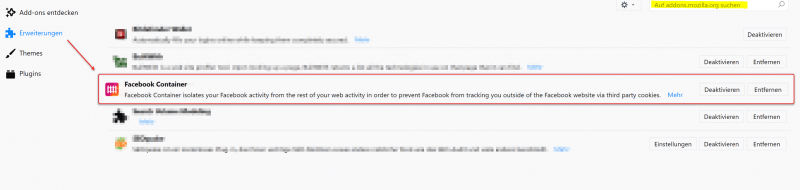
You can easily find the add-on in Firefox in the settings menu under “Extensions” and enter “Facebook Container” in the search field. Here you can install and activate the additional tool.
See picture:
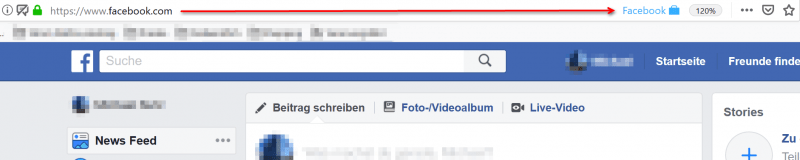
After the installation, you will first be automatically logged out of Facebook and have to log in again, and from then on you will find yourself in a separate area that no longer reflects your regular surfing behavior for Facebook.
For example, if you click on the “Share” button, a new special tab will be opened with the container icon.
For other browsers like the most used Google Chrome, and the tail end Microsoft Edge missing at the time of this article unfortunately comparable adequate solutions. Of course we hope that this will be replenished soon.
2. Use mobile page instead of the Facebook app
2. Use mobile page instead of the Facebook app
Even more data than on the Facebook website on the desktop collects the official Facebook app for mobile devices.
Often this is also installed by the users of course because it is just optimized for the small displays of smartphones and tablets, and also provides a lot of networking with the already stored on the device data such as pictures and contacts.
Far too carefree when installing the Facebook App the necessary rights that you have to grant her to use them waved through. But this problem can be solved easily by simply using the mobile page of Facebook at: m.facebook.com instead of the official app.
One must always be aware of the fact that every app is a small additional software, which can give itself of course completely different permissions than a website can over the (for example Google Chrome) web browser.
And considering how many sensitive data are nowadays on smartphones that are not really anyone’s business, the permissions of the Facebook app are basically a data protection catastrophe.

Even more data than on the Facebook website on the desktop collects the official Facebook app for mobile devices.
Often this is also installed by the users of course because it is just optimized for the small displays of smartphones and tablets, and also provides a lot of networking with the already stored on the device data such as pictures and contacts.
Far too carefree when installing the Facebook App the necessary rights that you have to grant her to use them waved through. But this problem can be solved easily by simply using the mobile page of Facebook at: m.facebook.com instead of the official app.
One must always be aware of the fact that every app is a small additional software, which can give itself of course completely different permissions than a website can over the (for example Google Chrome) web browser.
And considering how many sensitive data are nowadays on smartphones that are not really anyone’s business, the permissions of the Facebook app are basically a data protection catastrophe.
Popular Posts:

How AI fuels cyberattacks – and how it protects us from them
Cybercriminals are using AI for deepfakes and automated attacks. Defenses are also relying on AI: through behavioral analysis (UEBA) and automated responses (SOAR). Learn how this arms race works and how modern security strategies can protect your business.

Information overload: Protection & tips against digital stress
Constantly online, overwhelmed by news, emails & social media? Digital information overload leads to stress and concentration problems. Learn the best strategies and practical tips to effectively protect yourself, manage the chaos, and regain your focus.
Put an end to password chaos: Why a password manager is important
Passwords are constantly being stolen through data leaks. A password manager is your digital vault. It creates and stores strong, unique passwords for every service. This effectively protects you against identity theft through "credential stuffing".

Stop procrastinating: How distraction blockers can help you regain focus
Constant digital distractions kill your productivity. Distraction blockers like Forest or Freedom help you regain focus. They specifically block distractions on your PC and mobile phone and use techniques like the Pomodoro Technique. This helps you stop procrastinating.
Wer ist wo? Microsoft Teams schafft Klarheit im Hybrid-Büro
Die neue Arbeitsstandort-Funktion in Microsoft Teams zeigt, wer im Büro oder remote arbeitet. Verbessern Sie Ihre Meeting-Planung in Outlook und die Team-Koordination. Wir erklären die Vorteile, die Admin-Steuerung und die tiefe Anbindung an Microsoft Viva.

Excel Tutorial: How to quickly and safely remove duplicates
Duplicate entries in your Excel lists? This distorts your data. Our tutorial shows you, using a practical example, how to clean up your data in seconds with the "Remove Duplicates" function – whether you want to delete identical rows or just values in a column.
Offers 2024: Word & Excel Templates











Popular Posts:
How AI fuels cyberattacks – and how it protects us from them
Cybercriminals are using AI for deepfakes and automated attacks. Defenses are also relying on AI: through behavioral analysis (UEBA) and automated responses (SOAR). Learn how this arms race works and how modern security strategies can protect your business.
Information overload: Protection & tips against digital stress
Constantly online, overwhelmed by news, emails & social media? Digital information overload leads to stress and concentration problems. Learn the best strategies and practical tips to effectively protect yourself, manage the chaos, and regain your focus.
Put an end to password chaos: Why a password manager is important
Passwords are constantly being stolen through data leaks. A password manager is your digital vault. It creates and stores strong, unique passwords for every service. This effectively protects you against identity theft through "credential stuffing".
Stop procrastinating: How distraction blockers can help you regain focus
Constant digital distractions kill your productivity. Distraction blockers like Forest or Freedom help you regain focus. They specifically block distractions on your PC and mobile phone and use techniques like the Pomodoro Technique. This helps you stop procrastinating.
Wer ist wo? Microsoft Teams schafft Klarheit im Hybrid-Büro
Die neue Arbeitsstandort-Funktion in Microsoft Teams zeigt, wer im Büro oder remote arbeitet. Verbessern Sie Ihre Meeting-Planung in Outlook und die Team-Koordination. Wir erklären die Vorteile, die Admin-Steuerung und die tiefe Anbindung an Microsoft Viva.
Excel Tutorial: How to quickly and safely remove duplicates
Duplicate entries in your Excel lists? This distorts your data. Our tutorial shows you, using a practical example, how to clean up your data in seconds with the "Remove Duplicates" function – whether you want to delete identical rows or just values in a column.
Offers 2024: Word & Excel Templates