Import Google Calendar to Outlook


Today we want to take a quick look at how you can sync between the most frequently used calendars. It’s about how you can import the Google calendar into your Outlook calendar and keep it up to date.
Import Google Calendar to Outlook
Today we want to take a quick look at how you can sync between the most frequently used calendars. It’s about how you can import the Google calendar into your Outlook calendar and keep it up to date.
Import Google Calendar to Outlook
Import Google Calendar to Outlook
You can import Google calendar to Outlook by following the steps below:
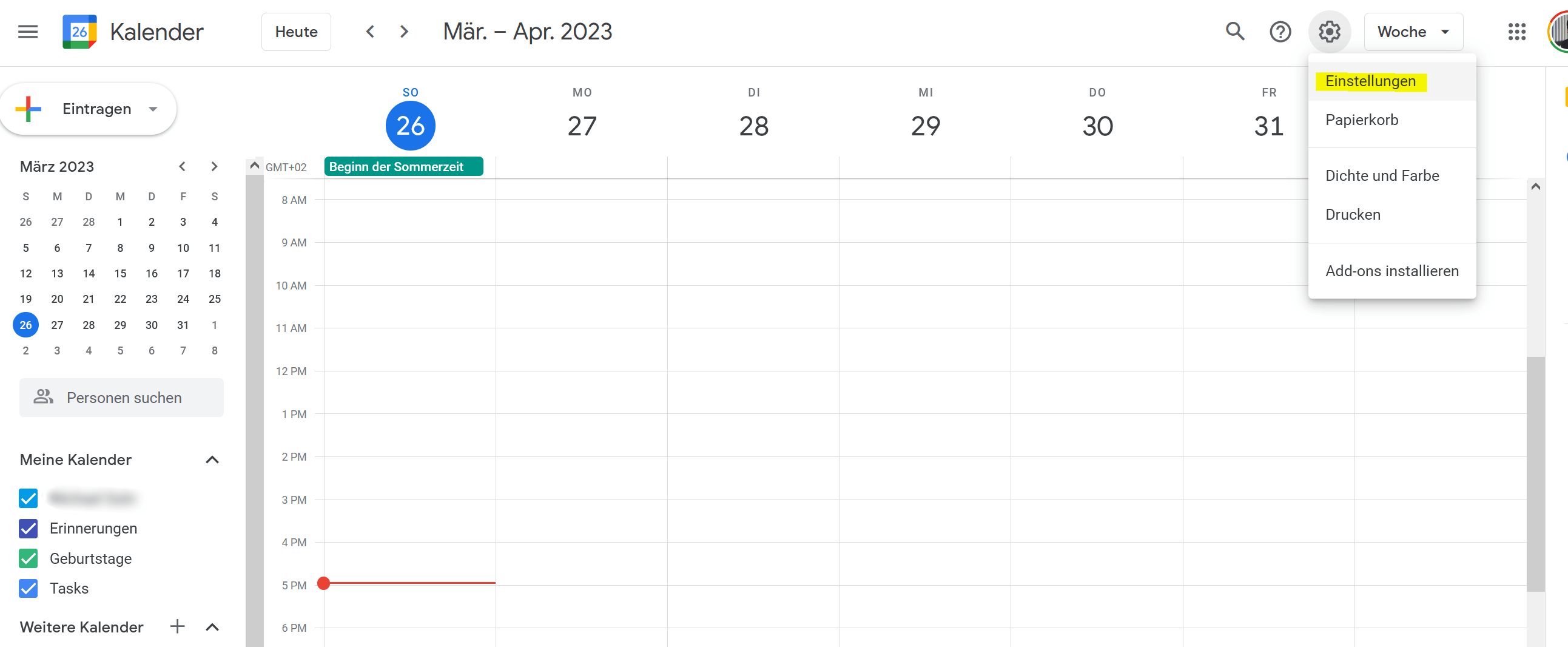
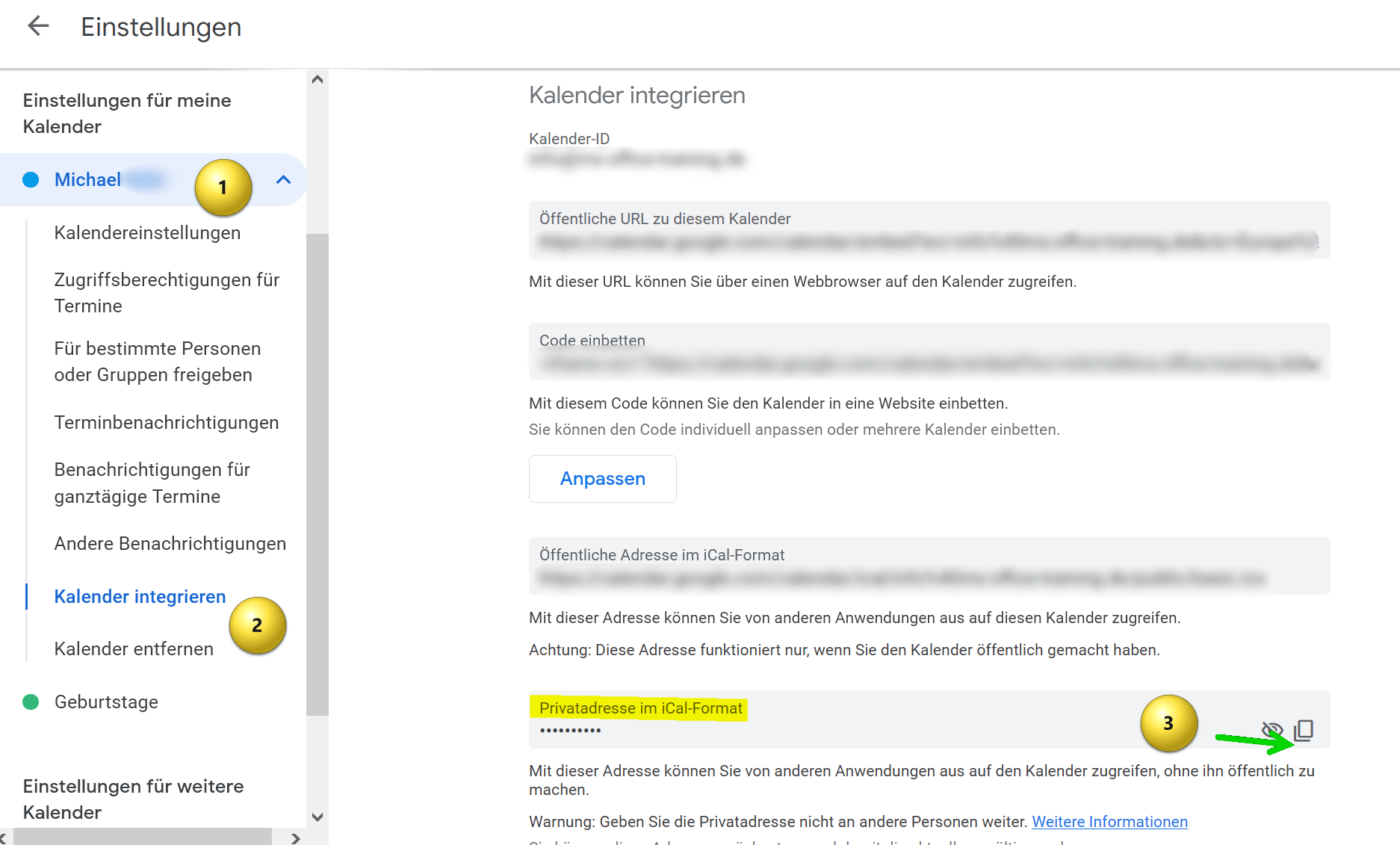
- Open your Google calendar in a web browser and click on the settings icon in the top right corner of the screen. It looks like a gear.
- Select “Settings” from the drop-down menu.
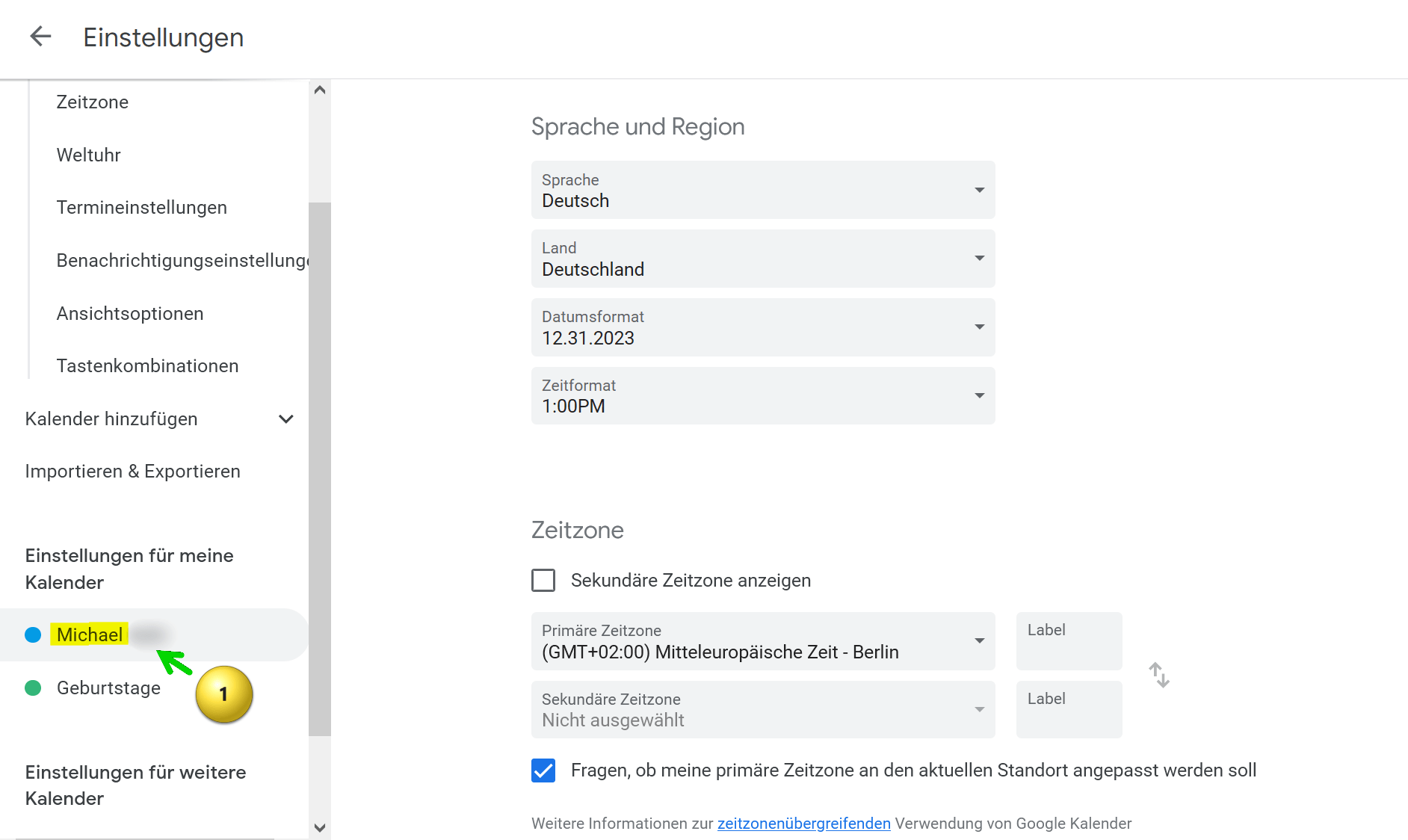
- Locate the calendar you want to import into Outlook and click the calendar name.
- Then click on “Integrate calendar“.
- Scroll down until you see the option “Home address in iCal format” and copy that address.
see fig. (click to enlarge)
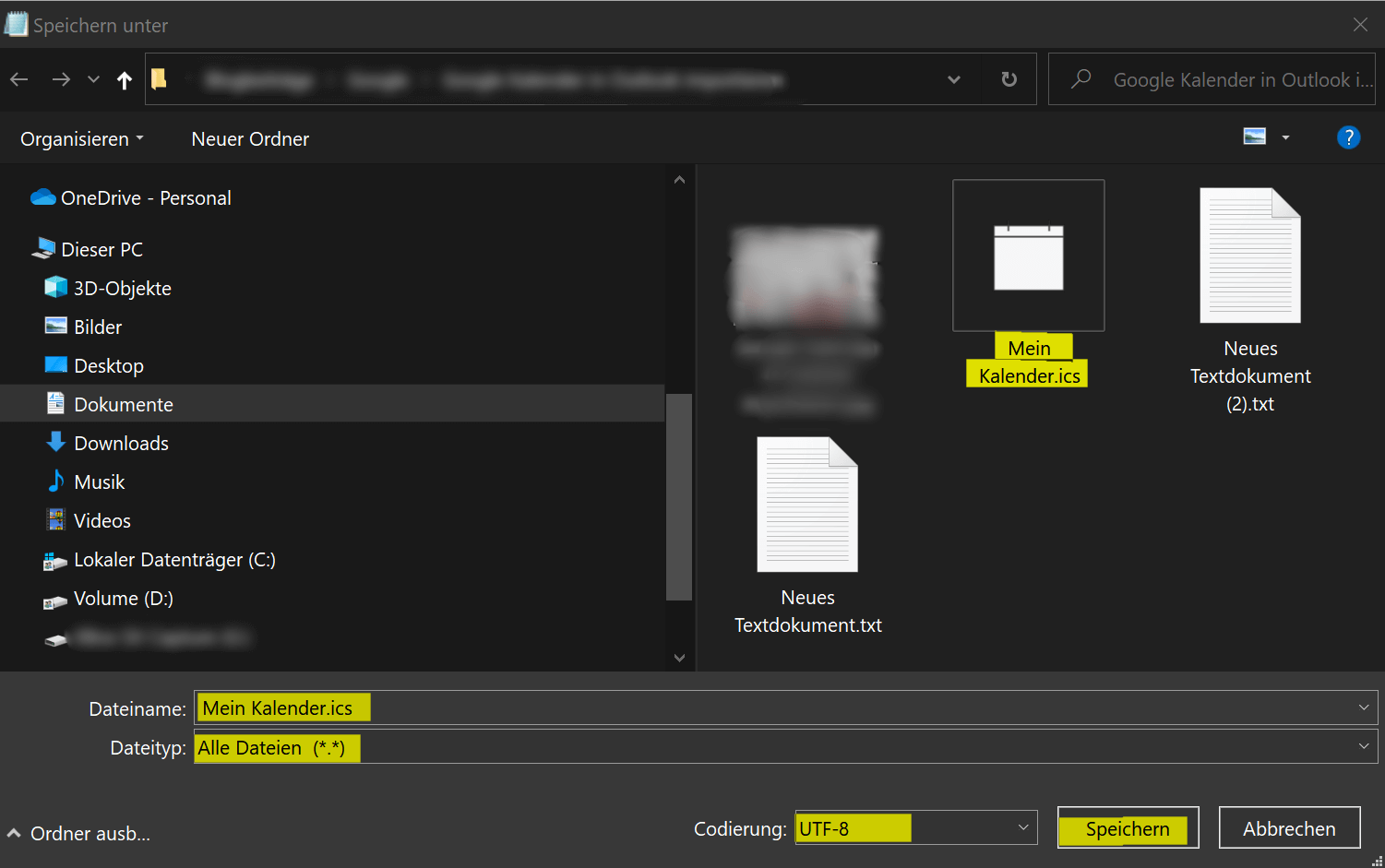
- Create a text file on your computer and copy the address into it.
- Then save the file with any filename and the .ics extension. Use “All files” as the file type in the drop-down selection and please keep UTF-8 for the encoding.
- Save this file anywhere on your PC.
see fig. (click to enlarge)

- Open Outlook on your computer.
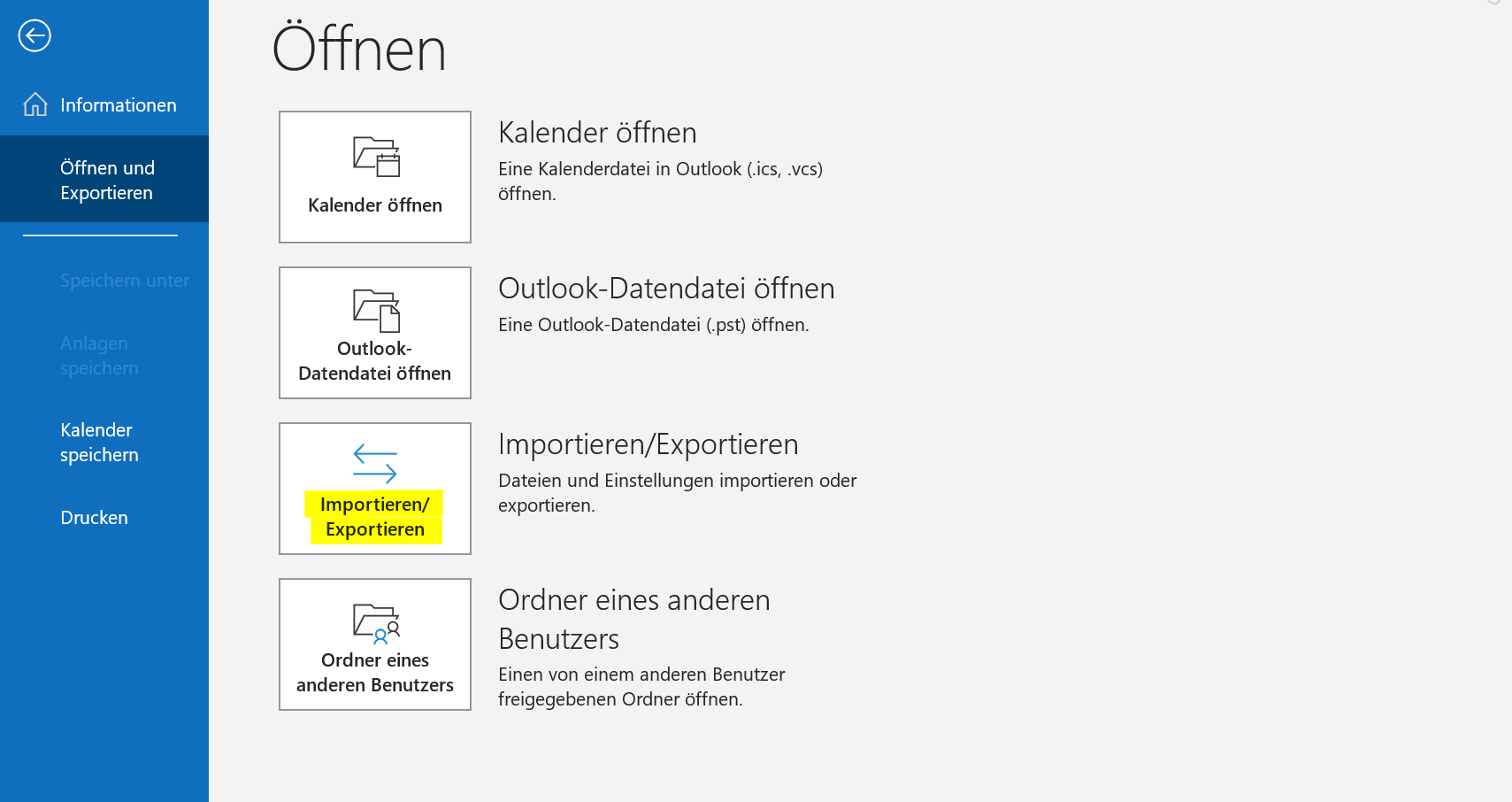
- Click “File” in the top left.
- Click “Open and Export“.
- Click “Import/Export“.
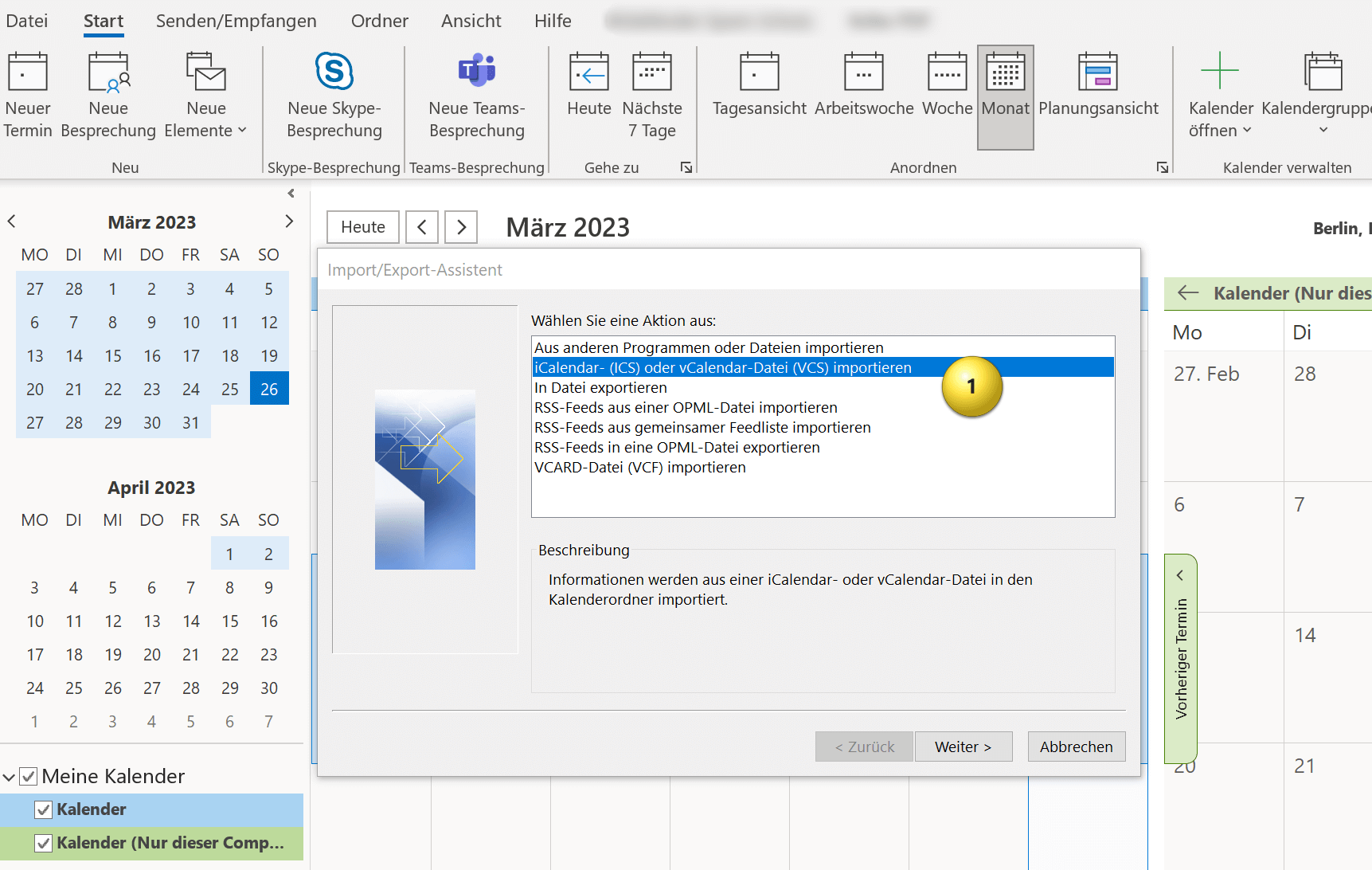
- In the Import and Export Wizard, select “Import an iCalendar (ICS) or vCalendar file (VCS)” and click Next.
Here you now have the option of integrating the Google calendar into your existing Outlook calendar or embedding it as an independent calendar. You have to decide for yourself what makes more sense. If you otherwise also work with several calendars, it makes sense to let the Google calendar run independently, otherwise it is more practical if you integrate the Google calendar into your existing one, so that appointment conflicts are easier to recognize.
see fig. (click to enlarge)

And that’s it. Your Google calendar has been successfully imported into Outlook and you can open the calendar and view all appointments and events in Outlook. Of course, your Outlook calendar will continue to be synchronized with Google calendar in the future.
You can import Google calendar to Outlook by following the steps below:
- Open your Google calendar in a web browser and click on the settings icon in the top right corner of the screen. It looks like a gear.
- Select “Settings” from the drop-down menu.
- Locate the calendar you want to import into Outlook and click the calendar name.
- Then click on “Integrate calendar“.
- Scroll down until you see the option “Home address in iCal format” and copy that address.
see fig. (click to enlarge)
- Create a text file on your computer and copy the address into it.
- Then save the file with any filename and the .ics extension. Use “All files” as the file type in the drop-down selection and please keep UTF-8 for the encoding.
- Save this file anywhere on your PC.
see fig. (click to enlarge)
- Open Outlook on your computer.
- Click “File” in the top left.
- Click “Open and Export“.
- Click “Import/Export“.
- In the Import and Export Wizard, select “Import an iCalendar (ICS) or vCalendar file (VCS)” and click Next.
Here you now have the option of integrating the Google calendar into your existing Outlook calendar or embedding it as an independent calendar. You have to decide for yourself what makes more sense. If you otherwise also work with several calendars, it makes sense to let the Google calendar run independently, otherwise it is more practical if you integrate the Google calendar into your existing one, so that appointment conflicts are easier to recognize.
see fig. (click to enlarge)
And that’s it. Your Google calendar has been successfully imported into Outlook and you can open the calendar and view all appointments and events in Outlook. Of course, your Outlook calendar will continue to be synchronized with Google calendar in the future.
Popular Posts:

5 simple security rules against phishing and spam that everyone should know
Deceptively authentic emails from your bank, DHL, or PayPal? That's phishing! Data theft and viruses are a daily threat. We'll show you 5 simple rules (2FA, password managers, etc.) to protect yourself immediately and effectively and help you spot scammers.

The 5 best tips for a clean folder structure on your PC and in the cloud
Say goodbye to file chaos! "Offer_final_v2.docx" is a thing of the past. Learn 5 simple tips for a perfect folder structure on your PC and in the cloud (OneDrive). With proper file naming and archive rules, you'll find everything instantly.

Never do the same thing again: How to record a macro in Excel
Tired of repetitive tasks in Excel? Learn how to create your first personal "magic button" with the macro recorder. Automate formatting and save hours – no programming required! Click here for easy instructions.
IMAP vs. Local Folders: The secret to your Outlook structure and why it matters
Do you know the difference between IMAP and local folders in Outlook? Incorrect use can lead to data loss! We'll explain simply what belongs where, how to clean up your mailbox, and how to archive emails securely and for the long term.

Der ultimative Effizienz-Boost: Wie Excel, Word und Outlook für Sie zusammenarbeiten
Schluss mit manuellem Kopieren! Lernen Sie, wie Sie Excel-Listen, Word-Vorlagen & Outlook verbinden, um personalisierte Serien-E-Mails automatisch zu versenden. Sparen Sie Zeit, vermeiden Sie Fehler und steigern Sie Ihre Effizienz. Hier geht's zur einfachen Anleitung!

Agentic AI: The next quantum leap in artificial intelligence?
Forget simple chatbots! Agentic AI is here: Autonomous AI that plans, learns, and solves complex tasks for you. Discover how AI agents will revolutionize the world of work and your everyday life. Are you ready for the future of artificial intelligence?
Offers 2024: Word & Excel Templates











Popular Posts:
5 simple security rules against phishing and spam that everyone should know
Deceptively authentic emails from your bank, DHL, or PayPal? That's phishing! Data theft and viruses are a daily threat. We'll show you 5 simple rules (2FA, password managers, etc.) to protect yourself immediately and effectively and help you spot scammers.
The 5 best tips for a clean folder structure on your PC and in the cloud
Say goodbye to file chaos! "Offer_final_v2.docx" is a thing of the past. Learn 5 simple tips for a perfect folder structure on your PC and in the cloud (OneDrive). With proper file naming and archive rules, you'll find everything instantly.
Never do the same thing again: How to record a macro in Excel
Tired of repetitive tasks in Excel? Learn how to create your first personal "magic button" with the macro recorder. Automate formatting and save hours – no programming required! Click here for easy instructions.
IMAP vs. Local Folders: The secret to your Outlook structure and why it matters
Do you know the difference between IMAP and local folders in Outlook? Incorrect use can lead to data loss! We'll explain simply what belongs where, how to clean up your mailbox, and how to archive emails securely and for the long term.
Der ultimative Effizienz-Boost: Wie Excel, Word und Outlook für Sie zusammenarbeiten
Schluss mit manuellem Kopieren! Lernen Sie, wie Sie Excel-Listen, Word-Vorlagen & Outlook verbinden, um personalisierte Serien-E-Mails automatisch zu versenden. Sparen Sie Zeit, vermeiden Sie Fehler und steigern Sie Ihre Effizienz. Hier geht's zur einfachen Anleitung!
Agentic AI: The next quantum leap in artificial intelligence?
Forget simple chatbots! Agentic AI is here: Autonomous AI that plans, learns, and solves complex tasks for you. Discover how AI agents will revolutionize the world of work and your everyday life. Are you ready for the future of artificial intelligence?
Offers 2024: Word & Excel Templates