
Microsoft Office gets fresher with a new design


After users were spared too big changes in the menu navigation thanks to the latest offshoot of the most popular office software with Microsoft Office 2019 in September 2018, and the focus was primarily on more functionality and networking, there should now be a refreshment for all Office versions.

Microsoft Office gets fresher with a new design
After users were spared too big changes in the menu navigation thanks to the latest offshoot of the most popular office software with Microsoft Office 2019 in September 2018, and the focus was primarily on more functionality and networking, there should now be a refreshment for all Office versions.
No more ribbon in Microsoft Office in the future
When Office 2003 was replaced by Office 2007, many users who could use Word, Excel & Co almost blindly – because they knew exactly where which function is located – had to get used to it when the menu ribbon was introduced to better categorize functional areas.
And of course at the beginning – as with almost everything that is new – there was a lot of criticism from the users. And now it’s time again that we all have to get used to it. Because the menu ribbon to which we have all got used falls victim to the red pen after 13 years, and should give way to a new, slimmer design. In the future, there will be a context-sensitive strip with buttons at the top of the screen, which changes depending on the work being carried out.
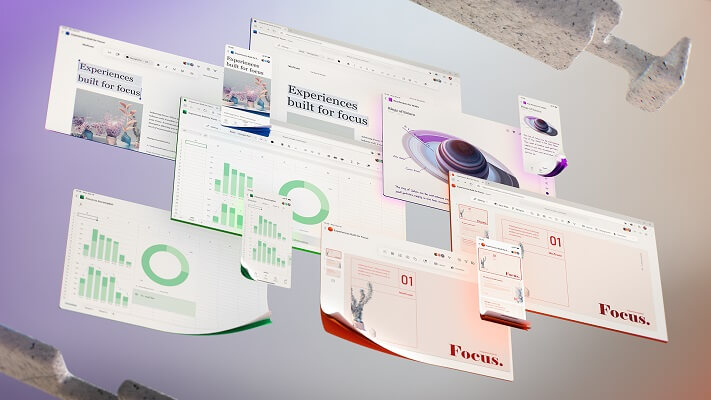
With this step, Microsoft would like to make it easier for users to work with the Office software through a tidier design, and to simplify the sometimes cluttered menu navigation. The focus should always be on the current work to be carried out. That this redesign is not just a visual gimmick for Microsoft, but really about improving the workflow with the office software is also noticeable because there is still no fixed date for the implementation with which everything is changed in one go becomes.
Rather, it is a project that is designed to be implemented in the long term. While some changes have already been tested, others are still in the testing phase to see whether changes really bring added value to users here, or only confuse them in the end. So it will take a while before all users will receive the new design. We think that (if Microsoft stays true to its cycle) the new design will be available to all users with the Office 2022 version at the latest.

No more ribbon in Microsoft Office in the future
When Office 2003 was replaced by Office 2007, many users who could use Word, Excel & Co almost blindly – because they knew exactly where which function is located – had to get used to it when the menu ribbon was introduced to better categorize functional areas.
And of course at the beginning – as with almost everything that is new – there was a lot of criticism from the users. And now it’s time again that we all have to get used to it. Because the menu ribbon to which we have all got used falls victim to the red pen after 13 years, and should give way to a new, slimmer design. In the future, there will be a context-sensitive strip with buttons at the top of the screen, which changes depending on the work being carried out.
With this step, Microsoft would like to make it easier for users to work with the Office software through a tidier design, and to simplify the sometimes cluttered menu navigation. The focus should always be on the current work to be carried out. That this redesign is not just a visual gimmick for Microsoft, but really about improving the workflow with the office software is also noticeable because there is still no fixed date for the implementation with which everything is changed in one go becomes.
Rather, it is a project that is designed to be implemented in the long term. While some changes have already been tested, others are still in the testing phase to see whether changes really bring added value to users here, or only confuse them in the end. So it will take a while before all users will receive the new design. We think that (if Microsoft stays true to its cycle) the new design will be available to all users with the Office 2022 version at the latest.
Popular Posts:

Format bachelor thesis in Word correctly
The review of the formatting of your bachelor thesis only makes sense after the proofreading and the plagiarism check.

This is how the Name Manager works in Excel
Calculate instead of numbers but just by name in Microsoft Excel, and make easier with the name manager's work.

That’s why a VPN is worthwhile for everyone
Cyber attacks on the Internet are on the rise, and freedom on the Internet is at risk. A VPN can provide a remedy.

Cloud Working – what is behind digital collaboration?
The Internet is constantly evolving and has a massive impact on the world of work. In order for employers and employees to remain competitive in the long term, they must adapt to changing circumstances and use new technologies for themselves.

How does Conditional Formatting work in Excel
Many times, you have certainly wished that certain contents of your Excel spreadsheet be highlighted a little bit more, so that they catch your eye at a glance.

Create dependent dropdown menus in Excel
In Excel, it may make sense to create a drop-down list that is based on a data source and also adapts dynamically instead of creating a very long list in rows or columns.
Offers 2024: Word & Excel Templates











Popular Posts:
Format bachelor thesis in Word correctly
The review of the formatting of your bachelor thesis only makes sense after the proofreading and the plagiarism check.
This is how the Name Manager works in Excel
Calculate instead of numbers but just by name in Microsoft Excel, and make easier with the name manager's work.
That’s why a VPN is worthwhile for everyone
Cyber attacks on the Internet are on the rise, and freedom on the Internet is at risk. A VPN can provide a remedy.
Cloud Working – what is behind digital collaboration?
The Internet is constantly evolving and has a massive impact on the world of work. In order for employers and employees to remain competitive in the long term, they must adapt to changing circumstances and use new technologies for themselves.
How does Conditional Formatting work in Excel
Many times, you have certainly wished that certain contents of your Excel spreadsheet be highlighted a little bit more, so that they catch your eye at a glance.
Create dependent dropdown menus in Excel
In Excel, it may make sense to create a drop-down list that is based on a data source and also adapts dynamically instead of creating a very long list in rows or columns.
Offers 2024: Word & Excel Templates















