More fonts in Word through Google Fonts


As long as you are limited to writing texts when working with Word, you will probably never have thought that it would be convenient to have more fonts in your luggage. But as soon as you start to use the potential of Word really, and thus also create flyers and business cards, invitations and the like, there is more of a desire to expand the portfolio.
You can find out how to expand the font selection in Word with just a few steps and above all free in our article
More fonts in Word through Google Fonts
As long as you are limited to writing texts when working with Word, you will probably never have thought that it would be convenient to have more fonts in your luggage. But as soon as you start to use the potential of Word really, and thus also create flyers and business cards, invitations and the like, there is more of a desire to expand the portfolio.
You can find out how to expand the font selection in Word with just a few steps and above all free in our article
1. Go to Google Fonts
1. Go to Google Fonts
First, go to https://fonts.google.com
Here you will first find a large selection of available fonts, which of course can be filtered according to either specific criteria, or (if you already know the name of a desired font) can be searched directly.
You can add them to your download list via the small + symbol to the right of each font.
See picture: (click to enlarge)

First, go to https://fonts.google.com
Here you will first find a large selection of available fonts, which of course can be filtered according to either specific criteria, or (if you already know the name of a desired font) can be searched directly.
You can add them to your download list via the small + symbol to the right of each font.
See picture:
2. Customize and download font
2. Customize and download font
In the next step, you can directly copy out the HTML or CSS shortcodes in order to insert them on a web page, for example.
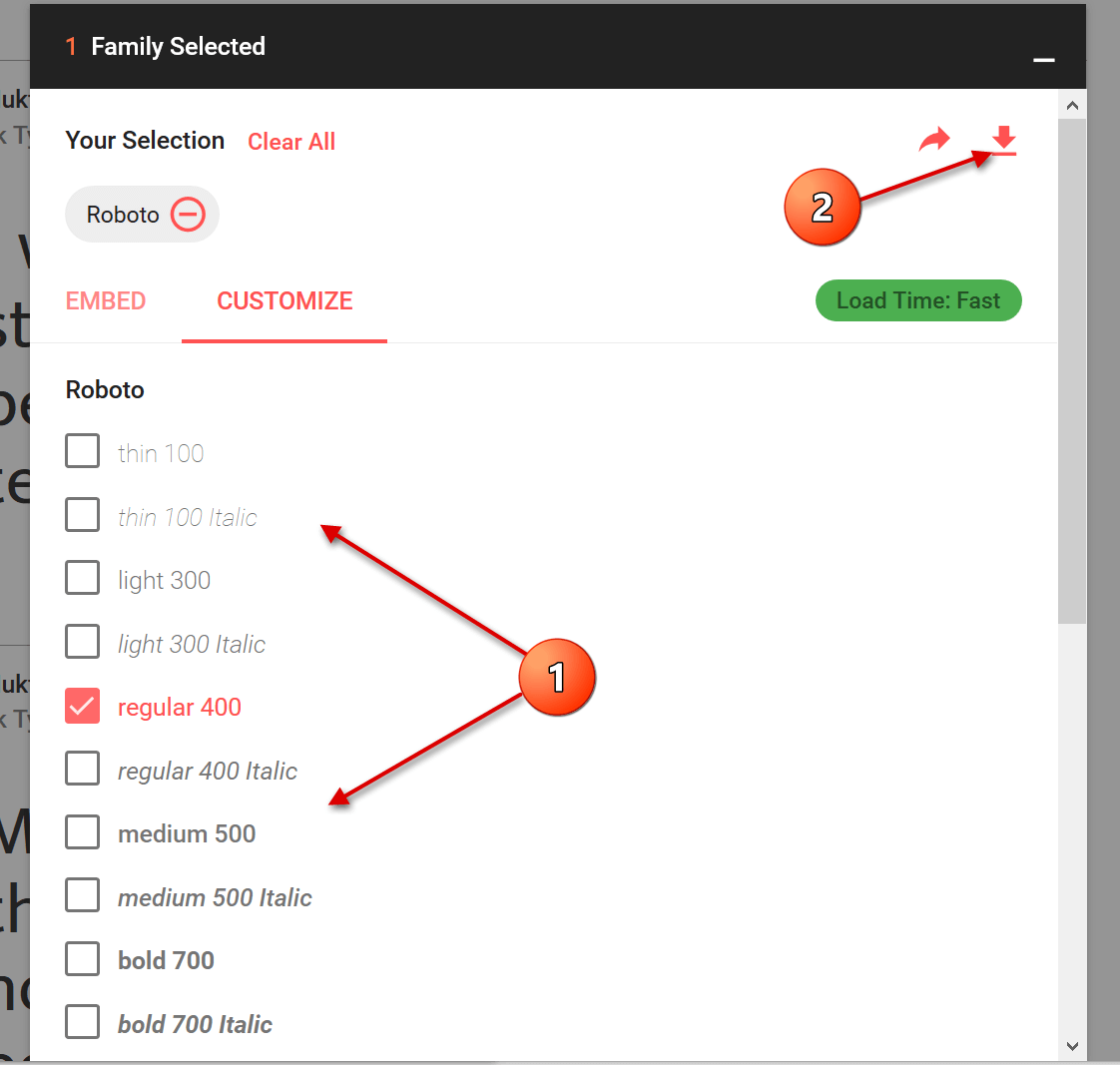
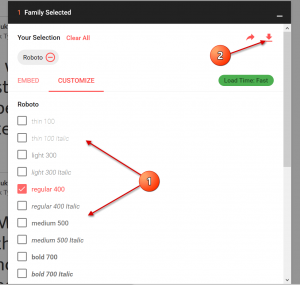
For the implementation in Word you do not need this, but you can go straight to the tab “Customize”, where you can select the desired font size and download it directly.
See picture: (click to enlarge)
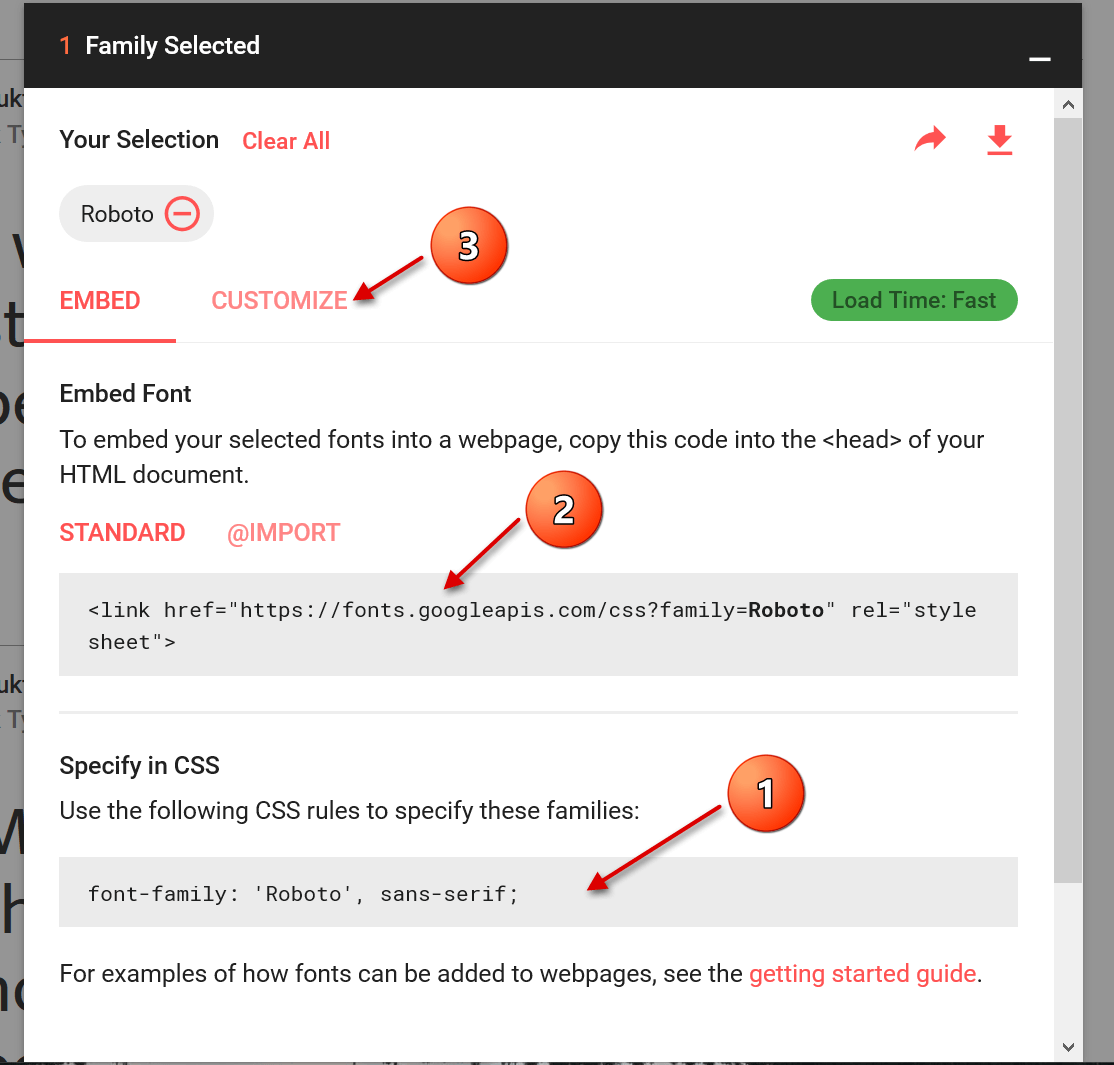
In the next step, you can directly copy out the HTML or CSS shortcodes in order to insert them on a web page, for example.
For the implementation in Word you do not need this, but you can go straight to the tab “Customize”, where you can select the desired font size and download it directly.
See picture: (click to enlarge)
3. Install font
3. Install font
The last step we need to take now is the simplest of them all.
After you have downloaded the zip file, it is best unpacked in a folder specially created for the respective font.
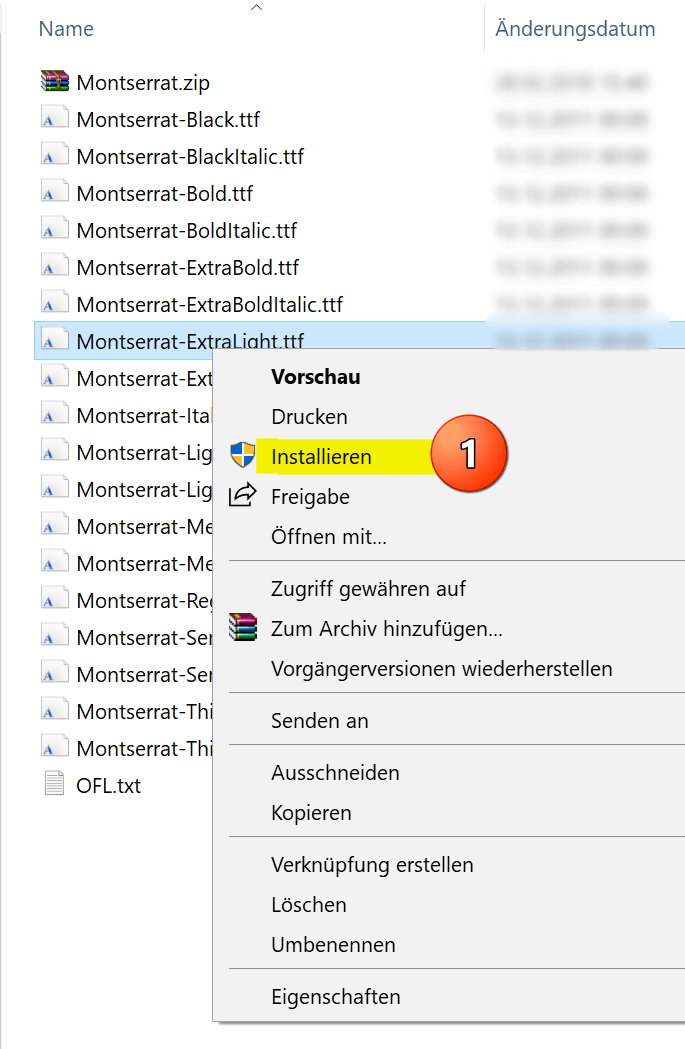
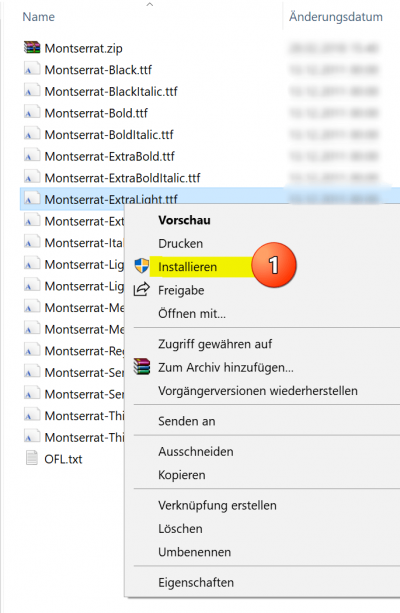
Here all font sizes are displayed, and can be easily installed by right-clicking on the appropriate file.
See picture: (click to enlarge)

The big advantage of this type of installation is that you have not only expanded the font selection in Word, but in all Microsoft Office applications.
What does this mean the fonts are also available in: Outlook, Excel, Powerpoint, etc.

The last step we need to take now is the simplest of them all.
After you have downloaded the zip file, it is best unpacked in a folder specially created for the respective font.
Here all font sizes are displayed, and can be easily installed by right-clicking on the appropriate file.
See picture:
The big advantage of this type of installation is that you have not only expanded the font selection in Word, but in all Microsoft Office applications.
What does this mean the fonts are also available in: Outlook, Excel, Powerpoint, etc.
Popular Posts:

So sieht das wirklich perfekte Homeoffice-Setup für 2026 aus
Ihr Homeoffice ist veraltet? Steigern Sie 2026 Produktivität & Gesundheit. Unser Guide zeigt das perfekte Setup: von ergonomischen Stühlen und 4K-Webcams bis zu Mesh-WLAN und Kabelmanagement. So investieren Sie in Ihre Karriere.
Internet, Telefon & TV: Die besten Komplettpakete
Internet, TV & Telefon aus einer Hand? Wir vergleichen die Komplettpakete von Telekom, Vodafone, O2 & 1&1. Wer punktet bei Speed, TV-Komfort (MagentaTV vs. GigaTV) und Preis? So finden Sie das beste Triple-Play-Angebot für Ihre Adresse.

5 Anzeichen, dass dein Chef dich im Homeoffice digital überwacht
Nur weil du im Homeoffice bist, heißt das nicht, dass dir niemand zusieht. "Bossware" ist auf dem Vormarsch. Wir zeigen 5 subtile Anzeichen für digitale Überwachung – von "Teams-Status"-Kult bis zu verdächtigen IT-Tools. So erkennst du die Warnsignale und schützt deine Karriere.

Schluss mit dem Tool-Chaos: 5 Apps, die Euer Office wirklich produktiver machen
Schluss mit digitaler Reibung: Diese 5 Apps machen Ihr Büro wirklich produktiver. Entdecken Sie, wie Asana, Loom, Notion, Zapier und Slack die Effizienz steigern, Meetings reduzieren und Ihr Team smarter vernetzen – wenn man sie richtig einsetzt.

AI in everyday office life: Your new invisible colleague
AI won't replace you – but those who use it will have a competitive edge. Make AI your co-pilot in the office! We'll show you four concrete hacks for faster emails, better meeting notes, and solved Excel problems. Get started today, no IT degree required.

Fünf vor Zwölf: Wie Sie erkennen, dass Sie kurz vor dem Burnout stehen
Erschöpfung ist normal, doch wenn das Wochenende keine Erholung mehr bringt und Zynismus die Motivation ersetzt, stehen Sie kurz vor dem Burnout. Erfahren Sie, welche 7 Warnsignale Sie niemals ignorieren dürfen und warum es jetzt lebenswichtig ist, die Notbremse zu ziehen
Offers 2024: Word & Excel Templates











Popular Posts:
So sieht das wirklich perfekte Homeoffice-Setup für 2026 aus
Ihr Homeoffice ist veraltet? Steigern Sie 2026 Produktivität & Gesundheit. Unser Guide zeigt das perfekte Setup: von ergonomischen Stühlen und 4K-Webcams bis zu Mesh-WLAN und Kabelmanagement. So investieren Sie in Ihre Karriere.
Internet, Telefon & TV: Die besten Komplettpakete
Internet, TV & Telefon aus einer Hand? Wir vergleichen die Komplettpakete von Telekom, Vodafone, O2 & 1&1. Wer punktet bei Speed, TV-Komfort (MagentaTV vs. GigaTV) und Preis? So finden Sie das beste Triple-Play-Angebot für Ihre Adresse.
5 Anzeichen, dass dein Chef dich im Homeoffice digital überwacht
Nur weil du im Homeoffice bist, heißt das nicht, dass dir niemand zusieht. "Bossware" ist auf dem Vormarsch. Wir zeigen 5 subtile Anzeichen für digitale Überwachung – von "Teams-Status"-Kult bis zu verdächtigen IT-Tools. So erkennst du die Warnsignale und schützt deine Karriere.
Schluss mit dem Tool-Chaos: 5 Apps, die Euer Office wirklich produktiver machen
Schluss mit digitaler Reibung: Diese 5 Apps machen Ihr Büro wirklich produktiver. Entdecken Sie, wie Asana, Loom, Notion, Zapier und Slack die Effizienz steigern, Meetings reduzieren und Ihr Team smarter vernetzen – wenn man sie richtig einsetzt.
AI in everyday office life: Your new invisible colleague
AI won't replace you – but those who use it will have a competitive edge. Make AI your co-pilot in the office! We'll show you four concrete hacks for faster emails, better meeting notes, and solved Excel problems. Get started today, no IT degree required.
Fünf vor Zwölf: Wie Sie erkennen, dass Sie kurz vor dem Burnout stehen
Erschöpfung ist normal, doch wenn das Wochenende keine Erholung mehr bringt und Zynismus die Motivation ersetzt, stehen Sie kurz vor dem Burnout. Erfahren Sie, welche 7 Warnsignale Sie niemals ignorieren dürfen und warum es jetzt lebenswichtig ist, die Notbremse zu ziehen
Offers 2024: Word & Excel Templates