

Google Bookmarks will be discontinued – Export bookmarks


Google Bookmarks is one of the oldest Google products and has been a popular tool with users since 2005. However, the number of users has continued to decline over the years. The younger generation hardly knows this feature any more, and accordingly does not use it. And when a product is no longer in demand, it is time to put its raison d’être to the test.

Google Bookmarks will be discontinued – Export bookmarks
Google Bookmarks is one of the oldest Google products and has been a popular tool with users since 2005. However, the number of users has continued to decline over the years. The younger generation hardly knows this feature any more, and accordingly does not use it. And when a product is no longer in demand, it is time to put its raison d’être to the test.
When will Google Bookmarks be discontinued & how do i export the bookmarks?
Actually, it is a bit of a shame that the Google Bookmarks will no longer be available from September 30, 2021, because you could not only save the bookmarks in the cloud and always have them ready, but you could also tag them to categorize them to a certain extent and to be able to find them more easily using the search function.
If you want to export Google’s bookmarks, you can do this very easily:
- Log into your Google account under which you also use the Google bookmarks.
- Go to the Google Bookmarks page.
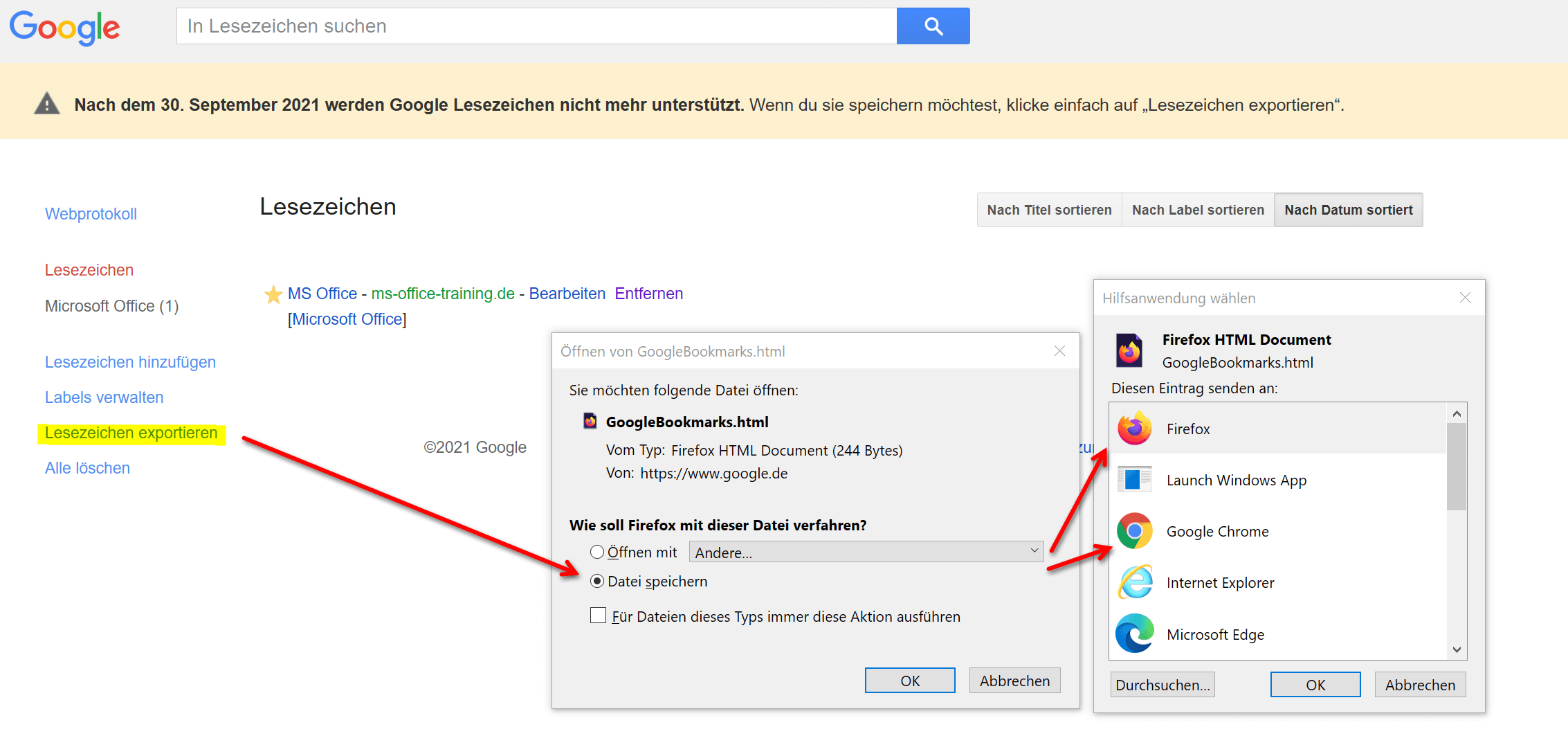
- Click Export Bookmarks in the menu on the left.
- Select the export method.
Here you have the option of either downloading the bookmarks separately as an HTML document, or you can make it even more convenient and choose which browser the bookmarks should be automatically exported to. However, even if you choose automatic integration in the browser, we recommend that you load the file again separately and save it. Because the bookmarks are often older and not so easy to find again. Then at least you have a backup of it.
See fig. (Click to enlarge)

Some may now wonder whether the favorites in Google Maps will also be affected by the discontinuation of the service. Fortunately, the all-clear can be given here, because the favorite locations that were linked by the connection of Google Bookmarks in Google Maps are retained even after the service has been discontinued.
We believe that this message will be a reason for many to click through your old bookmarks that you have set at some point and see which websites are still online and whether they have moved with the times ( HTTPS, Responsive Design, etc.) or whether you feel like you have stepped back in time.

When will Google Bookmarks be discontinued & how do i export the bookmarks?
Actually, it is a bit of a shame that the Google Bookmarks will no longer be available from September 30, 2021, because you could not only save the bookmarks in the cloud and always have them ready, but you could also tag them to categorize them to a certain extent and to be able to find them more easily using the search function.
If you want to export Google’s bookmarks, you can do this very easily:
- Log into your Google account under which you also use the Google bookmarks.
- Go to the Google Bookmarks page.
- Click Export Bookmarks in the menu on the left.
- Select the export method.
Here you have the option of either downloading the bookmarks separately as an HTML document, or you can make it even more convenient and choose which browser the bookmarks should be automatically exported to. However, even if you choose automatic integration in the browser, we recommend that you load the file again separately and save it. Because the bookmarks are often older and not so easy to find again. Then at least you have a backup of it.
See fig. (Click to enlarge)
Some may now wonder whether the favorites in Google Maps will also be affected by the discontinuation of the service. Fortunately, the all-clear can be given here, because the favorite locations that were linked by the connection of Google Bookmarks in Google Maps are retained even after the service has been discontinued.
We believe that this message will be a reason for many to click through your old bookmarks that you have set at some point and see which websites are still online and whether they have moved with the times ( HTTPS, Responsive Design, etc.) or whether you feel like you have stepped back in time.
Popular Posts:

Dynamic ranges in Excel: OFFSET function
The OFFSET function in Excel creates a flexible reference. Instead of fixing =SUM(B5:B7), the function finds the range itself, e.g., for the "last 3 months". Ideal for dynamic charts or dashboards that grow automatically.

Mastering the INDIRECT function in Excel
The INDIRECT function in Excel converts text into a real reference. Instead of manually typing =January!E10, use =INDIRECT(A2 & "!E10"), where A2 contains 'January'. This allows you to easily create dynamic summaries for multiple worksheets.

From assistant to agent: Microsoft’s Copilot
Copilot is growing up: Microsoft's AI is no longer an assistant, but a proactive agent. With "Vision," it sees your Windows desktop; in M365, it analyzes data as a "Researcher"; and in GitHub, it autonomously corrects code. The biggest update yet.

Windows 12: Where is it? The current status in October 2025
Everyone was waiting for Windows 12 in October 2025, but it didn't arrive. Instead, Microsoft is focusing on Windows 11 25H2 and "Copilot+ PC" features. We'll explain: Is Windows 12 canceled, postponed, or is it already available as an AI update for Windows 11?

Blocking websites on Windows using the hosts file
Want to block unwanted websites in Windows? You can do it without extra software using the hosts file. We'll show you how to edit the file as an administrator and redirect domains like example.de to 127.0.0.1. This will block them immediately in all browsers.

The “Zero Inbox” method with Outlook: How to permanently get your mailbox under control.
Caught red-handed? Your Outlook inbox has 1000+ emails? That's pure stress. Stop the email deluge with the "Zero Inbox" method. We'll show you how to clean up your inbox and regain control using Quick Steps and rules.
Offers 2024: Word & Excel Templates











Popular Posts:
Dynamic ranges in Excel: OFFSET function
The OFFSET function in Excel creates a flexible reference. Instead of fixing =SUM(B5:B7), the function finds the range itself, e.g., for the "last 3 months". Ideal for dynamic charts or dashboards that grow automatically.
Mastering the INDIRECT function in Excel
The INDIRECT function in Excel converts text into a real reference. Instead of manually typing =January!E10, use =INDIRECT(A2 & "!E10"), where A2 contains 'January'. This allows you to easily create dynamic summaries for multiple worksheets.
From assistant to agent: Microsoft’s Copilot
Copilot is growing up: Microsoft's AI is no longer an assistant, but a proactive agent. With "Vision," it sees your Windows desktop; in M365, it analyzes data as a "Researcher"; and in GitHub, it autonomously corrects code. The biggest update yet.
Windows 12: Where is it? The current status in October 2025
Everyone was waiting for Windows 12 in October 2025, but it didn't arrive. Instead, Microsoft is focusing on Windows 11 25H2 and "Copilot+ PC" features. We'll explain: Is Windows 12 canceled, postponed, or is it already available as an AI update for Windows 11?
Blocking websites on Windows using the hosts file
Want to block unwanted websites in Windows? You can do it without extra software using the hosts file. We'll show you how to edit the file as an administrator and redirect domains like example.de to 127.0.0.1. This will block them immediately in all browsers.
The “Zero Inbox” method with Outlook: How to permanently get your mailbox under control.
Caught red-handed? Your Outlook inbox has 1000+ emails? That's pure stress. Stop the email deluge with the "Zero Inbox" method. We'll show you how to clean up your inbox and regain control using Quick Steps and rules.
Offers 2024: Word & Excel Templates

























