Create distribution lists in Outlook


The longer you work with Outlook, the greater will be your contact list over time.
Therefore, it can be quite useful to organize the contacts into groups so that you do not have to select them individually for emails with multiple recipients, but instead use a recipient group instead.
How to create and edit distribution lists in Microsoft Outlook 2016/2019 can be found in our article.

Create distribution lists in Outlook
The longer you work with Outlook, the greater will be your contact list over time.
Therefore, it can be quite useful to organize the contacts into groups so that you do not have to select them individually for emails with multiple recipients, but instead use a recipient group instead.
How to create and edit distribution lists in Microsoft Outlook 2016/2019 can be found in our article.
1. Create a new distribution list
1. Create a new distribution list
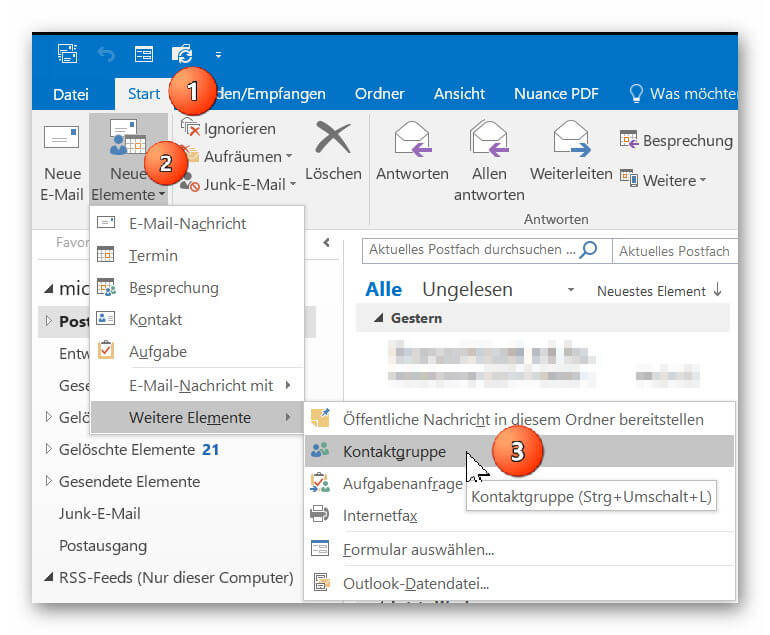
In Outlook go to “Start” tab on “New Items” – “More Items”
there to “contact group” and add a new contact group to your address book.
Next, give your new contact group a name (for example, family, friends, colleagues, etc.)
See picture: (click to enlarge)

In Outlook go to “Start” tab on “New Items” – “More Items”
there to “contact group” and add a new contact group to your address book.
Next, give your new contact group a name (for example, family, friends, colleagues, etc.)
See picture: (click to enlarge)
2. Add contacts to distribution list
2. Add contacts to distribution list
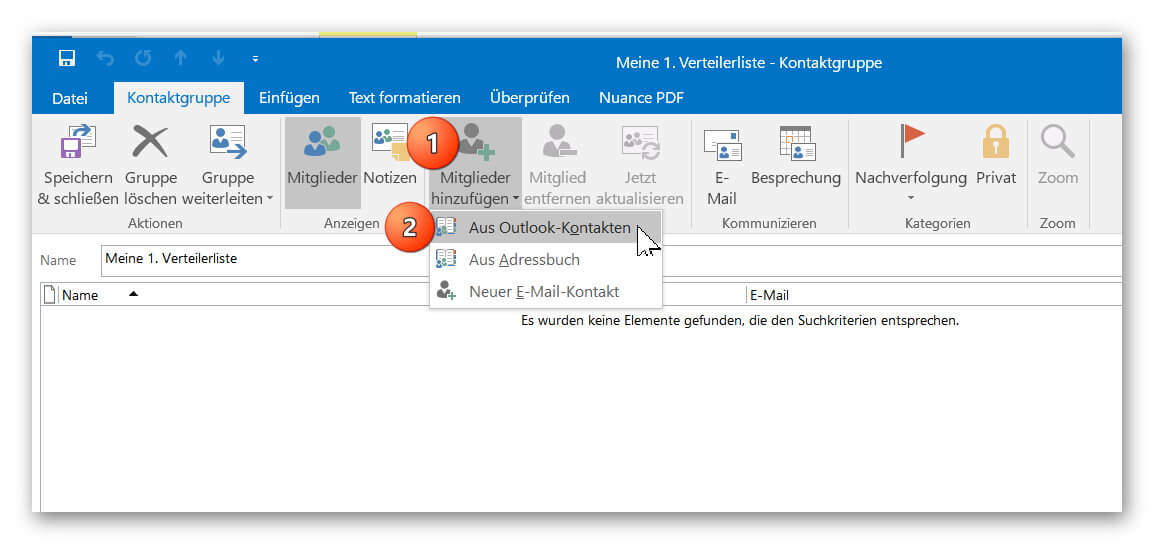
You can now add your contacts from your existing Outlook contacts to your distribution list or create new contacts.
If you should miss some entries in your address book, check if several address books have been created, and then select the missing entries by double-clicking on them.
See picture: (click to enlarge)
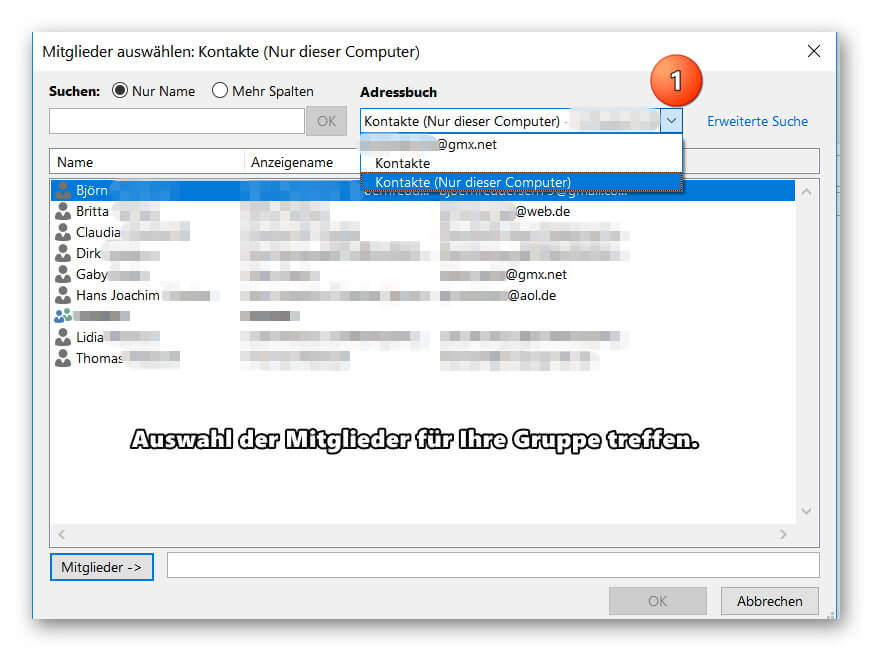
You can now add your contacts from your existing Outlook contacts to your distribution list or create new contacts.
If you should miss some entries in your address book, check if several address books have been created, and then select the missing entries by double-clicking on them.
See picture: (click to enlarge)
3. Send e-mail to distribution list in Outlook
3. Send e-mail to distribution list in Outlook
After you have successfully created your distribution list, you will now find it as additional entries in your address book.
Of course, the contacts contained in the group will continue to be displayed as individual entries so that you can always select them specifically as e-mail recipients.
To send an e-mail to one of your distribution lists, simply click on “New E-mail” as usual and double-click on your contact group in the address book.
To check the distribution list again before sending it for security, you can double-click it when selecting it directly in the address book, and if necessary add or remove other members to the list.
See picture: (click to enlarge)
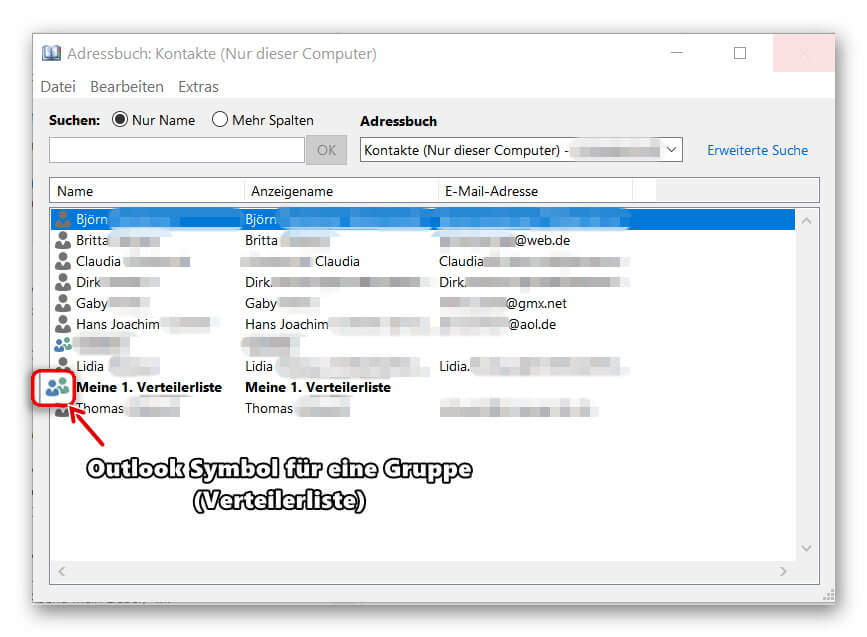

After you have successfully created your distribution list, you will now find it as additional entries in your address book.
Of course, the contacts contained in the group will continue to be displayed as individual entries so that you can always select them specifically as e-mail recipients.
To send an e-mail to one of your distribution lists, simply click on “New E-mail” as usual and double-click on your contact group in the address book.
To check the distribution list again before sending it for security, you can double-click it when selecting it directly in the address book, and if necessary add or remove other members to the list.
See picture: (click to enlarge)
Popular Posts:

Die Renaissance des Büros: Warum Präsenz manchmal unschlagbar ist
Homeoffice bietet Fokus, doch das Büro bleibt als sozialer Anker unverzichtbar. Spontane Innovation, direktes Voneinander-Lernen und echtes Wir-Gefühl sind digital kaum zu ersetzen. Lesen Sie, warum Präsenz oft besser ist und wie die ideale Mischung für moderne Teams aussieht.

New Work & Moderne Karriere: Warum die Karriereleiter ausgedient hat
Die klassische Karriereleiter hat ausgedient. New Work fordert ein neues Denken: Skills statt Titel, Netzwerk statt Hierarchie. Erfahre, warum das "Karriere-Klettergerüst" deine neue Realität ist und wie du dich mit 4 konkreten Schritten zukunftssicher aufstellst.

Die Homeoffice-Falle: Warum unsichtbare Arbeit deine Beförderung gefährdet
Produktiv im Homeoffice, doch befördert wird der Kollege im Büro? Willkommen in der Homeoffice-Falle. "Proximity Bias" lässt deine Leistung oft unsichtbar werden. Lerne 4 Strategien, wie du auch remote sichtbar bleibst und deine Karriere sicherst – ganz ohne Wichtigtuerei.

Microsoft Loop in Teams: The revolution of your notes?
What exactly are these Loop components in Microsoft Teams? We'll show you how these "living mini-documents" can accelerate your teamwork. From dynamic agendas to shared, real-time checklists – discover practical use cases for your everyday work.

Career booster 2026: These Microsoft Office skills will take you further!
A new year, new career opportunities! But which Office skills will really be in demand in 2026? "Skilled use" is no longer enough. We'll show you today's must-haves – like advanced Excel, using AI in the office, and relevant certifications for your resume.

Why Zero Trust doesn’t work without identity protection!
Zero Trust means: Trust no one, verify everyone. Identity protection is at the heart of this modern security model. Learn how IAM, MFA, Conditional Access, and the principle of least privilege effectively protect your business when the old network perimeter is gone.
Offers 2024: Word & Excel Templates











Popular Posts:
Die Renaissance des Büros: Warum Präsenz manchmal unschlagbar ist
Homeoffice bietet Fokus, doch das Büro bleibt als sozialer Anker unverzichtbar. Spontane Innovation, direktes Voneinander-Lernen und echtes Wir-Gefühl sind digital kaum zu ersetzen. Lesen Sie, warum Präsenz oft besser ist und wie die ideale Mischung für moderne Teams aussieht.
New Work & Moderne Karriere: Warum die Karriereleiter ausgedient hat
Die klassische Karriereleiter hat ausgedient. New Work fordert ein neues Denken: Skills statt Titel, Netzwerk statt Hierarchie. Erfahre, warum das "Karriere-Klettergerüst" deine neue Realität ist und wie du dich mit 4 konkreten Schritten zukunftssicher aufstellst.
Die Homeoffice-Falle: Warum unsichtbare Arbeit deine Beförderung gefährdet
Produktiv im Homeoffice, doch befördert wird der Kollege im Büro? Willkommen in der Homeoffice-Falle. "Proximity Bias" lässt deine Leistung oft unsichtbar werden. Lerne 4 Strategien, wie du auch remote sichtbar bleibst und deine Karriere sicherst – ganz ohne Wichtigtuerei.
Microsoft Loop in Teams: The revolution of your notes?
What exactly are these Loop components in Microsoft Teams? We'll show you how these "living mini-documents" can accelerate your teamwork. From dynamic agendas to shared, real-time checklists – discover practical use cases for your everyday work.
Career booster 2026: These Microsoft Office skills will take you further!
A new year, new career opportunities! But which Office skills will really be in demand in 2026? "Skilled use" is no longer enough. We'll show you today's must-haves – like advanced Excel, using AI in the office, and relevant certifications for your resume.
Why Zero Trust doesn’t work without identity protection!
Zero Trust means: Trust no one, verify everyone. Identity protection is at the heart of this modern security model. Learn how IAM, MFA, Conditional Access, and the principle of least privilege effectively protect your business when the old network perimeter is gone.
Offers 2024: Word & Excel Templates