Create distribution lists in Outlook


The longer you work with Outlook, the greater will be your contact list over time.
Therefore, it can be quite useful to organize the contacts into groups so that you do not have to select them individually for emails with multiple recipients, but instead use a recipient group instead.
How to create and edit distribution lists in Microsoft Outlook 2016/2019 can be found in our article.
Create distribution lists in Outlook
The longer you work with Outlook, the greater will be your contact list over time.
Therefore, it can be quite useful to organize the contacts into groups so that you do not have to select them individually for emails with multiple recipients, but instead use a recipient group instead.
How to create and edit distribution lists in Microsoft Outlook 2016/2019 can be found in our article.
1. Create a new distribution list
1. Create a new distribution list
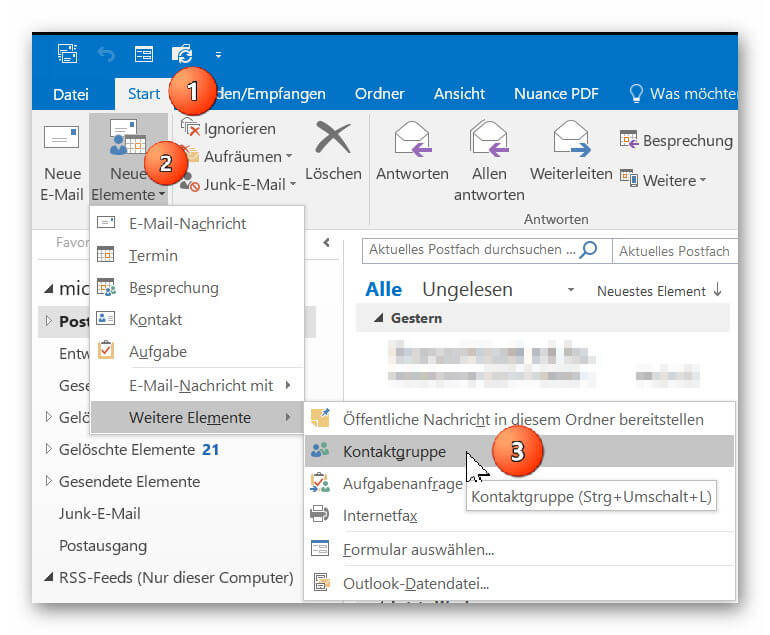
In Outlook go to “Start” tab on “New Items” – “More Items”
there to “contact group” and add a new contact group to your address book.
Next, give your new contact group a name (for example, family, friends, colleagues, etc.)
See picture: (click to enlarge)

In Outlook go to “Start” tab on “New Items” – “More Items”
there to “contact group” and add a new contact group to your address book.
Next, give your new contact group a name (for example, family, friends, colleagues, etc.)
See picture: (click to enlarge)
2. Add contacts to distribution list
2. Add contacts to distribution list
You can now add your contacts from your existing Outlook contacts to your distribution list or create new contacts.
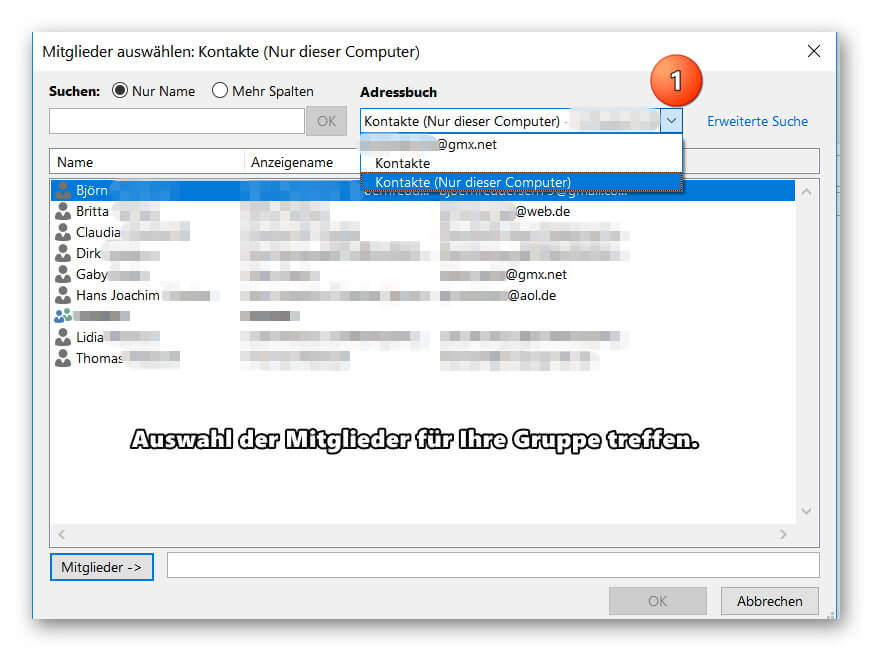
If you should miss some entries in your address book, check if several address books have been created, and then select the missing entries by double-clicking on them.
See picture: (click to enlarge)
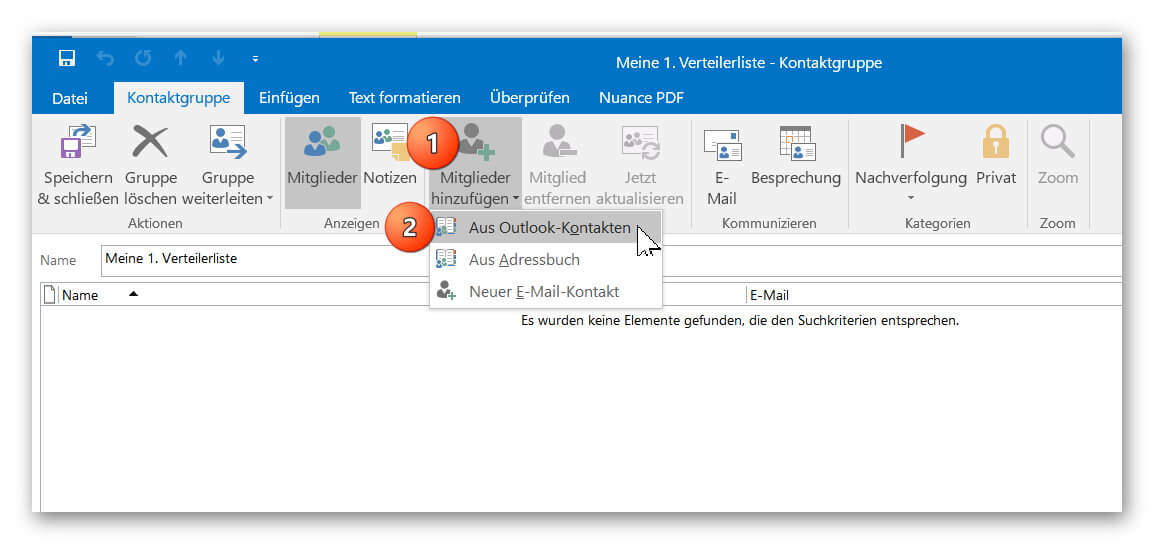
You can now add your contacts from your existing Outlook contacts to your distribution list or create new contacts.
If you should miss some entries in your address book, check if several address books have been created, and then select the missing entries by double-clicking on them.
See picture: (click to enlarge)
3. Send e-mail to distribution list in Outlook
3. Send e-mail to distribution list in Outlook
After you have successfully created your distribution list, you will now find it as additional entries in your address book.
Of course, the contacts contained in the group will continue to be displayed as individual entries so that you can always select them specifically as e-mail recipients.
To send an e-mail to one of your distribution lists, simply click on “New E-mail” as usual and double-click on your contact group in the address book.
To check the distribution list again before sending it for security, you can double-click it when selecting it directly in the address book, and if necessary add or remove other members to the list.
See picture: (click to enlarge)
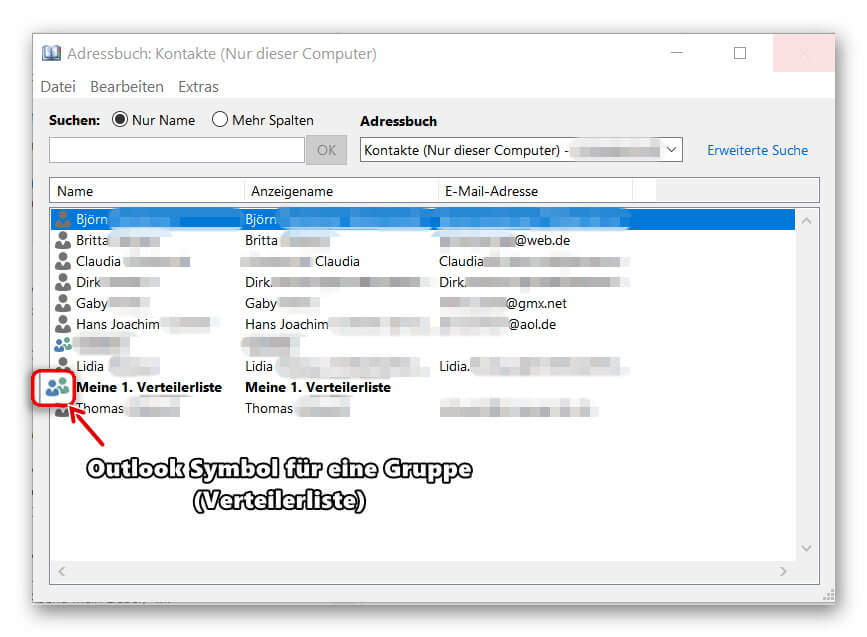

After you have successfully created your distribution list, you will now find it as additional entries in your address book.
Of course, the contacts contained in the group will continue to be displayed as individual entries so that you can always select them specifically as e-mail recipients.
To send an e-mail to one of your distribution lists, simply click on “New E-mail” as usual and double-click on your contact group in the address book.
To check the distribution list again before sending it for security, you can double-click it when selecting it directly in the address book, and if necessary add or remove other members to the list.
See picture: (click to enlarge)
Popular Posts:

So sieht das wirklich perfekte Homeoffice-Setup für 2026 aus
Ihr Homeoffice ist veraltet? Steigern Sie 2026 Produktivität & Gesundheit. Unser Guide zeigt das perfekte Setup: von ergonomischen Stühlen und 4K-Webcams bis zu Mesh-WLAN und Kabelmanagement. So investieren Sie in Ihre Karriere.

Internet, Telefon & TV: Die besten Komplettpakete
Internet, TV & Telefon aus einer Hand? Wir vergleichen die Komplettpakete von Telekom, Vodafone, O2 & 1&1. Wer punktet bei Speed, TV-Komfort (MagentaTV vs. GigaTV) und Preis? So finden Sie das beste Triple-Play-Angebot für Ihre Adresse.

5 Anzeichen, dass dein Chef dich im Homeoffice digital überwacht
Nur weil du im Homeoffice bist, heißt das nicht, dass dir niemand zusieht. "Bossware" ist auf dem Vormarsch. Wir zeigen 5 subtile Anzeichen für digitale Überwachung – von "Teams-Status"-Kult bis zu verdächtigen IT-Tools. So erkennst du die Warnsignale und schützt deine Karriere.

Schluss mit dem Tool-Chaos: 5 Apps, die Euer Office wirklich produktiver machen
Schluss mit digitaler Reibung: Diese 5 Apps machen Ihr Büro wirklich produktiver. Entdecken Sie, wie Asana, Loom, Notion, Zapier und Slack die Effizienz steigern, Meetings reduzieren und Ihr Team smarter vernetzen – wenn man sie richtig einsetzt.

AI in everyday office life: Your new invisible colleague
AI won't replace you – but those who use it will have a competitive edge. Make AI your co-pilot in the office! We'll show you four concrete hacks for faster emails, better meeting notes, and solved Excel problems. Get started today, no IT degree required.

Fünf vor Zwölf: Wie Sie erkennen, dass Sie kurz vor dem Burnout stehen
Erschöpfung ist normal, doch wenn das Wochenende keine Erholung mehr bringt und Zynismus die Motivation ersetzt, stehen Sie kurz vor dem Burnout. Erfahren Sie, welche 7 Warnsignale Sie niemals ignorieren dürfen und warum es jetzt lebenswichtig ist, die Notbremse zu ziehen
Offers 2024: Word & Excel Templates











Popular Posts:
So sieht das wirklich perfekte Homeoffice-Setup für 2026 aus
Ihr Homeoffice ist veraltet? Steigern Sie 2026 Produktivität & Gesundheit. Unser Guide zeigt das perfekte Setup: von ergonomischen Stühlen und 4K-Webcams bis zu Mesh-WLAN und Kabelmanagement. So investieren Sie in Ihre Karriere.
Internet, Telefon & TV: Die besten Komplettpakete
Internet, TV & Telefon aus einer Hand? Wir vergleichen die Komplettpakete von Telekom, Vodafone, O2 & 1&1. Wer punktet bei Speed, TV-Komfort (MagentaTV vs. GigaTV) und Preis? So finden Sie das beste Triple-Play-Angebot für Ihre Adresse.
5 Anzeichen, dass dein Chef dich im Homeoffice digital überwacht
Nur weil du im Homeoffice bist, heißt das nicht, dass dir niemand zusieht. "Bossware" ist auf dem Vormarsch. Wir zeigen 5 subtile Anzeichen für digitale Überwachung – von "Teams-Status"-Kult bis zu verdächtigen IT-Tools. So erkennst du die Warnsignale und schützt deine Karriere.
Schluss mit dem Tool-Chaos: 5 Apps, die Euer Office wirklich produktiver machen
Schluss mit digitaler Reibung: Diese 5 Apps machen Ihr Büro wirklich produktiver. Entdecken Sie, wie Asana, Loom, Notion, Zapier und Slack die Effizienz steigern, Meetings reduzieren und Ihr Team smarter vernetzen – wenn man sie richtig einsetzt.
AI in everyday office life: Your new invisible colleague
AI won't replace you – but those who use it will have a competitive edge. Make AI your co-pilot in the office! We'll show you four concrete hacks for faster emails, better meeting notes, and solved Excel problems. Get started today, no IT degree required.
Fünf vor Zwölf: Wie Sie erkennen, dass Sie kurz vor dem Burnout stehen
Erschöpfung ist normal, doch wenn das Wochenende keine Erholung mehr bringt und Zynismus die Motivation ersetzt, stehen Sie kurz vor dem Burnout. Erfahren Sie, welche 7 Warnsignale Sie niemals ignorieren dürfen und warum es jetzt lebenswichtig ist, die Notbremse zu ziehen
Offers 2024: Word & Excel Templates