

4K Fire TV Stick MAX with 40% more power


The streaming sticks from Amazon have been around since 2014 (USA) and also in Germany since 2015. And they are rightly one of the most popular streaming devices on the market. On the one hand, this is due to the fact that Amazon has a very powerful streaming service with Prime Video that does not need to hide behind competitors such as Netflix, Apple TV or Disney Plus.
In addition to some very good exclusive in-house productions, there are also plenty of international films and series. In addition to the top novelties that can be borrowed in addition to the offers available in the Prime Video subscription, Prime members also have the option of renting new films for € 0.99 once a month.
4K Fire TV Stick MAX with 40% more power
The streaming sticks from Amazon have been around since 2014 (USA) and also in Germany since 2015. And they are rightly one of the most popular streaming devices on the market. On the one hand, this is due to the fact that Amazon has a very powerful streaming service with Prime Video that does not need to hide behind competitors such as Netflix, Apple TV or Disney Plus.
In addition to some very good exclusive in-house productions, there are also plenty of international films and series. In addition to the top novelties that can be borrowed in addition to the offers available in the Prime Video subscription, Prime members also have the option of renting new films for € 0.99 once a month.
The next generation of Fire TV with Wi-Fi 6 and Dolby Vision
Fans are always waiting for the latest offshoots of Amazon’s own products and are excited to see what has happened again. This applies to both the in-house Kindle e-book readers, the echo devices and of course the streaming sticks.
And with the latter, Amazon has also made a splash with the brand new offshoot: 4K Fire TV Stick MAX, and presents and again some good further developments. The 4K Fire TV Stick MAX comes on the market with HDR10 +, Dolby Vision and, in keeping with the times, also with Wi-Fi6 support. If you look at the stick and the remote control, you first see no difference to the Fire TV Stick with HD streaming, which is also very popular (because it is cheap).
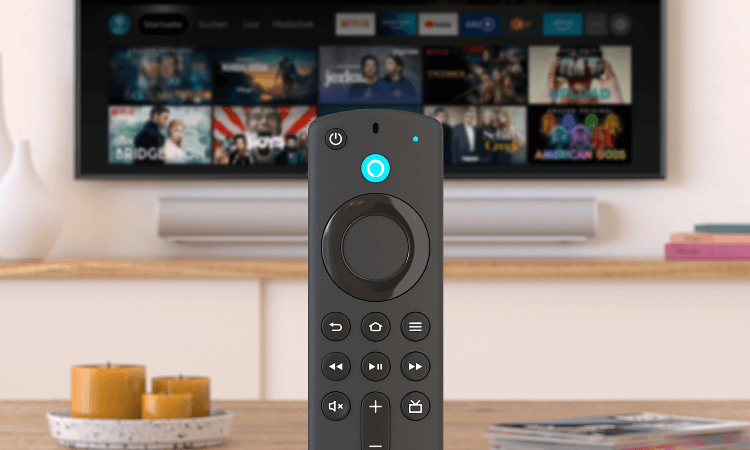
The remote control also features the new quick access buttons for: Netflix, Prime Video, Disney Plus, and Amazon Music.
Here, by the way, it is already clear where the trend is going, or rather should go. Namely for a multi subscription for streaming services. Whether you need it now or not, everyone has to decide for themselves, but due to the splitting of content where certain films and series are only available on this or that service, you sometimes almost force you to do so.
And otherwise there are no external differences to be found. It is clearly the inner values that count. And they can definitely be seen:
- 4K streaming
- HDR10 +, Dolby Vision
- Wi-Fi6 support
- Picture-in-picture live video
- 2GB RAM instead of 1.5GB
- Dolby Atmos
- CPU: 1.8 GHz (quad core) instead of 1.7 GHz (quad core)
- GPU: 750 MHz instead of 650 MHz
All of this together makes up the advertised 40% more performance. Because such a device is only as powerful as the weakest component in the link. With the 4K Fire TV Stick MAX, Amazon has pretty much all the current standards on the market to be able to serve all those who already have a TV with Dolby Vision and a Wi-Fi 6 router.
The 4K Fire TV Stick MAX will be available from October 7, 2021 on Amazon. However, it can already be pre-ordered for € 64.99 and will be delivered punctually on the day of publication. As soon as the device is available, we will test the new streaming stick and report whether the advertising promises have really been kept.

The next generation of Fire TV with Wi-Fi 6 and Dolby Vision
Fans are always waiting for the latest offshoots of Amazon’s own products and are excited to see what has happened again. This applies to both the in-house Kindle e-book readers, the echo devices and of course the streaming sticks.
And with the latter, Amazon has also made a splash with the brand new offshoot: 4K Fire TV Stick MAX, and presents and again some good further developments. The 4K Fire TV Stick MAX comes on the market with HDR10 +, Dolby Vision and, in keeping with the times, also with Wi-Fi6 support. If you look at the stick and the remote control, you first see no difference to the Fire TV Stick with HD streaming, which is also very popular (because it is cheap).
The remote control also features the new quick access buttons for: Netflix, Prime Video, Disney Plus, and Amazon Music.
Here, by the way, it is already clear where the trend is going, or rather should go. Namely for a multi subscription for streaming services. Whether you need it now or not, everyone has to decide for themselves, but due to the splitting of content where certain films and series are only available on this or that service, you sometimes almost force you to do so.
And otherwise there are no external differences to be found. It is clearly the inner values that count. And they can definitely be seen:
- 4K streaming
- HDR10 +, Dolby Vision
- Wi-Fi6 support
- Picture-in-picture live video
- 2GB RAM instead of 1.5GB
- Dolby Atmos
- CPU: 1.8 GHz (quad core) instead of 1.7 GHz (quad core)
- GPU: 750 MHz instead of 650 MHz
All of this together makes up the advertised 40% more performance. Because such a device is only as powerful as the weakest component in the link. With the 4K Fire TV Stick MAX, Amazon has pretty much all the current standards on the market to be able to serve all those who already have a TV with Dolby Vision and a Wi-Fi 6 router.
The 4K Fire TV Stick MAX will be available from October 7, 2021 on Amazon. However, it can already be pre-ordered for € 64.99 and will be delivered punctually on the day of publication. As soon as the device is available, we will test the new streaming stick and report whether the advertising promises have really been kept.
Fire TV devices in comparison:
| Model: | Fire TV Stick Lite | Fire TV Stick | Fire TV Stick 4K | Fire TV Stick 4K MAX | Fire TV Cube |
|---|---|---|---|---|---|
| Features: | |||||
| Supports 1080p Full HD (1920×1080) | |||||
| Supports 4K Ultra HD (3840×2160) | |||||
| Supports Dolby Vision (HDR image for even brighter colors) | |||||
| Hands-free with Alexa | |||||
| Wi-Fi-6-Support | |||||
| Picture-in-picture live video | |||||
| Storage space | 8 GB | 8 GB | 8 GB | 8 GB | 16 GB |
| RAM | 1 GB | 1 GB | 1,5 GB | 2 GB | 2 GB |
| Audio support | HDMI passthrough for Dolby encoded audio | Dolby Atmos | Dolby Atmos | Dolby Atmos | Dolby Atmos |
| Quad-Core-Processor | CPU 1,7 GHz, GPU 650 MHz | CPU 1,7 GHz, GPU 650 MHz | CPU 1,7 GHz, GPU 650 MHz | CPU 1,8 GHz, GPU 750 MHz | Hexa-Core-Prozessor, 2,2 GHz + 1,9 GHz, 800-MHz-GPU |
| Watch Now | Watch Now | Watch Now | Watch Now | Watch Now |

Fire TV devices in comparison:
| Model: | Fire TV Stick Lite | Fire TV Stick | Fire TV Stick 4K | Fire TV Stick 4K MAX | Fire TV Cube |
|---|---|---|---|---|---|
| Features: | |||||
| Supports 1080p Full HD (1920×1080) | |||||
| Supports 4K Ultra HD (3840×2160) | |||||
| Supports Dolby Vision (HDR image for even brighter colors) | |||||
| Hands-free with Alexa | |||||
| Wi-Fi-6-Support | |||||
| Picture-in-picture live video | |||||
| Storage space | 8 GB | 8 GB | 8 GB | 8 GB | 16 GB |
| RAM | 1 GB | 1 GB | 1,5 GB | 2 GB | 2 GB |
| Audio support | HDMI passthrough for Dolby encoded audio | Dolby Atmos | Dolby Atmos | Dolby Atmos | Dolby Atmos |
| Quad-Core-Processor | CPU 1,7 GHz, GPU 650 MHz | CPU 1,7 GHz, GPU 650 MHz | CPU 1,7 GHz, GPU 650 MHz | CPU 1,8 GHz, GPU 750 MHz | Hexa-Core-Prozessor, 2,2 GHz + 1,9 GHz, 800-MHz-GPU |
| Watch Now | Watch Now | Watch Now | Watch Now | Watch Now |
Popular Posts:

Dynamic ranges in Excel: OFFSET function
The OFFSET function in Excel creates a flexible reference. Instead of fixing =SUM(B5:B7), the function finds the range itself, e.g., for the "last 3 months". Ideal for dynamic charts or dashboards that grow automatically.

Mastering the INDIRECT function in Excel
The INDIRECT function in Excel converts text into a real reference. Instead of manually typing =January!E10, use =INDIRECT(A2 & "!E10"), where A2 contains 'January'. This allows you to easily create dynamic summaries for multiple worksheets.

From assistant to agent: Microsoft’s Copilot
Copilot is growing up: Microsoft's AI is no longer an assistant, but a proactive agent. With "Vision," it sees your Windows desktop; in M365, it analyzes data as a "Researcher"; and in GitHub, it autonomously corrects code. The biggest update yet.

Windows 12: Where is it? The current status in October 2025
Everyone was waiting for Windows 12 in October 2025, but it didn't arrive. Instead, Microsoft is focusing on Windows 11 25H2 and "Copilot+ PC" features. We'll explain: Is Windows 12 canceled, postponed, or is it already available as an AI update for Windows 11?

Blocking websites on Windows using the hosts file
Want to block unwanted websites in Windows? You can do it without extra software using the hosts file. We'll show you how to edit the file as an administrator and redirect domains like example.de to 127.0.0.1. This will block them immediately in all browsers.

The “Zero Inbox” method with Outlook: How to permanently get your mailbox under control.
Caught red-handed? Your Outlook inbox has 1000+ emails? That's pure stress. Stop the email deluge with the "Zero Inbox" method. We'll show you how to clean up your inbox and regain control using Quick Steps and rules.
Offers 2024: Word & Excel Templates











Popular Posts:
Dynamic ranges in Excel: OFFSET function
The OFFSET function in Excel creates a flexible reference. Instead of fixing =SUM(B5:B7), the function finds the range itself, e.g., for the "last 3 months". Ideal for dynamic charts or dashboards that grow automatically.
Mastering the INDIRECT function in Excel
The INDIRECT function in Excel converts text into a real reference. Instead of manually typing =January!E10, use =INDIRECT(A2 & "!E10"), where A2 contains 'January'. This allows you to easily create dynamic summaries for multiple worksheets.
From assistant to agent: Microsoft’s Copilot
Copilot is growing up: Microsoft's AI is no longer an assistant, but a proactive agent. With "Vision," it sees your Windows desktop; in M365, it analyzes data as a "Researcher"; and in GitHub, it autonomously corrects code. The biggest update yet.
Windows 12: Where is it? The current status in October 2025
Everyone was waiting for Windows 12 in October 2025, but it didn't arrive. Instead, Microsoft is focusing on Windows 11 25H2 and "Copilot+ PC" features. We'll explain: Is Windows 12 canceled, postponed, or is it already available as an AI update for Windows 11?
Blocking websites on Windows using the hosts file
Want to block unwanted websites in Windows? You can do it without extra software using the hosts file. We'll show you how to edit the file as an administrator and redirect domains like example.de to 127.0.0.1. This will block them immediately in all browsers.
The “Zero Inbox” method with Outlook: How to permanently get your mailbox under control.
Caught red-handed? Your Outlook inbox has 1000+ emails? That's pure stress. Stop the email deluge with the "Zero Inbox" method. We'll show you how to clean up your inbox and regain control using Quick Steps and rules.
Offers 2024: Word & Excel Templates

























