Show and remove duplicate entries in Excel


The longer lists in Excel become, the easier it is for duplicate entries to creep in by mistake. What initially does not appear to be problematic can become a problem at the latest when it comes to analyzes and the evaluation of the data, if this data is required as a basis for decision-making for further action.
If it’s only a handful of lines, that may still work, and you can find the error without any tools. But it is not uncommon for Excel spreadsheets to have several hundred or thousands of rows. And then you are almost in a fix if the data is not correct.
In our little tutorial we would like to show you different ways how you can remove duplicate entries in Excel, but also how you can only display rows of duplicate entries without deleting them at the same time. This can make sense if, depending on the complexity of the table, not all doubles should be deleted immediately.

Show and remove duplicate entries in Excel
The longer lists in Excel become, the easier it is for duplicate entries to creep in by mistake. What initially does not appear to be problematic can become a problem at the latest when it comes to analyzes and the evaluation of the data, if this data is required as a basis for decision-making for further action.
If it’s only a handful of lines, that may still work, and you can find the error without any tools. But it is not uncommon for Excel spreadsheets to have several hundred or thousands of rows. And then you are almost in a fix if the data is not correct.
In our little tutorial we would like to show you different ways how you can remove duplicate entries in Excel, but also how you can only display rows of duplicate entries without deleting them at the same time. This can make sense if, depending on the complexity of the table, not all doubles should be deleted immediately.
Remove duplicate entries from Excel
The simplest solution to remove duplicate entries in Excel works as follows:
- Go to “Data” in the register menu
- Mark the table in which duplicate entries are to be deleted
- Click Remove Duplicates
- Confirm with OK
Now it could happen that you get the error message that no duplicate entries were found. And that although you can even see them with your own eyes in the table. We deliberately included a few duplicate entries in our example table, but not all values within the individual rows are exactly the same with another row within the selected table. With this general method, it does not work error-free.
If you go to “Duplicate Entries” you will be shown the columns within which to search for duplicates in a dialog window, and you can mark them or exclude them from the selection within which you should search for duplicates. Now if we only include column C
in the selection it works immediately and our duplicate entries are found and the affected rows are also removed. But here, too, an error can ultimately creep in again if there is a duplicate entry in another column, it would not be found when searching for duplicate entries within only one column.
see fig. (click to enlarge)

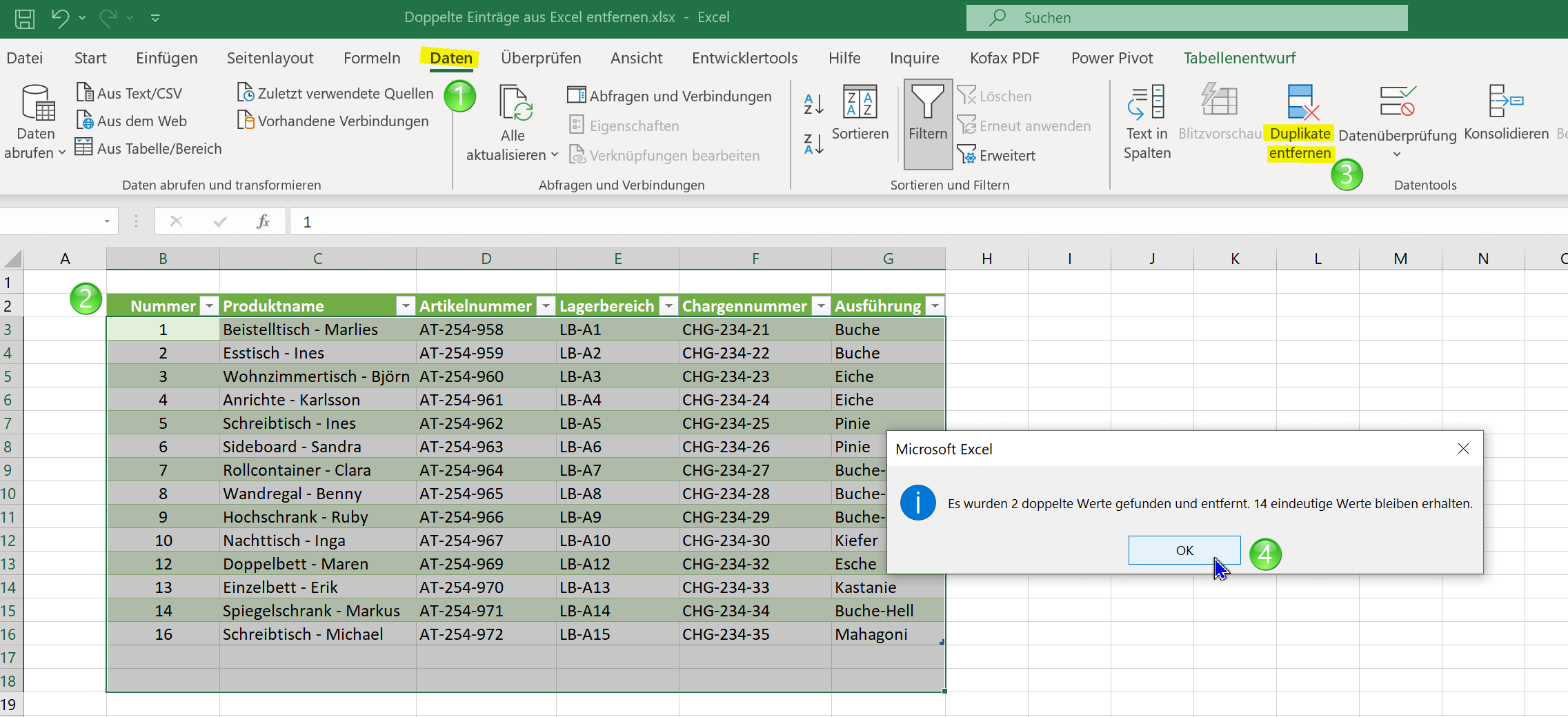

So as we can see, this blanket method of removing duplicate entries in Excel also involves some pitfalls, and is prone to errors. So you would have to search each column individually. Another approach would be to let us display duplicate entries within rows and tables using conditional formatting without deleting them immediately, and then to decide which ones should be removed.
Remove duplicate entries from Excel
The simplest solution to remove duplicate entries in Excel works as follows:
- Go to “Data” in the register menu
- Mark the table in which duplicate entries are to be deleted
- Click Remove Duplicates
- Confirm with OK
Now it could happen that you get the error message that no duplicate entries were found. And that although you can even see them with your own eyes in the table. We deliberately included a few duplicate entries in our example table, but not all values within the individual rows are exactly the same with another row within the selected table. With this general method, it does not work error-free.
If you go to “Duplicate Entries” you will be shown the columns within which to search for duplicates in a dialog window, and you can mark them or exclude them from the selection within which you should search for duplicates. Now if we only include column C
in the selection it works immediately and our duplicate entries are found and the affected rows are also removed. But here, too, an error can ultimately creep in again if there is a duplicate entry in another column, it would not be found when searching for duplicate entries within only one column.see fig. (click to enlarge)
So as we can see, this blanket method of removing duplicate entries in Excel also involves some pitfalls, and is prone to errors. So you would have to search each column individually. Another approach would be to let us display duplicate entries within rows and tables using conditional formatting without deleting them immediately, and then to decide which ones should be removed.
Highlight duplicate entries in Excel without removing
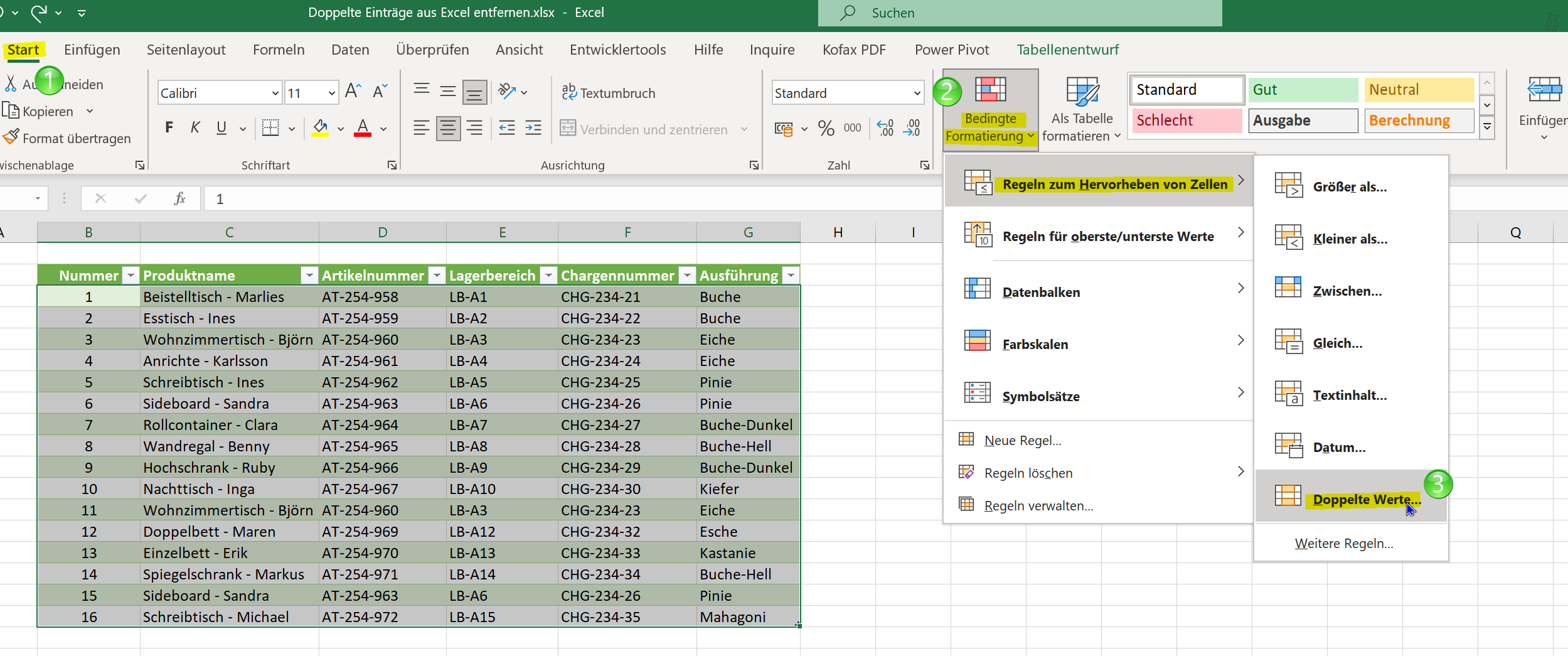
With conditional formatting, we can display duplicate or unique values within a table, and then decide whether to delete them or keep them. To do this, we proceed as follows:
- Go back to the Home tab
- Select the entire table or optionally individual columns
- From conditional formatting, go to “Row Highlighting Rules” and then to “Duplicate Values”
Here you now have the option of displaying either only unique values or double values and having the relevant cells highlighted in different colors. Whichever option you choose, both times it is an exclusion principle and you come to the solution.
See fig. (click to enlarge)
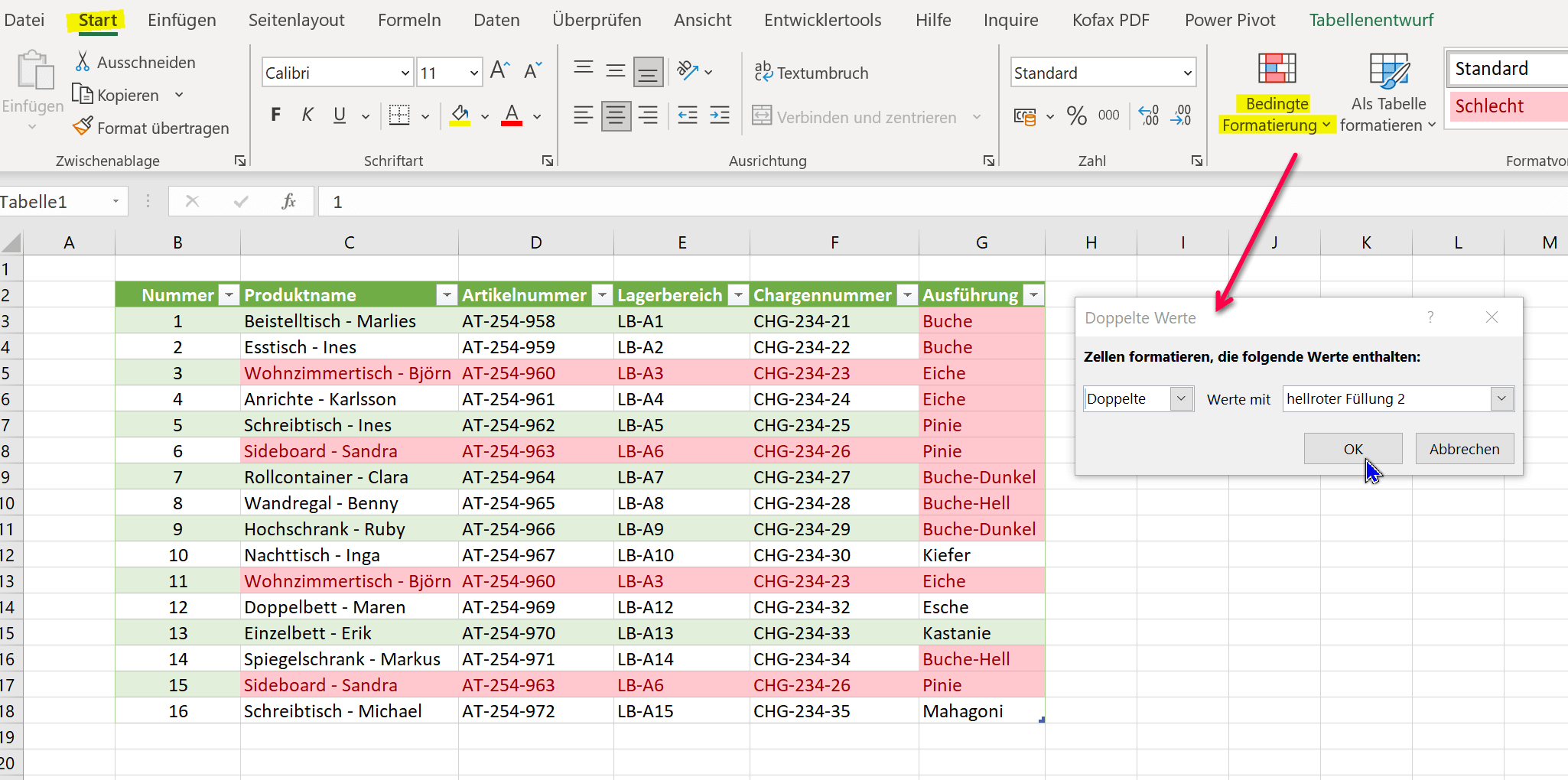
We hope that we could help you with this little tutorial. If you want to know more about the possibilities of conditional formatting in Excel, we also recommend the following article: Using conditional formatting in Excel correctly

Highlight duplicate entries in Excel without removing
With conditional formatting, we can display duplicate or unique values within a table, and then decide whether to delete them or keep them. To do this, we proceed as follows:
- Go back to the Home tab
- Select the entire table or optionally individual columns
- From conditional formatting, go to “Row Highlighting Rules” and then to “Duplicate Values”
Here you now have the option of displaying either only unique values or double values and having the relevant cells highlighted in different colors. Whichever option you choose, both times it is an exclusion principle and you come to the solution.
See fig. (click to enlarge)
We hope that we could help you with this little tutorial. If you want to know more about the possibilities of conditional formatting in Excel, we also recommend the following article: Using conditional formatting in Excel correctly
Popular Posts:

So sieht das wirklich perfekte Homeoffice-Setup für 2026 aus
Ihr Homeoffice ist veraltet? Steigern Sie 2026 Produktivität & Gesundheit. Unser Guide zeigt das perfekte Setup: von ergonomischen Stühlen und 4K-Webcams bis zu Mesh-WLAN und Kabelmanagement. So investieren Sie in Ihre Karriere.

Internet, Telefon & TV: Die besten Komplettpakete
Internet, TV & Telefon aus einer Hand? Wir vergleichen die Komplettpakete von Telekom, Vodafone, O2 & 1&1. Wer punktet bei Speed, TV-Komfort (MagentaTV vs. GigaTV) und Preis? So finden Sie das beste Triple-Play-Angebot für Ihre Adresse.

5 Anzeichen, dass dein Chef dich im Homeoffice digital überwacht
Nur weil du im Homeoffice bist, heißt das nicht, dass dir niemand zusieht. "Bossware" ist auf dem Vormarsch. Wir zeigen 5 subtile Anzeichen für digitale Überwachung – von "Teams-Status"-Kult bis zu verdächtigen IT-Tools. So erkennst du die Warnsignale und schützt deine Karriere.

Schluss mit dem Tool-Chaos: 5 Apps, die Euer Office wirklich produktiver machen
Schluss mit digitaler Reibung: Diese 5 Apps machen Ihr Büro wirklich produktiver. Entdecken Sie, wie Asana, Loom, Notion, Zapier und Slack die Effizienz steigern, Meetings reduzieren und Ihr Team smarter vernetzen – wenn man sie richtig einsetzt.

AI in everyday office life: Your new invisible colleague
AI won't replace you – but those who use it will have a competitive edge. Make AI your co-pilot in the office! We'll show you four concrete hacks for faster emails, better meeting notes, and solved Excel problems. Get started today, no IT degree required.

Fünf vor Zwölf: Wie Sie erkennen, dass Sie kurz vor dem Burnout stehen
Erschöpfung ist normal, doch wenn das Wochenende keine Erholung mehr bringt und Zynismus die Motivation ersetzt, stehen Sie kurz vor dem Burnout. Erfahren Sie, welche 7 Warnsignale Sie niemals ignorieren dürfen und warum es jetzt lebenswichtig ist, die Notbremse zu ziehen
Offers 2024: Word & Excel Templates











Popular Posts:
So sieht das wirklich perfekte Homeoffice-Setup für 2026 aus
Ihr Homeoffice ist veraltet? Steigern Sie 2026 Produktivität & Gesundheit. Unser Guide zeigt das perfekte Setup: von ergonomischen Stühlen und 4K-Webcams bis zu Mesh-WLAN und Kabelmanagement. So investieren Sie in Ihre Karriere.
Internet, Telefon & TV: Die besten Komplettpakete
Internet, TV & Telefon aus einer Hand? Wir vergleichen die Komplettpakete von Telekom, Vodafone, O2 & 1&1. Wer punktet bei Speed, TV-Komfort (MagentaTV vs. GigaTV) und Preis? So finden Sie das beste Triple-Play-Angebot für Ihre Adresse.
5 Anzeichen, dass dein Chef dich im Homeoffice digital überwacht
Nur weil du im Homeoffice bist, heißt das nicht, dass dir niemand zusieht. "Bossware" ist auf dem Vormarsch. Wir zeigen 5 subtile Anzeichen für digitale Überwachung – von "Teams-Status"-Kult bis zu verdächtigen IT-Tools. So erkennst du die Warnsignale und schützt deine Karriere.
Schluss mit dem Tool-Chaos: 5 Apps, die Euer Office wirklich produktiver machen
Schluss mit digitaler Reibung: Diese 5 Apps machen Ihr Büro wirklich produktiver. Entdecken Sie, wie Asana, Loom, Notion, Zapier und Slack die Effizienz steigern, Meetings reduzieren und Ihr Team smarter vernetzen – wenn man sie richtig einsetzt.
AI in everyday office life: Your new invisible colleague
AI won't replace you – but those who use it will have a competitive edge. Make AI your co-pilot in the office! We'll show you four concrete hacks for faster emails, better meeting notes, and solved Excel problems. Get started today, no IT degree required.
Fünf vor Zwölf: Wie Sie erkennen, dass Sie kurz vor dem Burnout stehen
Erschöpfung ist normal, doch wenn das Wochenende keine Erholung mehr bringt und Zynismus die Motivation ersetzt, stehen Sie kurz vor dem Burnout. Erfahren Sie, welche 7 Warnsignale Sie niemals ignorieren dürfen und warum es jetzt lebenswichtig ist, die Notbremse zu ziehen
Offers 2024: Word & Excel Templates