Record and save Skype video calls


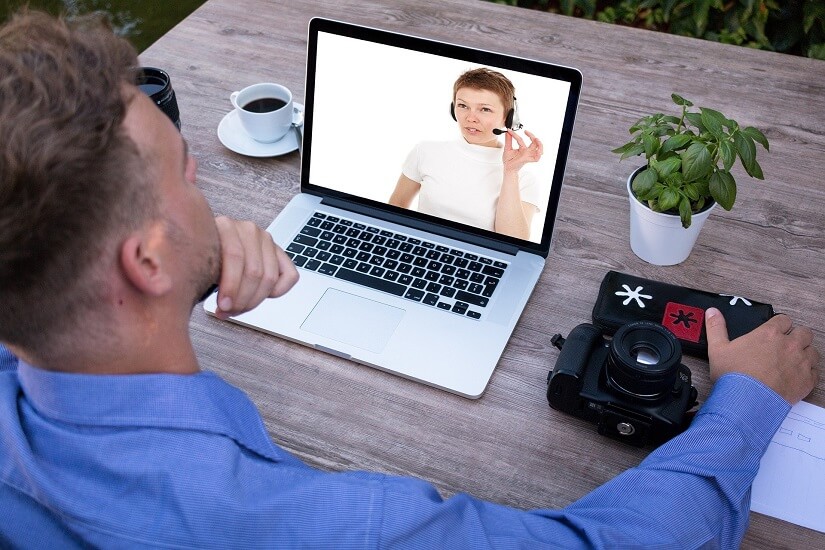
Even though Skype has had to cope with fierce losses against the competition WhatsApp & Co. (which mainly scores in the mobile sector) since its market launch about 15 years ago, the messenger service is still one of the most popular services when it comes to video conferencing.
However, what a feature users have long missed is the ability to save a recording of a conversation (with and without video). Microsoft has finally closed this gap since July 2018.
The recordings are stored in Microsoft’s own cloud.
However, if you prefer to save the saved recordings locally, there is also a free software solution that we would like to introduce in the following article.
Record and save Skype video calls
Even though Skype has had to cope with fierce losses against the competition WhatsApp & Co. (which mainly scores in the mobile sector) since its market launch about 15 years ago, the messenger service is still one of the most popular services when it comes to video conferencing.
However, what a feature users have long missed is the ability to save a recording of a conversation (with and without video). Microsoft has finally closed this gap since July 2018.
The recordings are stored in Microsoft’s own cloud.
However, if you prefer to save the saved recordings locally, there is also a free software solution that we would like to introduce in the following article.
1. Record skype calls with on-board resources
1. Record skype calls with on-board resources
First, we look at the possibility directly in Skype -so with on-board resources-.
To do this, proceed as follows:
- Start a call
- Click the + icon in the lower right corner of the screen
- Then click on “start recording”
- To stop the recording simply click on “Stop recording”
The recording is done while all participants are also displayed. The recording is stored on Microsoft Cloud servers for 30 days, and is available for download to all participants as an MP4 file.

First, we look at the possibility directly in Skype -so with on-board resources-.
To do this, proceed as follows:
- Start a call
- Click the + icon in the lower right corner of the screen
- Then click on “start recording”
- To stop the recording simply click on “Stop recording”
The recording is done while all participants are also displayed. The recording is stored on Microsoft Cloud servers for 30 days, and is available for download to all participants as an MP4 file.
2. Software solution for Skype recording
2. Software solution for Skype recording
As with all files that are stored in an external cloud, one may of course also ask the question what actually happens with the data, and whether these are not yet stored and evaluated after the deadline somewhere.
The providers of cloud systems deny this, but at least since Facebook, we know that the Internet never really forgets.
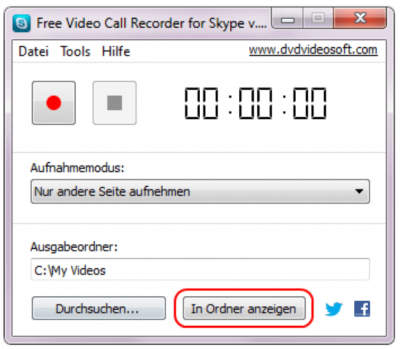
A software solution to save calls in Skype directly on the PC offers the manufacturer DVD Videosoft with the free program Free Video Call Recorder for Skype. The operation is very simple, and it can be determined in advance where, and in what format the conversation should be recorded, and also the differentiation either only audio, video only or complete is possible.
The difference in contrast to the on-board solution directly from Skype out is that here a recording of conversations is possible without the other participants to be notified.
As with all files that are stored in an external cloud, one may of course also ask the question what actually happens with the data, and whether these are not yet stored and evaluated after the deadline somewhere.
The providers of cloud systems deny this, but at least since Facebook, we know that the Internet never really forgets.
A software solution to save calls in Skype directly on the PC offers the manufacturer DVD Videosoft with the free program Free Video Call Recorder for Skype. The operation is very simple, and it can be determined in advance where, and in what format the conversation should be recorded, and also the differentiation either only audio, video only or complete is possible.
The difference in contrast to the on-board solution directly from Skype out is that here a recording of conversations is possible without the other participants to be notified.
3. Legal Notice
3. Legal Notice
Although the software solution is a practical matter to save videos directly on the PC without outsourcing them in a cloud before, but also represents a legal stumbling block.
Because in Germany the recording of non-public spoken word is prohibited. All the more so, of course, if the video track was also recorded. We therefore recommend the participants in advance to point out -bzw. to agree that you would like to record this conversation and save it locally.
You have the double security in any case if you also have the consent as appropriate record for later disagreements.

Although the software solution is a practical matter to save videos directly on the PC without outsourcing them in a cloud before, but also represents a legal stumbling block.
Because in Germany the recording of non-public spoken word is prohibited. All the more so, of course, if the video track was also recorded. We therefore recommend the participants in advance to point out -bzw. to agree that you would like to record this conversation and save it locally.
You have the double security in any case if you also have the consent as appropriate record for later disagreements.
Popular Posts:

Die Renaissance des Büros: Warum Präsenz manchmal unschlagbar ist
Homeoffice bietet Fokus, doch das Büro bleibt als sozialer Anker unverzichtbar. Spontane Innovation, direktes Voneinander-Lernen und echtes Wir-Gefühl sind digital kaum zu ersetzen. Lesen Sie, warum Präsenz oft besser ist und wie die ideale Mischung für moderne Teams aussieht.

New Work & Moderne Karriere: Warum die Karriereleiter ausgedient hat
Die klassische Karriereleiter hat ausgedient. New Work fordert ein neues Denken: Skills statt Titel, Netzwerk statt Hierarchie. Erfahre, warum das "Karriere-Klettergerüst" deine neue Realität ist und wie du dich mit 4 konkreten Schritten zukunftssicher aufstellst.

Die Homeoffice-Falle: Warum unsichtbare Arbeit deine Beförderung gefährdet
Produktiv im Homeoffice, doch befördert wird der Kollege im Büro? Willkommen in der Homeoffice-Falle. "Proximity Bias" lässt deine Leistung oft unsichtbar werden. Lerne 4 Strategien, wie du auch remote sichtbar bleibst und deine Karriere sicherst – ganz ohne Wichtigtuerei.

Microsoft Loop in Teams: The revolution of your notes?
What exactly are these Loop components in Microsoft Teams? We'll show you how these "living mini-documents" can accelerate your teamwork. From dynamic agendas to shared, real-time checklists – discover practical use cases for your everyday work.

Career booster 2026: These Microsoft Office skills will take you further!
A new year, new career opportunities! But which Office skills will really be in demand in 2026? "Skilled use" is no longer enough. We'll show you today's must-haves – like advanced Excel, using AI in the office, and relevant certifications for your resume.

Why Zero Trust doesn’t work without identity protection!
Zero Trust means: Trust no one, verify everyone. Identity protection is at the heart of this modern security model. Learn how IAM, MFA, Conditional Access, and the principle of least privilege effectively protect your business when the old network perimeter is gone.
Offers 2024: Word & Excel Templates











Popular Posts:
Die Renaissance des Büros: Warum Präsenz manchmal unschlagbar ist
Homeoffice bietet Fokus, doch das Büro bleibt als sozialer Anker unverzichtbar. Spontane Innovation, direktes Voneinander-Lernen und echtes Wir-Gefühl sind digital kaum zu ersetzen. Lesen Sie, warum Präsenz oft besser ist und wie die ideale Mischung für moderne Teams aussieht.
New Work & Moderne Karriere: Warum die Karriereleiter ausgedient hat
Die klassische Karriereleiter hat ausgedient. New Work fordert ein neues Denken: Skills statt Titel, Netzwerk statt Hierarchie. Erfahre, warum das "Karriere-Klettergerüst" deine neue Realität ist und wie du dich mit 4 konkreten Schritten zukunftssicher aufstellst.
Die Homeoffice-Falle: Warum unsichtbare Arbeit deine Beförderung gefährdet
Produktiv im Homeoffice, doch befördert wird der Kollege im Büro? Willkommen in der Homeoffice-Falle. "Proximity Bias" lässt deine Leistung oft unsichtbar werden. Lerne 4 Strategien, wie du auch remote sichtbar bleibst und deine Karriere sicherst – ganz ohne Wichtigtuerei.
Microsoft Loop in Teams: The revolution of your notes?
What exactly are these Loop components in Microsoft Teams? We'll show you how these "living mini-documents" can accelerate your teamwork. From dynamic agendas to shared, real-time checklists – discover practical use cases for your everyday work.
Career booster 2026: These Microsoft Office skills will take you further!
A new year, new career opportunities! But which Office skills will really be in demand in 2026? "Skilled use" is no longer enough. We'll show you today's must-haves – like advanced Excel, using AI in the office, and relevant certifications for your resume.
Why Zero Trust doesn’t work without identity protection!
Zero Trust means: Trust no one, verify everyone. Identity protection is at the heart of this modern security model. Learn how IAM, MFA, Conditional Access, and the principle of least privilege effectively protect your business when the old network perimeter is gone.
Offers 2024: Word & Excel Templates