Record and save Skype video calls


Even though Skype has had to cope with fierce losses against the competition WhatsApp & Co. (which mainly scores in the mobile sector) since its market launch about 15 years ago, the messenger service is still one of the most popular services when it comes to video conferencing.
However, what a feature users have long missed is the ability to save a recording of a conversation (with and without video). Microsoft has finally closed this gap since July 2018.
The recordings are stored in Microsoft’s own cloud.
However, if you prefer to save the saved recordings locally, there is also a free software solution that we would like to introduce in the following article.

Record and save Skype video calls
Even though Skype has had to cope with fierce losses against the competition WhatsApp & Co. (which mainly scores in the mobile sector) since its market launch about 15 years ago, the messenger service is still one of the most popular services when it comes to video conferencing.
However, what a feature users have long missed is the ability to save a recording of a conversation (with and without video). Microsoft has finally closed this gap since July 2018.
The recordings are stored in Microsoft’s own cloud.
However, if you prefer to save the saved recordings locally, there is also a free software solution that we would like to introduce in the following article.
1. Record skype calls with on-board resources
1. Record skype calls with on-board resources
First, we look at the possibility directly in Skype -so with on-board resources-.
To do this, proceed as follows:
- Start a call
- Click the + icon in the lower right corner of the screen
- Then click on “start recording”
- To stop the recording simply click on “Stop recording”
The recording is done while all participants are also displayed. The recording is stored on Microsoft Cloud servers for 30 days, and is available for download to all participants as an MP4 file.

First, we look at the possibility directly in Skype -so with on-board resources-.
To do this, proceed as follows:
- Start a call
- Click the + icon in the lower right corner of the screen
- Then click on “start recording”
- To stop the recording simply click on “Stop recording”
The recording is done while all participants are also displayed. The recording is stored on Microsoft Cloud servers for 30 days, and is available for download to all participants as an MP4 file.
2. Software solution for Skype recording
2. Software solution for Skype recording
As with all files that are stored in an external cloud, one may of course also ask the question what actually happens with the data, and whether these are not yet stored and evaluated after the deadline somewhere.
The providers of cloud systems deny this, but at least since Facebook, we know that the Internet never really forgets.
A software solution to save calls in Skype directly on the PC offers the manufacturer DVD Videosoft with the free program Free Video Call Recorder for Skype. The operation is very simple, and it can be determined in advance where, and in what format the conversation should be recorded, and also the differentiation either only audio, video only or complete is possible.
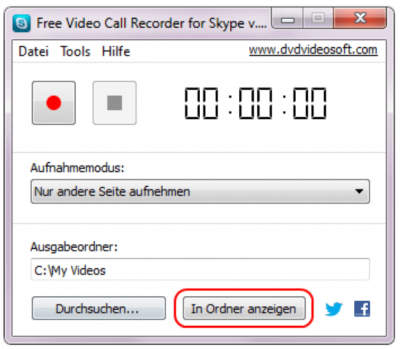
The difference in contrast to the on-board solution directly from Skype out is that here a recording of conversations is possible without the other participants to be notified.
As with all files that are stored in an external cloud, one may of course also ask the question what actually happens with the data, and whether these are not yet stored and evaluated after the deadline somewhere.
The providers of cloud systems deny this, but at least since Facebook, we know that the Internet never really forgets.
A software solution to save calls in Skype directly on the PC offers the manufacturer DVD Videosoft with the free program Free Video Call Recorder for Skype. The operation is very simple, and it can be determined in advance where, and in what format the conversation should be recorded, and also the differentiation either only audio, video only or complete is possible.
The difference in contrast to the on-board solution directly from Skype out is that here a recording of conversations is possible without the other participants to be notified.
3. Legal Notice
3. Legal Notice
Although the software solution is a practical matter to save videos directly on the PC without outsourcing them in a cloud before, but also represents a legal stumbling block.
Because in Germany the recording of non-public spoken word is prohibited. All the more so, of course, if the video track was also recorded. We therefore recommend the participants in advance to point out -bzw. to agree that you would like to record this conversation and save it locally.
You have the double security in any case if you also have the consent as appropriate record for later disagreements.

Although the software solution is a practical matter to save videos directly on the PC without outsourcing them in a cloud before, but also represents a legal stumbling block.
Because in Germany the recording of non-public spoken word is prohibited. All the more so, of course, if the video track was also recorded. We therefore recommend the participants in advance to point out -bzw. to agree that you would like to record this conversation and save it locally.
You have the double security in any case if you also have the consent as appropriate record for later disagreements.
Popular Posts:

So sieht das wirklich perfekte Homeoffice-Setup für 2026 aus
Ihr Homeoffice ist veraltet? Steigern Sie 2026 Produktivität & Gesundheit. Unser Guide zeigt das perfekte Setup: von ergonomischen Stühlen und 4K-Webcams bis zu Mesh-WLAN und Kabelmanagement. So investieren Sie in Ihre Karriere.

Internet, Telefon & TV: Die besten Komplettpakete
Internet, TV & Telefon aus einer Hand? Wir vergleichen die Komplettpakete von Telekom, Vodafone, O2 & 1&1. Wer punktet bei Speed, TV-Komfort (MagentaTV vs. GigaTV) und Preis? So finden Sie das beste Triple-Play-Angebot für Ihre Adresse.

5 Anzeichen, dass dein Chef dich im Homeoffice digital überwacht
Nur weil du im Homeoffice bist, heißt das nicht, dass dir niemand zusieht. "Bossware" ist auf dem Vormarsch. Wir zeigen 5 subtile Anzeichen für digitale Überwachung – von "Teams-Status"-Kult bis zu verdächtigen IT-Tools. So erkennst du die Warnsignale und schützt deine Karriere.

Schluss mit dem Tool-Chaos: 5 Apps, die Euer Office wirklich produktiver machen
Schluss mit digitaler Reibung: Diese 5 Apps machen Ihr Büro wirklich produktiver. Entdecken Sie, wie Asana, Loom, Notion, Zapier und Slack die Effizienz steigern, Meetings reduzieren und Ihr Team smarter vernetzen – wenn man sie richtig einsetzt.

AI in everyday office life: Your new invisible colleague
AI won't replace you – but those who use it will have a competitive edge. Make AI your co-pilot in the office! We'll show you four concrete hacks for faster emails, better meeting notes, and solved Excel problems. Get started today, no IT degree required.

Fünf vor Zwölf: Wie Sie erkennen, dass Sie kurz vor dem Burnout stehen
Erschöpfung ist normal, doch wenn das Wochenende keine Erholung mehr bringt und Zynismus die Motivation ersetzt, stehen Sie kurz vor dem Burnout. Erfahren Sie, welche 7 Warnsignale Sie niemals ignorieren dürfen und warum es jetzt lebenswichtig ist, die Notbremse zu ziehen
Offers 2024: Word & Excel Templates











Popular Posts:
So sieht das wirklich perfekte Homeoffice-Setup für 2026 aus
Ihr Homeoffice ist veraltet? Steigern Sie 2026 Produktivität & Gesundheit. Unser Guide zeigt das perfekte Setup: von ergonomischen Stühlen und 4K-Webcams bis zu Mesh-WLAN und Kabelmanagement. So investieren Sie in Ihre Karriere.
Internet, Telefon & TV: Die besten Komplettpakete
Internet, TV & Telefon aus einer Hand? Wir vergleichen die Komplettpakete von Telekom, Vodafone, O2 & 1&1. Wer punktet bei Speed, TV-Komfort (MagentaTV vs. GigaTV) und Preis? So finden Sie das beste Triple-Play-Angebot für Ihre Adresse.
5 Anzeichen, dass dein Chef dich im Homeoffice digital überwacht
Nur weil du im Homeoffice bist, heißt das nicht, dass dir niemand zusieht. "Bossware" ist auf dem Vormarsch. Wir zeigen 5 subtile Anzeichen für digitale Überwachung – von "Teams-Status"-Kult bis zu verdächtigen IT-Tools. So erkennst du die Warnsignale und schützt deine Karriere.
Schluss mit dem Tool-Chaos: 5 Apps, die Euer Office wirklich produktiver machen
Schluss mit digitaler Reibung: Diese 5 Apps machen Ihr Büro wirklich produktiver. Entdecken Sie, wie Asana, Loom, Notion, Zapier und Slack die Effizienz steigern, Meetings reduzieren und Ihr Team smarter vernetzen – wenn man sie richtig einsetzt.
AI in everyday office life: Your new invisible colleague
AI won't replace you – but those who use it will have a competitive edge. Make AI your co-pilot in the office! We'll show you four concrete hacks for faster emails, better meeting notes, and solved Excel problems. Get started today, no IT degree required.
Fünf vor Zwölf: Wie Sie erkennen, dass Sie kurz vor dem Burnout stehen
Erschöpfung ist normal, doch wenn das Wochenende keine Erholung mehr bringt und Zynismus die Motivation ersetzt, stehen Sie kurz vor dem Burnout. Erfahren Sie, welche 7 Warnsignale Sie niemals ignorieren dürfen und warum es jetzt lebenswichtig ist, die Notbremse zu ziehen
Offers 2024: Word & Excel Templates