

Microsoft Office gets fresher with a new design


After users were spared too big changes in the menu navigation thanks to the latest offshoot of the most popular office software with Microsoft Office 2019 in September 2018, and the focus was primarily on more functionality and networking, there should now be a refreshment for all Office versions.
Microsoft Office gets fresher with a new design
After users were spared too big changes in the menu navigation thanks to the latest offshoot of the most popular office software with Microsoft Office 2019 in September 2018, and the focus was primarily on more functionality and networking, there should now be a refreshment for all Office versions.
No more ribbon in Microsoft Office in the future
When Office 2003 was replaced by Office 2007, many users who could use Word, Excel & Co almost blindly – because they knew exactly where which function is located – had to get used to it when the menu ribbon was introduced to better categorize functional areas.
And of course at the beginning – as with almost everything that is new – there was a lot of criticism from the users. And now it’s time again that we all have to get used to it. Because the menu ribbon to which we have all got used falls victim to the red pen after 13 years, and should give way to a new, slimmer design. In the future, there will be a context-sensitive strip with buttons at the top of the screen, which changes depending on the work being carried out.
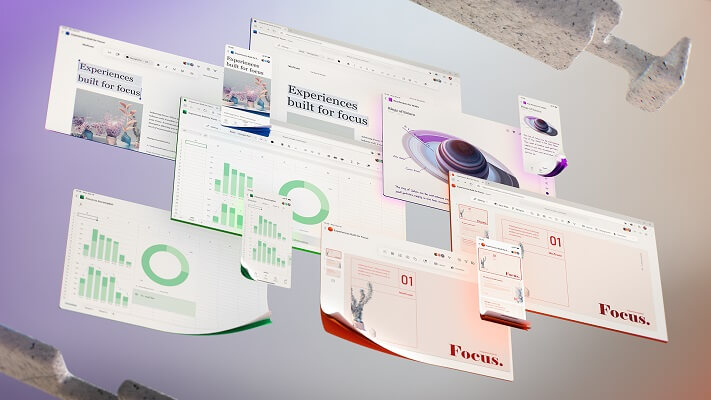
With this step, Microsoft would like to make it easier for users to work with the Office software through a tidier design, and to simplify the sometimes cluttered menu navigation. The focus should always be on the current work to be carried out. That this redesign is not just a visual gimmick for Microsoft, but really about improving the workflow with the office software is also noticeable because there is still no fixed date for the implementation with which everything is changed in one go becomes.
Rather, it is a project that is designed to be implemented in the long term. While some changes have already been tested, others are still in the testing phase to see whether changes really bring added value to users here, or only confuse them in the end. So it will take a while before all users will receive the new design. We think that (if Microsoft stays true to its cycle) the new design will be available to all users with the Office 2022 version at the latest.

No more ribbon in Microsoft Office in the future
When Office 2003 was replaced by Office 2007, many users who could use Word, Excel & Co almost blindly – because they knew exactly where which function is located – had to get used to it when the menu ribbon was introduced to better categorize functional areas.
And of course at the beginning – as with almost everything that is new – there was a lot of criticism from the users. And now it’s time again that we all have to get used to it. Because the menu ribbon to which we have all got used falls victim to the red pen after 13 years, and should give way to a new, slimmer design. In the future, there will be a context-sensitive strip with buttons at the top of the screen, which changes depending on the work being carried out.
With this step, Microsoft would like to make it easier for users to work with the Office software through a tidier design, and to simplify the sometimes cluttered menu navigation. The focus should always be on the current work to be carried out. That this redesign is not just a visual gimmick for Microsoft, but really about improving the workflow with the office software is also noticeable because there is still no fixed date for the implementation with which everything is changed in one go becomes.
Rather, it is a project that is designed to be implemented in the long term. While some changes have already been tested, others are still in the testing phase to see whether changes really bring added value to users here, or only confuse them in the end. So it will take a while before all users will receive the new design. We think that (if Microsoft stays true to its cycle) the new design will be available to all users with the Office 2022 version at the latest.
Popular Posts:

Dynamic ranges in Excel: OFFSET function
The OFFSET function in Excel creates a flexible reference. Instead of fixing =SUM(B5:B7), the function finds the range itself, e.g., for the "last 3 months". Ideal for dynamic charts or dashboards that grow automatically.

Mastering the INDIRECT function in Excel
The INDIRECT function in Excel converts text into a real reference. Instead of manually typing =January!E10, use =INDIRECT(A2 & "!E10"), where A2 contains 'January'. This allows you to easily create dynamic summaries for multiple worksheets.

From assistant to agent: Microsoft’s Copilot
Copilot is growing up: Microsoft's AI is no longer an assistant, but a proactive agent. With "Vision," it sees your Windows desktop; in M365, it analyzes data as a "Researcher"; and in GitHub, it autonomously corrects code. The biggest update yet.
Windows 12: Where is it? The current status in October 2025
Everyone was waiting for Windows 12 in October 2025, but it didn't arrive. Instead, Microsoft is focusing on Windows 11 25H2 and "Copilot+ PC" features. We'll explain: Is Windows 12 canceled, postponed, or is it already available as an AI update for Windows 11?

Blocking websites on Windows using the hosts file
Want to block unwanted websites in Windows? You can do it without extra software using the hosts file. We'll show you how to edit the file as an administrator and redirect domains like example.de to 127.0.0.1. This will block them immediately in all browsers.

The “Zero Inbox” method with Outlook: How to permanently get your mailbox under control.
Caught red-handed? Your Outlook inbox has 1000+ emails? That's pure stress. Stop the email deluge with the "Zero Inbox" method. We'll show you how to clean up your inbox and regain control using Quick Steps and rules.
Offers 2024: Word & Excel Templates











Popular Posts:
Dynamic ranges in Excel: OFFSET function
The OFFSET function in Excel creates a flexible reference. Instead of fixing =SUM(B5:B7), the function finds the range itself, e.g., for the "last 3 months". Ideal for dynamic charts or dashboards that grow automatically.
Mastering the INDIRECT function in Excel
The INDIRECT function in Excel converts text into a real reference. Instead of manually typing =January!E10, use =INDIRECT(A2 & "!E10"), where A2 contains 'January'. This allows you to easily create dynamic summaries for multiple worksheets.
From assistant to agent: Microsoft’s Copilot
Copilot is growing up: Microsoft's AI is no longer an assistant, but a proactive agent. With "Vision," it sees your Windows desktop; in M365, it analyzes data as a "Researcher"; and in GitHub, it autonomously corrects code. The biggest update yet.
Windows 12: Where is it? The current status in October 2025
Everyone was waiting for Windows 12 in October 2025, but it didn't arrive. Instead, Microsoft is focusing on Windows 11 25H2 and "Copilot+ PC" features. We'll explain: Is Windows 12 canceled, postponed, or is it already available as an AI update for Windows 11?
Blocking websites on Windows using the hosts file
Want to block unwanted websites in Windows? You can do it without extra software using the hosts file. We'll show you how to edit the file as an administrator and redirect domains like example.de to 127.0.0.1. This will block them immediately in all browsers.
The “Zero Inbox” method with Outlook: How to permanently get your mailbox under control.
Caught red-handed? Your Outlook inbox has 1000+ emails? That's pure stress. Stop the email deluge with the "Zero Inbox" method. We'll show you how to clean up your inbox and regain control using Quick Steps and rules.
Offers 2024: Word & Excel Templates


























