LinkedIn: The great AI search revolution – The end of keywords?


LinkedIn is no longer just a database for digital business cards. Behind the scenes, the world’s largest professional platform is undergoing one of the most radical transformations in its history. Driven by its close partnership with Microsoft and OpenAI, LinkedIn is changing the way people are found and how they find jobs. We’re moving away from rigid keyword searches toward semantic AI searches.
We’ve analyzed what this revolution means and how you can prepare for it.
From “Boolean Search” to “Natural Language”
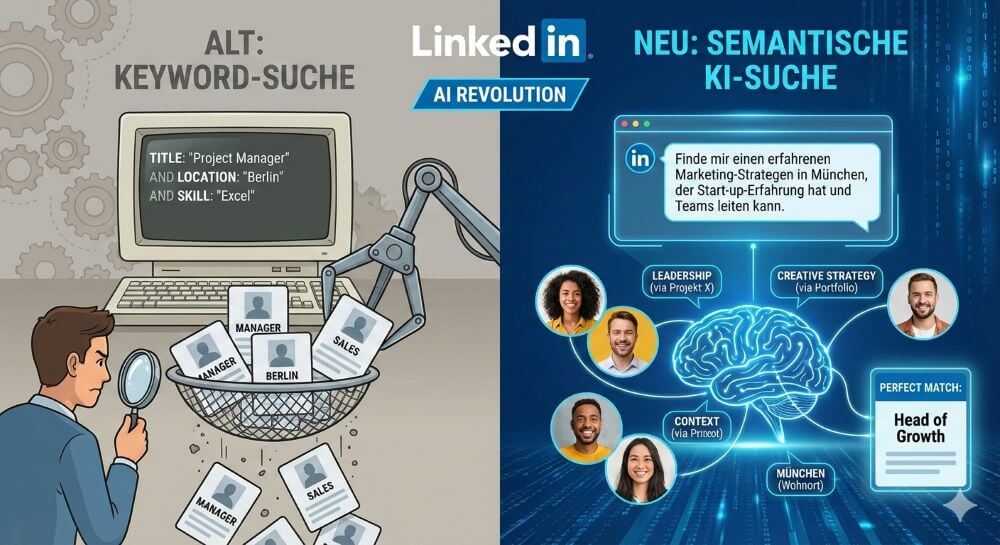
For years, recruiting on LinkedIn was an art form of Boolean operators. Recruiters had to build complex search strings like: (Project Manager OR Projektleiter) AND (SaaS OR Software) AND Berlin. Those who didn’t have the right keywords in their profile fell through the cracks.
That’s changing now: With the introduction of AI-powered tools (often grouped under the terms Recruiter 2024 or Talent Intelligence), HR professionals can now search using natural language.
The new search query: “Find me a senior marketing manager in the Munich area who has experience with startups and speaks fluent English.”
The AI magic: The algorithm understands context. He knows that a “growth hacker” in a startup might have similar qualifications to the marketing manager they’re looking for, even if the word “manager” isn’t in their job title. He infers skills from your job descriptions and projects, not just from your skills list.
The job seeker: AI as a career coach
The game is changing dramatically, not just for recruiters, but also for users. LinkedIn is rolling out features for premium users that make job searching more conversational.
Conversation instead of filters: Instead of painstakingly setting filters for industry, location, and level, users can ask: “Find a remote UX design job that matches my skills and offers a salary of over 60k.”
Match analysis: AI can analyze in seconds whether you are a good fit for a position. A click on “Am I a good candidate?” provides an analysis that reveals gaps in your resume (gap analysis) – e.g., B.: “You meet 80% of the requirements, but you lack experience with Tool X.”
Profile optimization 2.0: Context is king
What does this mean for your personal profile? The old SEO strategy of “keyword stuffing” (simply stringing together keywords) is losing its effectiveness. AI is looking for evidence of competence in context.
What AI is now looking for:
Semantic connections: AI reads your “About Me” section and your work experience like a human. Tell a story that demonstrates your skills.
Skills in context: It’s no longer enough to simply select “project management” as a skill. The AI checks whether your job descriptions include terms like “budget responsibility,” “team leadership,” or “agile methods” that support this skill.
Activity: Comments and your own contributions help the AI better understand your professional focus (Topic Authority).
The dangers: Bias and the “hidden market”
Despite the increased efficiency, there are critical voices. If an AI decides who is a “fit,” there is a risk that unusual resumes will be filtered out before a human sees them. Those who don’t fit the statistical average of a successful candidate could slip in the ranking.
Key takeaway: AI is an assistant, not a decision-maker – at least in theory. In practice, however, visibility will depend heavily on how “AI-readable” your profile is.
Conclusion: Adaptation is mandatory
The AI search revolution on LinkedIn is making networking more efficient, but also more demanding. The platform is transforming from a search engine into a “matching engine.” Those who understand that they are no longer writing just for humans, but also for semantic AI, will have the best cards in the “war for talent” in the future.
Recommendation: Revise your “work experience.” Delete mere lists of keywords and replace them with sentences that describe how you solved a problem. This is food for thought for the AI.

Beliebte Beiträge

Header and footer in Word – First page different in Word
How to make headers different on the first page than on the rest of the pages. Also create custom footers in Word for your documents.

Clean up Excel spreadsheets
It is very easy to use Excel tables created without a system and still get usable data from them with a few tricks.

Insert and edit header and footer in Excel
Inserting a header and footer in Excel is far from user-friendly. We show ways and workarounds how you can do it anyway.

Concatenate text and date in Excel – Tutorial
Concatenating text and date in Excel requires a combination of two functions. We use a practical example to explain how it can be used.

Create and save your own text modules in Word
Create your own text blocks in Word, save them and quickly add ready-made text and graphics to your documents.

Data Queries in Excel – Works with Power Query
So erstellen Sie aktive Datenabfragen durch Power Query aus verschiedensten Quellen in Excel, führen Daten aus verschiedenen Dateien und Tabellen zusammen.
Offers 2024: Word & Excel Templates