Incognito Mode Chrome and Firefox


There are plenty of reasons why people would want their Internet activities to remain secret.
Of course, this usually does not work with your Internet provider or search engines, nor with most websites. You are often completely transparent there, and every website you visit and your behavior on it is saved.
The incognito mode in the browser is more about hiding visited websites from other users who use the same PC as you (e.g. family members in the household). But the question is whether this is not more of a placebo that gives you the impression of anonymity.

In essence, the history of visited websites is not saved in incognito mode, or deleted again after the session has ended, and cookies accepted during the session are removed again. However, there is a relatively simple command under Windows 10 that you can enter via the command line, and in which all saved websites that have been surfed to are displayed.
This includes not only the directly controlled websites, but also those from which, for example, advertising content was downloaded in the background.
Incognito Mode Chrome and Firefox
There are plenty of reasons why people would want their Internet activities to remain secret.
Of course, this usually does not work with your Internet provider or search engines, nor with most websites. You are often completely transparent there, and every website you visit and your behavior on it is saved.
The incognito mode in the browser is more about hiding visited websites from other users who use the same PC as you (e.g. family members in the household). But the question is whether this is not more of a placebo that gives you the impression of anonymity.
In essence, the history of visited websites is not saved in incognito mode, or deleted again after the session has ended, and cookies accepted during the session are removed again. However, there is a relatively simple command under Windows 10 that you can enter via the command line, and in which all saved websites that have been surfed to are displayed.
This includes not only the directly controlled websites, but also those from which, for example, advertising content was downloaded in the background.
1. How does incognito mode work?
1. How does incognito mode work?
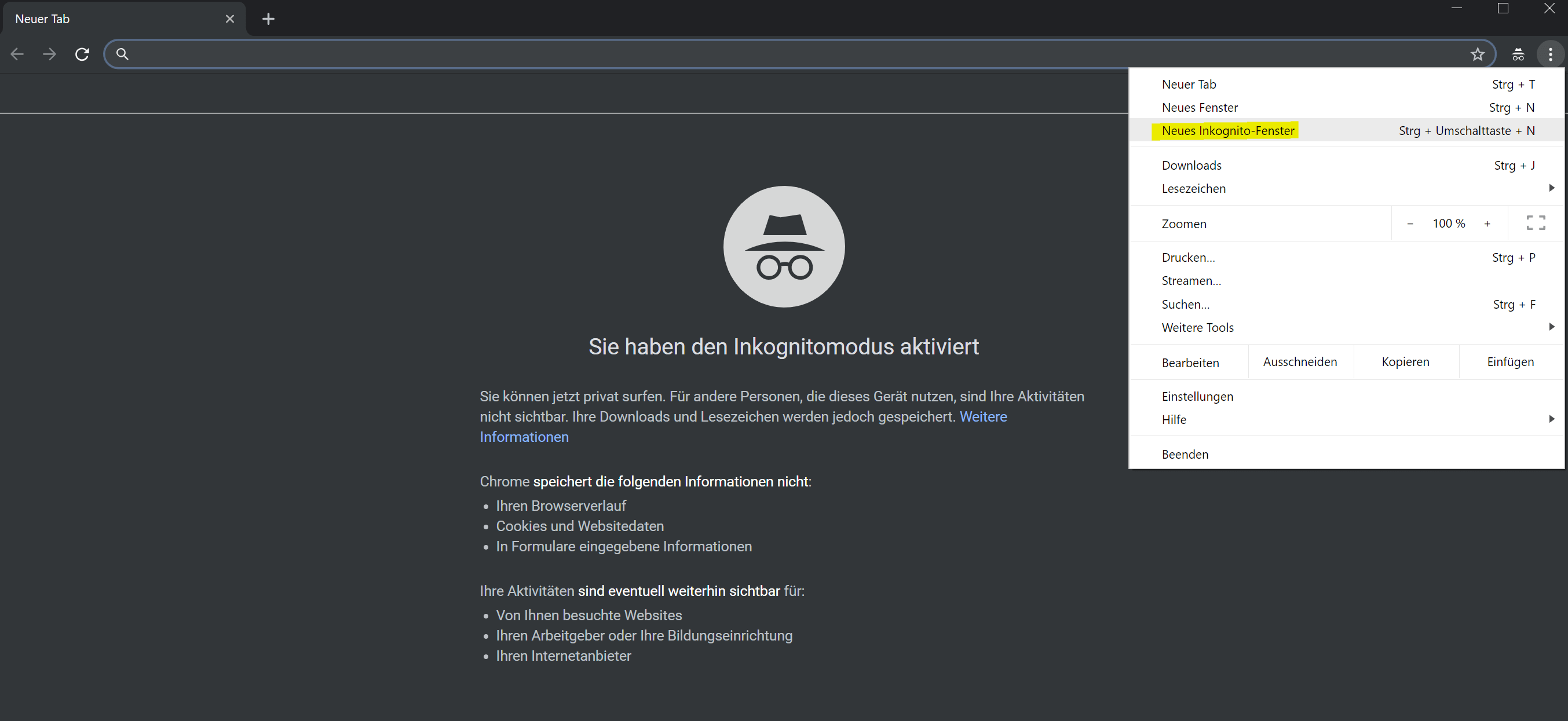
The incognito mode can be activated very easily, as shown by the example of the most commonly used browser, Google Chrome. To do this, simply go to the menu at the top right and open a new incognito window.
You will also be informed here that the websites you visit are still visible to other websites and internet providers. So you are by no means completely anonymous. The fact that not only the history of the visited websites, but also no cookies are stored, you will notice relatively quickly that no relevant advertising will be displayed to you if you constantly surf in incognito mode.
See fig.(click to enlarge)

Because that refers to the information that is otherwise in the stored cookies. But even if cookies have almost been described as the work of the devil, especially in the context of the GDPR and the ePrivacy Regulation, they not only offer website operators more opportunities to improve their offers, but they also make the user more comfortable when surfing the web.
Most of us certainly don’t want to have to log into our Facebook, Amazon or Google accounts every time. But because no more passwords are stored, that would be the result if you were only in incognito mode.
The incognito mode is therefore more intended for small sessions that do not reveal all visited websites to other users who can access the same PC.
The incognito mode can be activated very easily, as shown by the example of the most commonly used browser, Google Chrome. To do this, simply go to the menu at the top right and open a new incognito window.
You will also be informed here that the websites you visit are still visible to other websites and internet providers. So you are by no means completely anonymous. The fact that not only the history of the visited websites, but also no cookies are stored, you will notice relatively quickly that no relevant advertising will be displayed to you if you constantly surf in incognito mode.
See fig.(click to enlarge)
Because that refers to the information that is otherwise in the stored cookies. But even if cookies have almost been described as the work of the devil, especially in the context of the GDPR and the ePrivacy Regulation, they not only offer website operators more opportunities to improve their offers, but they also make the user more comfortable when surfing the web.
Most of us certainly don’t want to have to log into our Facebook, Amazon or Google accounts every time. But because no more passwords are stored, that would be the result if you were only in incognito mode.
The incognito mode is therefore more intended for small sessions that do not reveal all visited websites to other users who can access the same PC.
2. Real security only with VPN
2. Real security only with VPN
If you really want to be anonymous on the internet, this actually only works by using a VPN (Virtual Private Network). Here you do not connect via the usual way:
Your computer – internet provider – website
but:
Your computer – internet provider – VPN provider – website
A station is switched in between via the VPN provider, which on the one hand anonymizes the entire Internet traffic and on the other hand also encrypts the transmitted data for more security. Cheap and above all fast and reliable VPN providers are for example:
The costs for such a VPN service are usually between 2 – 3 euros per month. For significantly more security in everyday Internet traffic, it is certainly an investment that is worth getting over.
Other options to have anonymity while surfing would be either the use of a proxy server or the use of the TOR browser.
If you really want to be anonymous on the internet, this actually only works by using a VPN (Virtual Private Network). Here you do not connect via the usual way:
Your computer – internet provider – website
but:
Your computer – internet provider – VPN provider – website
A station is switched in between via the VPN provider, which on the one hand anonymizes the entire Internet traffic and on the other hand also encrypts the transmitted data for more security. Cheap and above all fast and reliable VPN providers are for example:
The costs for such a VPN service are usually between 2 – 3 euros per month. For significantly more security in everyday Internet traffic, it is certainly an investment that is worth getting over.
Other options to have anonymity while surfing would be either the use of a proxy server or the use of the TOR browser.
3. Show visited websites in Windows 10
3. Show visited websites in Windows 10
Not only the browser in standard mode, all visited websites (via cookies) and of course your internet provider know which websites you visited and when we already know.
But your operating system also saves all the IP addresses accessed behind which the visited websites are hidden. To display these under Windows 10, proceed as follows:
- Click on the Windows icon in the taskbar at the bottom left
- Then enter “CMD” and confirm with Enter
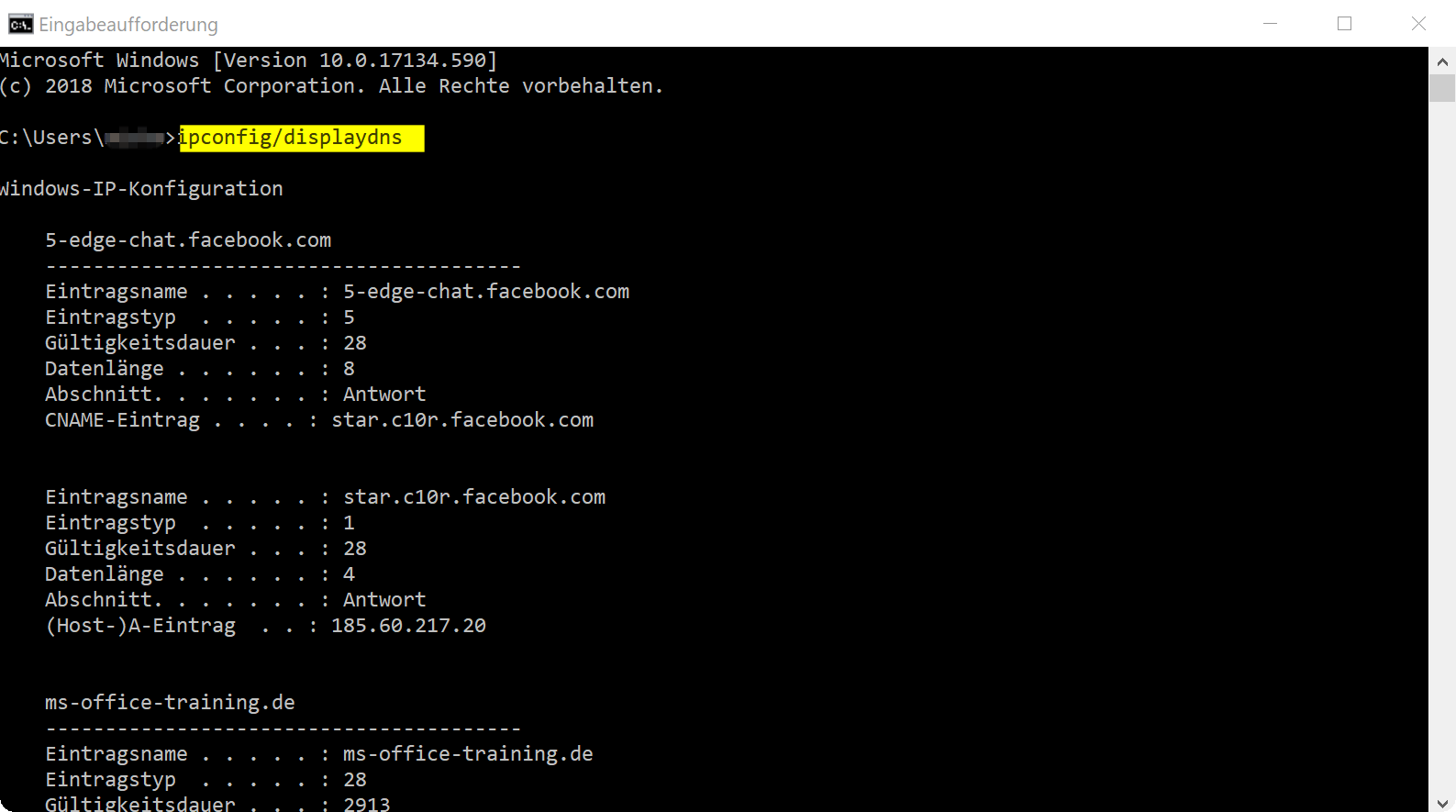
- Enter the following command line directly after “C:/Users/Your Computer”: ipconfig/displaydns
There you are then in the Windows IP configuration, in which the visited IP addresses are listed. Of course, the display is not as convenient as displaying the browser history in Chrome or Firefox, but it provides sufficient information about which IP addresses and thus which websites were visited.
However, using a VPN would also protect you from the prying eyes of a tech-savvy person, since only the IP address of the VPN provider would be revealed, everything that came in and out from there would remain hidden.
See fig. (click to enlarge)
Not only the browser in standard mode, all visited websites (via cookies) and of course your internet provider know which websites you visited and when we already know.
But your operating system also saves all the IP addresses accessed behind which the visited websites are hidden. To display these under Windows 10, proceed as follows:
- Click on the Windows icon in the taskbar at the bottom left
- Then enter “CMD” and confirm with Enter
- Enter the following command line directly after “C:/Users/Your Computer”: ipconfig/displaydns
There you are then in the Windows IP configuration, in which the visited IP addresses are listed. Of course, the display is not as convenient as displaying the browser history in Chrome or Firefox, but it provides sufficient information about which IP addresses and thus which websites were visited.
However, using a VPN would also protect you from the prying eyes of a tech-savvy person, since only the IP address of the VPN provider would be revealed, everything that came in and out from there would remain hidden.
See fig. (click to enlarge)
3. Conlusion
3. Conlusion
The bottom line is that we can say that the incognito mode of the different browser manufacturers creates a little more anonymity than using standard mode, but if you know a bit and want to know where a user was on the net, this is for you the incognito mode is actually just a stick that he has to jump over.
True security, like all services of value, does not come completely free, but in return it offers a significant gain in data protection and privacy. In times of increasing cyber crime, which does not only affect companies, it is a worthwhile investment.

The bottom line is that we can say that the incognito mode of the different browser manufacturers creates a little more anonymity than using standard mode, but if you know a bit and want to know where a user was on the net, this is for you the incognito mode is actually just a stick that he has to jump over.
True security, like all services of value, does not come completely free, but in return it offers a significant gain in data protection and privacy. In times of increasing cyber crime, which does not only affect companies, it is a worthwhile investment.
Popular Posts:

5 simple security rules against phishing and spam that everyone should know
Deceptively authentic emails from your bank, DHL, or PayPal? That's phishing! Data theft and viruses are a daily threat. We'll show you 5 simple rules (2FA, password managers, etc.) to protect yourself immediately and effectively and help you spot scammers.

The 5 best tips for a clean folder structure on your PC and in the cloud
Say goodbye to file chaos! "Offer_final_v2.docx" is a thing of the past. Learn 5 simple tips for a perfect folder structure on your PC and in the cloud (OneDrive). With proper file naming and archive rules, you'll find everything instantly.

Never do the same thing again: How to record a macro in Excel
Tired of repetitive tasks in Excel? Learn how to create your first personal "magic button" with the macro recorder. Automate formatting and save hours – no programming required! Click here for easy instructions.

IMAP vs. Local Folders: The secret to your Outlook structure and why it matters
Do you know the difference between IMAP and local folders in Outlook? Incorrect use can lead to data loss! We'll explain simply what belongs where, how to clean up your mailbox, and how to archive emails securely and for the long term.

Der ultimative Effizienz-Boost: Wie Excel, Word und Outlook für Sie zusammenarbeiten
Schluss mit manuellem Kopieren! Lernen Sie, wie Sie Excel-Listen, Word-Vorlagen & Outlook verbinden, um personalisierte Serien-E-Mails automatisch zu versenden. Sparen Sie Zeit, vermeiden Sie Fehler und steigern Sie Ihre Effizienz. Hier geht's zur einfachen Anleitung!

Agentic AI: The next quantum leap in artificial intelligence?
Forget simple chatbots! Agentic AI is here: Autonomous AI that plans, learns, and solves complex tasks for you. Discover how AI agents will revolutionize the world of work and your everyday life. Are you ready for the future of artificial intelligence?
Offers 2024: Word & Excel Templates











Popular Posts:
5 simple security rules against phishing and spam that everyone should know
Deceptively authentic emails from your bank, DHL, or PayPal? That's phishing! Data theft and viruses are a daily threat. We'll show you 5 simple rules (2FA, password managers, etc.) to protect yourself immediately and effectively and help you spot scammers.
The 5 best tips for a clean folder structure on your PC and in the cloud
Say goodbye to file chaos! "Offer_final_v2.docx" is a thing of the past. Learn 5 simple tips for a perfect folder structure on your PC and in the cloud (OneDrive). With proper file naming and archive rules, you'll find everything instantly.
Never do the same thing again: How to record a macro in Excel
Tired of repetitive tasks in Excel? Learn how to create your first personal "magic button" with the macro recorder. Automate formatting and save hours – no programming required! Click here for easy instructions.
IMAP vs. Local Folders: The secret to your Outlook structure and why it matters
Do you know the difference between IMAP and local folders in Outlook? Incorrect use can lead to data loss! We'll explain simply what belongs where, how to clean up your mailbox, and how to archive emails securely and for the long term.
Der ultimative Effizienz-Boost: Wie Excel, Word und Outlook für Sie zusammenarbeiten
Schluss mit manuellem Kopieren! Lernen Sie, wie Sie Excel-Listen, Word-Vorlagen & Outlook verbinden, um personalisierte Serien-E-Mails automatisch zu versenden. Sparen Sie Zeit, vermeiden Sie Fehler und steigern Sie Ihre Effizienz. Hier geht's zur einfachen Anleitung!
Agentic AI: The next quantum leap in artificial intelligence?
Forget simple chatbots! Agentic AI is here: Autonomous AI that plans, learns, and solves complex tasks for you. Discover how AI agents will revolutionize the world of work and your everyday life. Are you ready for the future of artificial intelligence?
Offers 2024: Word & Excel Templates