In 5 steps to the perfect Outlook signature


Who often writes e-mails will probably be annoyed at some point constantly manual the standard phrase “Sincerely” and put his name under it. It will be even more exhausting if you also want to insert additional contact data such as: address, telephone, fax, etc.
Fortunately, Outlook gives us the function of the signature template for this task.
This allows us to easily select different signatures (depending on the occasion and the recipient) and also provide them with business photos for business contacts or applications.
Read in our article how to make more impression with your signature in Microsoft Outlook.

In 5 steps to the perfect Outlook signature
Who often writes e-mails will probably be annoyed at some point constantly manual the standard phrase “Sincerely” and put his name under it. It will be even more exhausting if you also want to insert additional contact data such as: address, telephone, fax, etc.
Fortunately, Outlook gives us the function of the signature template for this task.
This allows us to easily select different signatures (depending on the occasion and the recipient) and also provide them with business photos for business contacts or applications.
Read in our article how to make more impression with your signature in Microsoft Outlook.
1. Switch to the Outlook Options menu
1. Switch to the Outlook Options menu
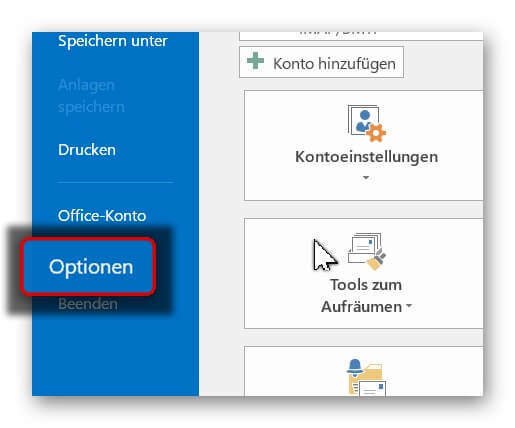
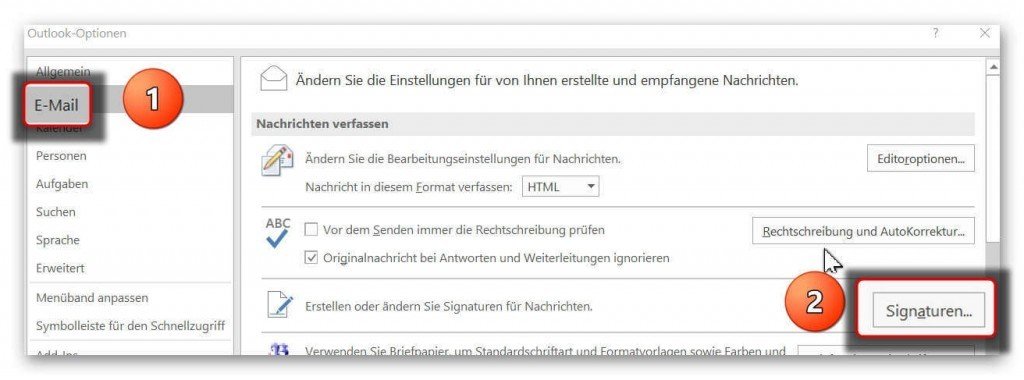
First we have to switch to the option menu of Outlook.
To do this, click on “File” in the tab on the left next to “Start” and change there in the e-mail options to “Signatures”
See picture (click to enlarge)

First we have to switch to the option menu of Outlook.
To do this, click on “File” in the tab on the left next to “Start” and change there in the e-mail options to “Signatures”
See picture (click to enlarge)
2. Name assigned for e-mail signature
2. Name assigned for e-mail signature
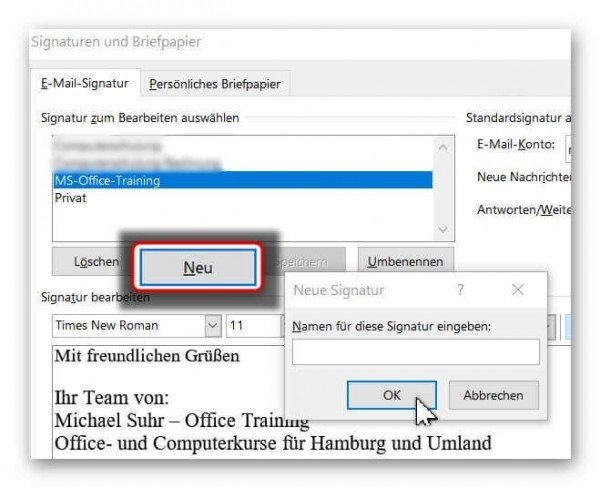
In the next step, we can give our signature a name.
If you do not give a name later “standard” will be available for selection.
Under the signatures overview, click on “New” and then enter your signature name there.
See picture (click to enlarge)

In the next step, we can give our signature a name.
If you do not give a name later “standard” will be available for selection.
Under the signatures overview, click on “New” and then enter your signature name there.
See picture (click to enlarge)
3. Create a signature in Outlook
3. Create a signature in Outlook
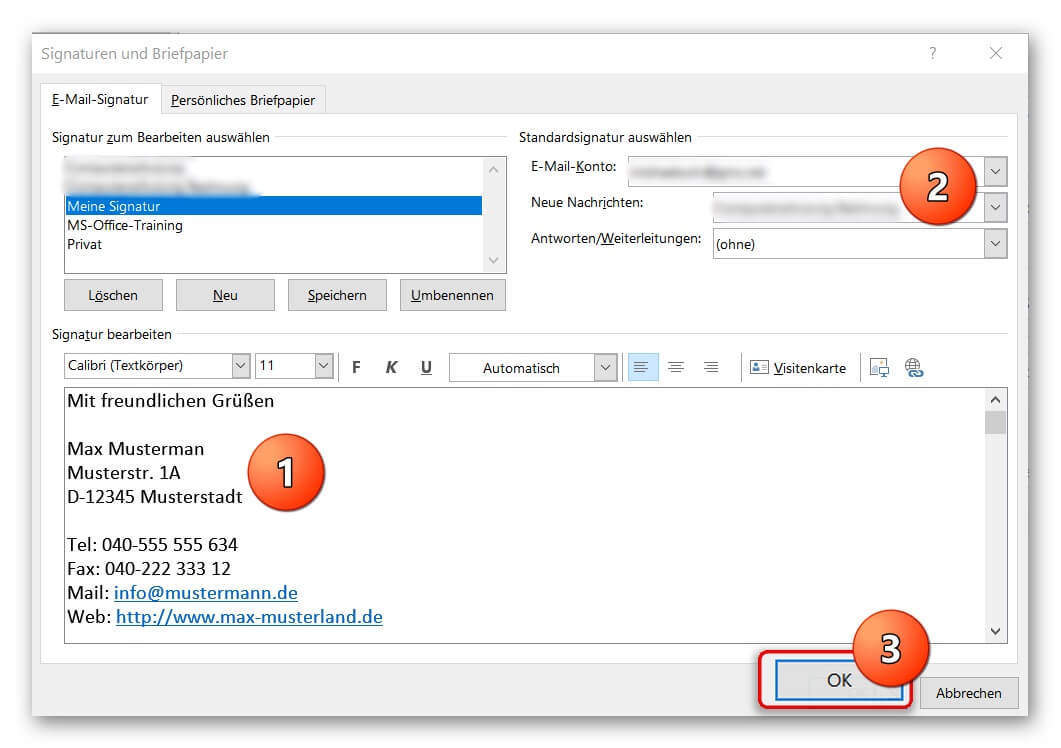
Next, proceed as follows:
- Enter your data (name, address, etc.) in the signature field.
You can also format the text components as you wish. (eg bold, italic, font size, etc.) - Assign a standard e-mail address to the signature. (does not apply to only 1 e-mail address)
- Check all entries again, and then confirm with “Ok”
See picture (click to enlarge)
Next, proceed as follows:
- Enter your data (name, address, etc.) in the signature field.
You can also format the text components as you wish. (eg bold, italic, font size, etc.) - Assign a standard e-mail address to the signature. (does not apply to only 1 e-mail address)
- Check all entries again, and then confirm with “Ok”
See picture (click to enlarge)
4. Insert photo into your Outlook signature
4. Insert photo into your Outlook signature
If you also want to insert your photo for the final fine-tuning of your perfect Outlook signature, please note the following:
1. For what purpose will I use the signature?
For example, e-mail applications have become a matter of course today.
So, regardless of your e-mail attachment with the application documents, you have the opportunity to present yourself already with the signature at your best.
2. Which image format is the right one for my signature, so that it looks the same everywhere?
If you are unsure which format to choose the best, or your current portrait photo looks more like a standard application photo than a business photo, we recommend professional career photo editing.
The advantage: It does not need a new photo shoot here.
An image upload to our Partner Starmazing.de can make sense here.

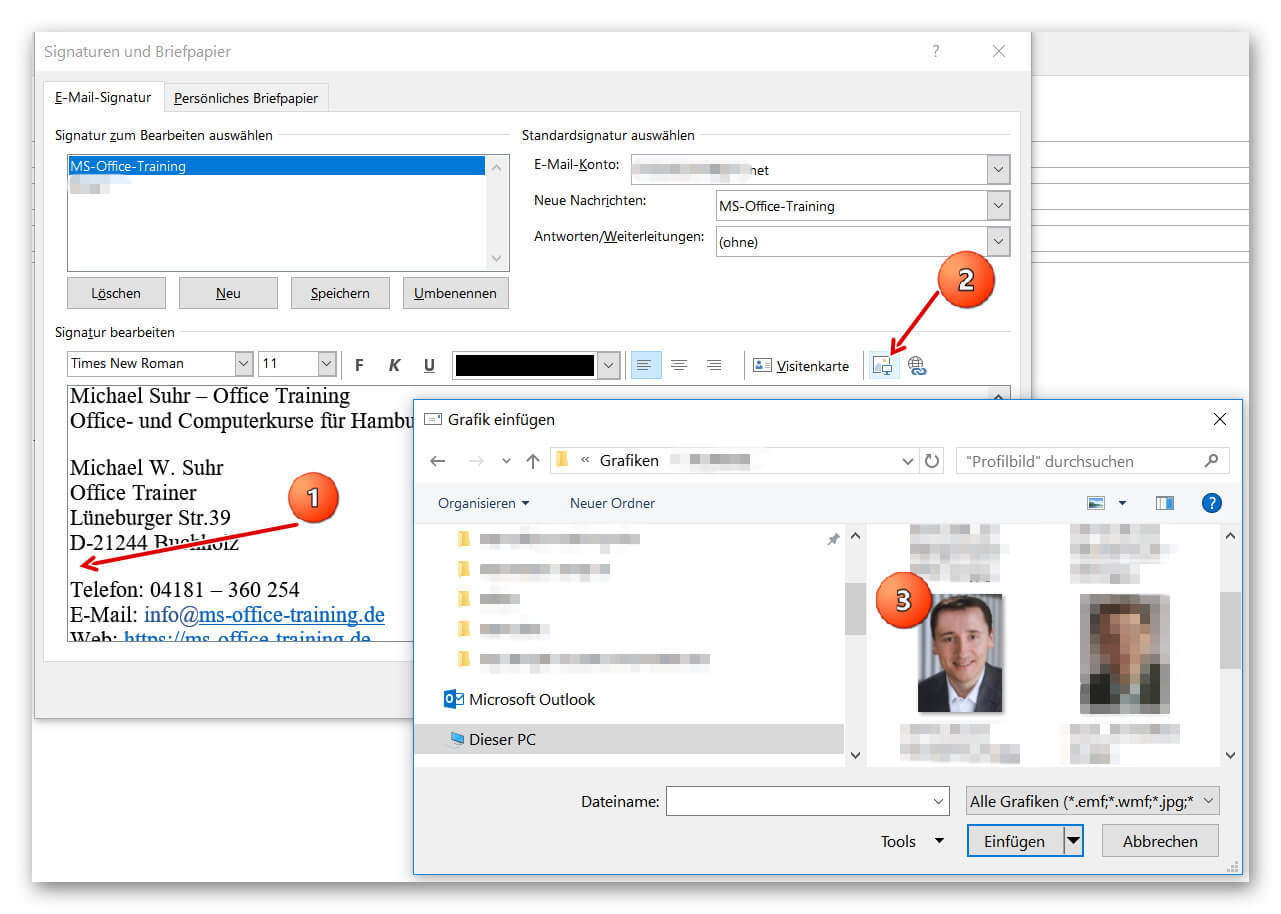
Then simply insert your photo as follows:
- Position the cursor at the position where you want to insert the image.
(for example, between address and other contact details such as phone and e-mail address) - Then click the image upload icon and select an optimized photo.
See picture (click to enlarge)
If you also want to insert your photo for the final fine-tuning of your perfect Outlook signature, please note the following:
1. For what purpose will I use the signature?
For example, e-mail applications have become a matter of course today.
So, regardless of your e-mail attachment with the application documents, you have the opportunity to present yourself already with the signature at your best.
2. Which image format is the right one for my signature, so that it looks the same everywhere?
If you are unsure which format to choose the best, or your current portrait photo looks more like a standard application photo than a business photo, we recommend professional career photo editing.
The advantage: It does not need a new photo shoot here.
An image upload to our Partner Starmazing.de can make sense here.
Then simply insert your photo as follows:
- Position the cursor at the position where you want to insert the image.
(for example, between address and other contact details such as phone and e-mail address) - Then click the image upload icon and select an optimized photo.
See picture (click to enlarge)
5. Insert the signature into an e-mail
5. Insert the signature into an e-mail
After we have created, assigned, and saved our signature, it will automatically be added to every e-mail after our message.
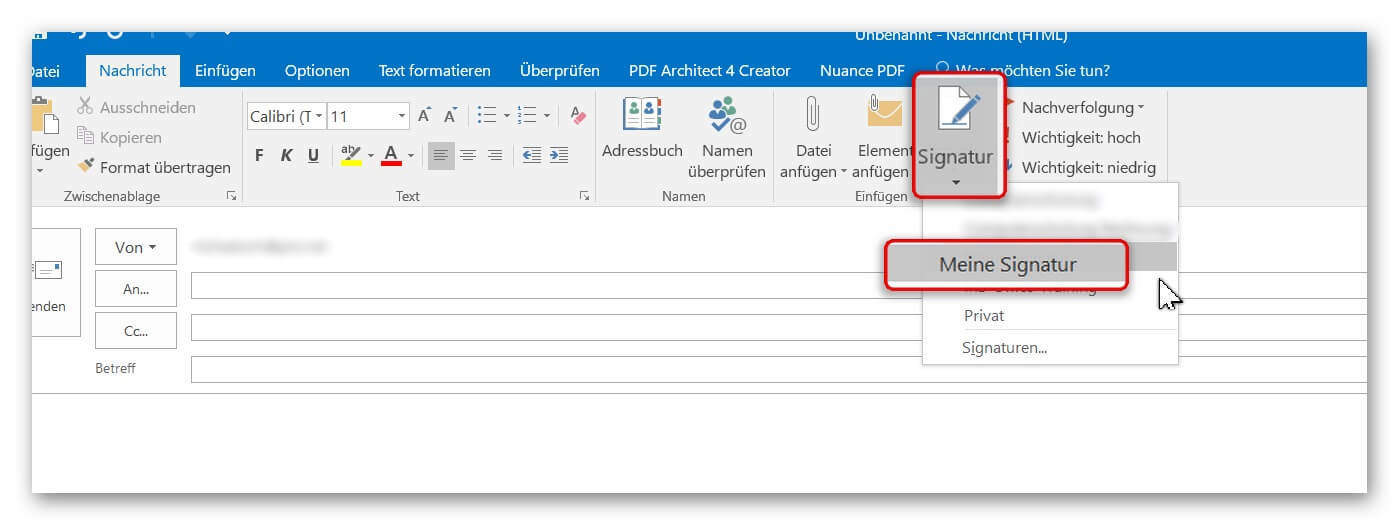
In case we did not do an automatic assignment (for example, if we want to use different signatures more often), proceed as follows:
- Position the cursor where you would normally put the salutation.
- And then click on “Signature” where you select the desired signature.
See picture (click to enlarge)

After we have created, assigned, and saved our signature, it will automatically be added to every e-mail after our message.
In case we did not do an automatic assignment (for example, if we want to use different signatures more often), proceed as follows:
- Position the cursor where you would normally put the salutation.
- And then click on “Signature” where you select the desired signature.
See picture (click to enlarge)
Popular Posts:

So sieht das wirklich perfekte Homeoffice-Setup für 2026 aus
Ihr Homeoffice ist veraltet? Steigern Sie 2026 Produktivität & Gesundheit. Unser Guide zeigt das perfekte Setup: von ergonomischen Stühlen und 4K-Webcams bis zu Mesh-WLAN und Kabelmanagement. So investieren Sie in Ihre Karriere.

Internet, Telefon & TV: Die besten Komplettpakete
Internet, TV & Telefon aus einer Hand? Wir vergleichen die Komplettpakete von Telekom, Vodafone, O2 & 1&1. Wer punktet bei Speed, TV-Komfort (MagentaTV vs. GigaTV) und Preis? So finden Sie das beste Triple-Play-Angebot für Ihre Adresse.

5 Anzeichen, dass dein Chef dich im Homeoffice digital überwacht
Nur weil du im Homeoffice bist, heißt das nicht, dass dir niemand zusieht. "Bossware" ist auf dem Vormarsch. Wir zeigen 5 subtile Anzeichen für digitale Überwachung – von "Teams-Status"-Kult bis zu verdächtigen IT-Tools. So erkennst du die Warnsignale und schützt deine Karriere.

Schluss mit dem Tool-Chaos: 5 Apps, die Euer Office wirklich produktiver machen
Schluss mit digitaler Reibung: Diese 5 Apps machen Ihr Büro wirklich produktiver. Entdecken Sie, wie Asana, Loom, Notion, Zapier und Slack die Effizienz steigern, Meetings reduzieren und Ihr Team smarter vernetzen – wenn man sie richtig einsetzt.

AI in everyday office life: Your new invisible colleague
AI won't replace you – but those who use it will have a competitive edge. Make AI your co-pilot in the office! We'll show you four concrete hacks for faster emails, better meeting notes, and solved Excel problems. Get started today, no IT degree required.

Fünf vor Zwölf: Wie Sie erkennen, dass Sie kurz vor dem Burnout stehen
Erschöpfung ist normal, doch wenn das Wochenende keine Erholung mehr bringt und Zynismus die Motivation ersetzt, stehen Sie kurz vor dem Burnout. Erfahren Sie, welche 7 Warnsignale Sie niemals ignorieren dürfen und warum es jetzt lebenswichtig ist, die Notbremse zu ziehen
Offers 2024: Word & Excel Templates











Popular Posts:
So sieht das wirklich perfekte Homeoffice-Setup für 2026 aus
Ihr Homeoffice ist veraltet? Steigern Sie 2026 Produktivität & Gesundheit. Unser Guide zeigt das perfekte Setup: von ergonomischen Stühlen und 4K-Webcams bis zu Mesh-WLAN und Kabelmanagement. So investieren Sie in Ihre Karriere.
Internet, Telefon & TV: Die besten Komplettpakete
Internet, TV & Telefon aus einer Hand? Wir vergleichen die Komplettpakete von Telekom, Vodafone, O2 & 1&1. Wer punktet bei Speed, TV-Komfort (MagentaTV vs. GigaTV) und Preis? So finden Sie das beste Triple-Play-Angebot für Ihre Adresse.
5 Anzeichen, dass dein Chef dich im Homeoffice digital überwacht
Nur weil du im Homeoffice bist, heißt das nicht, dass dir niemand zusieht. "Bossware" ist auf dem Vormarsch. Wir zeigen 5 subtile Anzeichen für digitale Überwachung – von "Teams-Status"-Kult bis zu verdächtigen IT-Tools. So erkennst du die Warnsignale und schützt deine Karriere.
Schluss mit dem Tool-Chaos: 5 Apps, die Euer Office wirklich produktiver machen
Schluss mit digitaler Reibung: Diese 5 Apps machen Ihr Büro wirklich produktiver. Entdecken Sie, wie Asana, Loom, Notion, Zapier und Slack die Effizienz steigern, Meetings reduzieren und Ihr Team smarter vernetzen – wenn man sie richtig einsetzt.
AI in everyday office life: Your new invisible colleague
AI won't replace you – but those who use it will have a competitive edge. Make AI your co-pilot in the office! We'll show you four concrete hacks for faster emails, better meeting notes, and solved Excel problems. Get started today, no IT degree required.
Fünf vor Zwölf: Wie Sie erkennen, dass Sie kurz vor dem Burnout stehen
Erschöpfung ist normal, doch wenn das Wochenende keine Erholung mehr bringt und Zynismus die Motivation ersetzt, stehen Sie kurz vor dem Burnout. Erfahren Sie, welche 7 Warnsignale Sie niemals ignorieren dürfen und warum es jetzt lebenswichtig ist, die Notbremse zu ziehen
Offers 2024: Word & Excel Templates