

Record and save Skype video calls


Even though Skype has had to cope with fierce losses against the competition WhatsApp & Co. (which mainly scores in the mobile sector) since its market launch about 15 years ago, the messenger service is still one of the most popular services when it comes to video conferencing.
However, what a feature users have long missed is the ability to save a recording of a conversation (with and without video). Microsoft has finally closed this gap since July 2018.
The recordings are stored in Microsoft’s own cloud.
However, if you prefer to save the saved recordings locally, there is also a free software solution that we would like to introduce in the following article.

Record and save Skype video calls
Even though Skype has had to cope with fierce losses against the competition WhatsApp & Co. (which mainly scores in the mobile sector) since its market launch about 15 years ago, the messenger service is still one of the most popular services when it comes to video conferencing.
However, what a feature users have long missed is the ability to save a recording of a conversation (with and without video). Microsoft has finally closed this gap since July 2018.
The recordings are stored in Microsoft’s own cloud.
However, if you prefer to save the saved recordings locally, there is also a free software solution that we would like to introduce in the following article.
1. Record skype calls with on-board resources
1. Record skype calls with on-board resources
First, we look at the possibility directly in Skype -so with on-board resources-.
To do this, proceed as follows:
- Start a call
- Click the + icon in the lower right corner of the screen
- Then click on “start recording”
- To stop the recording simply click on “Stop recording”
The recording is done while all participants are also displayed. The recording is stored on Microsoft Cloud servers for 30 days, and is available for download to all participants as an MP4 file.

First, we look at the possibility directly in Skype -so with on-board resources-.
To do this, proceed as follows:
- Start a call
- Click the + icon in the lower right corner of the screen
- Then click on “start recording”
- To stop the recording simply click on “Stop recording”
The recording is done while all participants are also displayed. The recording is stored on Microsoft Cloud servers for 30 days, and is available for download to all participants as an MP4 file.
2. Software solution for Skype recording
2. Software solution for Skype recording
As with all files that are stored in an external cloud, one may of course also ask the question what actually happens with the data, and whether these are not yet stored and evaluated after the deadline somewhere.
The providers of cloud systems deny this, but at least since Facebook, we know that the Internet never really forgets.
A software solution to save calls in Skype directly on the PC offers the manufacturer DVD Videosoft with the free program Free Video Call Recorder for Skype. The operation is very simple, and it can be determined in advance where, and in what format the conversation should be recorded, and also the differentiation either only audio, video only or complete is possible.
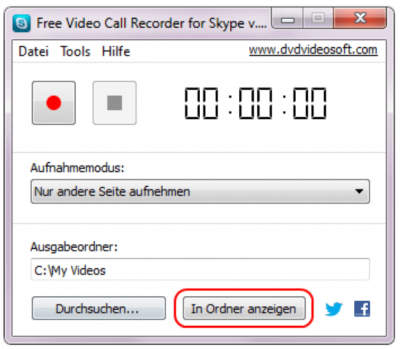
The difference in contrast to the on-board solution directly from Skype out is that here a recording of conversations is possible without the other participants to be notified.
As with all files that are stored in an external cloud, one may of course also ask the question what actually happens with the data, and whether these are not yet stored and evaluated after the deadline somewhere.
The providers of cloud systems deny this, but at least since Facebook, we know that the Internet never really forgets.
A software solution to save calls in Skype directly on the PC offers the manufacturer DVD Videosoft with the free program Free Video Call Recorder for Skype. The operation is very simple, and it can be determined in advance where, and in what format the conversation should be recorded, and also the differentiation either only audio, video only or complete is possible.
The difference in contrast to the on-board solution directly from Skype out is that here a recording of conversations is possible without the other participants to be notified.
3. Legal Notice
3. Legal Notice
Although the software solution is a practical matter to save videos directly on the PC without outsourcing them in a cloud before, but also represents a legal stumbling block.
Because in Germany the recording of non-public spoken word is prohibited. All the more so, of course, if the video track was also recorded. We therefore recommend the participants in advance to point out -bzw. to agree that you would like to record this conversation and save it locally.
You have the double security in any case if you also have the consent as appropriate record for later disagreements.

Although the software solution is a practical matter to save videos directly on the PC without outsourcing them in a cloud before, but also represents a legal stumbling block.
Because in Germany the recording of non-public spoken word is prohibited. All the more so, of course, if the video track was also recorded. We therefore recommend the participants in advance to point out -bzw. to agree that you would like to record this conversation and save it locally.
You have the double security in any case if you also have the consent as appropriate record for later disagreements.
Popular Posts:

Dynamic ranges in Excel: OFFSET function
The OFFSET function in Excel creates a flexible reference. Instead of fixing =SUM(B5:B7), the function finds the range itself, e.g., for the "last 3 months". Ideal for dynamic charts or dashboards that grow automatically.

Mastering the INDIRECT function in Excel
The INDIRECT function in Excel converts text into a real reference. Instead of manually typing =January!E10, use =INDIRECT(A2 & "!E10"), where A2 contains 'January'. This allows you to easily create dynamic summaries for multiple worksheets.

From assistant to agent: Microsoft’s Copilot
Copilot is growing up: Microsoft's AI is no longer an assistant, but a proactive agent. With "Vision," it sees your Windows desktop; in M365, it analyzes data as a "Researcher"; and in GitHub, it autonomously corrects code. The biggest update yet.

Windows 12: Where is it? The current status in October 2025
Everyone was waiting for Windows 12 in October 2025, but it didn't arrive. Instead, Microsoft is focusing on Windows 11 25H2 and "Copilot+ PC" features. We'll explain: Is Windows 12 canceled, postponed, or is it already available as an AI update for Windows 11?

Blocking websites on Windows using the hosts file
Want to block unwanted websites in Windows? You can do it without extra software using the hosts file. We'll show you how to edit the file as an administrator and redirect domains like example.de to 127.0.0.1. This will block them immediately in all browsers.

The “Zero Inbox” method with Outlook: How to permanently get your mailbox under control.
Caught red-handed? Your Outlook inbox has 1000+ emails? That's pure stress. Stop the email deluge with the "Zero Inbox" method. We'll show you how to clean up your inbox and regain control using Quick Steps and rules.
Offers 2024: Word & Excel Templates











Popular Posts:
Dynamic ranges in Excel: OFFSET function
The OFFSET function in Excel creates a flexible reference. Instead of fixing =SUM(B5:B7), the function finds the range itself, e.g., for the "last 3 months". Ideal for dynamic charts or dashboards that grow automatically.
Mastering the INDIRECT function in Excel
The INDIRECT function in Excel converts text into a real reference. Instead of manually typing =January!E10, use =INDIRECT(A2 & "!E10"), where A2 contains 'January'. This allows you to easily create dynamic summaries for multiple worksheets.
From assistant to agent: Microsoft’s Copilot
Copilot is growing up: Microsoft's AI is no longer an assistant, but a proactive agent. With "Vision," it sees your Windows desktop; in M365, it analyzes data as a "Researcher"; and in GitHub, it autonomously corrects code. The biggest update yet.
Windows 12: Where is it? The current status in October 2025
Everyone was waiting for Windows 12 in October 2025, but it didn't arrive. Instead, Microsoft is focusing on Windows 11 25H2 and "Copilot+ PC" features. We'll explain: Is Windows 12 canceled, postponed, or is it already available as an AI update for Windows 11?
Blocking websites on Windows using the hosts file
Want to block unwanted websites in Windows? You can do it without extra software using the hosts file. We'll show you how to edit the file as an administrator and redirect domains like example.de to 127.0.0.1. This will block them immediately in all browsers.
The “Zero Inbox” method with Outlook: How to permanently get your mailbox under control.
Caught red-handed? Your Outlook inbox has 1000+ emails? That's pure stress. Stop the email deluge with the "Zero Inbox" method. We'll show you how to clean up your inbox and regain control using Quick Steps and rules.
Offers 2024: Word & Excel Templates

























