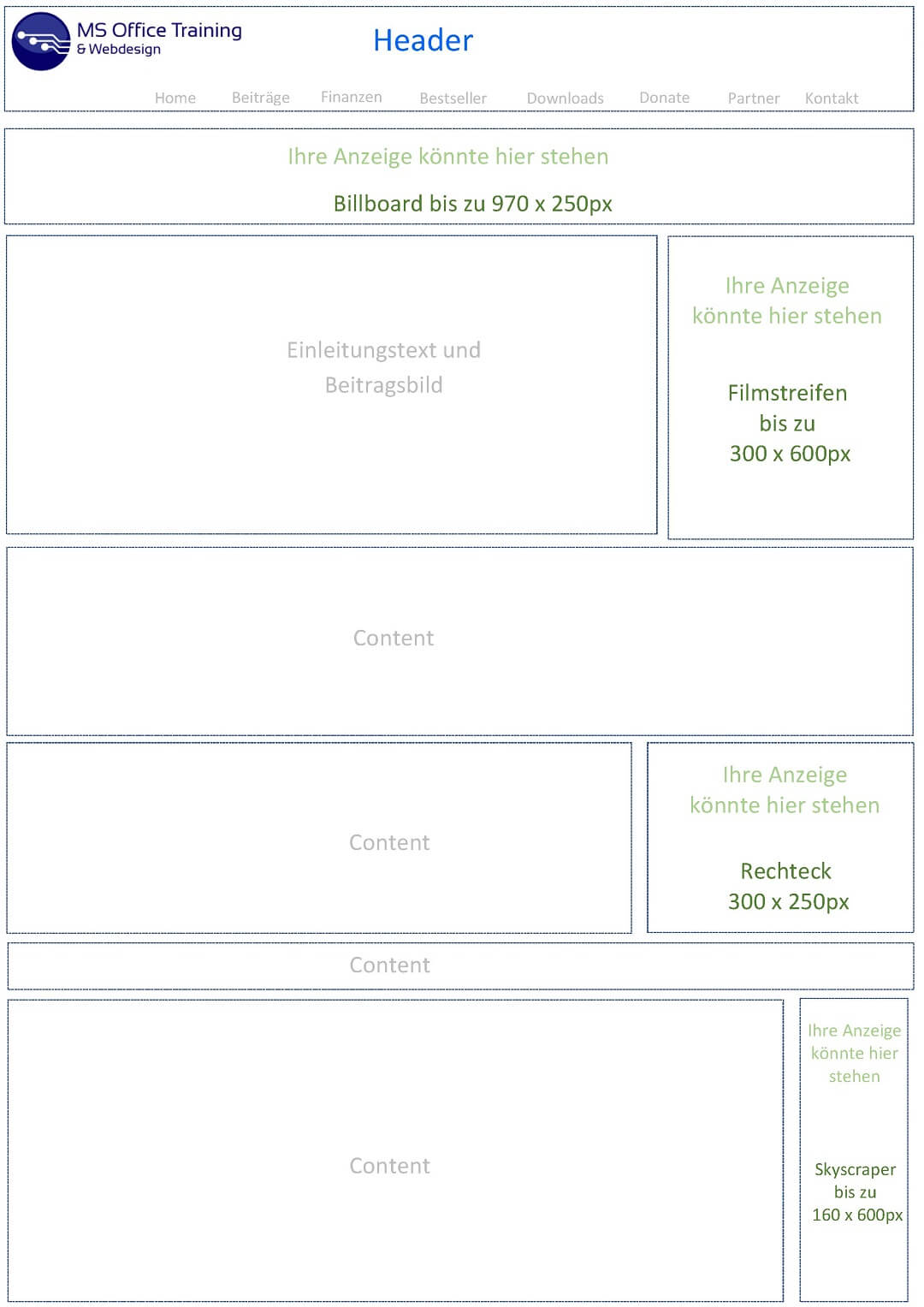
Become an advertising partner on our website
We have been running the MS Office Training website since 2015 and now have an average of around 100,000 page views per month. We currently have over 600 articles in German and more than 500 articles in English translation in our portfolio, and the trend is increasing.
We would like to offer companies the opportunity to advertise directly on our website at fair conditions. As an advertiser, you also have the option of storing your advertising material directly on our server so that it cannot be hidden by ad blockers. This of course gives you a much higher visibility. If you are interested, please send us a message.
Become an advertising partner on our website
We have been running the MS Office Training website since 2015 and now have an average of around 100,000 page views per month. We currently have over 600 articles in German and more than 500 articles in English translation in our portfolio, and the trend is increasing.
We would like to offer companies the opportunity to advertise directly on our website at fair conditions. As an advertiser, you also have the option of storing your advertising material directly on our server so that it cannot be hidden by ad blockers. This of course gives you a much higher visibility. If you are interested, please send us a message.
Popular Posts

Who owns the future? AI training and the global battle for copyright.
AI companies are training their models with billions of copyrighted works from the internet – often without permission. Is this transformative "fair use" or theft? Authors and artists are complaining because AI is now directly competing with them and copying their styles.

Dynamic ranges in Excel: OFFSET function
The OFFSET function in Excel creates a flexible reference. Instead of fixing =SUM(B5:B7), the function finds the range itself, e.g., for the "last 3 months". Ideal for dynamic charts or dashboards that grow automatically.

Mastering the INDIRECT function in Excel
The INDIRECT function in Excel converts text into a real reference. Instead of manually typing =January!E10, use =INDIRECT(A2 & "!E10"), where A2 contains 'January'. This allows you to easily create dynamic summaries for multiple worksheets.

From assistant to agent: Microsoft’s Copilot
Copilot is growing up: Microsoft's AI is no longer an assistant, but a proactive agent. With "Vision," it sees your Windows desktop; in M365, it analyzes data as a "Researcher"; and in GitHub, it autonomously corrects code. The biggest update yet.

The “Zero Inbox” method with Outlook: How to permanently get your mailbox under control.
Caught red-handed? Your Outlook inbox has 1000+ emails? That's pure stress. Stop the email deluge with the "Zero Inbox" method. We'll show you how to clean up your inbox and regain control using Quick Steps and rules.

5 simple security rules against phishing and spam that everyone should know
Deceptively authentic emails from your bank, DHL, or PayPal? That's phishing! Data theft and viruses are a daily threat. We'll show you 5 simple rules (2FA, password managers, etc.) to protect yourself immediately and effectively and help you spot scammers.
Offers 2024: Word & Excel Templates











Popular Posts
Who owns the future? AI training and the global battle for copyright.
AI companies are training their models with billions of copyrighted works from the internet – often without permission. Is this transformative "fair use" or theft? Authors and artists are complaining because AI is now directly competing with them and copying their styles.
Dynamic ranges in Excel: OFFSET function
The OFFSET function in Excel creates a flexible reference. Instead of fixing =SUM(B5:B7), the function finds the range itself, e.g., for the "last 3 months". Ideal for dynamic charts or dashboards that grow automatically.
Mastering the INDIRECT function in Excel
The INDIRECT function in Excel converts text into a real reference. Instead of manually typing =January!E10, use =INDIRECT(A2 & "!E10"), where A2 contains 'January'. This allows you to easily create dynamic summaries for multiple worksheets.
From assistant to agent: Microsoft’s Copilot
Copilot is growing up: Microsoft's AI is no longer an assistant, but a proactive agent. With "Vision," it sees your Windows desktop; in M365, it analyzes data as a "Researcher"; and in GitHub, it autonomously corrects code. The biggest update yet.
The “Zero Inbox” method with Outlook: How to permanently get your mailbox under control.
Caught red-handed? Your Outlook inbox has 1000+ emails? That's pure stress. Stop the email deluge with the "Zero Inbox" method. We'll show you how to clean up your inbox and regain control using Quick Steps and rules.
5 simple security rules against phishing and spam that everyone should know
Deceptively authentic emails from your bank, DHL, or PayPal? That's phishing! Data theft and viruses are a daily threat. We'll show you 5 simple rules (2FA, password managers, etc.) to protect yourself immediately and effectively and help you spot scammers.
Offers 2024: Word & Excel Templates