Excel Scenario manager and target value search


With Excel, you not only have a spreadsheet with which you can perform accurate calculations.
But you can also present different scenarios for assumptions of a situation with the “what if” analysis, without having to enter all possible combinations on spreadsheets to map them.
In our contribution, we would like to present the “target value search” and the “scenario manager” from the “what if” analysis using small practical examples.
You can find out how to use them in Microsoft Excel in our article.

Excel Scenario manager and target value search
With Excel, you not only have a spreadsheet with which you can perform accurate calculations.
But you can also present different scenarios for assumptions of a situation with the “what if” analysis, without having to enter all possible combinations on spreadsheets to map them.
In our contribution, we would like to present the “target value search” and the “scenario manager” from the “what if” analysis using small practical examples.
You can find out how to use them in Microsoft Excel in our article.
1. The operation of the Excel target value search
1. The operation of the Excel target value search
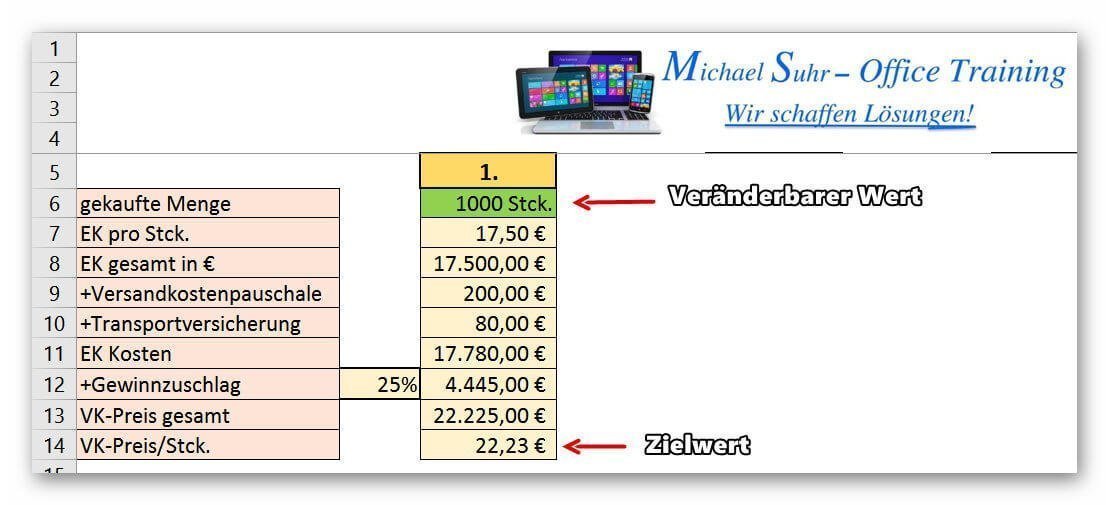
In our example we represent the purchase of a certain amount of an article plus surcharges and the sale plus profit surcharge.
In this case, different values (for example, the selling price) should reach a certain target value, while only one other value may change as a result.
In the first example we would like to know how high the purchase quantity has to be at least in order to reach a selling price of € 23.50 (under otherwise identical conditions).
See picture: (click to enlarge)
In our example we represent the purchase of a certain amount of an article plus surcharges and the sale plus profit surcharge.
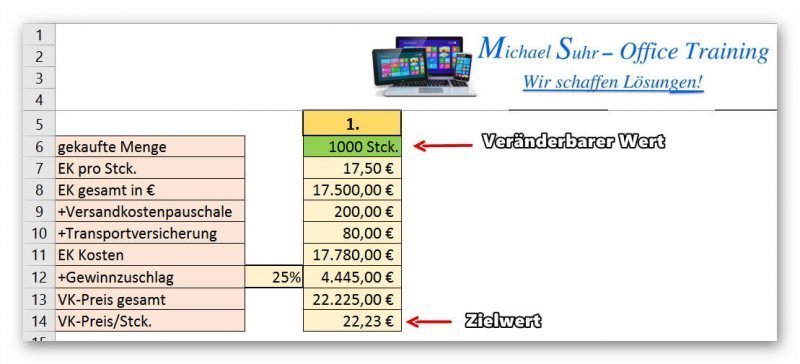
In this case, different values (for example, the selling price) should reach a certain target value, while only one other value may change as a result.
In the first example we would like to know how high the purchase quantity has to be at least in order to reach a selling price of € 23.50 (under otherwise identical conditions).
See picture: (click to enlarge)
2. Call up the target value search
2. Call up the target value search
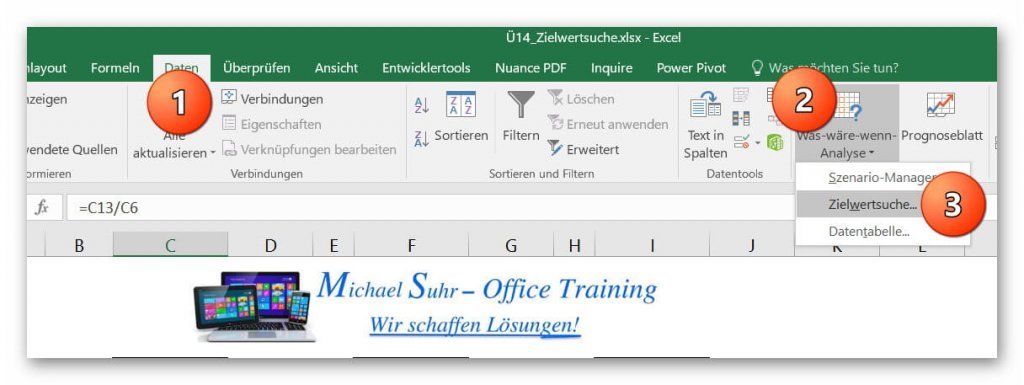
After we have created a scenario with different values, we call the target value search via the register:
“Data” – “What if analysis” – “target value search” on.
See picture (click to enlarge)

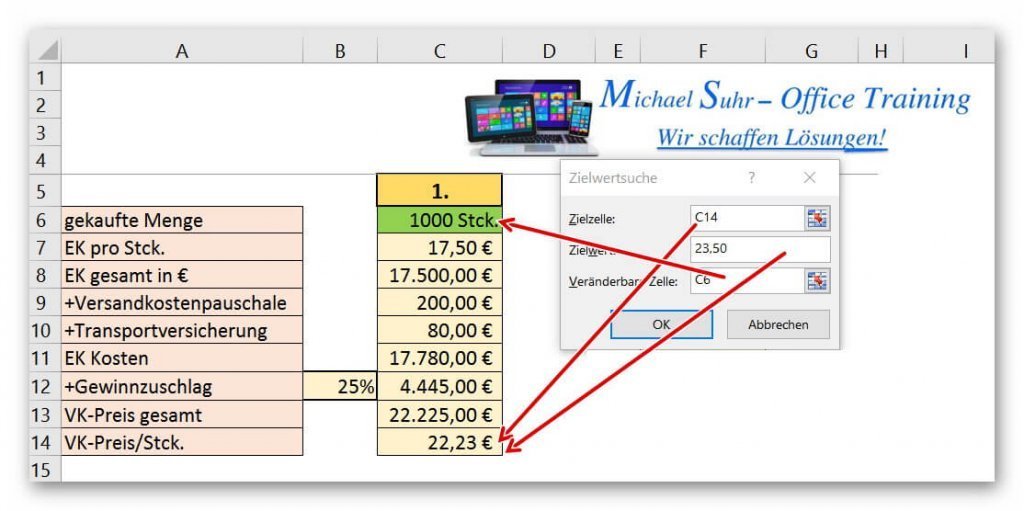
The following windows are available in the dialog box, which we fill out as follows:
- target cell
(Here the cell is marked, in which the desired value is to be determined.) - target value
(The corresponding target value is entered here.) - Changeable cell
(This is the cell that is allowed to change to reach the desired target value.)
See picture (click to enlarge)
After clicking on “OK”, the value in the changeable cell (in our example, the purchase quantity) is changed until the desired target value has been reached.
It goes without saying that the total value of the EK as well as other values dependent on the purchasing quantity also change here.
But not static values like our profit surcharge in% or the lump sum surcharges.
See picture (click to enlarge)

After we have created a scenario with different values, we call the target value search via the register:
“Data” – “What if analysis” – “target value search” on.
See picture (click to enlarge)
The following windows are available in the dialog box, which we fill out as follows:
- target cell
(Here the cell is marked, in which the desired value is to be determined.) - target value
(The corresponding target value is entered here.) - Changeable cell
(This is the cell that is allowed to change to reach the desired target value.)
See picture (click to enlarge)
After clicking on “OK”, the value in the changeable cell (in our example, the purchase quantity) is changed until the desired target value has been reached.
It goes without saying that the total value of the EK as well as other values dependent on the purchasing quantity also change here.
But not static values like our profit surcharge in% or the lump sum surcharges.
See picture (click to enlarge)
3. The scenario manager
3. The scenario manager
With the scenario manager, you can quickly display a variety of very complex scenarios with predefined values, without having to make any further entries, or enter all the options on the worksheet.
In our very small example, we have created a fixed investment amount for which the interest income should be displayed at different interest rates.
To call the scenario manager, proceed as follows:
- Data tab – “What if analysis”.
- And select the item “scenario manager” there.
See picture (click to enlarge)
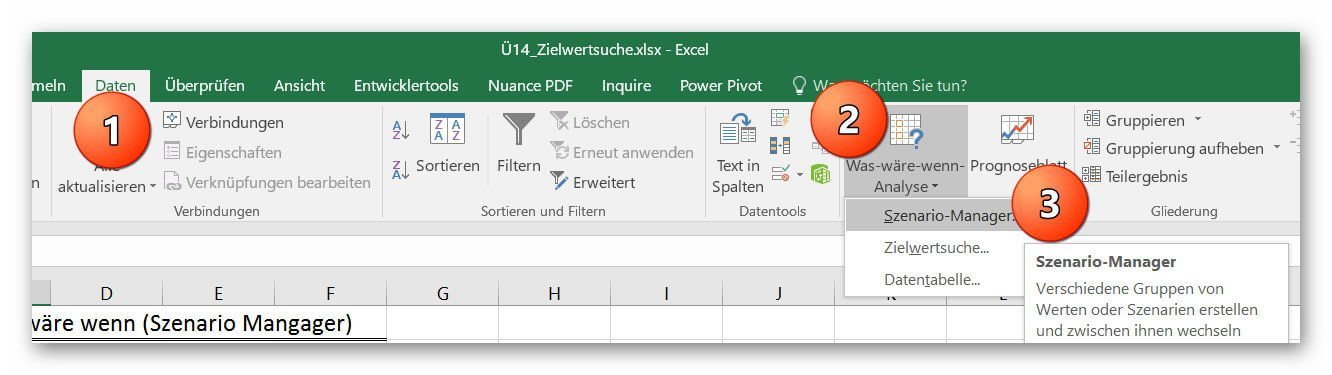
With the scenario manager, you can quickly display a variety of very complex scenarios with predefined values, without having to make any further entries, or enter all the options on the worksheet.
In our very small example, we have created a fixed investment amount for which the interest income should be displayed at different interest rates.
To call the scenario manager, proceed as follows:
- Data tab – “What if analysis”.
- And select the item “scenario manager” there.
See picture (click to enlarge)
4. Create a new scenario
4. Create a new scenario
After calling up the scenario, you can create different scenarios with different prerequisites.
To do this, click on “Add” in the scenario manager dialog box.
Then assign the scenario a comprehensible name for the scenario and set the modifiable cell (s).
In our example, we use only one changeable cell with the percentage.
Of course, you can set any number of changeable cells by selecting them on the worksheet.
By clicking on “OK” we are asked to set the values for the corresponding scenario, which can be displayed later.
You can set any number of scenarios by clicking Add after setting a scenario instead of OK, and then repeat the previous steps.
See picture: (click to enlarge)
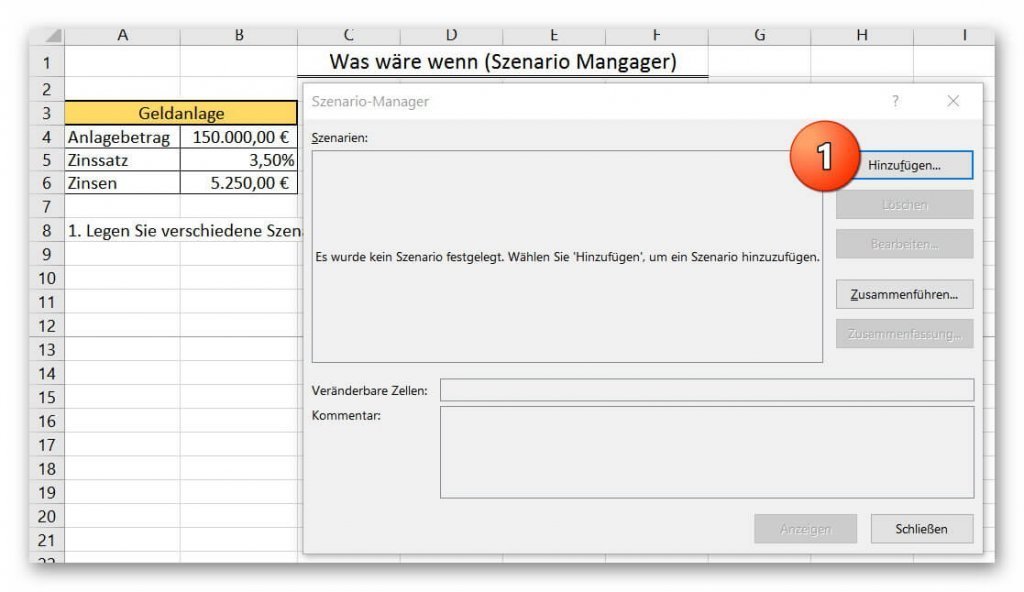
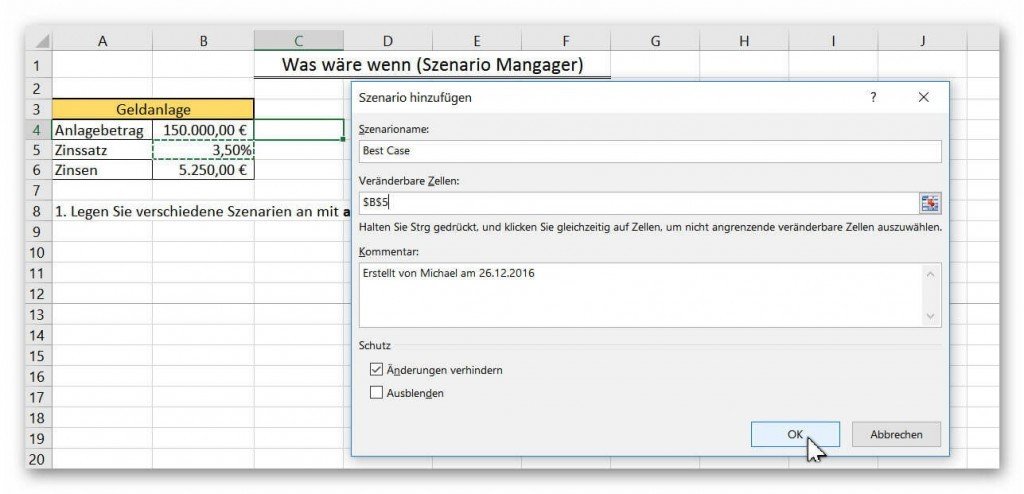
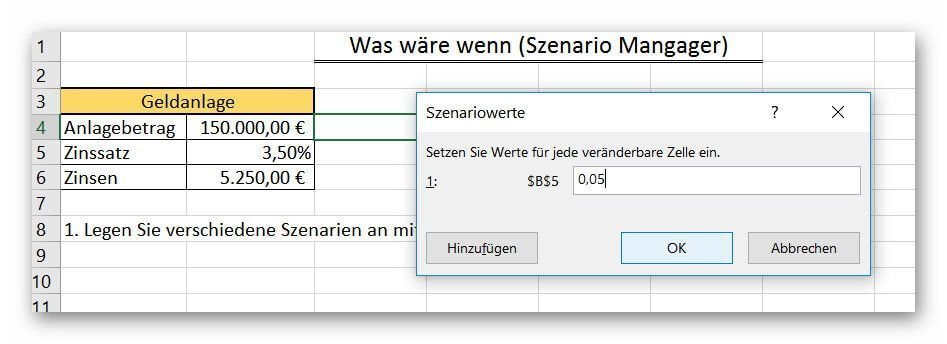
After calling up the scenario, you can create different scenarios with different prerequisites.
To do this, click on “Add” in the scenario manager dialog box.
Then assign the scenario a comprehensible name for the scenario and set the modifiable cell (s).
In our example, we use only one changeable cell with the percentage.
Of course, you can set any number of changeable cells by selecting them on the worksheet.
By clicking on “OK” we are asked to set the values for the corresponding scenario, which can be displayed later.
You can set any number of scenarios by clicking Add after setting a scenario instead of OK, and then repeat the previous steps.
See picture: (click to enlarge)
5. View the specified scenarios
5. View the specified scenarios
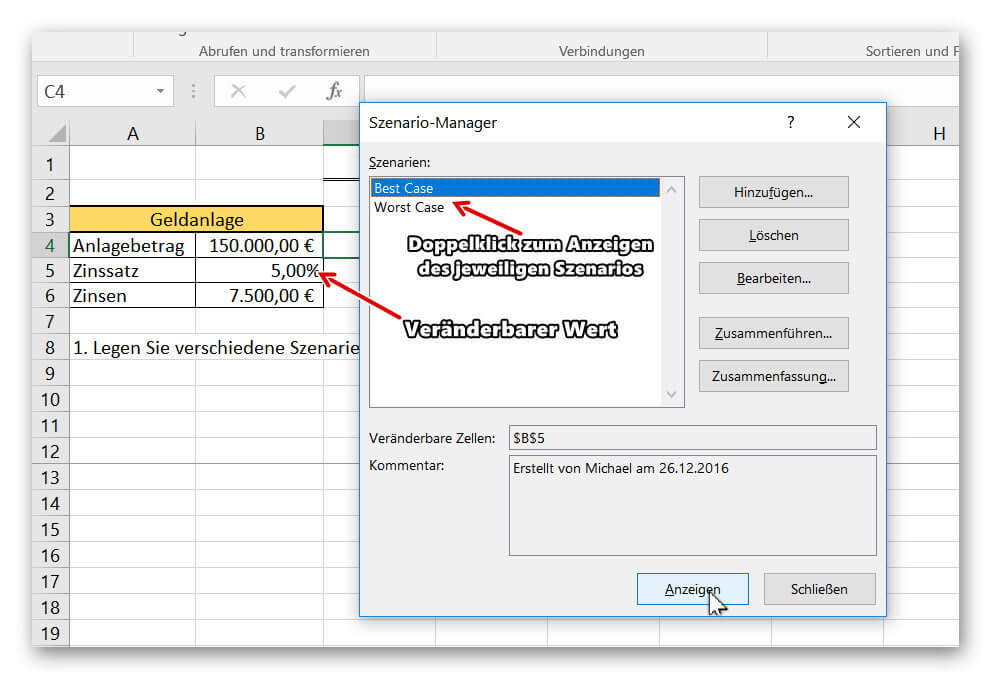
To call up and display your previously defined scenarios, simply click on the tab again in the corresponding sheet:
“Data” – “What if analysis” on “Scenario Manager”.
It displays your named scenarios, which you can easily display on your worksheet by either double-clicking on the respective scenario, or highlight, and “Show” button.
See picture (click to enlarge)
You will find that this tool can be used in a very useful and, above all, space-saving way to view the data without having to click through a large number of worksheets.

To call up and display your previously defined scenarios, simply click on the tab again in the corresponding sheet:
“Data” – “What if analysis” on “Scenario Manager”.
It displays your named scenarios, which you can easily display on your worksheet by either double-clicking on the respective scenario, or highlight, and “Show” button.
See picture (click to enlarge)
You will find that this tool can be used in a very useful and, above all, space-saving way to view the data without having to click through a large number of worksheets.
Popular Posts:

So sieht das wirklich perfekte Homeoffice-Setup für 2026 aus
Ihr Homeoffice ist veraltet? Steigern Sie 2026 Produktivität & Gesundheit. Unser Guide zeigt das perfekte Setup: von ergonomischen Stühlen und 4K-Webcams bis zu Mesh-WLAN und Kabelmanagement. So investieren Sie in Ihre Karriere.

Internet, Telefon & TV: Die besten Komplettpakete
Internet, TV & Telefon aus einer Hand? Wir vergleichen die Komplettpakete von Telekom, Vodafone, O2 & 1&1. Wer punktet bei Speed, TV-Komfort (MagentaTV vs. GigaTV) und Preis? So finden Sie das beste Triple-Play-Angebot für Ihre Adresse.

5 Anzeichen, dass dein Chef dich im Homeoffice digital überwacht
Nur weil du im Homeoffice bist, heißt das nicht, dass dir niemand zusieht. "Bossware" ist auf dem Vormarsch. Wir zeigen 5 subtile Anzeichen für digitale Überwachung – von "Teams-Status"-Kult bis zu verdächtigen IT-Tools. So erkennst du die Warnsignale und schützt deine Karriere.

Schluss mit dem Tool-Chaos: 5 Apps, die Euer Office wirklich produktiver machen
Schluss mit digitaler Reibung: Diese 5 Apps machen Ihr Büro wirklich produktiver. Entdecken Sie, wie Asana, Loom, Notion, Zapier und Slack die Effizienz steigern, Meetings reduzieren und Ihr Team smarter vernetzen – wenn man sie richtig einsetzt.

AI in everyday office life: Your new invisible colleague
AI won't replace you – but those who use it will have a competitive edge. Make AI your co-pilot in the office! We'll show you four concrete hacks for faster emails, better meeting notes, and solved Excel problems. Get started today, no IT degree required.

Fünf vor Zwölf: Wie Sie erkennen, dass Sie kurz vor dem Burnout stehen
Erschöpfung ist normal, doch wenn das Wochenende keine Erholung mehr bringt und Zynismus die Motivation ersetzt, stehen Sie kurz vor dem Burnout. Erfahren Sie, welche 7 Warnsignale Sie niemals ignorieren dürfen und warum es jetzt lebenswichtig ist, die Notbremse zu ziehen
Offers 2024: Word & Excel Templates











Popular Posts:
So sieht das wirklich perfekte Homeoffice-Setup für 2026 aus
Ihr Homeoffice ist veraltet? Steigern Sie 2026 Produktivität & Gesundheit. Unser Guide zeigt das perfekte Setup: von ergonomischen Stühlen und 4K-Webcams bis zu Mesh-WLAN und Kabelmanagement. So investieren Sie in Ihre Karriere.
Internet, Telefon & TV: Die besten Komplettpakete
Internet, TV & Telefon aus einer Hand? Wir vergleichen die Komplettpakete von Telekom, Vodafone, O2 & 1&1. Wer punktet bei Speed, TV-Komfort (MagentaTV vs. GigaTV) und Preis? So finden Sie das beste Triple-Play-Angebot für Ihre Adresse.
5 Anzeichen, dass dein Chef dich im Homeoffice digital überwacht
Nur weil du im Homeoffice bist, heißt das nicht, dass dir niemand zusieht. "Bossware" ist auf dem Vormarsch. Wir zeigen 5 subtile Anzeichen für digitale Überwachung – von "Teams-Status"-Kult bis zu verdächtigen IT-Tools. So erkennst du die Warnsignale und schützt deine Karriere.
Schluss mit dem Tool-Chaos: 5 Apps, die Euer Office wirklich produktiver machen
Schluss mit digitaler Reibung: Diese 5 Apps machen Ihr Büro wirklich produktiver. Entdecken Sie, wie Asana, Loom, Notion, Zapier und Slack die Effizienz steigern, Meetings reduzieren und Ihr Team smarter vernetzen – wenn man sie richtig einsetzt.
AI in everyday office life: Your new invisible colleague
AI won't replace you – but those who use it will have a competitive edge. Make AI your co-pilot in the office! We'll show you four concrete hacks for faster emails, better meeting notes, and solved Excel problems. Get started today, no IT degree required.
Fünf vor Zwölf: Wie Sie erkennen, dass Sie kurz vor dem Burnout stehen
Erschöpfung ist normal, doch wenn das Wochenende keine Erholung mehr bringt und Zynismus die Motivation ersetzt, stehen Sie kurz vor dem Burnout. Erfahren Sie, welche 7 Warnsignale Sie niemals ignorieren dürfen und warum es jetzt lebenswichtig ist, die Notbremse zu ziehen
Offers 2024: Word & Excel Templates