Book a Room in Outlook – Resources and Participants


If you work in a company where there are several teams but only a limited number of rooms for team meetings, planning the available resources is important. So if you want to invite your team to a team meeting in a specific room via Outlook on a fixed date, you should consider that this appointment may overlap with other teams in the room. This can cause embarrassing situations when your troops are standing in front of the room but cannot get in because the room is occupied.
In order to avoid something like this, we want to look at how you can invite participants to a team meeting and how you can also book rooms as resources in Outlook at the same time. This makes the whole thing much clearer and easier to plan for other teams in the company.

Book a Room in Outlook – Resources and Participants
If you work in a company where there are several teams but only a limited number of rooms for team meetings, planning the available resources is important. So if you want to invite your team to a team meeting in a specific room via Outlook on a fixed date, you should consider that this appointment may overlap with other teams in the room. This can cause embarrassing situations when your troops are standing in front of the room but cannot get in because the room is occupied.
In order to avoid something like this, we want to look at how you can invite participants to a team meeting and how you can also book rooms as resources in Outlook at the same time. This makes the whole thing much clearer and easier to plan for other teams in the company.
Create room in Outlook
Create room in Outlook
Before you can book a room as a resource in Outlook, Outlook must of course first know that this room exists and that it should be managed in addition to the regular e-mail addresses. To implement this, proceed as follows:
- Open Outlook and click on the “Calendar” menu.
- Click “Start a new meeting” to create a new meeting.
- In the Meeting Options section, click Resources.
- Click on “Rooms” and then on “Add Room“.
- Enter a name for the new room and click “OK“.
- If necessary, enter additional information about the new room, such as the maximum number of participants, the equipment available, etc.
- Click “Save” to create the new room.
Important: Please note that creating rooms in Outlook can normally only be carried out by people with administrator rights on the Exchange server (required). If you do not have administrator rights in your company, please contact your IT support for assistance in creating a new room.
Before you can book a room as a resource in Outlook, Outlook must of course first know that this room exists and that it should be managed in addition to the regular e-mail addresses. To implement this, proceed as follows:
- Open Outlook and click on the “Calendar” menu.
- Click “Start a new meeting” to create a new meeting.
- In the Meeting Options section, click Resources.
- Click on “Rooms” and then on “Add Room“.
- Enter a name for the new room and click “OK“.
- If necessary, enter additional information about the new room, such as the maximum number of participants, the equipment available, etc.
- Click “Save” to create the new room.
Important: Please note that creating rooms in Outlook can normally only be carried out by people with administrator rights on the Exchange server (required). If you do not have administrator rights in your company, please contact your IT support for assistance in creating a new room.
Book rooms and resources in Outlook
Book rooms and resources in Outlook
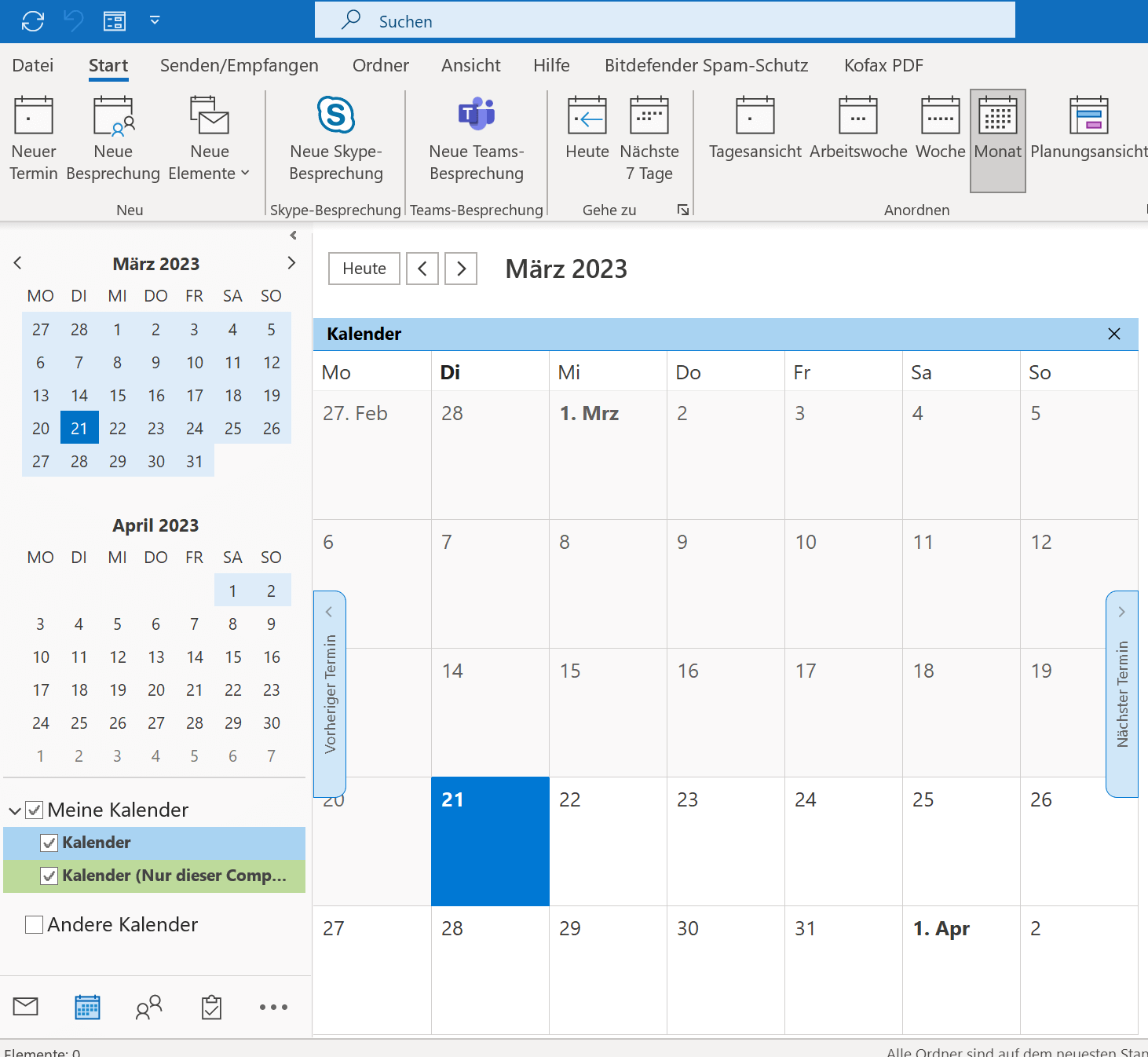
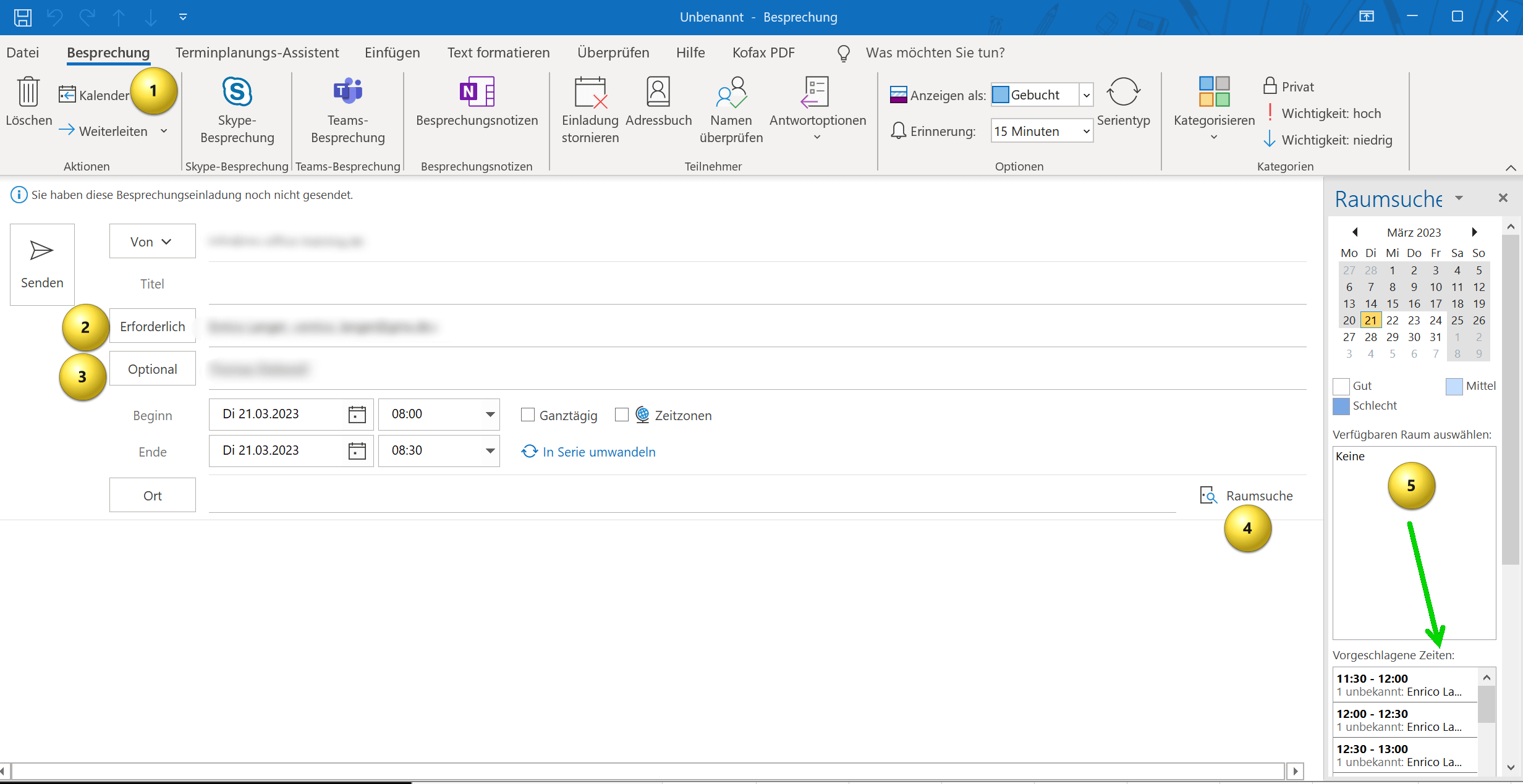
If the available rooms have been entered into the Outlook Exchange server in your company, the persons authorized by the administrator can now book a room as a resource relatively easily. To do this, proceed as follows:
- Open Outlook and go to your calendar.
- Click the “New Appointment” or “New Meeting” button to create a new appointment.
- In the Subject field, enter the name of the meeting or appointment.
- Click on the “Location” field or go to “Room Search” and select the desired “Room“.
- Select the start date and time for your appointment.
- Select the end date and time for your appointment.
- If necessary, enter a description for the meeting or appointment.
- Then add the “necessary” and, if necessary, “optional” participants for the meeting.
- Click “Send” to complete your booking request.
see fig. (click to enlarge)

By the way: Since we talked about rooms and resources, it should be added that not only rooms are a resource, but this can also be equipment that may be needed for meetings. So if you need a video projector or other things that are of course not available in unlimited quantities and that everyone in the company has to share, you can also create these in Outlook as a bookable resource and add them to a meeting as “necessary“.
If the available rooms have been entered into the Outlook Exchange server in your company, the persons authorized by the administrator can now book a room as a resource relatively easily. To do this, proceed as follows:
- Open Outlook and go to your calendar.
- Click the “New Appointment” or “New Meeting” button to create a new appointment.
- In the Subject field, enter the name of the meeting or appointment.
- Click on the “Location” field or go to “Room Search” and select the desired “Room“.
- Select the start date and time for your appointment.
- Select the end date and time for your appointment.
- If necessary, enter a description for the meeting or appointment.
- Then add the “necessary” and, if necessary, “optional” participants for the meeting.
- Click “Send” to complete your booking request.
see fig. (click to enlarge)
By the way: Since we talked about rooms and resources, it should be added that not only rooms are a resource, but this can also be equipment that may be needed for meetings. So if you need a video projector or other things that are of course not available in unlimited quantities and that everyone in the company has to share, you can also create these in Outlook as a bookable resource and add them to a meeting as “necessary“.
Popular Posts:

So sieht das wirklich perfekte Homeoffice-Setup für 2026 aus
Ihr Homeoffice ist veraltet? Steigern Sie 2026 Produktivität & Gesundheit. Unser Guide zeigt das perfekte Setup: von ergonomischen Stühlen und 4K-Webcams bis zu Mesh-WLAN und Kabelmanagement. So investieren Sie in Ihre Karriere.

Internet, Telefon & TV: Die besten Komplettpakete
Internet, TV & Telefon aus einer Hand? Wir vergleichen die Komplettpakete von Telekom, Vodafone, O2 & 1&1. Wer punktet bei Speed, TV-Komfort (MagentaTV vs. GigaTV) und Preis? So finden Sie das beste Triple-Play-Angebot für Ihre Adresse.

5 Anzeichen, dass dein Chef dich im Homeoffice digital überwacht
Nur weil du im Homeoffice bist, heißt das nicht, dass dir niemand zusieht. "Bossware" ist auf dem Vormarsch. Wir zeigen 5 subtile Anzeichen für digitale Überwachung – von "Teams-Status"-Kult bis zu verdächtigen IT-Tools. So erkennst du die Warnsignale und schützt deine Karriere.

Schluss mit dem Tool-Chaos: 5 Apps, die Euer Office wirklich produktiver machen
Schluss mit digitaler Reibung: Diese 5 Apps machen Ihr Büro wirklich produktiver. Entdecken Sie, wie Asana, Loom, Notion, Zapier und Slack die Effizienz steigern, Meetings reduzieren und Ihr Team smarter vernetzen – wenn man sie richtig einsetzt.

AI in everyday office life: Your new invisible colleague
AI won't replace you – but those who use it will have a competitive edge. Make AI your co-pilot in the office! We'll show you four concrete hacks for faster emails, better meeting notes, and solved Excel problems. Get started today, no IT degree required.

Fünf vor Zwölf: Wie Sie erkennen, dass Sie kurz vor dem Burnout stehen
Erschöpfung ist normal, doch wenn das Wochenende keine Erholung mehr bringt und Zynismus die Motivation ersetzt, stehen Sie kurz vor dem Burnout. Erfahren Sie, welche 7 Warnsignale Sie niemals ignorieren dürfen und warum es jetzt lebenswichtig ist, die Notbremse zu ziehen
Offers 2024: Word & Excel Templates











Popular Posts:
So sieht das wirklich perfekte Homeoffice-Setup für 2026 aus
Ihr Homeoffice ist veraltet? Steigern Sie 2026 Produktivität & Gesundheit. Unser Guide zeigt das perfekte Setup: von ergonomischen Stühlen und 4K-Webcams bis zu Mesh-WLAN und Kabelmanagement. So investieren Sie in Ihre Karriere.
Internet, Telefon & TV: Die besten Komplettpakete
Internet, TV & Telefon aus einer Hand? Wir vergleichen die Komplettpakete von Telekom, Vodafone, O2 & 1&1. Wer punktet bei Speed, TV-Komfort (MagentaTV vs. GigaTV) und Preis? So finden Sie das beste Triple-Play-Angebot für Ihre Adresse.
5 Anzeichen, dass dein Chef dich im Homeoffice digital überwacht
Nur weil du im Homeoffice bist, heißt das nicht, dass dir niemand zusieht. "Bossware" ist auf dem Vormarsch. Wir zeigen 5 subtile Anzeichen für digitale Überwachung – von "Teams-Status"-Kult bis zu verdächtigen IT-Tools. So erkennst du die Warnsignale und schützt deine Karriere.
Schluss mit dem Tool-Chaos: 5 Apps, die Euer Office wirklich produktiver machen
Schluss mit digitaler Reibung: Diese 5 Apps machen Ihr Büro wirklich produktiver. Entdecken Sie, wie Asana, Loom, Notion, Zapier und Slack die Effizienz steigern, Meetings reduzieren und Ihr Team smarter vernetzen – wenn man sie richtig einsetzt.
AI in everyday office life: Your new invisible colleague
AI won't replace you – but those who use it will have a competitive edge. Make AI your co-pilot in the office! We'll show you four concrete hacks for faster emails, better meeting notes, and solved Excel problems. Get started today, no IT degree required.
Fünf vor Zwölf: Wie Sie erkennen, dass Sie kurz vor dem Burnout stehen
Erschöpfung ist normal, doch wenn das Wochenende keine Erholung mehr bringt und Zynismus die Motivation ersetzt, stehen Sie kurz vor dem Burnout. Erfahren Sie, welche 7 Warnsignale Sie niemals ignorieren dürfen und warum es jetzt lebenswichtig ist, die Notbremse zu ziehen
Offers 2024: Word & Excel Templates