
Import Google Calendar to Outlook



Today we want to take a quick look at how you can sync between the most frequently used calendars. It’s about how you can import the Google calendar into your Outlook calendar and keep it up to date.
Import Google Calendar to Outlook
Today we want to take a quick look at how you can sync between the most frequently used calendars. It’s about how you can import the Google calendar into your Outlook calendar and keep it up to date.
Import Google Calendar to Outlook
Import Google Calendar to Outlook
You can import Google calendar to Outlook by following the steps below:
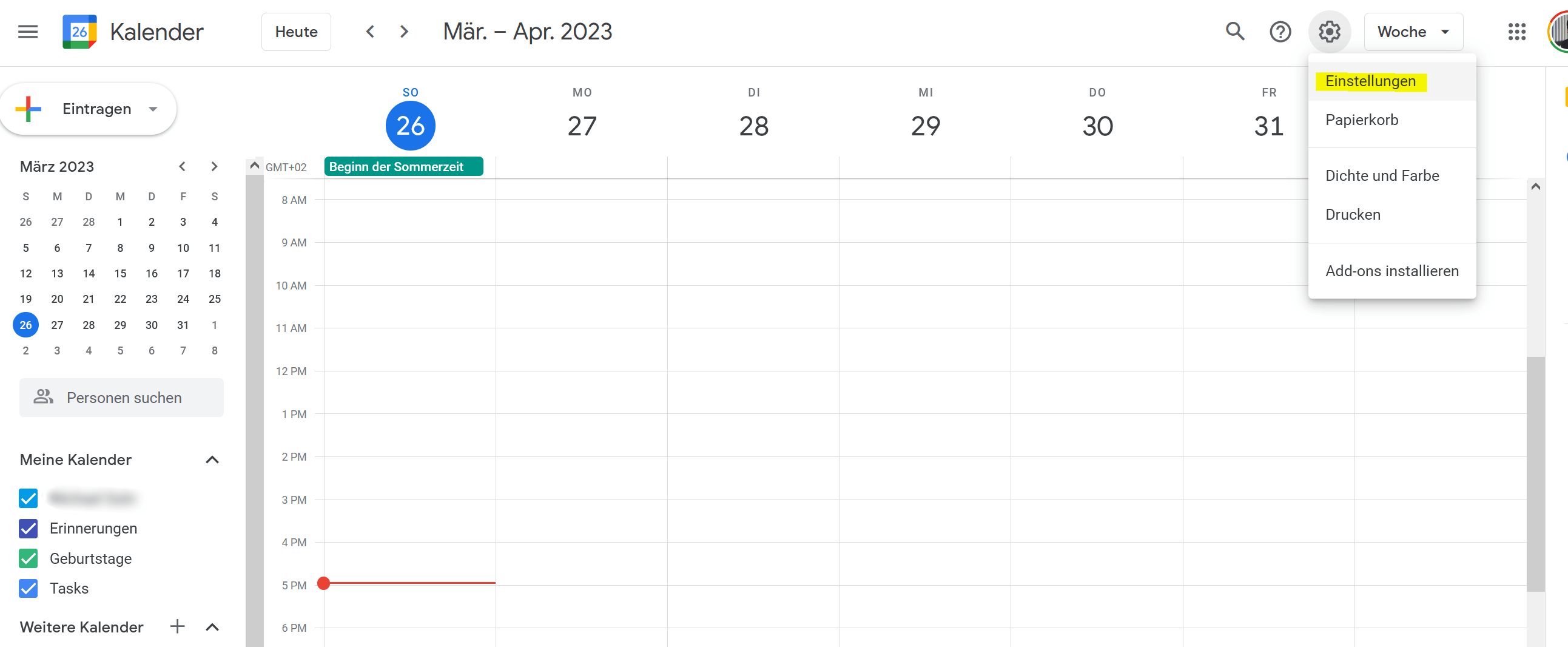
- Open your Google calendar in a web browser and click on the settings icon in the top right corner of the screen. It looks like a gear.
- Select “Settings” from the drop-down menu.
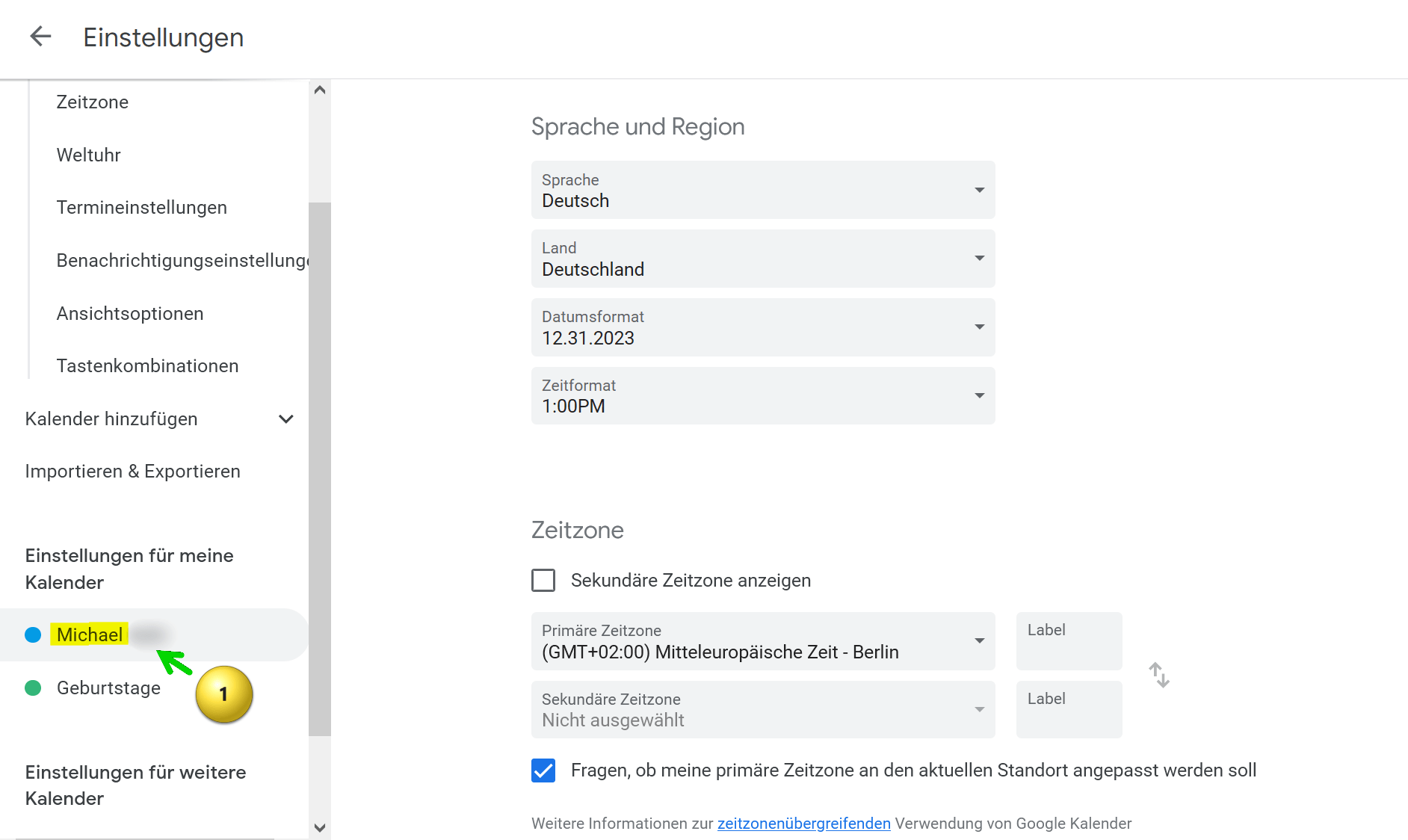
- Locate the calendar you want to import into Outlook and click the calendar name.
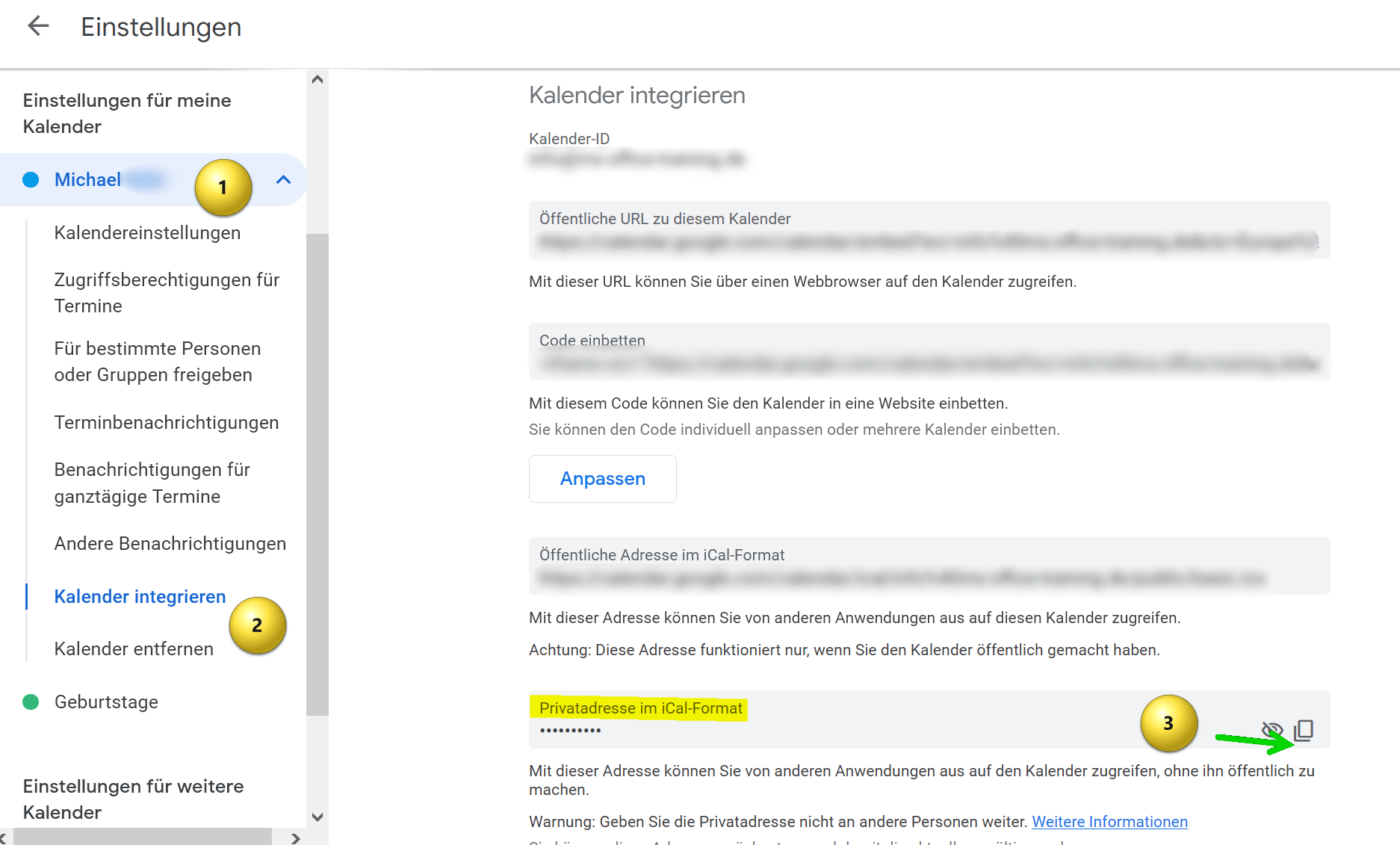
- Then click on “Integrate calendar“.
- Scroll down until you see the option “Home address in iCal format” and copy that address.
see fig. (click to enlarge)
- Create a text file on your computer and copy the address into it.
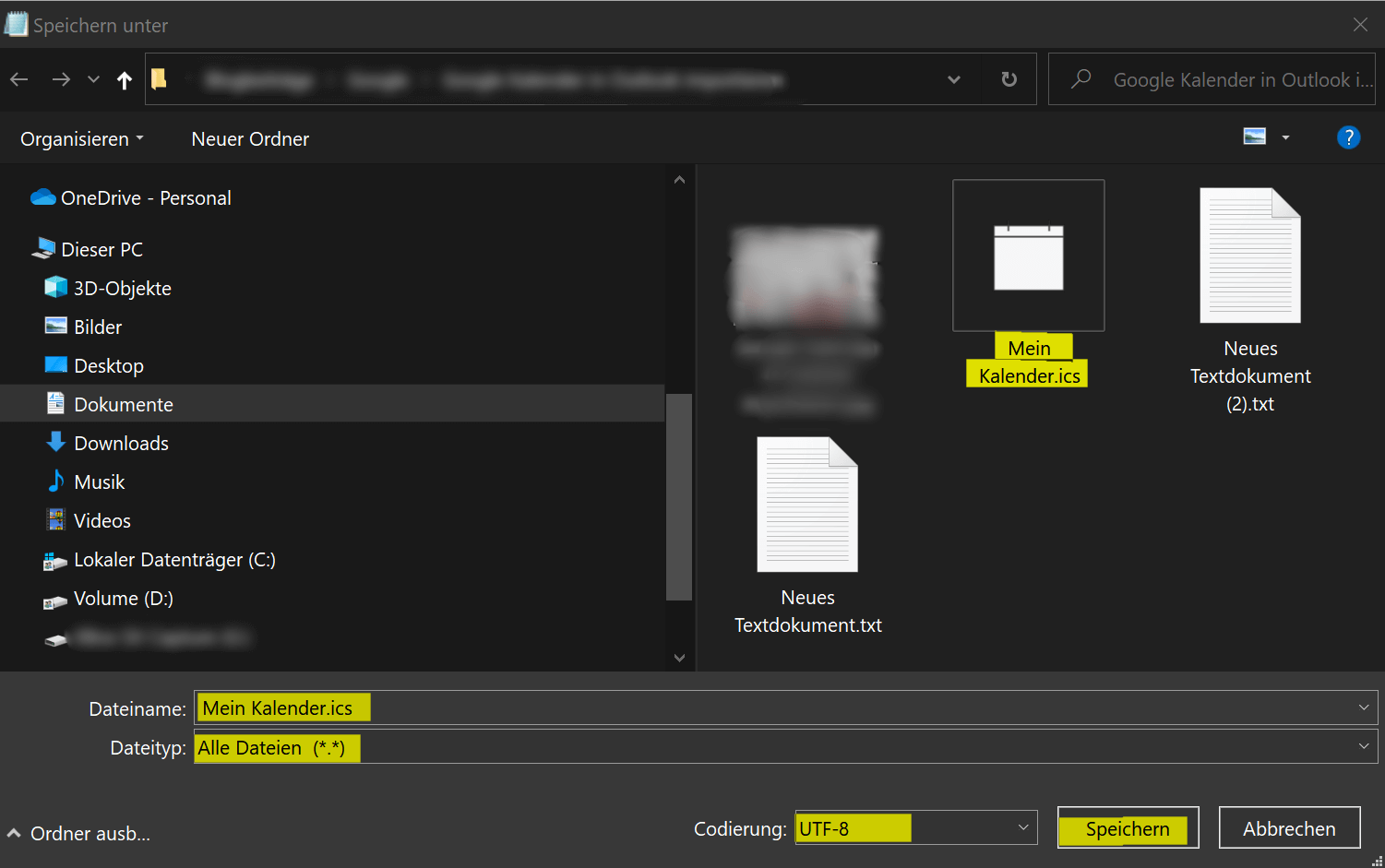
- Then save the file with any filename and the .ics extension. Use “All files” as the file type in the drop-down selection and please keep UTF-8 for the encoding.
- Save this file anywhere on your PC.
see fig. (click to enlarge)

- Open Outlook on your computer.
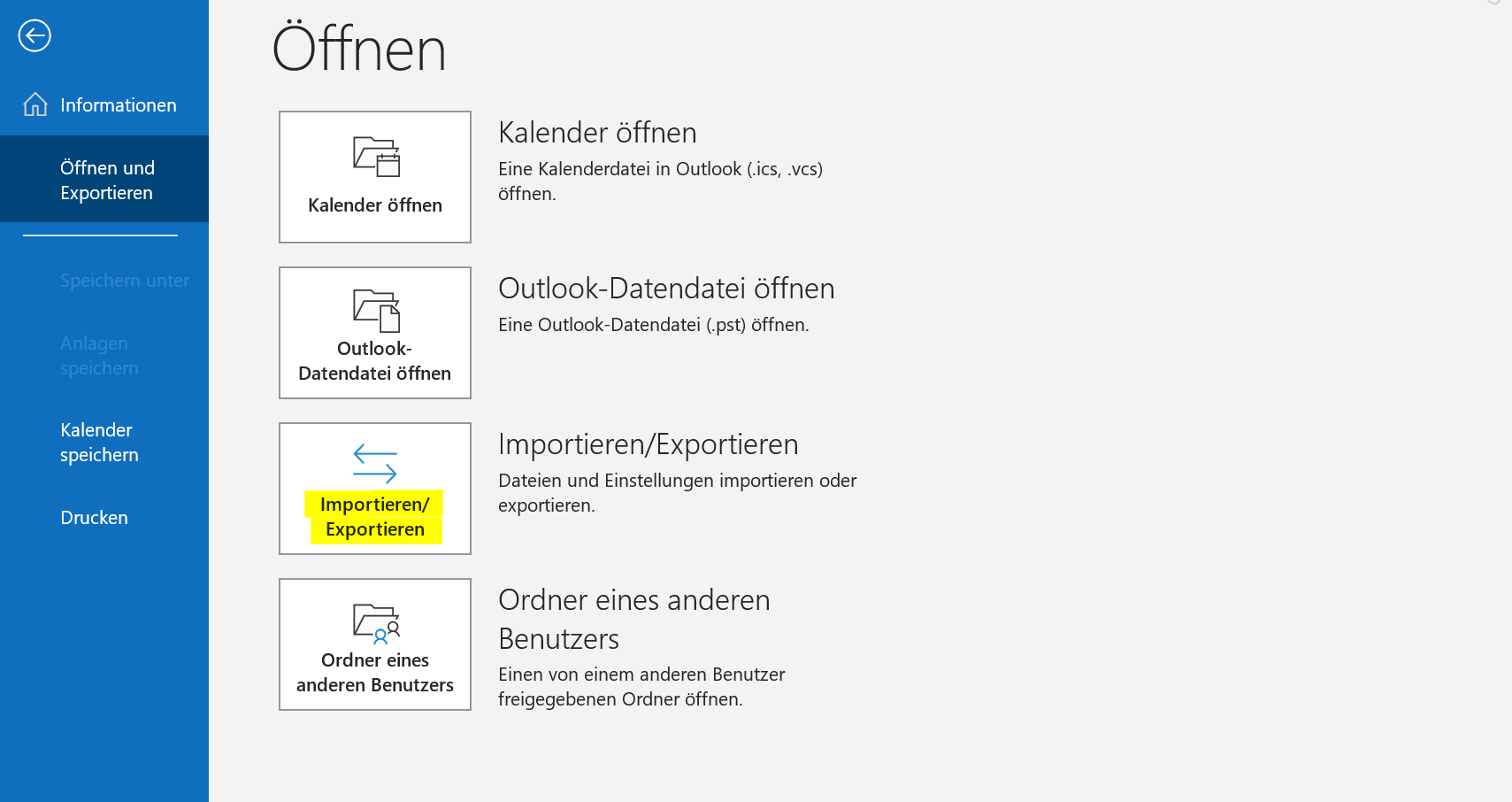
- Click “File” in the top left.
- Click “Open and Export“.
- Click “Import/Export“.
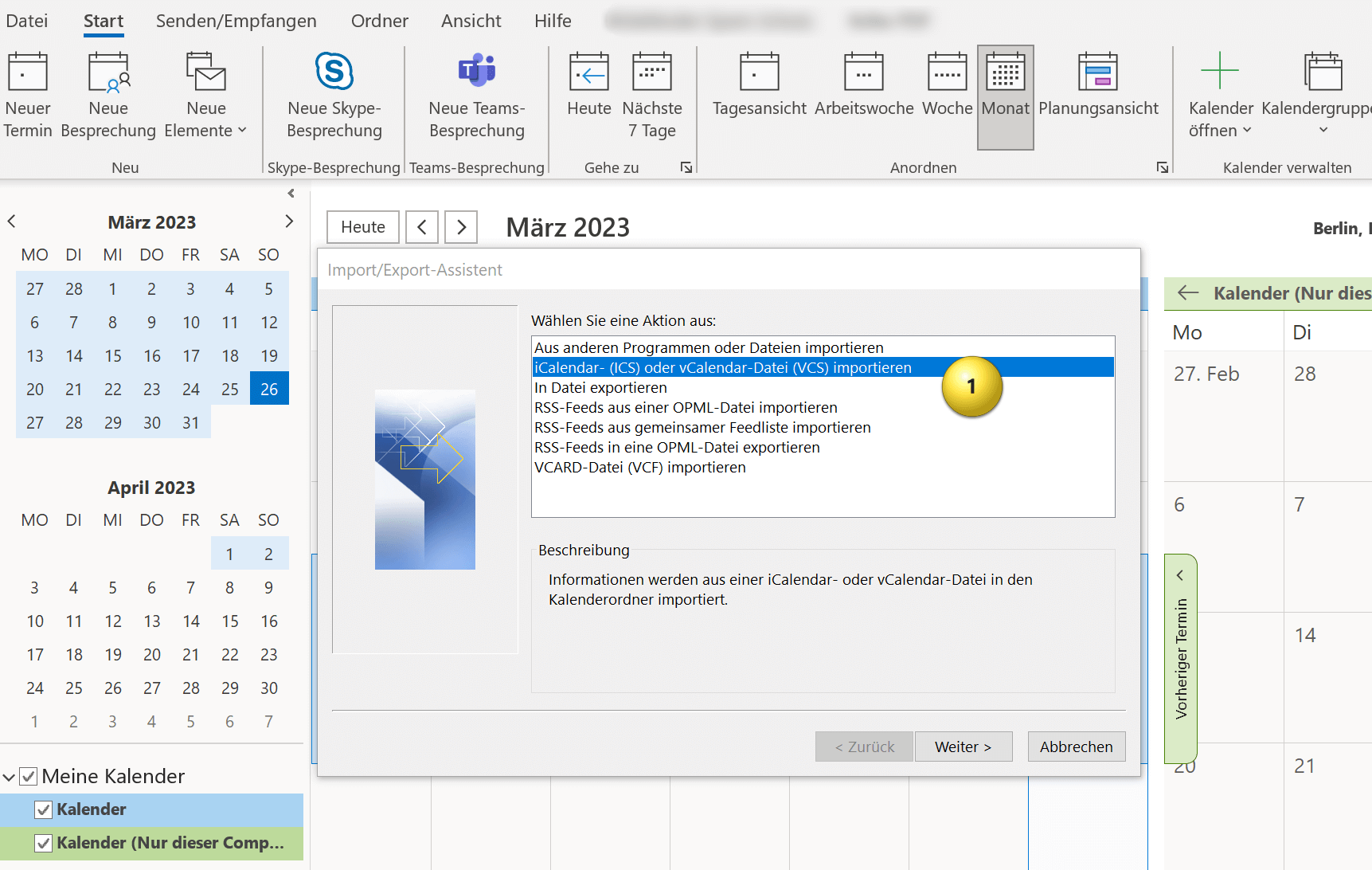
- In the Import and Export Wizard, select “Import an iCalendar (ICS) or vCalendar file (VCS)” and click Next.
Here you now have the option of integrating the Google calendar into your existing Outlook calendar or embedding it as an independent calendar. You have to decide for yourself what makes more sense. If you otherwise also work with several calendars, it makes sense to let the Google calendar run independently, otherwise it is more practical if you integrate the Google calendar into your existing one, so that appointment conflicts are easier to recognize.
see fig. (click to enlarge)

And that’s it. Your Google calendar has been successfully imported into Outlook and you can open the calendar and view all appointments and events in Outlook. Of course, your Outlook calendar will continue to be synchronized with Google calendar in the future.
You can import Google calendar to Outlook by following the steps below:
- Open your Google calendar in a web browser and click on the settings icon in the top right corner of the screen. It looks like a gear.
- Select “Settings” from the drop-down menu.
- Locate the calendar you want to import into Outlook and click the calendar name.
- Then click on “Integrate calendar“.
- Scroll down until you see the option “Home address in iCal format” and copy that address.
see fig. (click to enlarge)
- Create a text file on your computer and copy the address into it.
- Then save the file with any filename and the .ics extension. Use “All files” as the file type in the drop-down selection and please keep UTF-8 for the encoding.
- Save this file anywhere on your PC.
see fig. (click to enlarge)
- Open Outlook on your computer.
- Click “File” in the top left.
- Click “Open and Export“.
- Click “Import/Export“.
- In the Import and Export Wizard, select “Import an iCalendar (ICS) or vCalendar file (VCS)” and click Next.
Here you now have the option of integrating the Google calendar into your existing Outlook calendar or embedding it as an independent calendar. You have to decide for yourself what makes more sense. If you otherwise also work with several calendars, it makes sense to let the Google calendar run independently, otherwise it is more practical if you integrate the Google calendar into your existing one, so that appointment conflicts are easier to recognize.
see fig. (click to enlarge)
And that’s it. Your Google calendar has been successfully imported into Outlook and you can open the calendar and view all appointments and events in Outlook. Of course, your Outlook calendar will continue to be synchronized with Google calendar in the future.
Popular Posts:

Cloud Working – what is behind digital collaboration?
The Internet is constantly evolving and has a massive impact on the world of work. In order for employers and employees to remain competitive in the long term, they must adapt to changing circumstances and use new technologies for themselves.

How does Conditional Formatting work in Excel
Many times, you have certainly wished that certain contents of your Excel spreadsheet be highlighted a little bit more, so that they catch your eye at a glance.

Create dependent dropdown menus in Excel
In Excel, it may make sense to create a drop-down list that is based on a data source and also adapts dynamically instead of creating a very long list in rows or columns.

Is the purchase of Office 2019 worth it?
We clarify the new features of Office 2019, and if and for whom it is worth buying.
Offers 2024: Word & Excel Templates











Popular Posts:
Cloud Working – what is behind digital collaboration?
The Internet is constantly evolving and has a massive impact on the world of work. In order for employers and employees to remain competitive in the long term, they must adapt to changing circumstances and use new technologies for themselves.
How does Conditional Formatting work in Excel
Many times, you have certainly wished that certain contents of your Excel spreadsheet be highlighted a little bit more, so that they catch your eye at a glance.
Create dependent dropdown menus in Excel
In Excel, it may make sense to create a drop-down list that is based on a data source and also adapts dynamically instead of creating a very long list in rows or columns.
Is the purchase of Office 2019 worth it?
We clarify the new features of Office 2019, and if and for whom it is worth buying.
Offers 2024: Word & Excel Templates















