

Why often no one sees your resume


You spent hours perfecting your resume, choosing a modern layout, and crafting a flawless cover letter. You click “Submit.” Ten minutes later, an automated rejection lands in your inbox. Frustrating, right?
Chances are high that no human being even saw your application at that moment. Instead, you’ve been knocked out by the first gatekeeper: the Applicant Tracking System (ATS). In today’s job market, where hundreds of applications flood in for a single sought-after position, companies increasingly rely on algorithms to separate the wheat from the chaff.
Here, you’ll learn how these systems work and how to ensure your application lands on a real person’s desk.
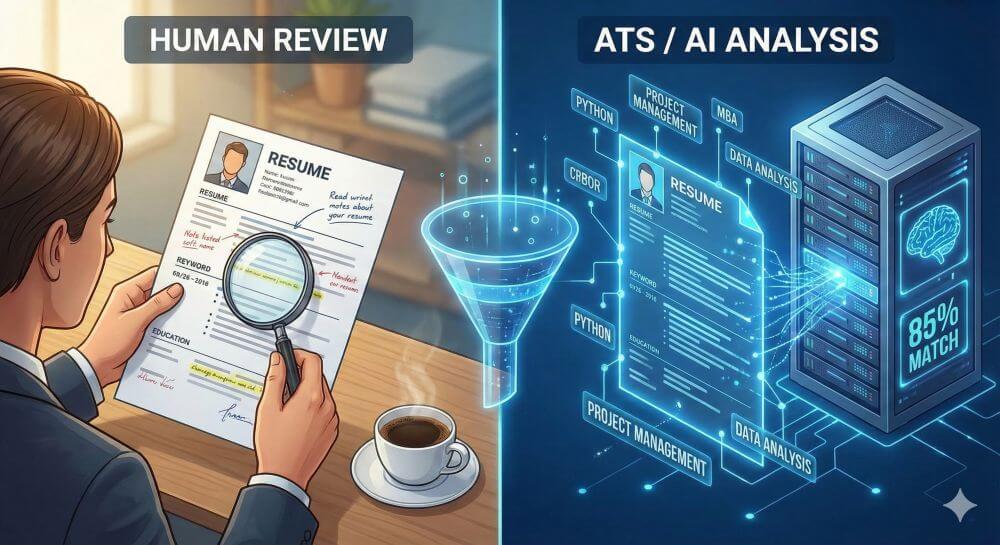
What exactly is an ATS?
An Applicant Tracking System (ATS) is a software solution that manages the entire recruitment process. Large corporations (almost 99% of Fortune 500 companies) have been using them for a long time, and medium-sized businesses are now following suit.
The ATS’s primary function is efficiency. It collects applications, organizes them, and—this is the critical point—filters and pre-ranks them.
The process in 3 steps:
- CV parsing: The system scans your uploaded document (usually a PDF or Word document) and breaks it down into structured data. It searches for names, contact information, employers, and time periods.
- Keyword matching: The algorithm compares the content of your resume with the requirements of the job posting.
- Ranking: The system assigns a “score” (e.g., 85% match). Recruiters often only look at candidates with the highest scores.
The role of AI: From buzzwords to semantics
Earlier ATS systems were “dumb.” They only looked for exact word matches. If the job posting said “Adobe Photoshop” and you only wrote “image editing,” you were rejected.
Modern systems use artificial intelligence (AI) and natural language processing (NLP). This fundamentally changes the game!
- Semantic understanding: Good AI understands context. It knows that a “Sales Manager” has similar skills to a “Sales Director.”
- Context: It not only recognizes that you possess a skill but also tries to interpret how much experience you have with it (based on length of employment).
- Pattern recognition: AI can analyze the resumes of successful employees within the company and search for applicants who exhibit similar patterns.
The most common “kill criteria”: Why you get weeded out
Often, it’s not your qualifications that are the problem, but the format. An ATS isn’t a design enthusiast. It’s a data processor.
1. The Layout Problem
- Graphically elaborate resumes with two columns, colorful bar charts for language skills, or symbols instead of text may be pleasing to the human eye, but they’re a nightmare for the parser.
- The Risk: If the parser can’t read the text in the correct order (e.g., because it jumps across columns), the data becomes jumbled. Your resume will appear empty or incorrect in the system.
2. Missing Hard Skills
- Soft skills like “teamwork” are important, but ATS primarily look for hard skills. If you lack the specific tools, certifications, or technical skills required in the job posting, your ranking will drop drastically.
3. Headers and Footers
- Many older ATS parsers cannot read information located in the header or footer of a Word or PDF document (often contact information).
How to optimize your resume for ATS
To convince the algorithm, you need to write in a “machine-friendly” way without boring the human reader.
Strategy 1: Plain Language Instead of Artwork
- Avoid complex designs.
- Use standard fonts (Arial, Calibri, Roboto).
- Use clear, standardized headings (e.g., “Work Experience” instead of “My Career Path”).
- Avoid tables, text boxes, and graphics.
Strategy 2: Keyword Optimization
- Analyze the job posting like a detective. Which terms appear multiple times?
- Reflect the language: If the company is looking for “Content Marketing,” don’t just write “Copywriting.” Use the exact term from the job posting.
- List tools: Explicitly list software and tools (e.g., “SAP”, “Python”, “Jira”).
Strategy 3: Provide context
- Instead of just listing “Project Management”, write in the bullet points under your job titles: “Leading IT projects using agile methods (Scrum) and budget responsibility.” This provides the AI with context.
Strategy 4: The right file format
- Always send a PDF unless a Word document is explicitly requested. But be careful: Use a text-based PDF, not an image PDF (scan). You can test this by trying to select and copy the text in your PDF with your mouse. If that works, the ATS can read it.
Conclusion: Operating humans and machines
The “application 2.0” requires a balancing act. You have to get past the gatekeeper (ATS) to meet the host (recruiter).
Don’t let this discourage you. An ATS-optimized resume doesn’t have to be boring. A clear structure and precise language are also appreciated by human readers. Once you’ve overcome the technical hurdles, your personality and individual skills are what ultimately matter.

Beliebte Beiträge

Warum dein Excel-Kurs Zeitverschwendung ist – was du wirklich lernen solltest!
Hand aufs Herz: Wann hast du zuletzt eine komplexe Excel-Formel ohne Googeln getippt? Eben. KI schreibt heute den Code für dich. Erfahre, warum klassische Excel-Trainings veraltet sind und welche 3 modernen Skills deinen Marktwert im Büro jetzt massiv steigern.

Microsoft Loop in Teams: The revolution of your notes?
What exactly are these Loop components in Microsoft Teams? We'll show you how these "living mini-documents" can accelerate your teamwork. From dynamic agendas to shared, real-time checklists – discover practical use cases for your everyday work.

Career booster 2026: These Microsoft Office skills will take you further!
A new year, new career opportunities! But which Office skills will really be in demand in 2026? "Skilled use" is no longer enough. We'll show you today's must-haves – like advanced Excel, using AI in the office, and relevant certifications for your resume.

Excel Tutorial: How to quickly and safely remove duplicates
Duplicate entries in your Excel lists? This distorts your data. Our tutorial shows you, using a practical example, how to clean up your data in seconds with the "Remove Duplicates" function – whether you want to delete identical rows or just values in a column.

Dynamic ranges in Excel: OFFSET function
The OFFSET function in Excel creates a flexible reference. Instead of fixing =SUM(B5:B7), the function finds the range itself, e.g., for the "last 3 months". Ideal for dynamic charts or dashboards that grow automatically.

Mastering the INDIRECT function in Excel
The INDIRECT function in Excel converts text into a real reference. Instead of manually typing =January!E10, use =INDIRECT(A2 & "!E10"), where A2 contains 'January'. This allows you to easily create dynamic summaries for multiple worksheets.
Offers 2024: Word & Excel Templates






























